



InShot AI Video Düzenleyici
InShot, AI altyazıları, efektleri ve basit zaman çizelgesi araçlarıyla mobil öncelikli hızlı düzenlemeye odaklanarak sosyal videoları hareket halindeyken parlatmayı kolaylaştırır. Düzenlemeden daha fazlası için Pollo AI, fikirleri, bağlantıları veya görüntüleri gelişmiş modeller ve Pollo Agent ile eksiksiz, yayınlanmaya hazır videolara dönüştürür. Şimdi ücretsiz dene!
Key Features
Mobile First Editing Workflow : Edit and publish videos entirely from your phone, anytime, anywhere.Auto Captions for Instant Subtitles : Generate subtitles automatically in multiple languages with minimal effort.AI Cut for Removing Pauses and Fillers : Clean up videos by automatically trimming silence and unnecessary speech.AI Background Removal for Flexible Editing : Remove backgrounds from subjects without using a green screen.Smart Tracking for Moving Subjects : Keep effects, text, or elements aligned with moving objects.Rich Effects, Filters, and Transitions Library : Enhance visuals with a wide range of creative styles and effects.Auto Beat Sync for Music-Driven Edits : Match video cuts and transitions to the rhythm of music automatically.Built-in Music Library for Easy Selection : Access a curated library of tracks to quickly match your video’s mood.Flexible Export for Social Platforms : Export videos in multiple resolutions and formats optimized for sharing.
Mobile First Editing Workflow
InShot is designed primarily for mobile devices, offering a streamlined editing experience optimized for touch interaction.
This makes it convenient for quick edits without needing a desktop setup, but it also means workflows are limited to smaller screens and mobile environments.
For example, a creator filming content throughout the day can immediately edit clips, add captions, and post to TikTok or Instagram directly from their phone without waiting to access a computer.
Pollo AI takes a more flexible approach. You can create videos on mobile through its use app, but also switch to a web-based platform with a much richer toolset, including multi-model generation, a video agent, and full video workflows.
This means you can start on your phone, then move to a desktop for more advanced creation instead of being confined to one device.
Auto Captions for Instant Subtitles
InShot can detect speech and turn it into captions without manual typing, including support for multiple languages and basic styling. This helps videos stay understandable even when muted.
For example, a creator making Instagram Reels can instantly add subtitles so viewers scrolling without sound still follow the message, improving watch time and engagement.
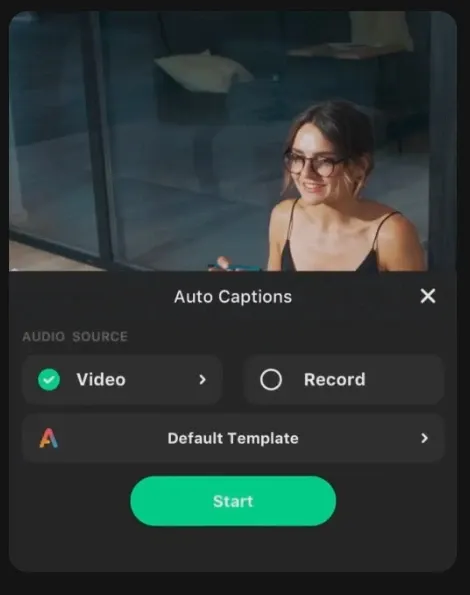
InShot makes subtitles easy by automatically detecting speech and generating captions with basic styling, helping videos stay clear on mute. It works well for quick edits, but still requires manual workflows around existing clips.
Pollo AI goes further. Its AI caption generator delivers highly accurate transcription, precise timing, and one-click syncing, so captions match speech naturally without adjustment.
It also applies clean, readable styles automatically, making videos instantly more professional and ready to share.
AI Cut for Removing Pauses and Fillers
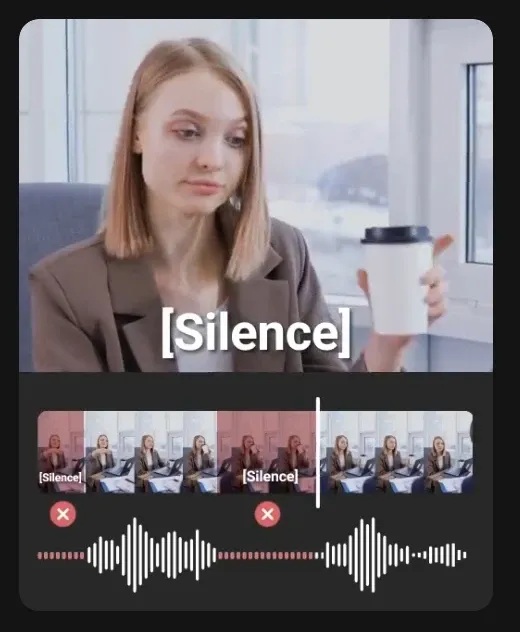
The AI cut feature of InShot identifies pauses, filler words, and silent segments, then removes them to create a smoother flow. It reduces the need for manual trimming on timelines.
For instance, a YouTuber recording a talking-head video can quickly remove awkward pauses and tighten delivery before posting, saving editing time.
AI Background Removal for Flexible Editing
InShot’s background removal isolates people or objects from the original footage, allowing users to place them onto new backgrounds or scenes. This expands creative flexibility without complex tools.
A marketer can shoot a simple product demo at home, remove the background, and place it into a cleaner branded setting for social media ads.
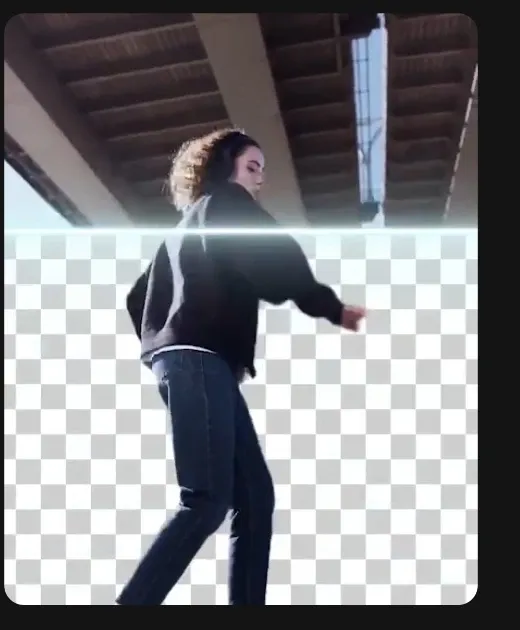
InShot makes background removal simple by isolating subjects and letting you place them into new scenes, which works well for quick edits. However, it still relies on manual workflows after extraction.
Pollo AI delivers cleaner, more precise results when you remove background of a video. It uses AI to detect subjects accurately, keeping edges sharp and avoiding quality loss.
The output stays clear and reusable, making it easy to drop into ads, demos, or websites with a more production-ready feel.
Smart Tracking for Moving Subjects
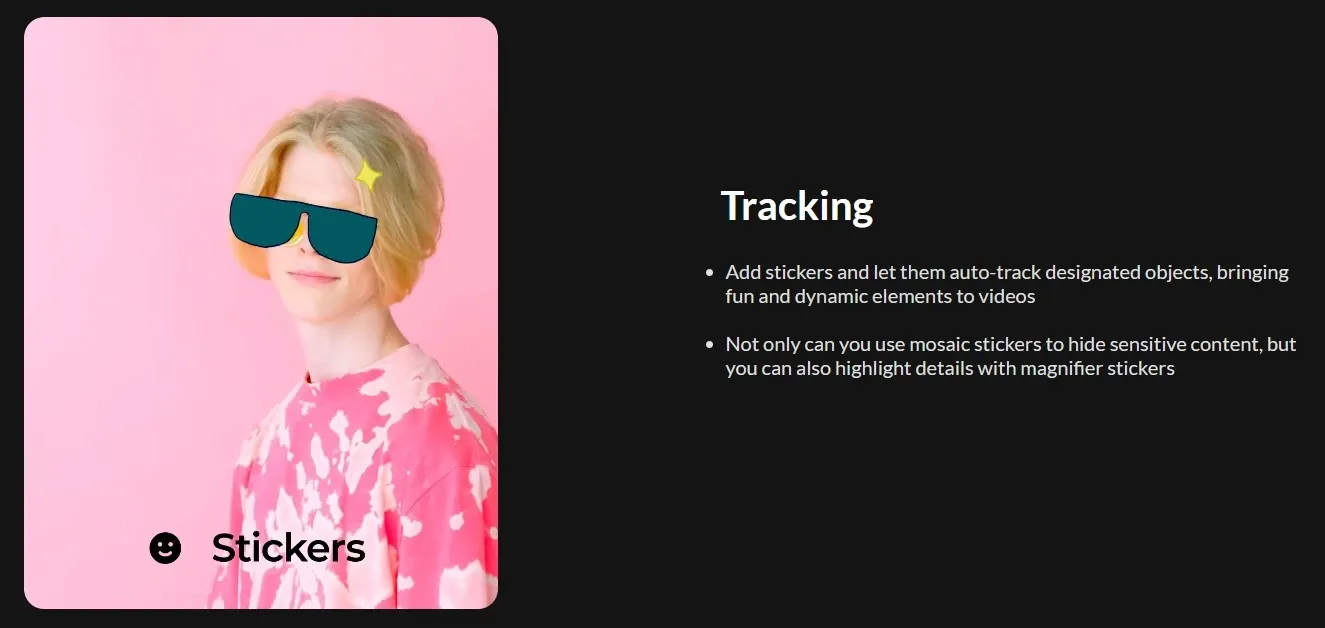
InShot’s smart tracking allows overlays like text, stickers, or effects to follow a subject throughout the video. This creates more dynamic and visually engaging edits.
For example, a fitness creator can attach labels or highlights to a moving body part during a workout clip, making instructions clearer.
Rich Effects, Filters, and Transitions Library
InShot offers numerous filters, transitions, and visual effects such as glitch, retro, blur, and cinematic overlays. These help transform raw footage into stylized content quickly.
A social media manager can apply trendy visual styles to match current platform aesthetics, making brand content feel more relevant and eye-catching.
Pollo AI delivers a more advanced transition system with richer and more diverse effects, including dynamic styles like splash transition and melt transition.
These feel more cinematic and varied, helping videos stand out visually rather than relying on basic, repetitive transitions.
Auto Beat Sync for Music-Driven Edits
InShot analyzes the audio track and aligns cuts, transitions, and motion timing with the beat, creating more polished and rhythmic videos without manual syncing.
A content creator can turn a series of clips into a TikTok-style montage that naturally follows the music, making it more engaging and shareable.
Built-in Music Library for Easy Selection
InShot provides a built-in music library with a range of genres and ready-to-use tracks, allowing users to add background music without sourcing audio externally. This simplifies the editing process and helps videos feel more complete and engaging.
For example, a lifestyle creator editing a travel vlog can quickly pick a calm or cinematic track directly inside InShot, sync it with clips, and publish the video to Instagram or YouTube without needing to search for music on other platforms.
Flexible Export for Social Platforms
InShot supports exports up to 4K and 60fps, along with different aspect ratios for various platforms. This ensures content looks sharp and fits platform requirements.
For example, a creator can edit once and export both vertical (9:16) for TikTok and horizontal (16:9) for YouTube, without needing separate tools.
Who Actually Uses InShot, and How
Social Media Creators:
Creators use InShot to trim clips, add captions, sync to music, and apply trendy effects for TikTok or Reels. For example, a lifestyle influencer can shoot daily footage, edit on mobile, add subtitles, and post within minutes.
Small Business Owners:
Entrepreneurs use InShot to make simple product demos or promos by combining clips, adding background music, and overlaying text. A Shopify seller, for instance, can turn raw product footage into a clean Instagram ad in one sitting.
YouTubers:
InShot helps YouTubers cut out pauses with AI Cut, add captions, and polish videos quickly. A solo creator can record a short tutorial, clean it up on their phone, and upload without using desktop software.
Freelancers & Marketers:
Marketers use InShot to quickly produce short-form content like ads or social posts. A freelancer can edit a client’s raw clips, add branded text, and deliver a ready-to-publish video the same day.
Students & Educators:
Students and teachers use InShot to create presentations, explainers, or class projects. A student can combine slides, voiceover, and visuals into a short educational video and submit it directly.
InShot vs CapCut vs Pollo AI
| Features | InShot | CapCut | Pollo AI |
| Core Workflow | Mobile editing | AI + editing + templates | AI-first video and image generation |
| AI Capabilities | Basic (captions, cut) | Advanced (AI video, templates, auto edit) | Full generation + multi-model |
| Video Creation | Edit existing clips | Generate + edit videos | text to video/ reference to video/ video agent |
| Templates & Effects | Filters, transitions | Large template ecosystem | Effects + 100+ scenario-based use cases |
| Platform Support | Mobile-focused | Mobile + desktop + web | Web + Mobile |
| Agent | None | Partial (AI tools, no full agent) | Full Pollo Agent (simple ideas to complete videos) |
InShot stands out as a simple, mobile-first video editor designed for quick edits, captions, and social-ready formatting. It works well for creators who already have footage and need to polish it fast.
CapCut expands this with stronger AI tools and a larger template ecosystem, offering more flexibility in editing and styling.
Pollo AI takes a different approach, going beyond editing by turning ideas, links, or images into complete, ready-to-publish videos through its multi-model and video agent workflow.
Is InShot Enough for Modern Video Creation
Pros
- Simple, Fast Mobile Editing: InShot is easy to pick up and built for speed. You can trim, add captions, apply effects, and export within minutes, making it ideal for quick social content creation on the go.
- Helpful AI Tools for Polishing Videos: Features like Auto Captions, AI Cut, and background removal reduce manual work and make basic editing more efficient, especially for talking videos and short-form content.
- Strong Fit for Social Media Formats: With flexible aspect ratios, music, effects, and quick export options, InShot is well-suited for platforms like TikTok, Instagram Reels, and YouTube Shorts.
Cons
- Limited to Editing, not Full Video Creation: InShot mainly works with existing footage. It doesn’t generate complete videos from ideas, scripts, or inputs, which limits its use for more advanced content workflows.
- Less Control and Depth for Complex Projects: Compared to more advanced or desktop-based tools, it offers fewer options for multi-scene structuring, detailed storytelling, or large-scale video production.
Where Does InShot Really Stand Today
InShot sits firmly in the category of fast, mobile-first video editing tools built for everyday creators. It is designed to simplify the final step of content creation—polishing clips, adding captions, syncing music, and preparing videos for social platforms.
Rather than reshaping how videos are created, InShot focuses on making editing more accessible and efficient, especially for short-form content. Its growing set of AI features enhances speed and convenience, but the core remains editing-centric.
As content demands shift toward faster production and more complete outputs, InShot represents a practical solution for refining footage, rather than generating fully structured videos from scratch.
Looking for More Than Just Editing? Try Pollo AI!
Pollo AI is an all-in-one AI video and image creation platform built for creators and marketers who want to move beyond simple editing. Instead of starting with footage, it helps you turn ideas into complete videos in one smooth workflow.
One of its key strengths is access to multiple leading video models in one place.
You can choose different models based on your needs, whether using Kling AI for faster generation or using Seedance for higher-quality output. This flexibility makes it easier to adapt your workflow without relying on separate tools.
At the core of the platform is the Pollo Agent, which takes a simple input such as a product link, script, or concept and turns it into a structured, multi-scene video.
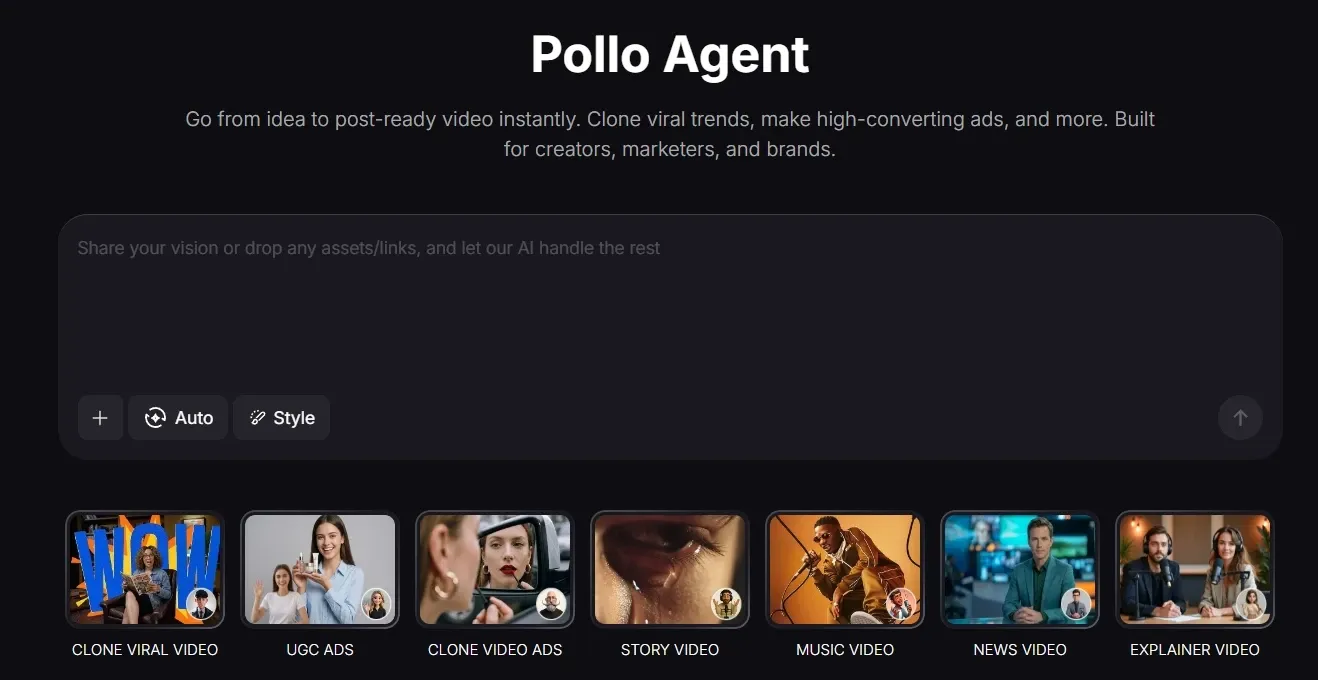
The output is already polished and ready to post. For example, a marketer can turn a product page into a UGC AI video or a short promotional video without filming or editing.
Pollo AI also offers 100+ scenario-based video use cases designed for real content tasks.
You can use AI music video generator or clone video ads by selecting a use case and adding your inputs. The system handles the structure and visuals, so you can focus on the idea rather than the editing process.
In short, while InShot helps refine existing clips, Pollo AI helps you create complete, ready-to-use videos from the ground up.
Pollo AI neden daha çok öne çıkıyor?
Çok Modelli Video Üretimi
En iyi modellere tek bir yerden erişin ve hız veya kalite ihtiyaçlarınıza göre kolayca geçiş yapın.
Tam Video Oluşturma için Pollo Agent
Fikirleri, bağlantıları veya senaryoları düzenleme gerektirmeden yapılandırılmış, yayına hazır videolara dönüştür.
Hepsi Bir Arada Araçlar ve Efektler
Videoları yapay zeka video genişletici ile genişletin ve gökyüzü düşüşü gibi viral görselleri tek bir platformda oluşturun.










 5000'den fazla değerlendirmeGüven puanı 4,4
10 milyondan fazla içerik üreticisi ve pazarlamacı tarafından kullanılıyor.
Binlerce memnun kullanıcı, Pollo AI deneyimlerini Trustpilot'ta paylaşarak bizi "Mükemmel" olarak değerlendirdi. Platformumuzda sevdikleri şeylere göz atın.
Liz Cassidy Dec 15, 2025Richard QuickOct 15, 2025armourdudeNov 19, 2025
 DuduJan 14, 2026
 Ray WarnesDec 30, 2025
 lawless clanNov 22, 2025
Pollo AI'da Diğer Yapay Zeka Video Editörlerini Keşfet
Sıkça Sorulan Sorular
What is InShot AI Video Editor?
InShot is a mobile-first video editing app designed for quick, social-ready content creation. It combines essential editing tools with AI features like auto captions, AI cut, background removal, and beat sync, making it easy to polish videos without a steep learning curve. It’s especially popular for creators who want fast edits for platforms like TikTok, Instagram, and YouTube.
Can InShot create videos from scratch?
Not really. InShot mainly works with existing footage, helping you edit and enhance clips. If you’re looking to generate full videos from ideas, scripts, or links, tools like Pollo AI are better suited since they can handle the entire creation process, not just editing.
Does InShot support AI video features?
Yes, but they are focused on editing efficiency rather than full creation. Features like AI captions, AI cut, and background removal help speed up workflows, but they don’t generate complete videos or multi-scene content.
Is InShot good for social media content?
Yes, it’s built for social platforms. You can easily adjust aspect ratios, add music, captions, and effects, then export videos optimized for TikTok, Instagram Reels, or YouTube Shorts.
Can I use InShot for professional video production?
It works well for lightweight projects and quick edits, but it’s not designed for complex storytelling or large-scale production. For more structured, multi-scene videos or campaign-level content, platforms that generate complete outputs, like Pollo AI, can be more efficient.
Does InShot work on desktop?
InShot is primarily designed for mobile devices (iOS and Android). If you prefer working across devices or need more flexibility in workflows, web-based platforms like Pollo AI may offer a smoother experience.

Tek Tıklamayla Oluşturma için Pollo AI'ı dene
Düzenlemeden fazlası. Fikirden videoya. Anında hazır.