يركز Magnific على توليد صور فائقة الواقعية، وتحسين جودة الصور بشكل إبداعي، وإضافة تفاصيل غنية إلى المحتوى المرئي. أما بالنسبة للمبدعين الذين يحتاجون إلى أكثر من مجرد تحسين الصور، فيدعم Pollo AI توليد صور عالية الجودة باستخدام الذكاء الاصطناعي، واستكشاف أنماط الصور، وتحرير الصور دفعة واحدة في عملية واحدة. جرّب برنامج Pollo AI لتوليد الصور مجانًا!
تحويل النص إلى صورة
صورة إلى صورة
Pollo Recast
أعد إنتاج الفيديوهات المنتشرة. أعد مزج النسخ الجديدة.
Pollo إيجنت × Gemini 4 أرجون
تفكير أكثر ذكاءً. كل ذلك من خلال برنامج Pollo Agent.
تحدي Pollo Recast
بمجرد تحميل الفيديو، سينتشر انتشاراً واسعاً. مكافآت لا حدود لها في انتظارك.
اربح جهاز آيفون ديو
سيطر على مدينة في دقيقة واحدة. انضم إلى التحدي الآن.
Pollo MCP
إنشاء محتوى متكامل. حتى 4 فيديوهات / 20 صورة مجاناً.
احصل على صور GPT غير محدودة 2.5
أسرع. أكثر دقة. أذكى. انطلق بلا حدود مع ألترا.
افتح إمكانيات Minimax H3 غير المحدودة
مرجع شامل. غير محدود مع Ultra.
احصل على Wan 3.0 غير محدودة
مقاطع فيديو أصلية مدتها 30 ثانية. مدخلات مرجعية أكثر ثراءً.
الميزات الرئيسية لـ Magnific
إنشاء الصور من النص : يقوم بإنشاء صور أصلية من نصوص مكتوبة لإنتاج صور إبداعية وتجارية.
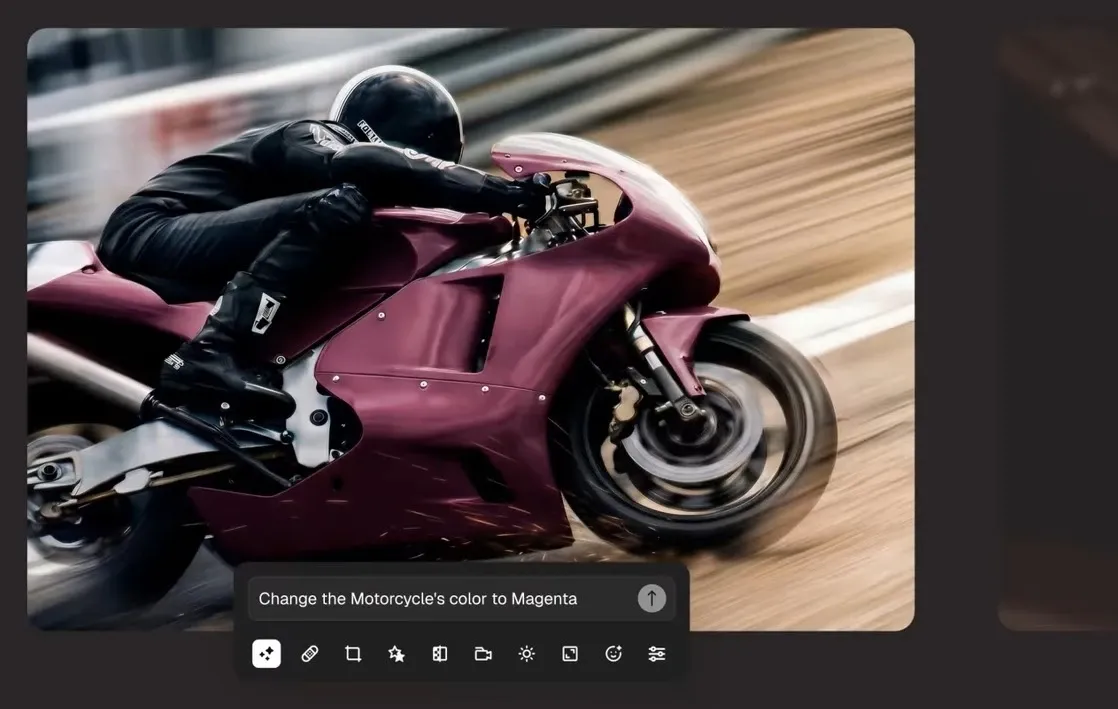
مجموعة أدوات تحرير الصور : يقوم بتعديل الصور الموجودة من خلال أدوات تحرير الذكاء الاصطناعي للحصول على صور أكثر وضوحًا ومرونة.
إزالة الخلفية تلقائياً : يزيل خلفيات الصور لعزل العناصر لاستخدامها في المنتجات والصور الشخصية والتصميم.
مساعد إبداعي في المحادثة : يستخدم نظام سير عمل قائم على الدردشة للمساعدة في إنشاء وتخصيص التصاميم المرئية.
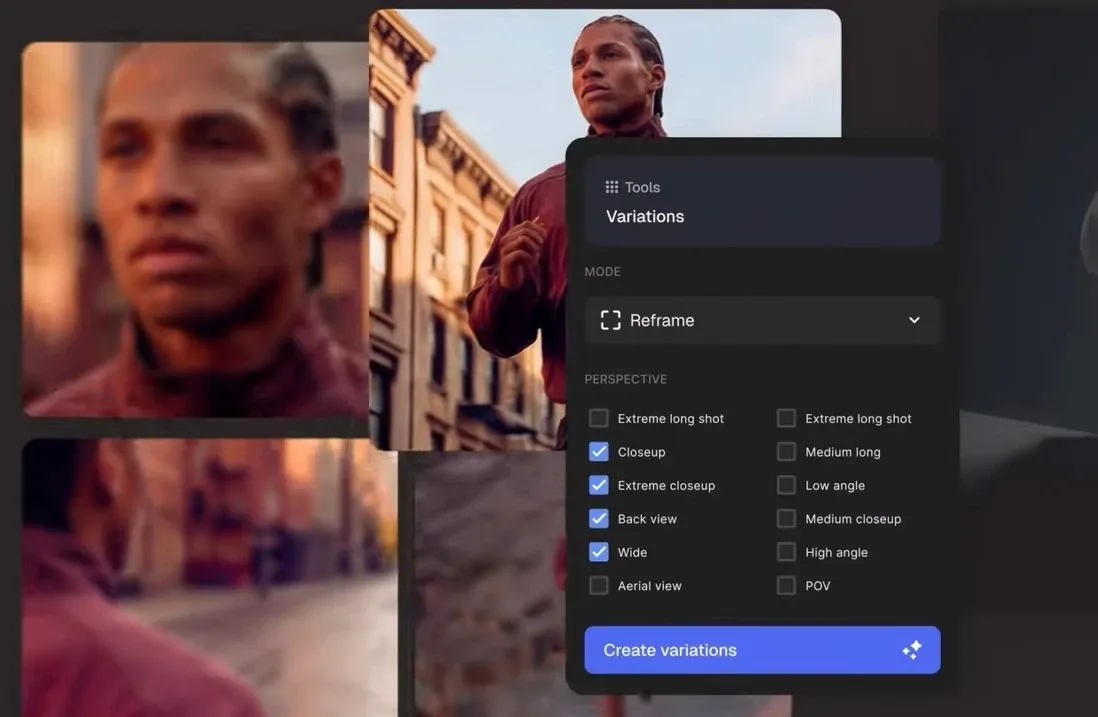
توليد تنوع الصور : يقوم بإنشاء نسخ مرئية جديدة من صورة موجودة مع الحفاظ على الفكرة الأساسية سليمة.
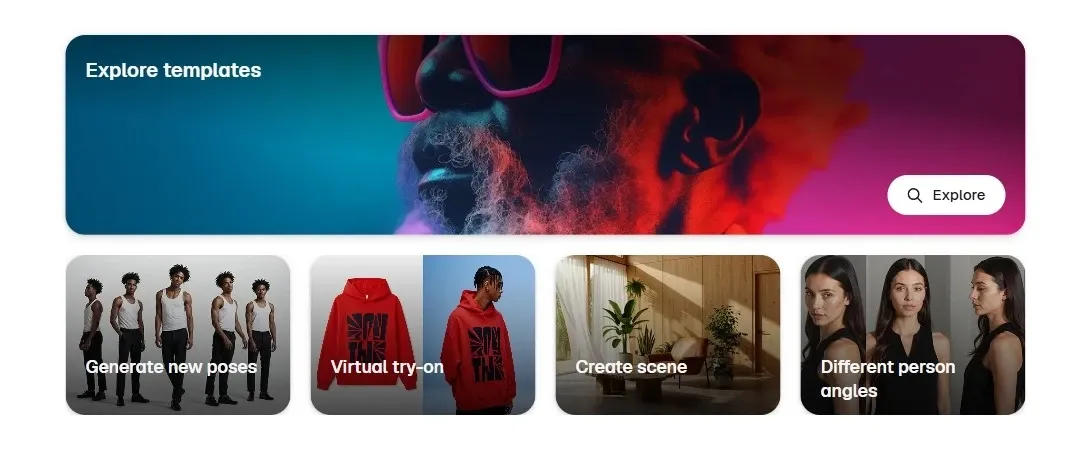
قوالب إبداعية جاهزة للاستخدام : يوفر هذا البرنامج مسارات عمل مرئية مُعدة مسبقًا لإنشاء العلامات التجارية والحملات الإعلانية وصور المنتجات.
الوصول إلى واجهة برمجة التطبيقات الإبداعية : يربط بين إنشاء الصور وتحريرها وأصول الصور المخزنة من خلال سير عمل واجهة برمجة التطبيقات الجاهزة للمطورين.
إنشاء الصور من النص
عندما يبدأ المشروع بفكرة أولية فقط، يمكن Magnific تحويل المطالبات النصية إلى صور مخصصة عبر أنماط بصرية مختلفة.
يُعد هذا الأمر عمليًا بالنسبة للوحات المزاج الخاصة بالحملات الإعلانية، وصور المنتجات ، والصور التحريرية، ومفاهيم منشورات وسائل التواصل الاجتماعي، أو توجيهات العلامة التجارية في المراحل المبكرة قبل أن يلتزم الفريق بالتصوير الفوتوغرافي أو التصميم النهائي.
مجموعة أدوات تحرير الصور
بالنسبة للفرق التي تعمل باستخدام الأصول الموجودة، يوفر Magnific تحرير الصور لتنقيح الصور وتغيير حجمها وإعادة تصميمها وتعديل العناصر المرئية بعد إنشائها.
يمكن للمسوق تعديل صورة المنتج لصفحة الهبوط، أو تحسين تصميم الحملة الإعلانية، أو معالجة المشكلات البصرية الصغيرة قبل تمرير الأصل إلى الإعلانات المدفوعة أو منشورات وسائل التواصل الاجتماعي.
عندما تحتاج صورة منتج واحدة إلى أن تصبح مجموعة كاملة من أصول الكتالوج والإعلان ووسائل التواصل الاجتماعي، Pollo AI يتجاوز مجرد تحسينات الصور الفردية.
يدعم محرر الصور المدعوم بالذكاء الاصطناعي التعديلات القائمة على التوجيهات، وإزالة الخلفية، ومسح العناصر، وإعادة الإضاءة، وتغييرات النمط، والتحرير الجماعي لعشرات الصور في وقت واحد.
وهذا يعني أن بإمكان بائعي ومسوقي التجارة الإلكترونية الحفاظ على اتساق الخلفيات والإضاءة والأسلوب البصري عبر صفحات المنتجات والإعلانات والمنشورات.
إزالة الخلفية تلقائياً
غالباً ما تكون عملية القصّ النظيف الخطوة الأولى في التصميم التجاري. بإمكان Magnific إزالة الخلفية من الصور، مما يُسهّل وضع المنتجات أو الأشخاص أو الأشياء في التصاميم الجديدة.
يساعد هذا فرق التجارة الإلكترونية على إنشاء صور السوق، والإعلانات الإبداعية، وصور الكتالوج، وشعارات مواقع الويب ، وأصول العرض التقديمي النظيفة بشكل أسرع.
مساعد إبداعي في المحادثة
بدلاً من التنقل عبر عناصر تحكم منفصلة لكل تغيير، يقدم Magnific مساعدًا يستجيب للتعليمات الإبداعية في Flow محادثة سلسة.
يمكن لفريق العلامة التجارية الصغير أن يطلب تعديلات على التصميم، أو تغييرات في التخطيط، أو تحسينات بصرية أثناء إعداد الرسومات الاجتماعية، أو اللافتات الترويجية، أو مسودات الحملات للمراجعة.
توليد تنوع الصور
يمكن لصورة واحدة معتمدة أن تتحول إلى عدة اتجاهات إبداعية من خلال تنويعات Magnific .
يساعد هذا المسوقين على اختبار أنماط أو تركيبات أو أجواء بصرية مختلفة للإعلانات والصور المصغرة ومفاهيم المنتجات ومنشورات وسائل التواصل الاجتماعي دون الحاجة إلى البدء من جديد من نقطة فارغة في كل مرة.
عندما تحتاج صورة واحدة إلى التفرع إلى اتجاهات إبداعية أكثر دقة، فإن الاختلافات الواسعة لا تكفي دائمًا.
يتضمن Magnific داخل مساحة العمل الإبداعية الخاصة به قوالب جاهزة لمهام مثل ملصقات الأفلام وصور الملابس والصور المرئية للمنتجات التقنية.
يساعد هذا الفرق الإبداعية الصغيرة على التحرك بشكل أسرع عند بناء مسودات الحملات الإعلانية، أو مفاهيم الإعلانات، أو العروض التقديمية المرئية، أو الأصول الاجتماعية ذات العلامات التجارية دون الحاجة إلى البدء في كل تصميم من الصفر.
الوصول إلى واجهة برمجة التطبيقات الإبداعية
بالنسبة لفرق المنتجات التي تقوم ببناء أدوات إبداعية على نطاق واسع، يوفر Magnific إمكانية الوصول إلى واجهة برمجة التطبيقات (API) لإنشاء الصور وتحريرها وتكبيرها ومحتوى المخزون.
يُعد هذا الأمر عمليًا لمنصات SaaS، Apps التصميم، وأدوات السوق، أو أنظمة العلامات التجارية الداخلية التي تحتاج إلى إنشاء مرئي آلي دون الاعتماد على إنتاج الأصول يدويًا.
من يستخدم Magnific Best؟
مسوقو العلامات التجارية
تُساعد Magnific المسوّقين على تحويل أفكار الحملات التسويقية الأولية إلى صور جذابة، بدءًا من لوحات إلهام العلامة التجارية وصولًا إلى مفاهيم الإعلانات التي تُركّز على المنتج. يُمكن لفريق صغير تصميم عدة اتجاهات بصرية لإطلاق موسمي قبل اختيار ما سيُستخدم في الإعلانات المدفوعة أو صفحات الهبوط.
بائعي التجارة الإلكترونية
يمكن لفرق تطوير المنتجات استخدام Magnific لإنشاء صور المنتجات، وإزالة الخلفيات ، وتصميم قوائم المنتجات بشكل أكثر وضوحًا. يُعدّ هذا مفيدًا عندما تحتاج صورة منتج واحدة إلى أن تعمل على منصات Amazon، وشوبيفاي، والإعلانات على مواقع التواصل الاجتماعي، ورسائل البريد الإلكتروني.
مصممون مبدعون
يستطيع المصممون استخدام أدوات تحرير الصور والخيارات والقوالب الجاهزة في برنامج Magnific لاستكشاف التصاميم بسرعة أكبر. قد يبدأ المصمم بملصق فيلم، أو صورة أزياء لمجلة، أو فكرة تصميم عبوة تحمل علامة تجارية، ثم يُنشئ نسخًا متعددة لعرضها على العميل.
المطورون وفرق البرمجيات كخدمة (SaaS)
يُعدّ الوصول إلى واجهة برمجة التطبيقات (API) الخاصة بـ Magnific خيارًا مثاليًا للفرق التي تُدمج عناصر التصميم المرئي في Apps أو سير العمل الداخلي. إذ يُمكن لمنصة تصميم أو أداة سوق أو نظام أتمتة العلامة التجارية ربط عمليات إنشاء الصور وتحريرها والأصول المخزنة مباشرةً بمنتجها الخاص.
استكشاف الصور، والمرشحات الإبداعية، والأنماط الفنية
تصميمات تسويقية وتجارة إلكترونية احترافية للمنشورات على مواقع التواصل الاجتماعي، وإعلانات المواقع الإلكترونية، وقوائم المنتجات
هل Magnific موثوقة دائمًا؟
تبدو تعليقات المستخدمين حول Magnific متسقة إلى حد كبير: يتم الإشادة بالمنصة لإضافة الواقعية والملمس والتفاصيل الإضافية إلى الصور المولدة بواسطة CGI أو الذكاء الاصطناعي، خاصة في سير العمل الإبداعي الذي يتضمن بالفعل أدوات مثل Photoshop.
في الوقت نفسه، أبلغ بعض المستخدمين عن وجود قيود مع دقة عالية جدًا ونتائج محببة في بعض الأحيان بعد تكبير الصورة، خاصة عند دفع الصور إلى ما بعد أحجام معينة.
أين يناسب Magnific؟
يُصنف Magnific ضمن فئة إنشاء الصور وتحسينها المتميزة.
إنها ليست مجرد أداة بسيطة لتحويل الصور، ولا مجرد أداة قديمة لتحسين جودتها. تكمن قيمتها في جعل الصور تبدو أكثر احترافية وتفصيلاً وقابلة للاستخدام التجاري، خاصة في مجال العلامات التجارية وصور المنتجات والإنتاج الإبداعي.
ومع ذلك، قد يبدو Magnific أقل ملاءمة للمبدعين الذين يرغبون في الحصول على مرونة أكبر في إنشاء الصور وتحريرها واستكشاف الأنماط في سير عمل إبداعي أوسع.
لماذا تختار Pollo AI؟
01
نماذج الصور الرائدة
يمكنك الوصول إلى نماذج الصور الرائدة في الصناعة مثل Nano Banana و Seedream لتلبية الاحتياجات الإبداعية المختلفة.
I’ve been using Pollo AI mainly for short videos and quick image-to-video tests. The interface is straightforward and it works well even with simple prompts, which is a big plus compared to tools that need long, complicated instructions. The results can be really impressive, and it’s honestly been fun to experiment with. I’d love a bit more consistency on faces when there’s movement, but overall it’s been a solid experience for what I needed.
Awesome website. loads of options and a great way to learn how to work with 'AI' my reasoning for 5 stars is based upon price, versatility and ease of use. Also I would like to add, Pollo AI runs a lot of promos on different AI products as well. I rate their customer service at 5 stars, when I purchased my first subscription my computer crashed the following weekend and I lost all my data and info passwords you name it I lost it, contacted pollo by email they responded quickly and found my info/username and account, and I was able to restore my account.
I have been using Pollo AI for short videos. It is easy to use and works well with simple prompts. Other generators seem to need long drawn out complicated explanations to get even close to what I want.
i tried 220 online img to vid in 2 months, and this is the best online video.I will subscribe for a year; there are many reasons. But freedom is the most important.
اكتشف مولدات صور أخرى قوية تعمل بالذكاء الاصطناعي على Pollo AI
Magnific هي منصة إبداعية تعتمد على الذكاء الاصطناعي لإنشاء الصور ، مع تركيز قوي على تصميم الصور وتحريرها بجودة عالية. تشمل ميزاتها تحرير الصور بالذكاء الاصطناعي، وإزالة الخلفية، وتنوع الصور، وقوالب إبداعية، وإمكانية الوصول إلى واجهة برمجة التطبيقات (API) للمطورين.
ما هي أفضل استخدامات Magnific ؟
يُعدّ Magnific الخيار الأمثل للأعمال البصرية الراقية، مثل مفاهيم العلامات التجارية، وصور المنتجات، وصور الحملات الإعلانية، والرسومات التحريرية، والأصول الإبداعية التي تتطلب مظهرًا أكثر احترافية. وتتيح تقنية Mystic لإنشاء الصور إمكانية إنتاج صور واقعية بدقة 1K و2K و4K للتسويق والتجارة الإلكترونية والمشاريع الإبداعية.
هل يستطيع Magnific إزالة خلفيات الصور؟
نعم. تتيح لك أداة إزالة الخلفية في برنامج Magnific إمكانية إزالة خلفيات الصور أو استبدالها أو تمويهها أو تخصيصها. وهذا مفيد لصور المنتجات وصور الملفات الشخصية والإعلانات والتصميمات البسيطة التي تتطلب تمييز العنصر الرئيسي عن المشهد الأصلي.
هل تقدم Magnific واجهة برمجة تطبيقات (API)؟
نعم. توفر Magnific إمكانية الوصول إلى واجهة برمجة التطبيقات (API) لإنشاء الصور، وتكبيرها، ومحتوى المخزون، وغيرها من عمليات العمل الإبداعية. تتيح واجهة برمجة تطبيقات محتوى المخزون البحث عن الصور والقوالب والأيقونات ومقاطع الفيديو والموسيقى واسترجاعها وتنزيلها Apps والأنظمة الداخلية.
ما هو أفضل بديل لبرنامج Magnific لإنشاء الصور؟
يُعدّ Pollo AI بديلاً قوياً لبرنامج Magnific للمستخدمين الذين يرغبون في أكثر من مجرد تحسين الصور. فهو يوفر سير عمل أوسع للصور مع مُولّد صور مدعوم بالذكاء الاصطناعي من نماذج رائدة، وإمكانية إنشاء صور متعددة، وتحرير الصور دفعة واحدة، واستكشاف بصري يركز على الأنماط.
أنشئ صورًا مصقولة باستخدام Pollo AI
قم بإنشاء الصور وإعادة تصميمها وتحسينها من أجل سير عمل إبداعي أوسع.







 Liz Cassidy


