




Runway運動筆刷

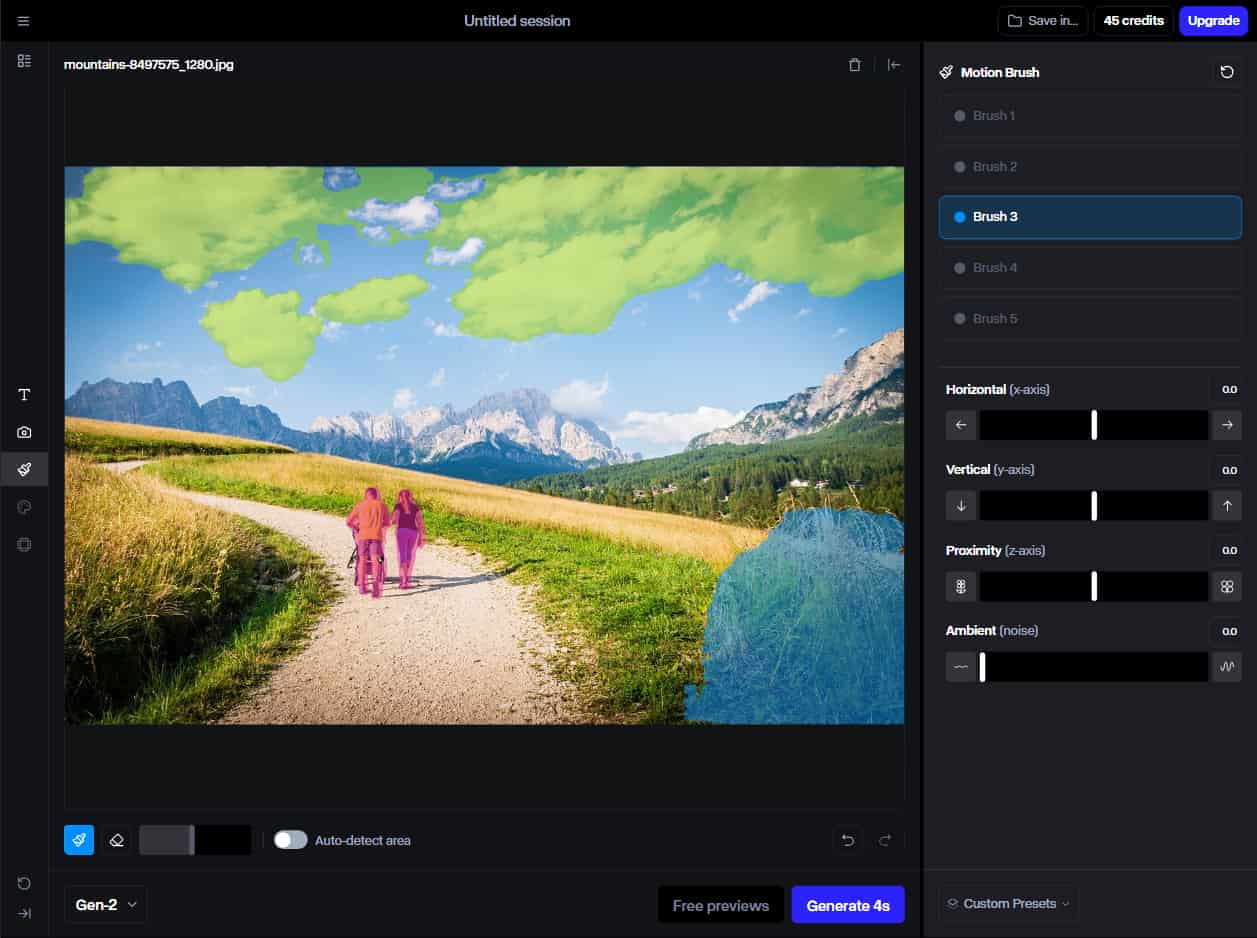
Runway 的運動筆刷功能可讓您選擇影像的特定區域並定義這些區域應如何移動,從而創造更具互動性和吸引力的視覺體驗。目前,它在Gen 2中均可用。試試下面的工具!

圖生影片

點擊上傳圖片

主要特點

  • 運動畫筆:透過在靜止影像上繪製運動路徑,使靜止影像的主體或元素變得栩栩如生。
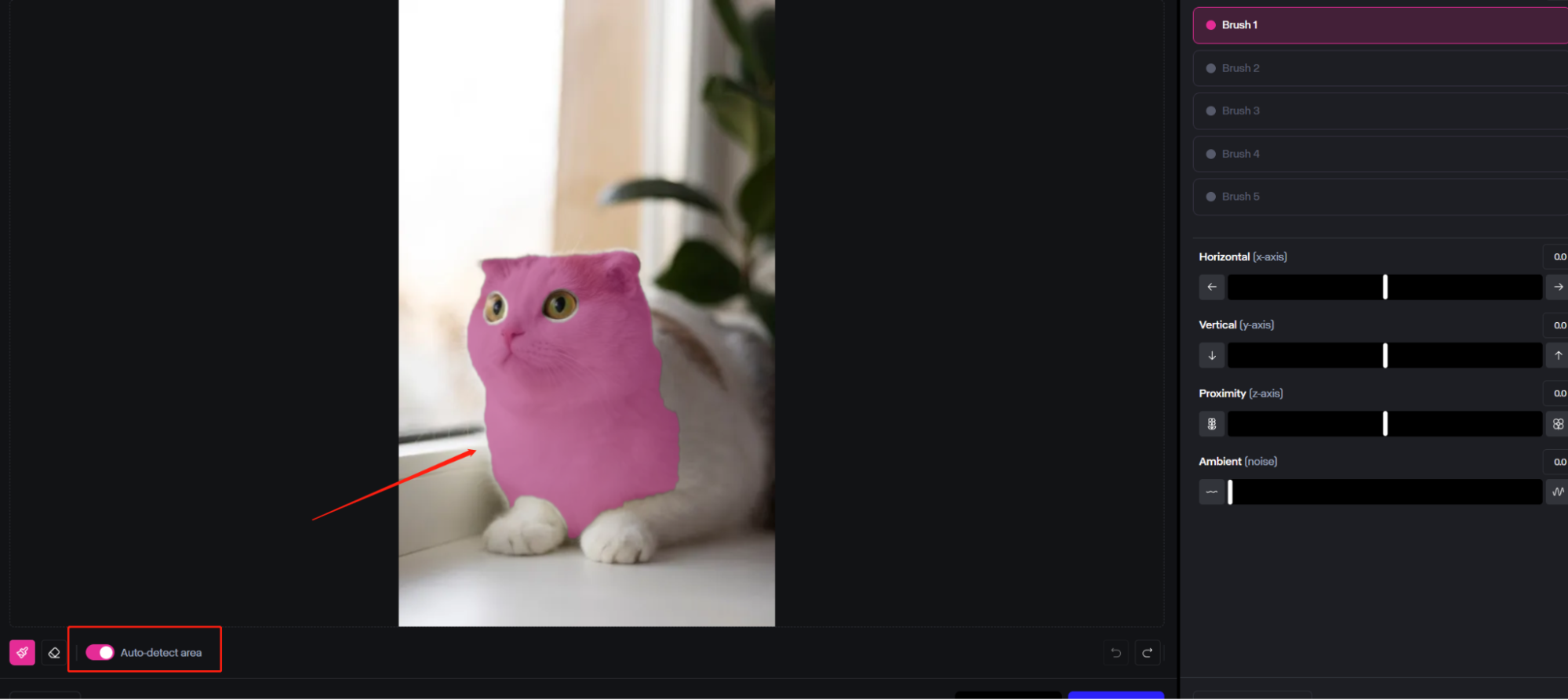
  • 自動偵測區域:運動畫筆可以自動辨識您想要新增運動的區域。
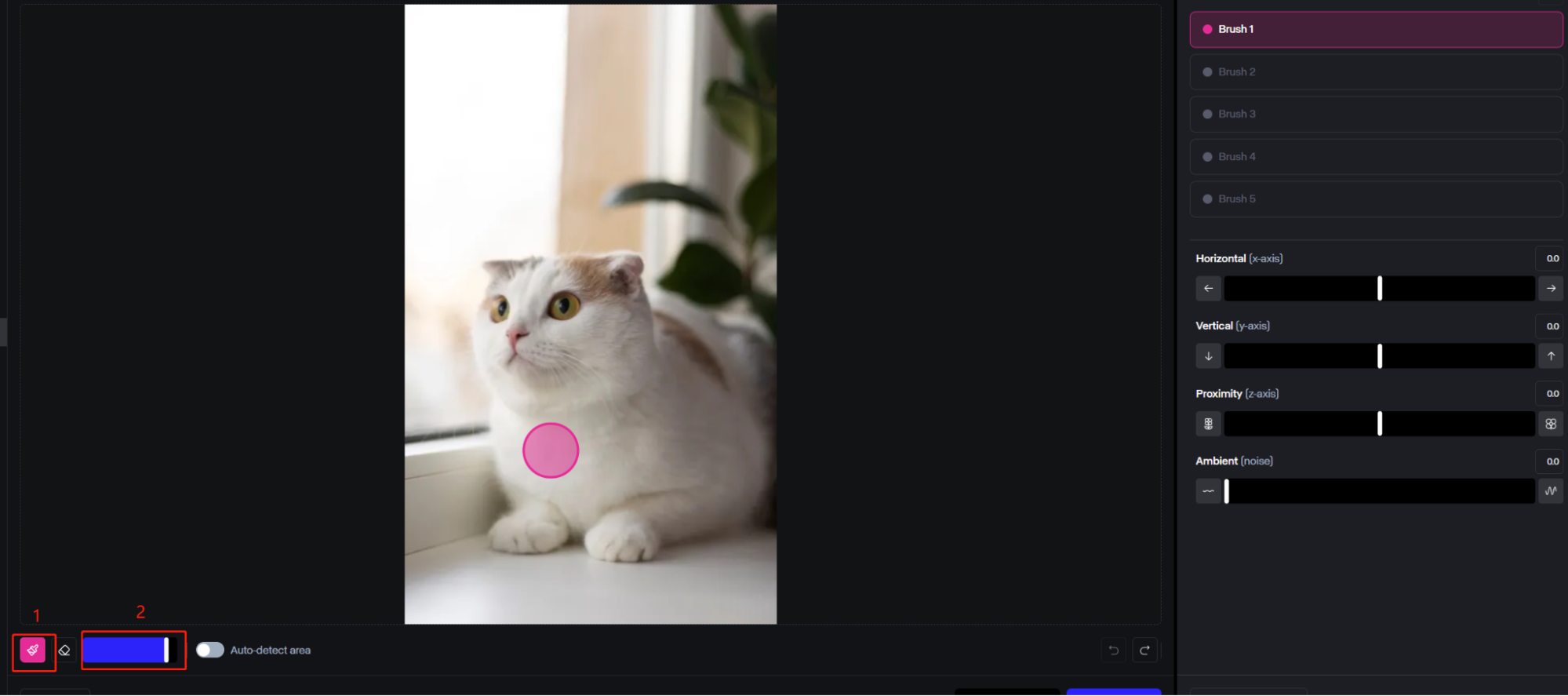
  • 可調整畫筆大小:在較大或較小的畫筆之間切換,分別覆蓋更大或更精確的區域。
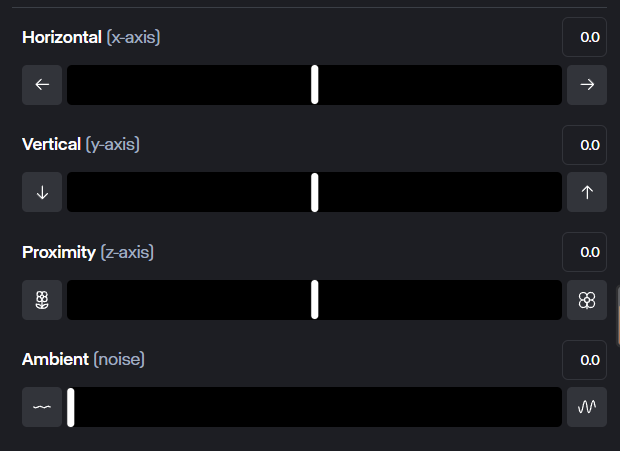
  • 移動方向和速度:使用滑桿輕鬆控制元素移動的精確方式以及運動的速度。

使用 Motion Brush 讓圖像栩栩如生

運動畫筆可讓您為靜止的畫面注入活力。您只需使用畫筆在圖像上“繪畫”,並選擇您想要移動的區域即可。它可以是任何東西,從天上的雲到人體的各個肢體。

帶來

自動偵測主題和章節

您不必擔心使用運動畫筆時需要特別精確,因為它可以自動找出您想要突出顯示的圖片區域或部分,然後為您填充它們。

探測

可變畫筆大小,輕鬆繪畫

使用者可以調整運動畫筆塗抹器的大小,使用簡單的滑桿使其變大或變小。如果您想要刷過影像中的大元素(例如一大片雲),則可以將其放大;如果您需要更具體或針對微小元素,則可以將其縮小。

畫筆大小

方便的方向和速度滑塊,實現最大程度的控制

一旦您選擇了影像的一部分或元素,您就可以使用提供的滑桿來控制其移動。有用於水平、垂直和近距離(深度)移動的滑塊,您可以將它們設定為更快或更慢。

便利

精確且獨立的運動控制

Runway 的Gen-2 Multi Motion Brush 可對影片內的不同區域進行獨立控制,從而實現更精確且可自訂的運動效果。它還可以獨立於相機運動工作,為您的動畫提供更大的靈活性。

第二代運動畫筆技術

透過應用這些技術,您可以最大限度地發揮 Gen 2 Motion Brush 的潛力並產生令人印象深刻的專業運動效果。

  • 將該工具與“圖像+描述”模式結合起來,實現精確控制,並使用簡單的提示實現更好的解釋。
  • 將 Motion Brush 與相機運動配對,以獲得更身臨其境的電影效果。
  • 根據您的需求調整畫筆大小,以實現廣泛和詳細的控制。
  • 啟用自動偵測功能可自動識別運動區域,從而節省時間和精力。
  • 應用緩和功能來創造更自然的動作。
  • 不斷完善您的提示和調整,因為即使是微小的調整也可以顯著增強最終的輸出。

比較第二代 Motion Brush 和第三代 Motion Brush

儘管 Runway 的Gen-2運動畫筆可能無法理解現實世界運動的細微差別,但第三代運動畫筆超越了這些限制,為每一幀提供了無與倫比的控制和準確性。

  • 超現實運動理解
  • 複雜動畫的精確控制
  • 與業界領先的影片編輯工具無縫集成

影片評論

X 的其他評論

Liz Cassidy photoRichard Quick photoarmourdude photo4000+ 則評論Trustscore 4.4

超過1000萬創作者和行銷人員使用

成千上萬的滿意用戶在 Trustpilot 上分享了他們使用Pollo AI 的體驗,並給予我們「優秀」的評價。看看他們喜歡我們平台的哪些方面。

Liz Cassidy photoLiz Cassidy
Trustpilot 評論Dec 15, 2025
Easy to use, great results for short videos
I’ve been using Pollo AI mainly for short videos and quick image-to-video tests. The interface is straightforward and it works well even with simple prompts, which is a big plus compared to tools that need long, complicated instructions. The results can be really impressive, and it’s honestly been fun to experiment with. I’d love a bit more consistency on faces when there’s movement, but overall it’s been a solid experience for what I needed.
Richard Quick photoRichard Quick
Trustpilot 評論Oct 15, 2025
Awesome website
Awesome website. loads of options and a great way to learn how to work with 'AI' my reasoning for 5 stars is based upon price, versatility and ease of use. Also I would like to add, Pollo AI runs a lot of promos on different AI products as well. I rate their customer service at 5 stars, when I purchased my first subscription my computer crashed the following weekend and I lost all my data and info passwords you name it I lost it, contacted pollo by email they responded quickly and found my info/username and account, and I was able to restore my account.
armourdude photoarmourdude
Trustpilot 評論Nov 19, 2025
I have been using Pollo AI for short…
I have been using Pollo AI for short videos. It is easy to use and works well with simple prompts. Other generators seem to need long drawn out complicated explanations to get even close to what I want.
Dudu photoDudu
Trustpilot 評論Jan 14, 2026
I'm just amazed by the level of quality…
I'm just amazed by the level of quality output that Pollo AI can produce from a simple image. The motion, the realism, It's too good!!
Ray Warnes photoRay Warnes
Trustpilot 評論Dec 30, 2025
A fabulous journey
I find Pollo easy to use, it gives me great results and I'd recommend it to anyone. It has been a wonderful experience for me.
lawless clan photolawless clan
Trustpilot 評論Nov 22, 2025
i tried 220 online img to vid in 2…
i tried 220 online img to vid in 2 months, and this is the best online video.I will subscribe for a year; there are many reasons. But freedom is the most important.

常見問題解答

運動畫筆在Runway中有什麼作用?

運動畫筆可讓您為靜止影像添加動作。您可以在影像中想要看到移動的部分上刷或塗色。然後您可以使用滑桿來控制移動的方向和速度。

如何使用跑道刷?

使用Runway運動畫筆非常簡單。只需建立一個新會話,上傳一張圖像(或使用 Runwayml 建立一個圖像),然後選擇“運動畫筆”,在要設定​​動畫的部分上繪圖,然後設定滑桿來控制動作。

Runway Gen 3 有運動刷嗎?

否。 Gen-3 AlphaGen-3 Alpha Turbo皆不支援運動筆刷。

Runway Gen 2 運動刷可以免費使用嗎?

是的, RunwayML有一個免費計劃,讓您無需花費任何金錢即可探索Runway的工具和功能。但您在免費套餐中的使用次數有限。

最好的運動刷是什麼?

有多種可用的運動畫筆工具,最好的一種取決於您的特定需求和偏好。 Pollo AI 的運動畫筆在對現實世界運動和物理的理解方面表現出色,從而產生更自然、更令人信服的運動。相比之下,Runway 的運動畫筆在這方面偶爾會遇到困難。