Sora AI created 60s realistic videos, but is no longer available. Pollo 2.5 delivers studio-grade videos with minimal editing, consistent characters, multi-shot storytelling, and precise camera control. Try it for free!
One upload in. Your viral video out. Unlimited rewards await.
WIN iPHONE DUO
Capture a city in one minute. Join the challenge now.
Pollo MCP
End-to-end content creation. Up to 4 Videos/ 20 Images for FREE.
Get Unlimited GPT Image 2.5
Faster. Sharper. Smarter. Go Unlimited with Ultra.
Unlock Unlimited MiniMax H3
Omni-Reference. Unlimited with Ultra.
Get Unlimited Wan 3.0
Native 30-second videos. Richer reference inputs.
Key Features of Sora AI
Text-to-Video Generation: Turn ideas, characters, and scenes into dynamic Sora AI videos with simple text prompts.
Powerful Remix Tool: Edit existing videos by adding objects, removing distractions, or changing styles with prompts.
Immersive Visual Perspectives: Create Sora AI videos from varied perspectives, making each scene feel deeper and more cinematic.
Storyboard Scene Planning: Plan multi-shot Sora AI videos with clearer timing, structure, and story flow.
Image Reference Support: Use images as visual references to keep characters, products, or scenes more consistent.
Native Audio Generation: Generate videos with synced dialogue, sound effects, and background soundscapes.
Seamless Loop Creation: Turn strong video moments into repeatable loops for social posts and visual backgrounds.
Cinematic Camera Movement: Guide Sora AI videos with cinematic camera prompts, such as pans, tracking shots, orbit shots, or slow dolly-ins.
Text-to-Video Generation
With Sora's groundbreaking text-to-video feature, you can instantly convert your ideas into dynamic videos within seconds! Simply type in your ideas, from character descriptions to scene settings, and it will instantly generate a professional-quality video matching your description.
Prompt
Output video
A fast-tracking shot through a futuristic city with buildings made from reflective organic chrome. It is daytime, rainbows fill the sky, and an alien planet looms above. The camera zooms in on a robotic bee working inside a reflective organic chrome structure.
A paper boat sets sail in a rain-filled gutter. It navigates the current with unexpected grace. It voyages into a storm drain, continuing its journey to unknown waters.
Powerful Remix Tool
By using Sora AI's Remix feature, you can introduce new characters, objects, or entire scenes into your existing video, erase distractions, and completely transform video styles, moods, and settings—all with simple text prompts.
Input video
Output video
Immersive Visual Perspectives
Sora AI can generate videos from different visual perspectives, including close-ups, aerial views, street-level shots, and wide cinematic frames. This helps creators present scenes with more depth, context, and visual variety.
Prompt
Video Output
A realistic cinematic video of a man with a thick beard, wearing an orange knit cap and a white jacket, standing on a coastal road. On his left side is a wide open sea stretching into the distance. The scene begins with a front view of the man as he stands still on the road, with the ocean visible beside him. Then the camera changes to show his right-side profile, keeping the same environment and character appearance consistent. Natural outdoor lighting, realistic movement, cinematic framing, detailed coastal atmosphere, smooth angle transition, high realism.
Storyboard Scene Planning
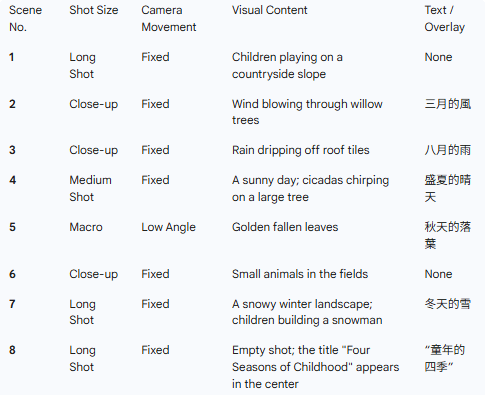
Sora AI’s storyboard feature helps users break a video idea into connected scenes instead of relying on one single prompt.
You can organize key moments, guide pacing, and make the final video feel more like a planned story. This is useful for testimonial videos, short films, trailer videos, and concept videos that need stronger narrative control.
Image 1
Prompt
Output Video
Based on the shooting script of the feature film shown in @Image 1, and referring to the shots, camera angles, movement shots, scenes and dialogues in @Image 1, create a 15-second soothing opening sequence about "The Four Seasons of Childhood".
Image Reference Support
Sora AI supports image-guided generation, allowing users to start from a visual reference instead of only writing a prompt. This helps preserve the look of a product, brand asset, character, or environment.
It is especially useful for marketers, designers, and creators who need AI videos to follow an existing visual direction.
Prompt
Reference Image
Output Video
The girl is gracefully drying the clothes. After that, she takes out another one from the bucket and shakes it vigorously.
Native Audio Generation
With Sora 2, OpenAI expanded Sora AI from a video generator into a video-audio generation model.
It can create synchronized dialogue, realistic sound effects, and immersive background audio directly with the video. This makes scenes feel more complete and reduces the need to add separate audio tracks in post-production.
Prompt
Generated Video
Two mountain explorers in bright technical shells, ice crusted faces, eyes narrowed with urgency shout in the snow, one at a time
Underwater scuba diver, sounds of the coral reef
Seamless Loop Creation
Sora AI’s loop feature helps users create video clips that repeat smoothly. This works well for social media posts, meme videos, animated backgrounds, product videos, and short attention-grabbing creative assets.
Instead of producing a clip with a clear stop point, users can make motion feel continuous and more platform-friendly.
Prompt
Output video
Create a short seamless loop video with continuous motion. A peaceful countryside path in autumn, covered with golden fallen leaves. A soft wind blows through the scene, making the leaves rise, swirl gently, and settle back down in a natural cycle. The camera stays still, the lighting remains warm and consistent, and the first frame should match the final frame for a perfect loop. Make it cinematic, nostalgic, and smooth. No text overlay.
Cinematic Camera Movement
Sora AI can respond to camera movement descriptions in your prompt, helping videos feel more cinematic and directed. You can describe shots like a slow dolly-in, handheld follow shot, orbiting camera, or drone-style movement.
Camera movement
Output video
Pan
Zoom
Who Is Sora AI for
Short-form creators: Generate cinematic clips, memes, and viral videos with sound, helping them post faster, follow trends, and attract more engagement across social platforms.
Marketing teams: Create campaign drafts, product scenes, and feature highlight videos to lower production costs, test more angles, and speed up stakeholder approvals.
Designers: Generate visual directions, lighting tests, and motion concepts before manual editing, helping teams compare creative ideas and choose stronger layouts earlier.
Educators: Turn abstract lessons into explainer videos with moving scenes, making complex topics easier to understand, remember, and discuss in class.
Agencies: Create client-ready mood films, campaign samples, and creative variations quickly, helping teams present stronger ideas and win approvals with less production pressure.
Developers: Produce videos through APIs and automated workflows, reducing repetitive production tasks and helping apps generate visual content at scale.
Fans and communities: Generate playful remixes, fan edits, and celebrity videos, turning community jokes, tributes, and stories into shareable entertainment.
Sora AI’s Technical Architecture
OpenAI describes Sora as a diffusion model that starts with noise and gradually forms video. It uses a transformer architecture, similar in spirit to large language models.
Instead of words, Sora represents images and videos as patches. That shared representation helps the model handle many durations, resolutions, and aspect ratios.
Sora also builds on OpenAI's image-generation work. The original technical preview said Sora used recaptioning techniques from DALL-E 3. Better captions likely improved prompt following and scene description.
Sora 2 adds synchronized audio and stronger world consistency. OpenAI said it could follow complex, multi-shot instructions while maintaining world state
The API documentation says Sora uses multimodal diffusion and diverse visual training data. It can generate dynamic clips with audio from natural language or images.
The production API uses asynchronous rendering. Developers create a video job, then poll or receive webhook updates. Completed jobs return MP4 files. The API also supports image guidance, character assets, extensions, targeted edits, downloads, and batch queues.
Sora AI also offers safety and provenance measures. Generated videos carry visible watermarks and C2PA metadata. It also has internal reverse-search tools for tracing Sora outputs. Those controls are central to Sora's design, as realistic video creates misuse risks.
What Users Think About Sora AI
Users most often praise Sora AI's ability to convert ideas into motion quickly. Some value that Sora AI offers a simple way to turn prompts and images into usable visual content.
Users also like Sora AI's creative range. Cinematic, animated, photorealistic, cartoon, and surreal styles are highlighted across reviews. Reviewers also praise character interactions, concept testing, and remix-friendly experimentation.
Additionally, users like workflow savings. Users only input the changes they want, and Sora AI will fine-tune the image or video automatically. No need to remove objects or adjust lighting by hand. That reduces manual work before final editing and client presentation.
But users complain that restrictions were too strict or inconsistent. For example, some say harmless prompts are flagged as sexual, suggestive, or policy-breaking. Reviewers also criticize token limits and guardrails.
Users also dislike access, export, and reliability friction. For instance, creators report missing direct video download or export options.
I’ve been using Pollo AI mainly for short videos and quick image-to-video tests. The interface is straightforward and it works well even with simple prompts, which is a big plus compared to tools that need long, complicated instructions. The results can be really impressive, and it’s honestly been fun to experiment with. I’d love a bit more consistency on faces when there’s movement, but overall it’s been a solid experience for what I needed.
Awesome website. loads of options and a great way to learn how to work with 'AI' my reasoning for 5 stars is based upon price, versatility and ease of use. Also I would like to add, Pollo AI runs a lot of promos on different AI products as well. I rate their customer service at 5 stars, when I purchased my first subscription my computer crashed the following weekend and I lost all my data and info passwords you name it I lost it, contacted pollo by email they responded quickly and found my info/username and account, and I was able to restore my account.
I have been using Pollo AI for short videos. It is easy to use and works well with simple prompts. Other generators seem to need long drawn out complicated explanations to get even close to what I want.
i tried 220 online img to vid in 2 months, and this is the best online video.I will subscribe for a year; there are many reasons. But freedom is the most important.
Yes, OpenAI's Sora AI, a text-to-video generation model, has been publicly available since December 2024 for users with ChatGPT Plus or Pro subscriptions, allowing creation of short videos up to 20 seconds long with resolutions reaching 1080p in the Pro tier. It is also accessible for free through Microsoft's Bing mobile app since June 2025, though limited to 5-second clips. As of September 2025, Sora operates in most supported countries, including the EU and UK, with ongoing updates for stability and features.
How does Sora AI work?
Sora functions on AI diffusion models. This means that it doesn’t generate videos frame by frame. Instead, it creates visual noise and continuously adds details to generate scenes until the final result resembles the desired prompt.
How can I use Sora?
You can use Sora for content marketing, product advertising, film concepts, social media clips, and short educational content. For example, marketers can create product launch videos to attract more attention and let viewers buy your products quickly, while social media creators can use YouTube intro video maker to captivate more audiences. Simply input an image, describe the scene and motion you want, and let Sora generate the video.
Is OpenAI's Sora AI video generator free?
OpenAI's Sora is not entirely free for its full capabilities, as advanced features like higher resolutions and longer durations require a paid ChatGPT Plus ($20/month) or Pro ($200/month) subscription. If you need a more flexible AI video generator, Pollo AI offers comprehensive and powerful functions such as 70+ leading AI video models, 100+ specialized workflow apps and Pollo Agent for post-ready, edit-free results.
What is the best Sora AI alternative?
We have already written a comprehensive article outlining 10 alternatives to Sora, all of which are ideal choices for users looking for better products. However, Pollo AI stands out due to its own distinctive features, including high-definition video quality, wide-ranging customization options, and fast generation speed.
Bring Your Idea to Life with Sora AI for Free!
Use Sora AI to create realistic, engaging videos from simple prompts or visual references.








 Liz Cassidy


