



Runway視頻轉視頻
Runway的視訊轉影片功能於 2024 年 9 月首次上線,讓創作者能夠根據文字提示將影片改編成各種美學風格和效果。它是作為Gen-3 Alpha和Gen-3 Alpha Turbo型號的一部分發布的。試試下面的Runway影片吧!
Kling 4.0
最多可設定 10 個關鍵影格。性能出色。
Runway 視訊轉視訊工具的主要功能
應用帶有提示的樣式: 使用文字提示改變您的影片風格。廣泛的自訂預設: 提供了大量的範例重新設計提示庫。可自訂的結構一致性: 控制維持原始視訊結構和產生更多抽象輸出之間的平衡。
使用提示套用樣式
您可以上傳影片並在提示中指定視覺樣式變更或新增效果。 Runway會將影片轉換成您想要的新外觀。它可以幫助您將影片轉換為黏土動畫風格、線條藝術,甚至是印象派繪畫。
| 輸入影片 | 迅速的 | 輸出影片 |
 | 3D 半色調 CMYK 風格。半色調印刷點。漫畫書。青藍色、黃色、洋紫色和黑色圓點層層疊加,呈現鮮豔的色彩。 |  |
豐富的自訂預設
如果您不知道如何轉換您的視頻, Runway還提供了一個大型的“自訂預設”庫,這些預設是可以幫助您重新設計上傳視頻的範例提示。它們帶有佔位符文本,您可以用自訂內容替換它們。
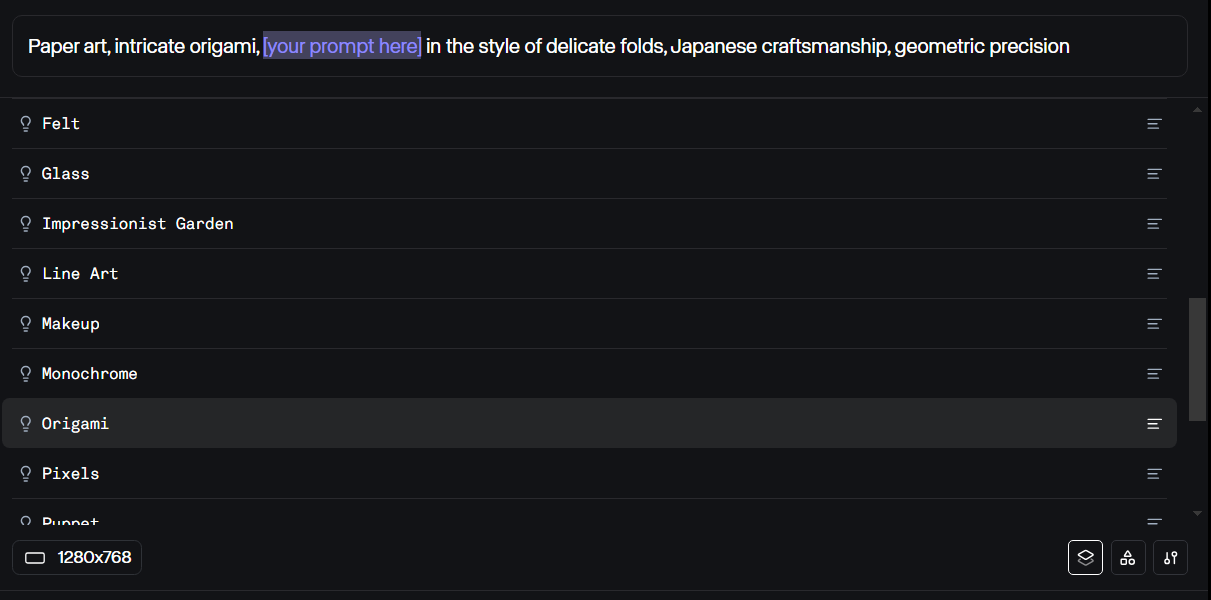
可自訂的結構一致性
Runway 的視訊轉視訊工具附帶一個設置,可控制維持原始視訊結構和產生更抽象的輸出之間的平衡。較低的值保留了更多的原始結構,而較高的值則產生了更抽象的結果。
| 結構變換值為0 | 結構轉換值 5 | 結構轉換值 10 |
 |  |  |
Reddit上人們對 Runway 的 Video to Video 的評價
人們普遍喜歡 Runway 的視訊轉視訊工具。但有些人也提到,他們必須在提示中非常具體,以避免照片寫實主義和抽象主義的可怕混雜。
其中一些人使用 Runway 的視訊轉視訊功能來重新設計舊的遊戲視訊。
YouTube對 Runway 影片轉影片的評論
X 上的其他評論
進行一些後期工作,將跑道 gen3 影片與影片和Act One結合。 pic.twitter.com/js7Ug2so9M
— Jon Finger (@mrjonfinger) 2024 年 10 月 27 日

10M+使用者
使用 Pollo AI 進行創作與啟發靈感


超過1000萬創作者和行銷人員使用
- Liz CassidyDec 15, 2025Easy to use, great results for short videosI’ve been using Pollo AI mainly for short videos and quick image-to-video tests. The interface is straightforward and it works well even with simple prompts, which is a big plus compared to tools that need long, complicated instructions. The results can be really impressive, and it’s honestly been fun to experiment with. I’d love a bit more consistency on faces when there’s movement, but overall it’s been a solid experience for what I needed.
- Richard QuickOct 15, 2025Awesome websiteAwesome website. loads of options and a great way to learn how to work with 'AI' my reasoning for 5 stars is based upon price, versatility and ease of use. Also I would like to add, Pollo AI runs a lot of promos on different AI products as well. I rate their customer service at 5 stars, when I purchased my first subscription my computer crashed the following weekend and I lost all my data and info passwords you name it I lost it, contacted pollo by email they responded quickly and found my info/username and account, and I was able to restore my account.
- armourdudeNov 19, 2025I have been using Pollo AI for short…I have been using Pollo AI for short videos. It is easy to use and works well with simple prompts. Other generators seem to need long drawn out complicated explanations to get even close to what I want.
- DuduJan 14, 2026I'm just amazed by the level of quality…I'm just amazed by the level of quality output that Pollo AI can produce from a simple image. The motion, the realism, It's too good!!
- Ray WarnesDec 30, 2025A fabulous journeyI find Pollo easy to use, it gives me great results and I'd recommend it to anyone. It has been a wonderful experience for me.
- lawless clanNov 22, 2025i tried 220 online img to vid in 2…i tried 220 online img to vid in 2 months, and this is the best online video.I will subscribe for a year; there are many reasons. But freedom is the most important.


關於Runway視訊轉影片的有用文章
常見問題解答
什麼是視訊轉視訊工具?
視訊到視訊工具允許用戶使用文字提示來改變視訊的風格。 Runway利用Gen-3 Alpha和Gen-3 Alpha Turbo模型來重新設計您的影片並產生創意影片輸出。
Runway 的哪些型號具有視訊到視訊功能?
Runway 的視訊到視訊功能是Gen-3 Alpha和 Turbo 模型的一部分。它不適用於Gen-2等較舊型號。
Runway 的影片轉影片工具可以免費使用嗎?
是的,但Runway為免費用戶提供有限的積分,而且您無法透過其免費方案存取Gen-3 Alpha 。
Runway 視訊轉視訊工具的最佳提示是什麼?
嘗試在提示中盡可能具體地描述您的影片所需的風格。您可以選擇他們的自訂預設提示之一來了解最佳的提示格式。
我可以上傳的最大影片長度是多少?
您可以上傳長度最長為 20 秒的影片。如果您上傳的影片長度超過 20 秒,則僅處理前 20 秒。
