
Google Veo 3 AI Video Generator
Announced at the Google I/O 2025 conference in May 2025, Google Veo 3 is a state-of-the-art AI video model capable of generating high-quality videos with realistic and natural audio, building upon its predecessor Veo 2 to achieve a significant leap in video quality. Try Veo 3 in Pollo AI video generator for free!
Key Features of Veo 3
- Native Audio Generation: Create and integrate audio into the videos it produces
- Produce Viral-ready Content: Create entertaining “fake news” videos or time-travel clips that help you earn likes
- Advanced Prompt Understanding: Interpret complex prompts with high accuracy
- Reference to Video and Consistent Characters: Create character consistent videos based on references
- Accurate Style Control: Control the artistic style based on reference images
- Camera Controls: Create videos with specific camera movements
- First and Last Frames: Generate seamless videos between two uploaded images
- Add and Remove Objects: Add or erase objects within a video scene
- Flexible Motion Control: Customize the movements of video objects
- Integration with Flow: Create videos with Google’s new AI filmmaking tool
Native Audio Generation
Veo 3 can create and integrate audio directly into the videos it produces, including sound effects, ambient noises, and character dialogue with synchronized lip-syncing. This makes the videos more immersive and realistic, addressing a major limitation in previous AI video tools that lacked integrated sound.
| Prompt | Output video |
| In rural Ireland, circa 1860s, two women, their long, modest dresses of homespun fabric whipping gently in the strong coastal wind, walk with determined strides across a windswept cliff top. The ground is carpeted with hardy wildflowers in muted hues. They move steadily towards the precipitous edge, where the vast, turbulent grey-green ocean roars and crashes against the sheer rock face far below, sending plumes of white spray into the air. | |
| A keyboard whose keys are made of different types of candy. Typing makes sweet, crunchy sounds. Audio: Crunchy, sugary typing sounds, delighted giggles. | |
| A snow-covered plain of iridescent moon-dust under twilight skies. Thirty-foot crystalline flowers bloom, refracting light into slow-moving rainbows. A fur-cloaked figure walks between these colossal blossoms, leaving the only footprints in untouched dust. |
Produce Viral-ready Content
Create scroll-stopping viral videos in minutes. Veo 3 lets you craft entertaining “fake news” and time-travel, historical videos, or even animal talking videos with perfect audio-visual sync and cinematic quality. Grab likes and shares effortlessly.
| Viral concepts | Generated video |
| "Fake news" | |
| Time travel/historical videos | |
| Animal talking |
Advanced Prompt Understanding
Veo 3 can interpret complex, narrative-driven prompts with high accuracy. Users can describe detailed scenes, character actions, and story elements in everyday language, and the model translates these into cohesive video clips.
| Prompt | Output video |
| A fast-tracking shot through a futuristic city with buildings made from reflective organic chrome. It is daytime, rainbows fill the sky, and an alien planet looms above. The camera zooms in on a robotic bee working inside a reflective organic chrome structure. | |
| A paper boat sets sail in a rain-filled gutter. It navigates the current with unexpected grace. It voyages into a storm drain, continuing its journey to unknown waters. |
Reference to Video and Consistent Characters
Veo 3 supports reference-powered video generation, allowing users to provide images of characters, scenes, objects, or artistic styles as visual anchors for the AI. This ensures that characters and elements remain visually consistent across multiple clips or scenes.
| Input | Output video |
 |
|
Accurate Style Control
By using reference images or style prompts, Veo 3 lets creators control the artistic style of the video output. Whether you want a photorealistic look, a cartoonish animation, or a particular cinematic style, you can guide the AI’s rendering to match your vision by uploading a style reference image.
| Input | Output video |
 |
Camera Controls
Veo 3, especially integrated within Flow, offers advanced camera manipulation features. Users can specify camera movements such as pans, zooms, and angle changes. This enables filmmakers to craft cinematic shots with dynamic perspectives and smooth transitions, enhancing the storytelling impact.
| Camera movement | Output video |
| Pan | |
| Zoom |
First and Last Frames
Veo 3 can generate seamless video content between two uploaded frames. This ensures smooth transitions and continuity from the first to last frames of a sequence, which is essential for coherent storytelling.
| Input | Output video |
  |
Add and Remove Objects
Veo 3 includes powerful object manipulation capabilities. Users can add or erase objects within a video scene, and the AI understands the scale, shadows, and interactions of these objects with the environment. This means you can modify a generated video by inserting new props or removing unwanted elements while maintaining a natural, realistic look.
| Input video | Output video |
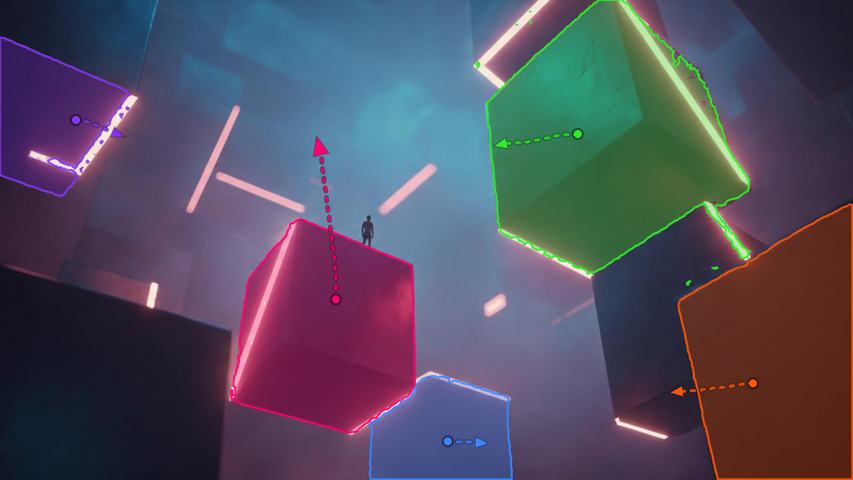
Flexible Motion Control
Veo 3 excels at producing realistic and consistent motion. It allows you to specify movements of the objects in your video, and they will move naturally and interact believably. You can use this to produce fluid character animation, and coherent movement of environmental elements like fabric or water.
| Input | Output video |
 |
Integration with Flow
Veo 3 works with Google’s new AI filmmaking tool called Flow, which enables users to create cinematic videos by specifying locations, shots, and styles. Flow combines Veo 3 with Imagen 4 and the Gemini AI model to streamline video production workflows.
Built for Short Videos That Need Sound
- Talking Character Clips: Create short story scenes where characters speak, react, or perform with synced dialogue and matching ambience.
- SaaS Demo Shorts: Turn a SaaS idea into a quick demo clip with realistic motion, sound effects, and cinematic framing.
- Brand Mood Films: Generate premium visual concepts for campaigns, pitch decks, launch videos, and creative direction.
- Explainer Snippets: Show a simple process, feature, or concept with clear motion, natural pacing, and built-in audio.
- Comedy and Skit Videos: Make short dialogue-driven scenes, parody clips, or character moments that feel more complete with voice and sound.
- Atmospheric Story Scenes: Create fantasy, sci-fi, realistic, or historical scenes where environmental sound helps carry the mood.
Veo 3 vs Seedance 2.0 vs Kling 3.0
| Feature | Veo 3 | Seedance 2.0 | Kling 3.0 |
| Best For | Cinematic short clips with built-in sound | Reference-led videos with stronger director control | Character motion, lip-sync, and commercial videos |
| Input Options | Text prompts; image-to-video in supported workflows | Text, image, audio, and video references | Text-to-video, image-to-video, and Omni workflows |
| Creative Control | Strong prompt, camera, scene, and audio direction | Controls performance, lighting, shadow, and camera movement with references | Motion control, character consistency, and multi-shot flow |
| Visual Strength | Realistic physics, lighting, and cinematic mood | Motion stability and multimodal reference consistency | Stable characters, objects, and commercial-style rendering |
| Audio | Native dialogue, ambience, music, and sound effects | Audio-video joint generation | Native audio with character-level lip-sync |
| Best Choice When | You need a realistic video that already has sound | You need to guide the result with images, videos, or audio | You need speaking characters, action shots, or product demos |
Why Veo 3 Feels Different
Pros
- Video and sound together: Veo 3 can generate visuals with dialogue, ambience, sound effects, and music in the same workflow.
- Strong cinematic realism: It works well for lighting, camera feel, natural motion, textures, and believable scene atmosphere.
- Good prompt following: Users can describe subject, setting, action, camera style, and audio direction in one detailed prompt.
Cons
- Clear prompting matters: Better results usually come from prompts that explain the scene, camera, dialogue, and sound mood clearly.
- Audio direction takes practice: Users may need a few tests to get voice tone, ambience, or sound effects exactly right.
What Creators Keep Pointing Out
Audio is the biggest upgrade
The strongest user reaction is around Veo 3 generating voices, sound effects, and ambience with the video instead of leaving clips silent.
The clips feel more finished
Creators often describe Veo 3 outputs as closer to usable video because the sound and visuals arrive together.
Realism gets strong praise
Many shared examples focus on lighting, textures, camera movement, and natural scene atmosphere.
Prompt quality still decides a lot
User feedback suggests Veo 3 works best when prompts clearly include subject, scene, camera movement, dialogue, and audio details.

How to Use Google Veo 3 on Pollo AI
Here’s a simple rundown to help you dive into Veo 3 on Pollo AI:
Choose the Veo 3 Model
Go the Pollo AI image to video AI and select the Veo 3 model.
Enter Your Prompt
Upload your image and if needed, enter a prompt, then adjust the video settings.
Save Your Video
Click Create and once the video is ready, download it if you’re happy with the result.
YouTube Videos About Veo 3
Reddit Posts About Veo 3
X Posts About Veo 3
This was built using;
— FHILY👑 (@Oluwaphilemon1) June 6, 2026
Nano Banana + VEO 3 + Lovable
Prompt below ↓ pic.twitter.com/8URUaQCFvt
I did this with just chatGPT and VEO 3.
— Olatunde | AI | 3D (@OlatundeAI) June 8, 2026
Comments and like if you want to learn this. pic.twitter.com/NJmrNYPxW4
Veo 3 can generate videos — and soundtracks to go along with them | TechCrunch https://t.co/1g8APq2Uhj
— TechCrunch (@TechCrunch) May 20, 2025
With Veo 3 and Flow out in the world, here's a few examples of videos I've created with Veo 3.
— Martin Nebelong (@MartinNebelong) May 20, 2025
The first video is an example of the incredible voice/audio capabilities. The second one is a test of doing a longer form video (edited in Premiere).
Generated with Veo. pic.twitter.com/ZfBX8p5SBI
Veo 3 is from a different world https://t.co/MVY0mZDBX3
— Josh Woodward (@joshwoodward) May 20, 2025
Veo 3 now has sound and Veo 2 comes with lots of incredible new capabilities: Reference Powered Video, Camera Controls and more!
— Thomas Kipf (@tkipf) May 20, 2025
Try it on Flow! https://t.co/W2e0gYEofThttps://t.co/o4lOUHct50
Google launches Veo 3, an AI video generator that incorporates audio https://t.co/pC20n1MC5P
— CNBC (@CNBC) May 20, 2025
Veo 3 is here, and in addition to better visuals, it makes noises and speaks! This was a massive effort made possible by incredible passion from the whole Veo team and the many other team enabling it to launch today.
— Jason Baldridge (@jasonbaldridge) May 20, 2025
Looking forward to seeing what others do with it!#veo3 pic.twitter.com/BylAi75ejq
3/ It’s simply unbelievable how far we’ve managed to come in just one year since Veo started as a project: Veo 2 is still very much a SOTA for text-to-video model and now Veo 3 is a *significant* leap in both quality and capability. I’m exceptionally proud of the work of the Veo… pic.twitter.com/NBbHtgCKpp
— Dumitru Erhan (@doomie) May 20, 2025
Veo 3 is seriously mind blowing. The characters, the lighting, the sound, the camera controls built-in... https://t.co/zY3CQiRzWI
— Steren (@steren) May 20, 2025
By far the best Veo 3 video I've seen so far 🤣 https://t.co/Ia4R3xtXdf
— Mat Velloso (@matvelloso) May 21, 2025
Google just launched Veo 3, an AI video generator that creates videos with built-in audio—including dialogue and sound effects
— Tatiana Tsiguleva (@ciguleva) May 20, 2025
+ Flow, a new AI filmmaking app for building cinematic scenes with advanced controls.
Both are available to US subscribers of Google’s Ultra plan.… pic.twitter.com/4sJkDGEaGZ
Veo 3 is here, and in addition to better visuals, it makes noises and speaks! This was a massive effort made possible by incredible passion from the whole Veo team and the many other team enabling it to launch today.
— Jason Baldridge (@jasonbaldridge) May 20, 2025
Looking forward to seeing what others do with it!#veo3 pic.twitter.com/BylAi75ejq
VEO 3 initial impressions: Audio is goated, sounds great, it's intelligent fits the video. So much fun to mess with! Great motion and detail quality, follows prompts well enough but not a massive leap over Veo 2 in that regard. References work pretty well, about as good as other… pic.twitter.com/Tw9iNYXWTT
— MattVidPro AI (@MattVidPro) May 20, 2025
FAQs
What is Google Veo 3?
Veo 3 is Google DeepMind's latest AI video generation model that can create high-quality videos from text or image prompts, with enhanced character consistency, style and camera control. Read our review of Veo 3 to know our personal experience with this model.
How does Veo 3 differ from its predecessor Veo 2?
Unlike Veo 2, Veo 3 generates native audio along with video, offers improved video quality with realistic physics, better lip-syncing, and enhanced understanding of complex narrative prompts.
What platforms provide access to Veo 3?
You can now try Google Veo 3 model in Pollo AI for free. Since Pollo AI has integrated Veo 3, you can create videos from text prompts using Pollo AI text to video AI with the same Google model.
How does Google ensure ethical use of Veo 3-generated content?
All Veo 3 videos include invisible SynthID watermarks that identify the content as AI-generated, helping combat misinformation and promote transparency.

Get Started with Google Veo 3 on Pollo AI Now!
Use Veo 3 to create viral-ready videos with realistic, natural audio from text prompts or image references.