



クリングAIモーションブラシ
Kling AI Motion Brush を使用すると、静止画像内の特定の要素の移動パスを簡単に定義し、滑らかな動きでシーンに命を吹き込むことができます。Pollo Pollo AIで無料でお試しいただけます。
Kling4.0
最大10個のキーフレームに対応。優れたパフォーマンス。
主な特徴:
静止画像をアニメーション化: 画像内の要素にモーション パスを描画して、誰かを手を振らせたり、立ち上がらせたりすることで、静止画像に命を吹き込みます。
調整可能なブラシ サイズ: ブラシ サイズを最大 50 ピクセルまで変更して、大きな動きと細かいディテールの両方を作成できます。
スマート自動セグメンテーション: 正確なモーション パスをすばやく描画し、画像のアニメーション化を容易にします。
静止領域の選択: 画像の一部を静止させ、他の部分を移動させます。
Kling AIモーションブラシで静止画像に命を吹き込む
Kling AIの強力な新機能であるKling AI Motion Brush の魔法を体験してください。この機能を使用すると、静止画像に命を吹き込むことができます。Motion Brush を使用すると、静止画像内の要素や被写体の動きを簡単に制御できるため、クリエイティブなビデオやアニメーションを作成するための無限の可能性が得られます。
| モーションブラシを適用したサンプル画像 | 出力ビデオ |
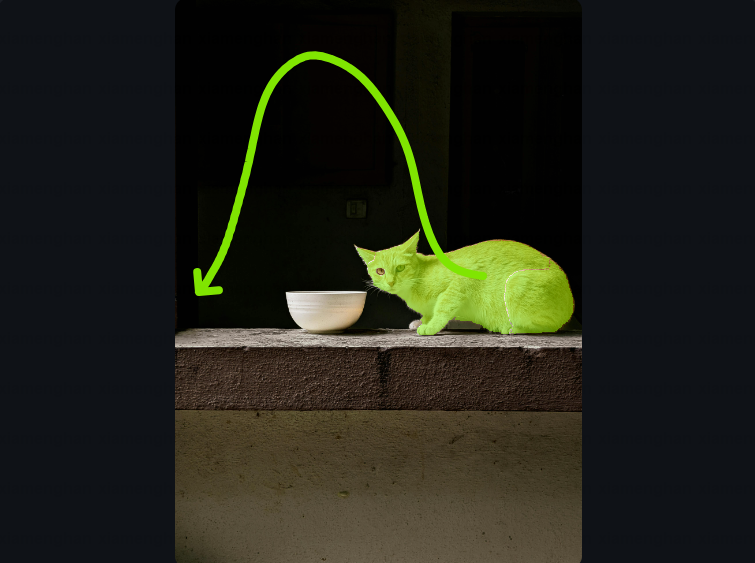 |
|
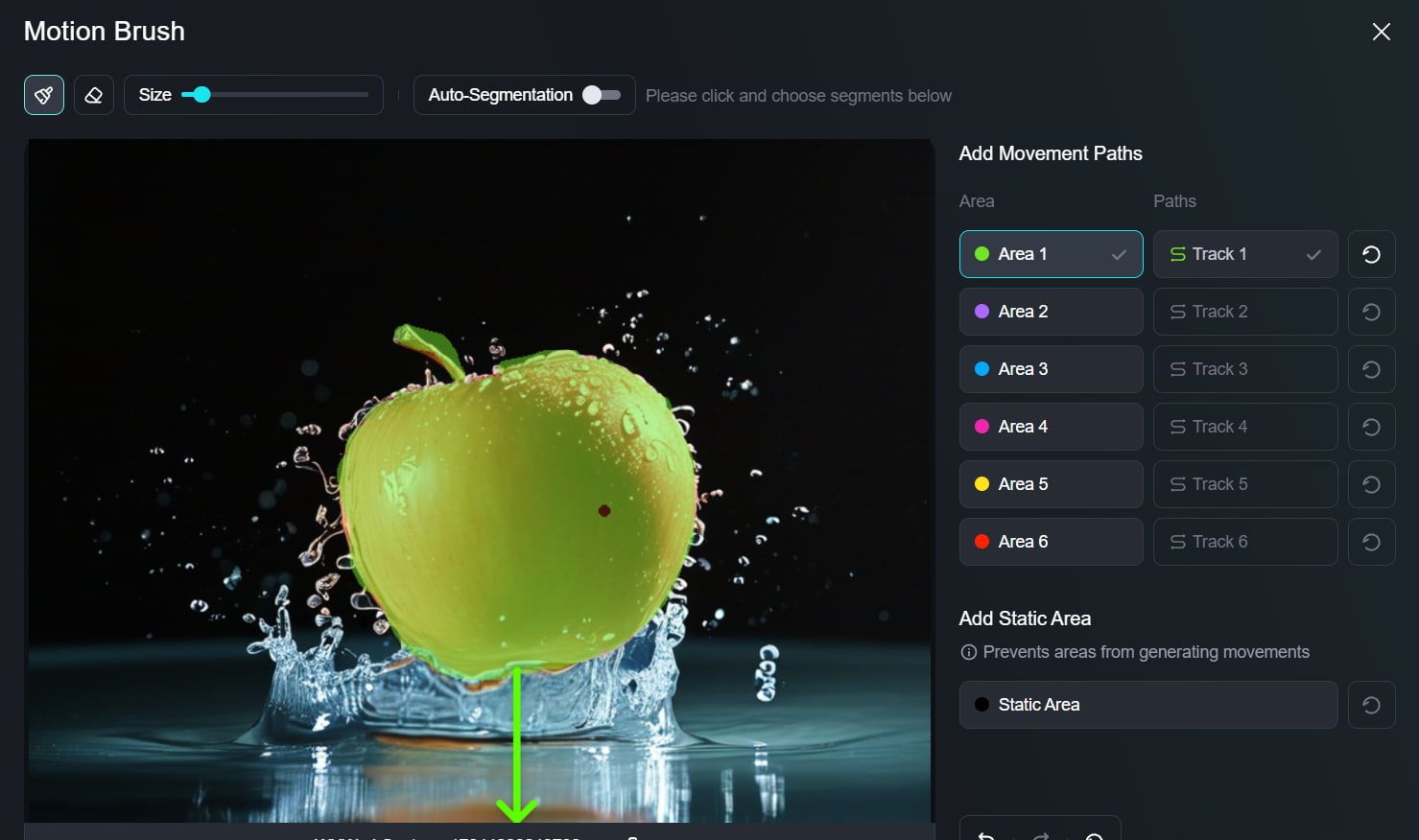 |
Kling AI モーションブラシの使い方に関するYouTube動画
Redditでモーションブラシについて人々が話していること
X上のさらなるレビュー
Kling AI 1.5 Motion Brush is incredible.
— Min Choi (@minchoi) November 30, 2024
You can give different motions to multiple subjects in the same scene.
Game changing control and quality
6 wild examples: pic.twitter.com/sEDbNC1iPq
🔥 #kling_ai Motion Brush is an absolute game-changer! 😍
— Pierrick Chevallier | IA (@CharaspowerAI) September 30, 2024
The craziest part? It’s only available for model 1... Just imagine what’s coming with 1.5 model! 🚀
Have you tried it? What do you think? pic.twitter.com/1xOk9twAjr
Kling AI 1.5: Unleash the Power of the Motion Brush@Kling_ai just got massive updates, and it's the same affordable price.
— el.cine (@EHuanglu) September 19, 2024
But, to me, the most POWERFUL feature is the Motion Brush. It basically helps us direct the movement of our actor so our prompts can be super simple.
4… pic.twitter.com/YygirB8wZm
Kling AI Motion Brush is insane.
— AI Andy (@TheAIAndy) December 9, 2024
Creating custom AI videos has never been easier.
6 examples of what you can do with it:
1.pic.twitter.com/2544MyT7AM
This AI Motion Brush tool is insane!
— el.cine (@EHuanglu) November 28, 2024
It lets you control the movement and actions of 5 different objects simultaneously. It's the only AI tool can do blocking for AI filmmaking so far.
You have free credits to try on Kling AI, link in comments!
Here’s how to get started: pic.twitter.com/H77RVNV7m4
Here is why @Kling_ai Motion Brush is absolutely insane!
— el.cine (@EHuanglu) September 23, 2024
We can literally control 3 different subjects at the same time and Kling understands how they should move, this is scary.
But the thing that really blew my mind is the car that's coming towards us actually avoids the red… pic.twitter.com/YjHc1arbYH
Playing with motion brush @Kling_ai, this one is totally unexpected🤣 (or is it?
— Xiaojian Ma (@jeasinema) September 25, 2024
thanks for the reference image @EHuanglu pic.twitter.com/bA6J3YEs2W

10M+ユーザー
Pollo AIを使って創造し、インスピレーションを与える


世界中の1,000万人以上のクリエイターとマーケターに選ばれました
- Liz CassidyDec 15, 2025Easy to use, great results for short videosI’ve been using Pollo AI mainly for short videos and quick image-to-video tests. The interface is straightforward and it works well even with simple prompts, which is a big plus compared to tools that need long, complicated instructions. The results can be really impressive, and it’s honestly been fun to experiment with. I’d love a bit more consistency on faces when there’s movement, but overall it’s been a solid experience for what I needed.
- Richard QuickOct 15, 2025Awesome websiteAwesome website. loads of options and a great way to learn how to work with 'AI' my reasoning for 5 stars is based upon price, versatility and ease of use. Also I would like to add, Pollo AI runs a lot of promos on different AI products as well. I rate their customer service at 5 stars, when I purchased my first subscription my computer crashed the following weekend and I lost all my data and info passwords you name it I lost it, contacted pollo by email they responded quickly and found my info/username and account, and I was able to restore my account.
- armourdudeNov 19, 2025I have been using Pollo AI for short…I have been using Pollo AI for short videos. It is easy to use and works well with simple prompts. Other generators seem to need long drawn out complicated explanations to get even close to what I want.
- DuduJan 14, 2026I'm just amazed by the level of quality…I'm just amazed by the level of quality output that Pollo AI can produce from a simple image. The motion, the realism, It's too good!!
- Ray WarnesDec 30, 2025A fabulous journeyI find Pollo easy to use, it gives me great results and I'd recommend it to anyone. It has been a wonderful experience for me.
- lawless clanNov 22, 2025i tried 220 online img to vid in 2…i tried 220 online img to vid in 2 months, and this is the best online video.I will subscribe for a year; there are many reasons. But freedom is the most important.


Kling AIモーションブラシに関する役立つ記事
よくある質問
Kling AI モーションブラシとは何ですか?
Kling AI モーション ブラシを使用すると、モーション パスを描画して静止画像内の特定の要素をアニメーション化できます。この機能により、静止画像が動的なアニメーションに変換され、手を振ったり、うなずいたり、ベンチから立ち上がったりするなど、滑らかな動きを作成できます。
モーションブラシ機能にアクセスするにはどうすればいいですか?
モーション ブラシの使用は簡単で、3 つの主な手順があります。まず、アニメーション化したい写真またはアートワークをアップロードし、モーション ブラシを使用してアニメーション化したい要素の輪郭を描き、対応するモーション パスウェイを描画し、選択内容を確認して [作成] をクリックすると、Kling AI が描画したパスウェイに基づいて画像をアニメーション化します。
Kling AI モーションブラシはどこで試せますか?
Pollo AIで Kling AI モーションブラシ を無料で試すことができます。このプラットフォームでは、ツールを試して、クリエイティブ プロジェクトをどのように強化できるかを確認できます。
