



Nano Banana 2 Hands-On: Infinite Ratios, Faster Generations, and Where It Falls Short
The original Nano Banana took the AI art scene by storm, quickly becoming one of the top-tier models for creators. Naturally, the arrival of Nano Banana 2 has drawn massive attention. This update focuses on a more flexible workflow—offering custom aspect ratios and native 2K output without the long wait times.
After pushing the new features to the limit, I found that while it offers incredible control over the canvas, it still hits a wall when rendering complex, data-heavy text. Here is my breakdown of how it handles custom scales versus typographic precision.
What’s New in Nano Banana 2?
Building on its previous versions, Nano Banana 2 introduces several technical upgrades designed for creators who need high-quality assets on a budget:
- Increased Speed & Efficiency: Generating a high-resolution image now takes approximately 20 seconds. It is both faster and more cost-effective for high-volume tasks.
- Default 2K Output: The model has moved away from low-res previews. It now defaults to 2K resolution, eliminating the extra step of upscaling for many projects.
- Unlocked Aspect Ratios: The model can now generate images in virtually any aspect ratio. While it defaults to 16:9, users can specify common formats like Portrait (3:2), Square (1:1), or Ultrawide (21:9). It even supports extreme custom ratios such as 8:1 or even 10:1.
The Performance Test: Composition and Text Precision
To evaluate the model's strengths and weaknesses, I conducted a series of tests focusing on its new aspect ratio capabilities and its ability to follow text-based instructions.
Test 1: Ultra-Wide Scroll
My first test aimed to push the boundaries of the new aspect ratio settings to see if the model could maintain a cohesive scene over an extreme width.
| Prompt | Output |
| A continuous fantasy landscape scroll in an 8:1 aspect ratio. From left to right: a mystical forest, a glowing river, and a distant mountain range under a sunset. |
 |
Test 2: Text Precision and Typographic Logic
Next, I tested the model’s ability to render specific words within a complex scene, which is a common challenge for generative AI.
| Prompt | Output |
| A detailed hipster coffee shop menu written on a large chalkboard. At the top it says "NANO ROASTERS". Below it, three sections. Section 1: "Espresso 3.50", "Latte 4.50". Section 2: "Chemex 6.00", "Aeropress 5.00". Section 3: "Croissant 3.00", "Muffin 2.50". |
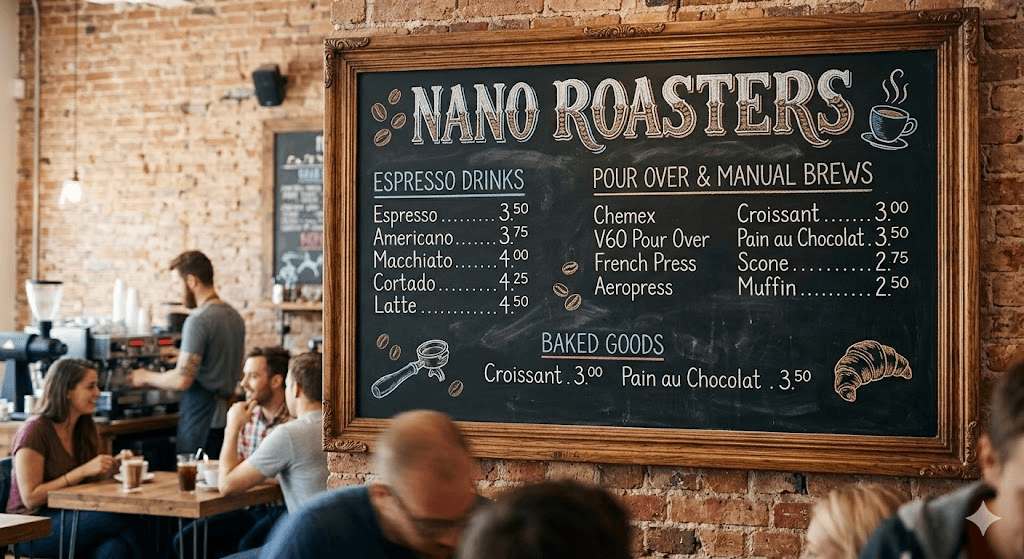 |
The overall image quality and high-resolution textures were excellent, but the logical execution of the text was just so-so.
While the main headers were mostly fine, the model completely missed the prices for the items in Section 2.
Furthermore, it hallucinated numerous extra products and text on the chalkboard that were never mentioned in the prompt. It shows that while it can draw beautiful text elements, its strict adherence to precise data is lacking.
Observations: Ratio Flexibility vs. Detail Accuracy
While Nano Banana 2 is a massive leap forward for workflow speed and custom framing, it clearly prioritizes creating impressive visual environments over following strict textual instructions.
Pros
- Total Canvas Freedom: Unrestricted aspect ratio support allows for extreme custom dimensions (like 8:1 or 10:1) while maintaining excellent compositional logic and avoiding repetitive patterns.
- Lightning-Fast 2K Output: Generates native 2K resolution images in roughly 20 seconds, completely eliminating the need for a secondary upscaling step and massively speeding up workflow iteration.
Cons
- Weak Text and Data Adherence: Struggles significantly with dense, structured text prompts, often ignoring exact data (like specific numbers or prices) and filling the canvas with hallucinated text.
Final Thoughts
Nano Banana 2 isn't a perfect all-rounder; it’s a specialist built for speed and layout. If you need ultra-wide ratios like 8:1 or 10:1, the fast 20-second 2K output is a massive time-saver that eliminates the need for separate upscaling.
However, be realistic about its limits. Text precision is still its Achilles' heel. Fortunately, when using Nano Banana 2 on Pollo AI, you have flexibility. If your project requires perfect typography or complex data accuracy, Pollo AI has other models available for you to use.
My advice? Use Nano Banana 2 to nail the high-res environment, the lighting, and the composition, then handle the exact text in post-production. It’s a useful, specialized tool for your kit—great for concept art and wide-format backgrounds—as long as you know where it works best and where it hits a wall.