



Kling 2.0
Officially launched on 15th April 2025, Kling 2.0 is the latest AI video model from Kling AI that improves upon its predecessor, the Kling 1.6 model. This new release features improved prompt understanding, enhanced character motion dynamics, greater visual quality, and even a 'Multi-Elements Editor' that makes video editing more accessible, flexible, and efficient. Try Kling 2.0 in Pollo AI video generator now!
Key Features of Kling 2.0
- Enhanced Prompt Adherence: Interprets complex user prompts with sequential actions more precisely than ever.
- Better Motion Dynamics: Supports greater motion range with more natural and fluid character movements.
- Improved Visual Aesthetics: Generates higher-quality videos with richer details and more accurate visual style control.
- Multi-Elements Editor: Enables users to add/swap/delete video content based on text/image inputs.
Enhanced Prompt Adherence
Kling 2.0 can better understand and process complex text prompts to create video outputs that perfectly align with your instructions. It can accurately interpret intricate character actions, delicate expressions, and even advanced camera movements. This makes it easier than ever to direct visual sequences with more professional-grade results.
| Prompt | Kling 1.6 | Kling 2.0 |
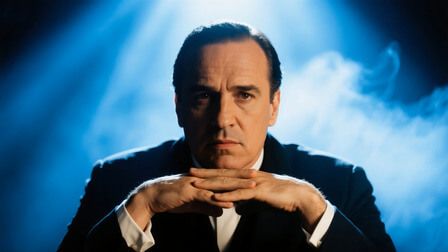 The guy chuckles with joy at first, but then abruptly turns furious, slamming the table and jumping to his feet. |
Better Motion Dynamics
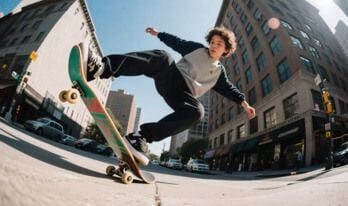
With Kling 2.0, it is now possible to generate character/subject videos with an even greater range of motion across frames than before. This also means rendering their actions with more fluid movements and natural speed to create immersive visual sequences that better simulate complex movements in realistic detail.
| Prompt | Kling 1.6 | Kling 2.0 |
 |
||
 |
Improved Visual Aesthetics
Using text inputs, Kling 2.0 can generate cinematic-level sequences that boast even more dramatic character expressions and richer visual details than before. It also offers greater visual style control and consistency when utilizing reference images, which makes it easier than ever to create more realistic and captivating scenes.
| Prompt | Kling 1.6 | Kling 2.0 |
| The camera follows the bee as it quickly weaves through the flowers, finally focusing on a fresh flower covered in dewdrops. | ||
 |
Multi-Elements Editor
Kling 2.0 introduces a powerful video editor that offers greater customization control than ever before using text and image inputs.
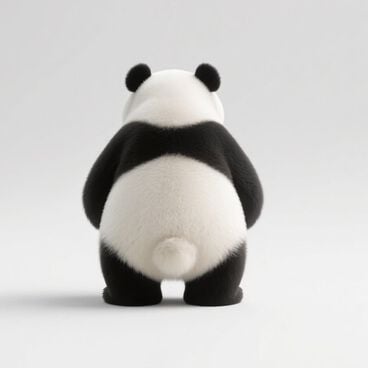
With Swap, users can perfectly switch out elements like clothing or even entire subjects.
| Original Video | Original Image | Generated Video |
 |
Using Add, you can add subjects to any scene with flawless results.
| Original Video | Original Image | Generated Video |
 |
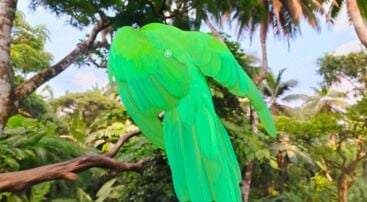
Using Delete, you can seamlessly remove any selected subject.
| Original Video | Original Image | Generated Video |
 |
How to Use Kling 2.0 on Pollo AI
Select the Kling 2.0 Model
Go to the Pollo AI image to video AI and choose the Kling 2.0 model.
Input Your Image and Prompt
Upload your image, enter your text prompt, and select other video options.
Create Video
Click Create to start the video generation process.


 4000+ reviewsTrustscore 4.4
Used by 10M+ Creators and Marketers
Thousands of satisfied users have shared their Pollo AI experiences on Trustpilot, rating us as "Excellent." See what they love about our platform.
Liz Cassidy Dec 15, 2025Richard QuickOct 15, 2025armourdudeNov 19, 2025
 DuduJan 14, 2026
 Ray WarnesDec 30, 2025
 lawless clanNov 22, 2025
FAQs
What Is Kling 2.0?
Kling 2.0 is the latest AI video generation model from the China-based AI tech giant, Kuaishou. You can use it to create all sorts of unique videos using text or image inputs, making it an excellent solution for filmmakers, marketers, content creators, and more.
How Does Kling 2.0 improve upon 1.6?
Kling 2.0 comes with new advancements that far surpass Kling 1.6. It can interpret complex text prompts better, offers greater visual quality, and supports improved character motions. Most notably, it has a new video editing interface that makes it so easy to customize videos.
Is Kling 2.0 free to use?
You can use Kling 2.0 on Pollo AI with features such as text to video AI without having to pay anything via our free trial. However, this will only provide you with limited user access. To get unlimited access and video generations, you will need to subscribe to a paid plan.
Who can use Kling 2.0?
Anyone looking to generate high-quality videos or customize their existing videos without much hassle can rely on Kling 2.0 to help. Whether you are a hobbyist or working professional, this AI video model does well to simplify video creation for any use case.
Can I access Kling 2.0 on mobile?
Yes. Since Pollo AI is mobile-optimized, this means you can seamlessly use Kling 2.0 on any device, be it mobile, tablet or desktop. This makes it a viable solution for anyone looking to generate or edit videos on-the-go with quality results.
How long does Kling 2.0 take to generate videos?
Not long at all. With Kling 2.0, you can use text prompt and reference images to create custom videos in a matter of minutes. Best of all, the output is significantly more improved than ever before, making it well-suited for creating content at scale.

Try Kling 2.0 for Free on Pollo AI!
Explore the incredible new updates that Kling 2.0 has to offer here.