



How to Create an AI Game Character Combat Video
Want to see a ninja fight a giant mech warrior? Or imagine two fighters trading rapid combos and explosive effects in a dramatic showdown.
With Pollo AI's game character combat video generator, you can create dynamic battle videos in seconds. No animation experience is needed.
It’s great for quick game demos, promo clips, or scroll-stopping social content, without the usual production time and cost.
In this guide, I will show you how to make your own fighting game videos step by step. First, let’s look at what Pollo AI's game character combat video generator does.
What Does the AI Fighting Game Characters Video Generator Do?
The AI fighting game characters video generator is a text-to-video tool on Pollo AI that lets you create dynamic fighting game combat scenes in seconds.
By simply entering a text prompt, you can generate animated battle sequences featuring two characters in action — without complex animation software or manual editing.
With this tool, you can quickly bring combat ideas to life, turning written descriptions into stylized fight videos with dramatic motion and cinematic impact.
Some popular uses of the AI game character combat video generator include:
- Game Concept Visualization: Quickly turn ideas into battle demos to showcase fighting mechanics, character abilities, or combat styles without building full animations.
- Social Media Content: Create short, action-packed fight clips that grab attention and help your posts stand out on video platforms and social feeds.
- Creative Storytelling: Produce animated combat scenes for fan content, character lore, or fictional universes.
- Marketing & Promotions: Produce eye-catching combat visuals to highlight characters, features, or themed campaigns while saving time on production.
Now that you know what this tool does, let’s explore how to use it step by step.
How To Create the AI Fighting Game Characters Video on Pollo AI?
You can create fighting game character videos in just three simple steps:
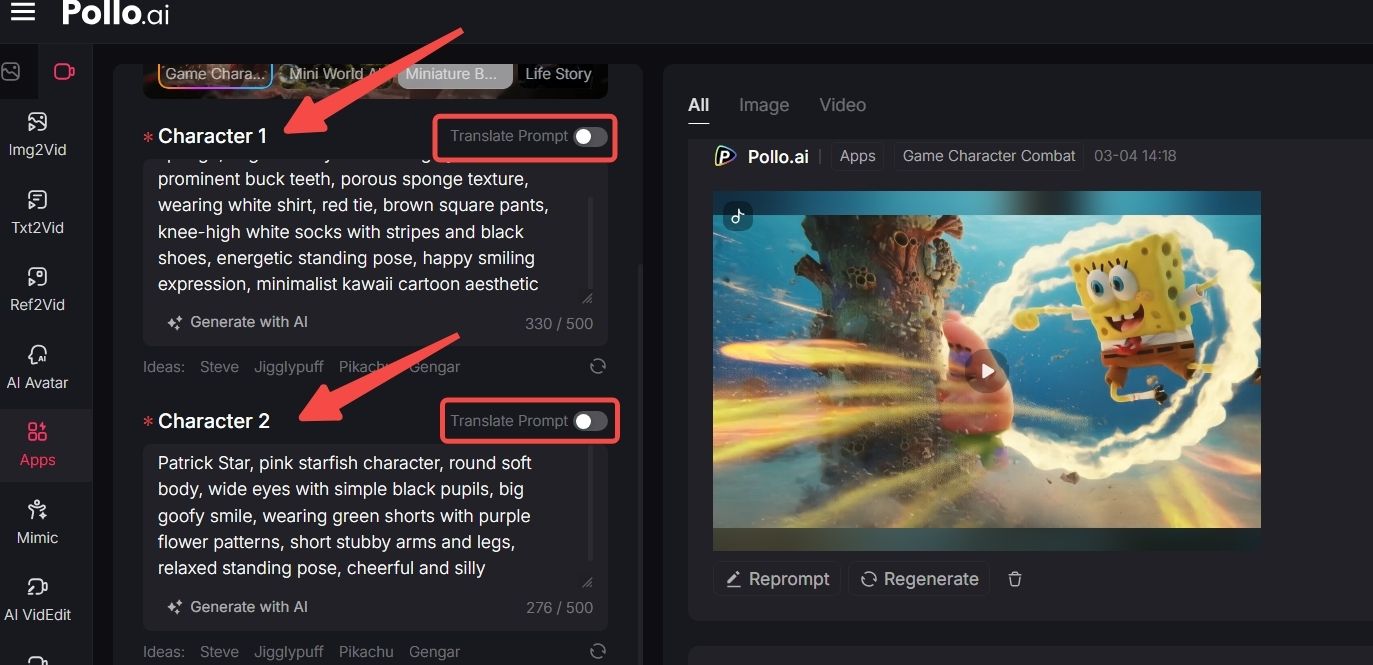
Step 1: Describe the Characters
Go to the AI fighting game characters video generator page and enter descriptions for Character 1 and Character 2 in the prompt boxes. You can also use the “Translate Prompt” feature to instantly convert your text into English.
Step 2: Select Shots and Aspect Ratio
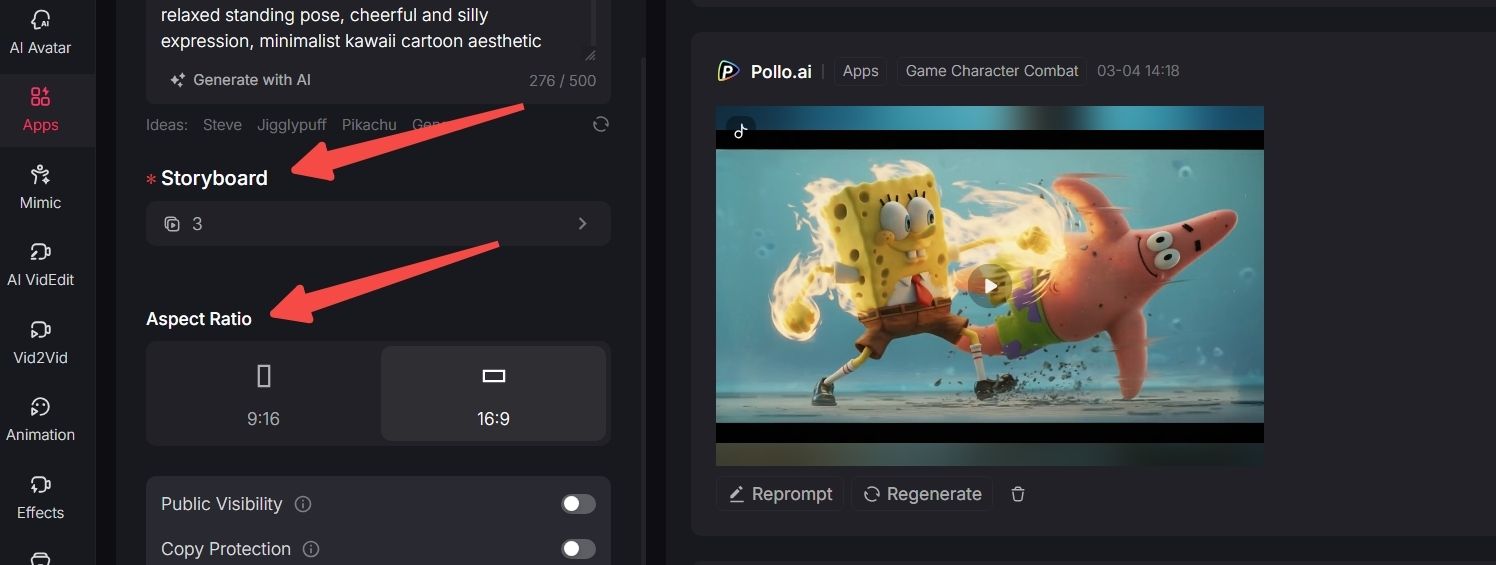
Choose the number of shots you want to include, and select your preferred aspect ratio — 9:16 or 16:9.
Step 3: Click Create and Download
Click “Create” to generate your fighting game video. Once ready, download and share it anywhere you like.
Key Features and Benefits of the AI Fighting Game Characters Video Generator
The AI game characters combat video generator of Pollo AI makes it easy to create action-packed combat videos from simple text prompts. Here’s what makes it stand out:
Text-to-Fight Scene Generation
Turn written character descriptions into animated fighting sequences in seconds. Simply describe two characters and their combat style, and the tool generates a dynamic battle scene without manual animation work.
Multi-Shot Scene Control
Choose the number of shots to structure your fight sequence. This allows you to create more cinematic, structured combat videos instead of a single static animation.
Flexible Aspect Ratio Options
Select between 9:16 or 16:9 formats to match your intended platform. Whether you’re creating content for social media or widescreen viewing, the output fits your distribution needs.
Beginner-Friendly Workflow
No animation software or technical experience required. The simple prompt-based interface allows creators, gamers, and marketers to produce stylized fighting game videos with just a few clicks.
Summing Up
Complicated animation software and time-consuming editing are no longer necessary. With the AI game characters combat video generator on Pollo AI, you can turn simple text into dynamic combat scenes quickly and easily.
Start creating your own fighting game character videos with Pollo AI and bring your battle ideas to life in seconds.