



Kling 4.0 AI Video Generator
Kling 4.0 generates 30-second videos with stereo audio, supports 15 multimodal references, and offers 10-keyframe control to shape your story. Try Kling 4.0 for Free Now!
Kling 4.0
Up to 10 keyframes. Impressive performance.
Discover Kling 4.0’s Endless Possibilities
Key Features of Kling 4.0 AI Video Generator
- Precise Multi-Keyframe Control: Supports up to 10 keyframes to guide character states, scene changes, and key moments.
- Native 30-Second Generation: Generates up to 30 seconds in one pass, reducing the need to assemble separate clips.
- 4K and HDR Output: Supports 4K output, 1080p 10-bit HDR, and 21:9 framing for detailed visuals and wider compositions.
- Consistent Characters & Brands: Combines up to 15 references to guide movement, voice, and visuals throughout generation.
Precise Multi-Keyframe Control
Kling 4.0 supports up to 10 keyframe inputs to guide character states, scene changes, and key narrative moments. Creators can define opening and closing frames or add intermediate checkpoints for more detailed control over a sequence.
This flexibility helps align camera direction and pacing with a planned storyboard. For story videos and advertising concepts, multiple keyframes provide clearer visual guidance while helping reduce character drift and unwanted style changes.
Native 30-Second Generation
Kling 4.0 generates videos up to 30 seconds long in a single pass, allowing a setup, action, and resolution to develop within one sequence. Native generation reduces the need to assemble shorter clips and reconcile differences between them.
Time-based prompts and keyframes provide additional control over narrative pacing. The longer duration suits short dramas and product demos that need space for several connected visual moments.
Create Unlimited KLING 4.0 Videos Now
Kling 4.0 is here on Pollo AI! Create 30-second stories with vivid detail, stereo sound, and precise keyframe control!
4K Detail and 10-Bit HDR Output
Kling 4.0 supports 4K output and 1080p 10-bit HDR, bringing finer visual detail, richer tonal gradation, and smoother transitions between light and dark. These capabilities help preserve textures and subtle lighting differences in demanding scenes.
Backlit portraits, night environments, and product close-ups benefit from better-preserved highlights and shadows, with reduced color banding. Support for a 21:9 ultrawide aspect ratio also provides more composition space for cinematic scenes and brand films.
Consistent Characters & Brands
Kling 4.0 combines up to 15 reference inputs across images, videos, voices, and elements. Images establish appearance, videos guide movement and camera direction, and voice references help maintain a recognizable vocal identity.
This capability of reference to video brings visual and audio guidance into the same generation process. It is particularly useful for recurring characters, branded subjects, and serialized content that require a consistent identity across changing scenes.
Targeted Video Editing
Kling 4.0 supports targeted changes to character expressions, body movements, backgrounds, visual styles, and camera direction. Specific details can be revised while preserving surrounding content, reducing the need to regenerate an otherwise usable scene.
The model accepts one primary video and additional video references, with up to five video inputs totaling 30 seconds. Pollo AI’s AI video editor also provides a dedicated entry point for prompt-based video refinements.
| Prompt | Input Video | Output Video |
Replace the cat in the video with a dog. |
Reference-Based Creative Recreation
Kling 4.0 uses reference videos to guide narrative pacing, shot composition, transitions, and creative expression. Existing concepts can be adapted with different products, characters, or environments while retaining the structure that makes the sequence effective.
For product videos, this enables a single creative direction to support multiple collections, product variations, or campaign themes. Reference-led recreation reduces the planning required to develop each version from scratch.
Voice Generation in 9 Languages & Regional Dialects
Kling 4.0 supports voice generation in Chinese, English, Japanese, Korean, Spanish, Portuguese, German, French, and Hindi. Regional options include Cantonese and Sichuanese, alongside accents such as American, British, and Indian English.
Voice references help preserve character identity across scenes, while language and accent choices support localized storytelling. For additional audio production, Pollo AI offers separate tools for voiceovers and custom sound effects.
| Reference Image | Prompt | Output Video |
|---|---|---|
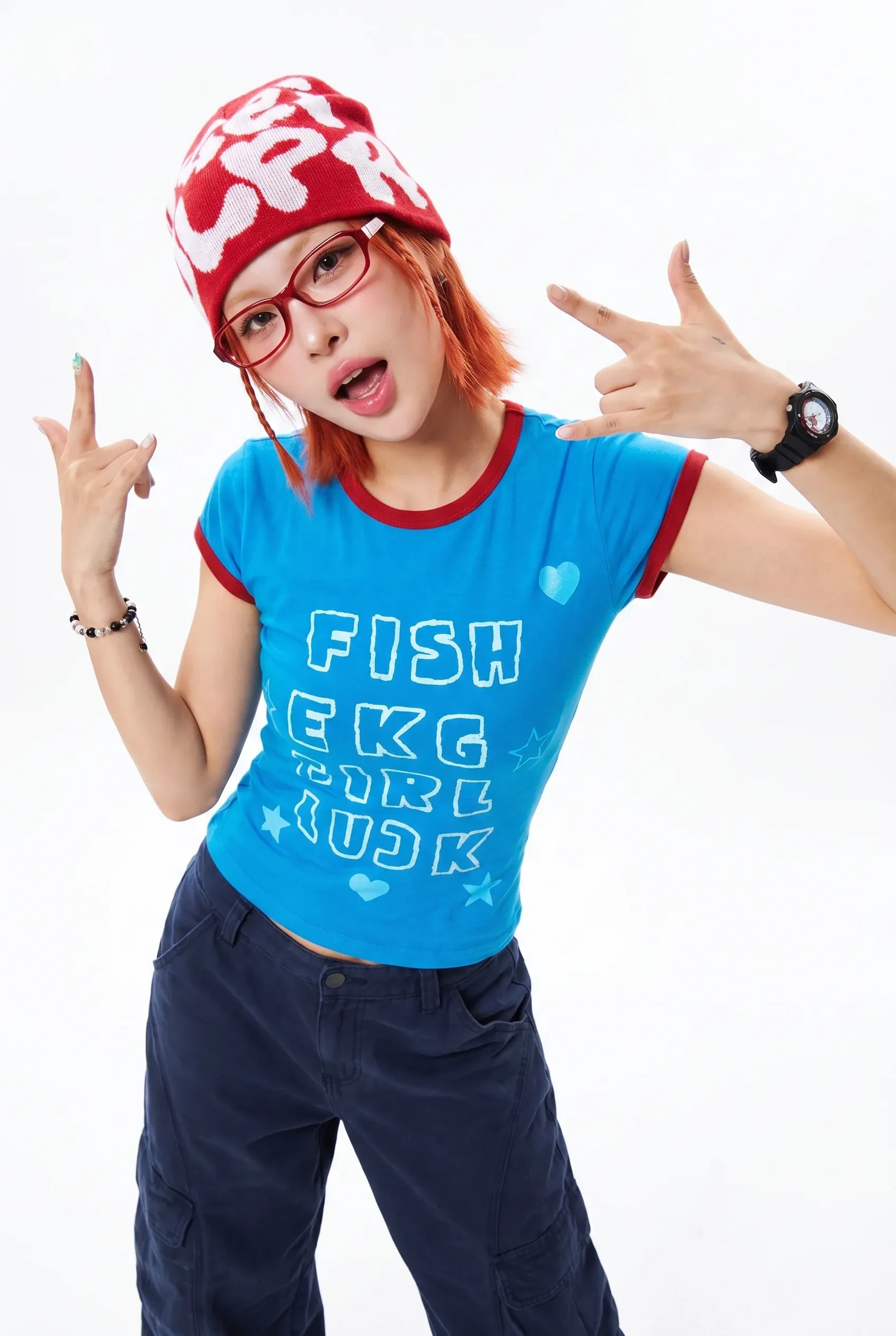  | A playful Korean-snack foodie creator with a short bright orange-red bob, a bold red knit beanie with oversized white graphic lettering, slim red rectangular glasses, glossy pink lips, a fitted bright blue baby tee with red trim and playful graphic lettering, loose dark navy cargo pants, a black watch, and a beaded bracelet sits at a small desk after a convenience-store run. She has fun, expressive Y2K street-style energy. She holds a strawberry ice cream cup Style: authentic influencer UGC, cute snack review, pastel desk setup, product close-ups, spoon sounds and soft upbeat music with warm conversational Korean voiceover, photorealistic 4K, no logo/no watermark. |
Video Extension Up to Two Minutes
Kling 4.0 supports video extension across multiple generations, allowing an uploaded clip to develop into a sequence up to two minutes long. This gives actions, emotional arcs, and connected story beats more time to unfold.
Reference-guided consistency helps maintain character appearance and visual style as the sequence grows. The extended format suits brand stories, short dramas, and performance videos that need more room than a single 30-second generation.
Find the Right Kling 4.0 Workflow for Your Creative Goals
Whether you are building a campaign, developing a story, or keeping your social channels active, explore how Kling 4.0 and Pollo AI’s creative apps can support your next project.
- Creators and filmmakers: Develop story videos with keyframes that guide plot turns, references that keep characters recognizable, and cinematic camera movements that bring each scene to life.
- Musicians and visual artists: Develop music videos with performance scenes, stylized worlds, and consistent subjects. Use keyframes to guide visual changes and video extension to give the sequence more room to unfold.
- Marketers and creative teams: Create 30-second AI videos, explore fresh creative treatments, and refine expressions, backgrounds, or brand messaging as campaign needs change.
- E-commerce sellers: Turn product images into product videos, from detailed close-ups to lifestyle demonstrations. Reuse a creative direction across products while keeping their appearance aligned with your references.
- Social media creators: Take inspiration from viral videos and adapt their pacing to your own subjects and style. Explore different visual treatments to build a recognizable series for your feed.
Kling 4.0 vs. Kling 3.0 vs. Seedance 2.5
The right model depends on how you want to direct your video. Compare the longer generation and keyframe control of Kling 4.0 with Kling 3.0's shot planning and Seedance 2.5's extensive reference support.
| Creative Need | Kling 4.0 | Kling 3.0 | Seedance 2.5 |
|---|---|---|---|
| Room to develop your story | 3–30 seconds per standard generation | 3–15 seconds per generation | Up to 30 seconds per generation |
| Control over the sequence | Up to 10 visual keyframes, plus time-based prompts | Storyboard control for up to six shots, including duration and camera direction | Time-coded prompts for actions and transitions |
| References to guide the result | Up to 15 references across images, videos, audio, and elements | Image and video references for subject consistency | Up to 50 references: 30 images, 10 videos, and 10 audio clips |
| Projects to try | Product reveals and story scenes with specific visual checkpoints | Short multi-shot scenes and character dialogue | Campaigns built around extensive visual and audio reference material |
What Makes Kling 4.0 Stand Out
Kling 4.0 brings together detailed story control, consistent references, and flexible revisions. Its key strengths include:
- 10-Keyframe Story Control: Up to 10 keyframes guide character states, scene transitions, and narrative pacing within a native 30-second generation, helping planned sequences stay closer to the storyboard.
- Visual and Voice Consistency: Up to 15 references combine images, videos, voices, and elements to preserve recognizable subjects and vocal identities, supporting recurring characters and cohesive branded content.
- Flexible Creative Reuse: Reference-based recreation and targeted editing help adapt existing concepts to new products, characters, and settings, reducing the need to rebuild every campaign variation from scratch.
- Detailed Cinematic Output: 4K output, 1080p 10-bit HDR, and 21:9 framing support fine textures, richer tonal transitions, and wider compositions for product showcases and brand films.
Take Your Idea Further in One Creative Workspace
Pollo AI always brings the latest AI video models into a broader creative workspace for creators, marketers, and sellers. Start with the new model, then explore other approaches as your project develops, with image creation and video tools close at hand.
How to Use Kling 4.0 on Pollo AI for Free

Select Kling AI Video Model
Head to the Pollo AI Image to Video page and select Kling 4.0 from the model dropdown.
Add Your Inputs
Enter your idea and upload the references needed for your scene
Generate Your Video
Click the Generate button and download your finished clip once rendering completes.
The All-in-One AI Video Creation Platform
Go from basic scripts to high-converting content. Seamlessly transition between automated AI agents, presenter-led avatars, sound design, and tailored video apps.
Animate Photos Into Motion
Bring your still images to life with cinematic motion and depth. Create captivating short video stories from your photos for a new level of visual storytelling.
Refine Your Raw Footage
Streamline your editing process effortlessly. Instantly swap faces, adjust colors, remove objects, and add effects with one click.
Create Professional Video From Any Concept
The ultimate multi-modal video generator. Combine text, images, or audio to produce complete, production-ready video content in minutes.
Generate Realistic AI Voiceovers & SFX
Elevate your visuals with studio-quality audio. Generate natural-sounding speech and custom sound effects to perfectly match your video's mood.
Accelerate Video Creation With Video Apps
Deploy purpose-built video apps for instant results. Generate video slideshows, music videos, and social shorts in just seconds.
Create Videos With No Editing Required
Go from a simple idea to a finished video instantly. Describe your vision, and let the Pollo Agent automate the full production process for flawless results.

10M+Users
Using Pollo AI to Create and Inspire


Loved by 10M+ Creators and Marketers Globally
- Liz CassidyDec 15, 2025Easy to use, great results for short videosI’ve been using Pollo AI mainly for short videos and quick image-to-video tests. The interface is straightforward and it works well even with simple prompts, which is a big plus compared to tools that need long, complicated instructions. The results can be really impressive, and it’s honestly been fun to experiment with. I’d love a bit more consistency on faces when there’s movement, but overall it’s been a solid experience for what I needed.
- Richard QuickOct 15, 2025Awesome websiteAwesome website. loads of options and a great way to learn how to work with 'AI' my reasoning for 5 stars is based upon price, versatility and ease of use. Also I would like to add, Pollo AI runs a lot of promos on different AI products as well. I rate their customer service at 5 stars, when I purchased my first subscription my computer crashed the following weekend and I lost all my data and info passwords you name it I lost it, contacted pollo by email they responded quickly and found my info/username and account, and I was able to restore my account.
- armourdudeNov 19, 2025I have been using Pollo AI for short…I have been using Pollo AI for short videos. It is easy to use and works well with simple prompts. Other generators seem to need long drawn out complicated explanations to get even close to what I want.
- DuduJan 14, 2026I'm just amazed by the level of quality…I'm just amazed by the level of quality output that Pollo AI can produce from a simple image. The motion, the realism, It's too good!!
- Ray WarnesDec 30, 2025A fabulous journeyI find Pollo easy to use, it gives me great results and I'd recommend it to anyone. It has been a wonderful experience for me.
- lawless clanNov 22, 2025i tried 220 online img to vid in 2…i tried 220 online img to vid in 2 months, and this is the best online video.I will subscribe for a year; there are many reasons. But freedom is the most important.


Explore Our Collection of Free AI Video Tools
Kling 4.0 FAQs
What is Kling 4.0?
Kling 4.0 is the latest Kling AI video model designed for cinematic scenes, with synchronized stereo audio. It combines up to 10 keyframes, multimodal references, and flexible editing to give you more control over characters, camera movement, and storytelling.
How long can Kling 4.0 videos be?
Kling 4.0 generates videos up to 30 seconds long in a single generation, giving you room for a complete scene or product sequence. You can also extend an existing clip across multiple generations, reaching up to two minutes in total.
What references does Kling 4.0 support?
Kling 4.0 supports images, videos, audio, and elements, with up to 15 references in total. The documented limits include up to 10 images and five videos, with reference videos totaling no more than 30 seconds.
Can Kling 4.0 edit an existing video?
Yes. Kling 4.0 supports targeted changes to expressions, movements, backgrounds, and other details while preserving surrounding content. Provide a primary video and supporting references to guide the revision, or explore additional refinements with Pollo AI’s AI video editor.
What types of videos can I create with Kling 4.0?
Create everything from cinematic story scenes and video ads to stylized music videos. Keyframe control, consistent references, and varied visual styles help you shape each project around its audience and creative direction.
Can I use Kling 4.0 for free on Pollo AI?
Yes. You can earn free credits on Pollo AI by completing tasks such as inviting friends and checking in daily, then use those credits to create videos with Kling 4.0.

Create Cinematic Videos With Kling 4.0 on Pollo AI
Kling 4.0 is now live on Pollo AI! Bring your stories to life with vivid detail, stereo sound, and greater creative control!