



How to Make Eye-Catching Gaming Intros with AI
A professional intro of a gaming channel's identity helps viewers recognize your content immediately and sets a consistent, high-energy tone for your videos.
For many streamers, creating a custom animation is difficult without learning complex software or hiring an editor.
Using AI to generate these intros allows you to create high-quality branding in a few minutes. This is a simple but effective way to improve the production value of your content, improve viewer retention, and encourage new viewers to follow your channel.
Key Features of the Pollo AI gaming intro maker
The Pollo AI gaming intro maker is built specifically for streamers and gaming content creators.
This app offers several specialized capabilities that allow you to produce high-energy openings without any professional animation experience.
- Text-to-Gaming Aesthetic Generation: You can describe your channel's vibe in words, and the AI will generate a visual sequence that fits. This allows for highly customized intros that match specific genres like cyberpunk, retro, or competitive shooters without needing a single frame of manual animation.
- AI-Generated High-Energy Audio: The tool doesn't just create visuals; it automatically generates a synchronized soundtrack and sound effects. By matching the audio to the digital glitches or explosions in the video, the AI ensures your intro has the impact needed to grab attention instantly.
- Specialized Motion Effects: The AI focuses on the fast-paced transitions and lighting effects common in gaming culture, such as neon glows, digital distortions, and 3D particle effects. These visual "hooks" are effective for stopping the scroll on social media feeds.
- Optimized Social Media Formats: The tool supports the formats most used by gamers, including 16:9 for YouTube and 9:16 for TikTok or Shorts. Having the correct ratio ensures your branding looks consistent and professional across every platform you use to reach your followers.
How to Make a Gaming Intro on Pollo AI?
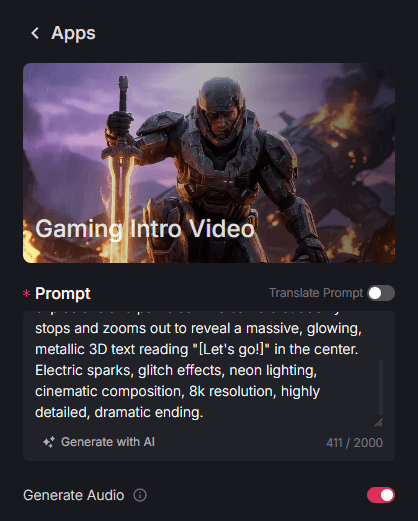
Step 1: Describe Your Gaming Brand and Theme
Describe the visual style you want for your intro. You can mention your channel name, preferred colors, and the genre of your games.
If you want your game introduction video to have sound, make sure to enable the "Generate Audio" option.
Step 2: Choose Video Length and Aspect Ratio
Select the duration that best fits your video format. You can select from 4s, 6s, or 8s for a quick, high-impact opening.
Then, select the aspect ratio—pick 16:9 for long-form YouTube videos or 9:16 if you are building your brand through vertical clips on TikTok or YouTube Shorts.
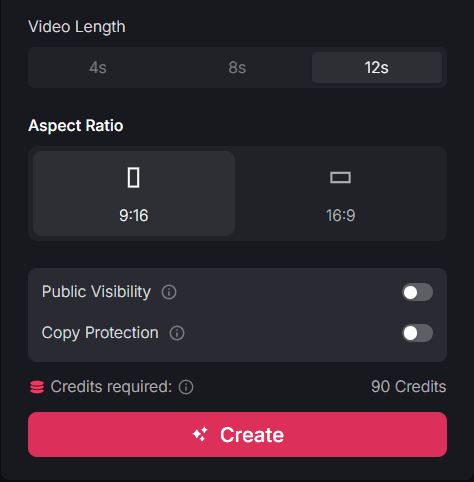
Step 3: Generate and Finalize
Start creating your custom intro. Download your final gaming intro video and be ready to share everywhere.
Target Users and Use Cases
The gaming intro maker is a practical resource for any creator looking to build a professional and recognizable brand in the competitive gaming niche.
- Twitch Streamers: Streamers can use these intros as transition scenes or "Starting Soon" clips. Having a professional visual opening builds authority immediately when a viewer joins the stream, making them more likely to stay and hit the follow button.
- YouTube Gaming Channels: For YouTubers, a consistent 4-8 second intro helps viewers identify the brand across every upload. This familiarity is a key driver for long-term subscriber growth and helps your videos look more official in a crowded search result.
- Esports Teams and Organizations: Small teams can use the tool to create unified intros for their highlight reels or tournament announcements. This professional touch helps the team build a serious brand identity that attracts fans and potential sponsors.
- Content Montage Editors: Editors who create "best of" or "killstreak" montages can use the intro maker to separate different segments or introduce players. High-energy visuals help maintain the excitement throughout the montage, which increases the likelihood of the video going viral.
Summary
Using the gaming intro maker of Pollo AI is a straightforward way to build a professional brand that attracts fans and keeps them engaged.
To further grow your gaming audience and create a more complete cinematic experience, you can explore other tools in the ecosystem.
For example, the game character combat generator is ideal for creating custom action scenes for your stream, while the trailer maker can help you produce high-impact teasers for your biggest video projects.