



Turn Into Lifelike Ice Sculpture With Pollo AI
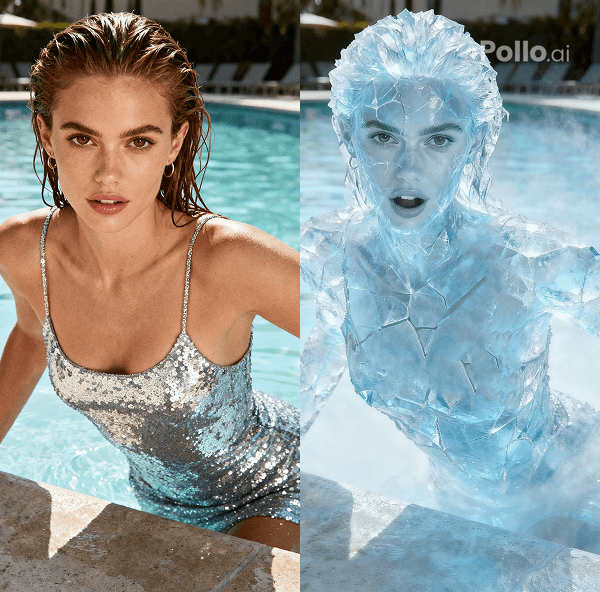
With Pollo AI ice sculpture video effect, you simply upload any photo, and watch as the main subject morphs into a lifelike ice sculpture. You will see them transform into a frozen sentinel—hand outstretched in desperate reach toward you, face twisted in a haunting scream—delivering a spine-tingling AI video that's equal parts art and adrenaline.
Effortless Ice Sculpture Transformation
You pick your photo, hit Create, and in just moments, Pollo AI video generator encases your photo subject in shimmering ice, locking that dramatic reach and scream into a seamless, hyper-real video loop—ready to mesmerize without a single edit.
Instant Social Impact
Share your ice sculpture creation directly to your favorite platforms, where the vivid, frozen drama of your subject’s scream and reach grabs attention and sparks awe, perfect for boosting your online presence. Need a more clear video clip? Try Pollo AI video upscaler to elevate your video into 4K resolution.
How to Use Pollo AI Ice Sculpture Video Effect?
With only three steps, you can easily create videos from images with Pollo AI.
Step 1
Upload one clear image of your target person to Pollo AI.
Step 2
Click Create to transform your photo subject into an ice sculpture.
Step 3
Preview and then download the final video.
Discover Other Popular Video Effects from Pollo AI
FAQs
What types of photos work best with the Ice Sculpture video effect?
You can use any clear photo with a distinct subject. For the best results, choose images with good lighting and a visible face or body to capture the dramatic hand-reach and screaming expression in icy detail.
How long does Pollo AI take to create an ice sculpture video?
It’s lightning-fast! Once you upload your photo, Pollo AI processes it in just minutes, delivering a polished, chilling video of your subject frozen in a lifelike ice sculpture, ready to share.
Can I use the Ice Sculpture video effect for free?
Absolutely! You can try Pollo AI ice sculpture video effect at no cost with our free user plan to try out its feature. For more video credits, please upgrade your subscription plan.
Is the Ice Sculpture AI video shareable on social media?
Yes! Your finished video is optimized for instant sharing on platforms like Instagram, TikTok, or X, letting you showcase the eerie, frozen drama of your ice sculpture to captivate your followers.
