



Captivating Particle-Dissolution Spectacle
Your photo’s subjects burst into vibrant red particles, creating a breathtaking video with a smooth, powdery explosion. The particles drift gracefully, evoking a timeless, cinematic moment that captivates with its vivid, seamless beauty against the original backdrop.
Stunning Dissolution with Explosive Impact
Your subjects transform into a vibrant cascade of red particles in a 1080p video, flowing seamlessly with a dense, powdery explosion. This visually striking effect delivers a bold, dynamic spectacle that commands attention without altering the original background.
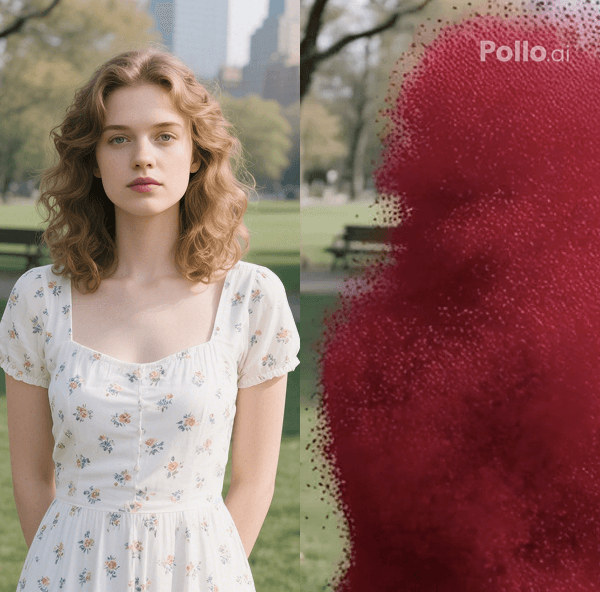
Romantic Ambiance with Artistic Storytelling
This effect crafts a poignant video where subjects dissolve into red dust, drifting away in a melancholic yet vibrant flow. The contrast of vivid colors and wistful mood creates a story-rich, artistic clip, perfect for evocative, cinematic storytelling.
How to Create Your Turn to Dust Video with Pollo AI?
With only three steps, you can easily create videos from images with Pollo AI.
Step 1
Upload a clear photo with any subjects.
Step 2
Generate your turn to dust video instantly.
Step 3
Preview and save your explosion clip.
Discover Other Popular Video Effects
FAQs
What happens in the Turn to Dust effect?
The Turn to Dust effect morphs your photo’s subjects into bright red particles that drift gracefully in a 1080p video, creating a romantic, cinematic scene with an undistorted background for a striking, poetic effect.
Can I use photos with multiple subjects?
Yes, the Turn to Dust effect supports photos with any number of subjects. Each subject dissolves into vibrant red particles, ensuring a cohesive, visually stunning transformation in the video.
How does the effect create a romantic mood?
The effect’s red particles float gently in a slow, dreamy motion, blending vivid colors with a melancholic tone. This artistic contrast crafts a romantic, story-driven atmosphere ideal for cinematic videos.
What photo types yield the best results?
High-resolution JPG or PNG images with clear, well-lit subjects work best. Detailed photos enhance the particle-dissolution effect, ensuring a vibrant, seamless transformation in the Turn to Dust video.
