



How to Create Epic Movie Trailers with AI (Step-by-Step Guide)
A well-made movie trailer is a powerful way to build interest in any project, whether it is a film, a novel, or a brand story. Trailers use high-impact visuals and dramatic music to create a sense of scale, which can help a project go viral before it is even officially released.
Pollo AI movie trailer maker allows independent creators to generate cinematic scenes from text prompts, providing a practical way to grow a following by sharing high-quality teasers.
Follow this complete guide and know how to make a stunning viral movie trailer with minimal effort.
What is the Pollo AI movie trailer maker?
Pollo AI movie trailer maker is a specialized tool that transforms narrative descriptions into cinematic video sequences.
This tool uses generative technology to interpret your plot points and create visuals that match the specific mood and environment of your story, allowing you to visualize complex scenes without a physical camera.
Some uses of Pollo AI movie trailer maker:
- Viral Social Media Teasers: Creating 15-30 second high-impact clips designed to stop the scroll and attract new followers on TikTok and Reels.
- Book Trailers for Authors: Visualizing key scenes from a novel to help authors promote their work on visual-heavy platforms like Instagram.
- Independent Film Concepts: Generating visual "proof of concept" clips to show potential investors or fans the visual direction of a project.
- Brand Storytelling: Transforming a standard company mission or product launch into a dramatic, cinematic experience that builds professional credibility.
How to Create a Movie Trailer on Pollo AI?
Step 1: Input Your Story Plot or Description
Enter a summary of your story or describe specific dramatic scenes involving your characters.
Focus on the setting, the action, and the "vibe" to help the AI capture the exact visuals you want.
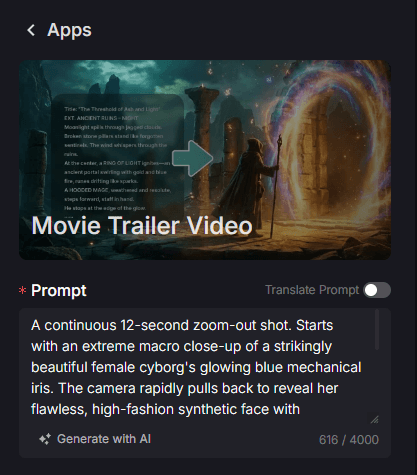
Step 2: Select Ratio and Duration
Choose the aspect ratio based on where you plan to share your teaser.
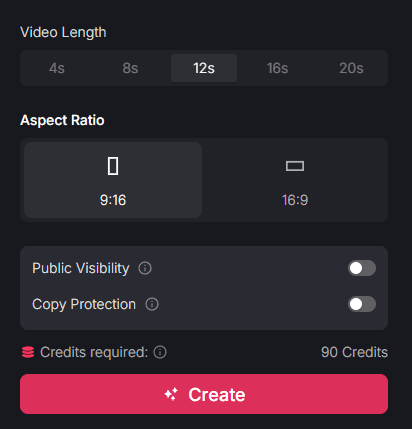
Use 16:9 for a traditional cinema feel on YouTube or 9:16 for vertical platforms like TikTok to reach more mobile users.
You should also define the duration of your clips to fit your editing needs.
Step 3: Generate and Share
Click "Create" to process your cinematic sequence.
Once finished, you can download the result and share it on your social media platforms to start building "hype" and attracting fans to your project.
Why Use the AI movie trailer maker?
Cinematic Scale on an Independent Budget
You can create visuals that look like they were filmed on a professional movie set without the associated costs of location scouting, actors, or expensive equipment. This allows independent authors and filmmakers to produce content that looks professional and authoritative.
Effective Pre-Release "Hype" for Follower Growth
By sharing a high-quality cinematic teaser, you give people a compelling reason to follow your progress, which is a reliable way to gain new subscribers and followers before your main project is even released.
Consistent Visual Storytelling without Filming
The movie trailer maker helps ensure that your characters and environments maintain a unified look across different scenes. This clarity makes your brand’s message more memorable and ensures your audience stays engaged with the narrative you are building.
Low Production Risk and Creative Freedom
Instead of spending weeks on CGI or scouting, you can visualize supernatural or futuristic scenes in minutes. This allows you to experiment with different concepts and visuals to see which style gets the most engagement from your target audience, reducing the financial risk of high-end video production.
Final Verdict
Using the movie trailer maker on Pollo AI is a direct way to turn your ideas into high-impact visual assets that build anticipation for your brand. While trailers are ideal for building hype, maintaining a varied content feed is key to long-term success.
To expand your cinematic project, you can use the horror video generator for specialized suspenseful clips, or the game character combat generator to create high-action fighting scenes that fit right into your project’s promotional campaign.