



How to Create Magical Christmas Videos Using AI
Sharing holiday joy on social media is a tradition, but standing out in a crowded December feed can be difficult.
A high-quality video captures the "magic" of the season far better than a simple static image. The Christmas video maker on Pollo AI helps you elevate your festive posts by turning your existing holiday photos into cinematic scenes.
Whether it is for your personal feed or a digital greeting, this tool allows you to create professional holiday content with just a photo and a short description.
Why Use Pollo AI Christmas Video Maker for Your Holiday Content?
The Christmas video maker is an image to video generator designed to add a professional holiday "glow" to your personal photos. Using AI to enhance your holiday photos provides several strategic advantages for both personal branding and engagement:
- Cinematic Festive Atmosphere: The tool automatically handles holiday-specific lighting and snow effects that are difficult to capture with a standard phone camera.
- Authentic Branding: By uploading your own photos, you ensure your festive content remains personal and recognizable rather than using generic stock footage.
- High Engagement Potential: Dynamic holiday videos are significantly more likely to be shared and saved than static greeting cards or standard photos.
How to create Christmas videos on Pollo AI?
Step 1: Upload Your Photo and Prompt
Visit the tool page and upload a photo. In the text box, provide a description of the festive scene you want.
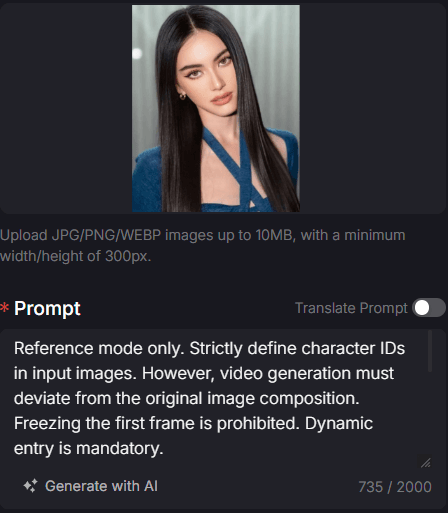
Step 2: Set Duration and Aspect Ratio
Choose your preferred duration (2-12s) and decide whether to include background audio.
Select the 9:16 ratio for mobile platforms or 16:9 for widescreen.
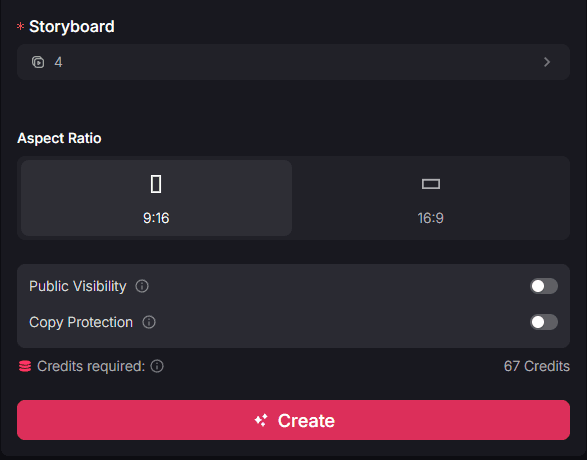
Step 3: Preview and Download Your Video
Click "Create," and the AI will render your holiday video, ready for you to download and share.
Who can benefit from magical Christmas videos?
This tool is an accessible resource for anyone looking to share high-quality holiday cheer without needing a professional studio:
- Individual Social Media Users: Create stunning "Holiday Mood" videos for your Instagram or TikTok using your favorite winter photos.
- Small Business Owners: Celebrate your customers with a professional-looking festive shout-out that features your brand's unique holiday aesthetic.
- Digital Artists: Quickly turn your holiday-themed illustrations or photography into moving scenes to showcase your work in a dynamic way.
Conclusion
Pollo AI Christmas video maker is an efficient way to turn a simple holiday photo into a professional visual experience. It allows you to share the joy of the season through high-quality storytelling without requiring technical editing skills.
For more ways to celebrate milestones and holidays, you can explore the wide variety of specialized tools on our Pollo apps page, including the birthday video maker and other celebration-themed generators.