



How to Generate High-Quality B-roll Footage with AI
High-quality B-roll footage is the secret weapon behind every viral video, acting as the visual glue that keeps your audience hooked during storytelling transitions. Without dynamic supplementary shots, even the best script can feel static and unengaging. This guide will show you exactly how to generate high-quality B-roll footage with AI to create cinematic transitions that boost your video retention and help you dominate the social media algorithm.
What is a B-roll AI Video?
A B-roll video refers to the secondary, supplemental footage intercut with the main shot (A-roll) to add context, depth, and visual variety to a narrative. By using an AI B-roll generator, creators can produce professional-grade visuals—ranging from sweeping cityscapes to detailed close-ups—without the need for a B-camera or an expensive production crew.
These AI-generated clips are essential for maintaining a high production value while scaling your content creation speed.
How to Generate Cinematic AI B-Roll on Pollo AI
Creating cinematic filler content on Pollo AI is a streamlined process designed for maximum efficiency. Follow these steps to upgrade your video quality:
Step 1: Prompt Your Visual Fillers
Navigate to the AI B-roll generator page and enter a specific prompt for the shot you need.
Top-down close up shot, slow motion, white milk foam being poured into a cup of dark espresso. The foam is smoothly expanding on the surface, forming a distinct white heart shape against the brown crema. Detailed fluid dynamics, steam rising, warm atmosphere, 4k, photorealistic.
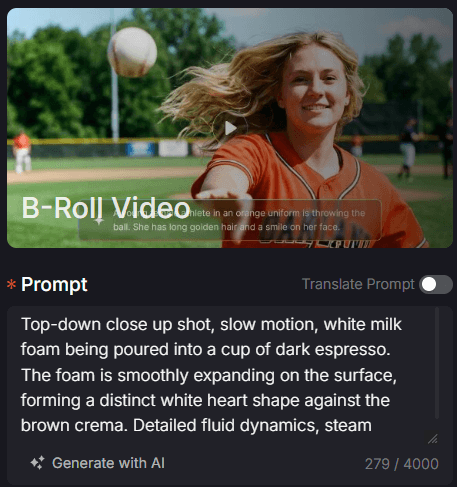
The more you describe the texture and lighting, the higher the quality of your AI output.
Step 2: Sync Duration and Framing
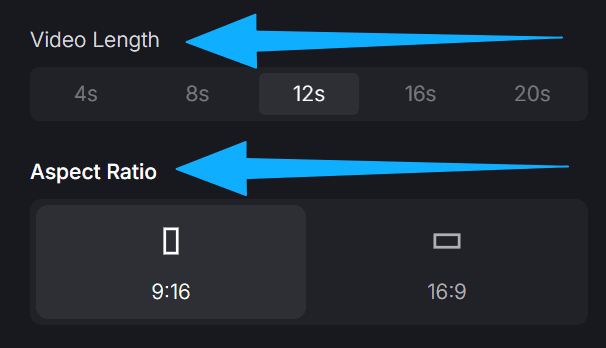
Select your video length (choose from 4s to 20s) to match the pacing of your edit. Set the aspect ratio to 9:16 for vertical storytelling or 16:9 for professional YouTube documentaries.
Step 3: Secure Your Assets and Create
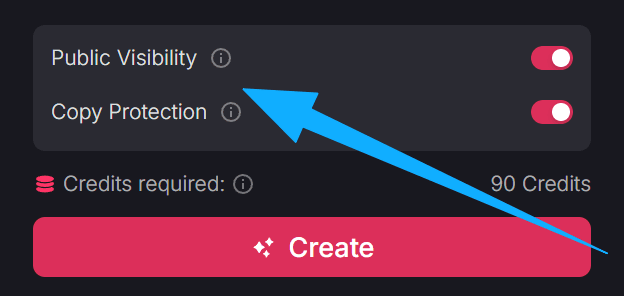
Before rendering, manage your privacy settings. Toggle public visibility to share your creative style with the community, or enable copy protection to keep your unique prompt engineering private.
Click 'Create' to let the AI generate your high-definition clip. Once the process is finished, your high-quality B-roll is ready to be downloaded and dropped into your video editor.
Use Cases for AI B-Roll Footage
- Documentary Filmmaking: Insert realistic archival-style footage or environmental shots to illustrate complex narrations without a location budget.
- YouTube Vlogging: Break up "talking head" segments with dynamic cutaways to keep viewers from scrolling away.
- Commercial Ads: Combine with our AI promo video maker logic to create high-end product close-ups that look like they were shot in a million-dollar studio.
Boost Your Channel with Other Pollo AI Apps
Beyond B-roll, Pollo AI offers a comprehensive suite of tools designed to streamline your entire content creation workflow. To further scale your channel's growth and production quality, explore these specialized applications:
- Professional Branding & Storytelling: Seamlessly stitch your best cinematic moments together using our video montage maker. Integrating high-quality B-roll into your final narrative builds instant trust and establishes a premium image for your personal brand, helping your content stand out and secure consistent viral growth.
- Dynamic Visual Effects: Enhance your video flow by experimenting with seamless Pollo Transitions or adding a personalized touch with the AI human video generator. These tools ensure your AI-generated content feels organic, professionally directed, and ready to share instantly with your global audience.
Final Thoughts
Mastering the use of AI video tools is the fastest way to bridge the gap between amateur and professional content. By learning how to generate high-quality B-roll footage with AI, you empower yourself to tell more compelling stories and build a loyal following. Don't let a limited budget stop your creativity. Start using Pollo AI today and transform your videos into cinematic masterpieces that capture the world's attention!