



How to Get Viewers to Watch Multiple YouTube Videos: Simple Hacks
Do you know what makes a YouTube channel grow faster than having a viral video? It’s all about how binge-worthy your content is.
If you can get people to watch not just one but two or more videos as often as possible, this tells the algorithm that your videos offer value. It signals viewer satisfaction.
And when this happens, your videos start to be amplified even more to other users on the platform. Before you know it, your YouTube channel gains a ton of views and subscribers.
So, let’s look into some proven tips and tricks that you can use to get viewers to stick around. In the process, we will also touch on how Pollo AI can help you out with this!
TL;DR
To get viewers to watch multiple videos and boost channel growth, leverage YouTube's internal ecosystem: use end-screens, info cards, pinned comments, and playlists to guide audiences to related content, while utilizing YouTube Shorts and Pollo AI to scale production and hook new viewers.
Why You Need To Make Viewers Watch Multiple Videos
Ever since YouTube’s new algorithm arrived on the scene, the platform no longer cares so much about how high your view or subscriber count is. It’s all about how satisfied your viewers are.
How long are they watching your videos for? Are they engaging with your videos? Have they been watching 2-3 more videos on your channel?
On the new YouTube, a channel that keeps viewers on the platform for longer is much more valuable than a single viral video. Let’s put it this way…
Your video could have high views, but if people don’t feel the need to engage with the rest of your channel, then it’s all superficial. You have to consider the bigger picture now.
This is a good thing, especially for new creators. It means that growth on YouTube is not just about stats. You can make progress, as long as you create content that people find value in.
And the best way to prove to the algorithm that your videos should keep being recommended to others is to keep viewers on your channel for longer.
Do this often, and the algorithm will favor your content enough for it to snowball. And if you need help creating more videos, you can use tools like Pollo AI’s image to video to scale production.
But before anything else, you need to see how your channel is performing via YouTube Analytics. To be specific, check your YouTube channel’s Average Views Per Viewer (AVPV).
This lets you see just how many videos each user watches on your channel. What you want to see is a higher result than 1 because that’s the absolute minimum.
For example, if your AVPV is at 4, then it means the average viewer on your channel watches 4 videos before they leave. This would be a good place to be.
Ultimately, the higher your AVPV is, the more binge-worthy your YouTube content is. And this brings us to the all-important question: How do you get that number even higher?
The simple answer is to improve the quality of your content and scale. One way is by using tools like the Pollo AI YouTube video editor to automate editing, which helps speed up your output.
But if we are to be more specific, several other proven strategies can help, such as:
Tip 1: Leverage YouTube End-Screens
Some creators like to use outros in their videos, but if you want viewers to keep watching another video from your channel, then try a simple end-screen.
Most of us have seen these in the last 5–20 seconds of several YouTube videos we’ve watched. Usually, the end-screen will have a related video icon that many viewers click on. Why?
Because it’s a compelling call to action that’s tough to resist. And it often works very well, especially if the video we just finished watching was quite satisfying.
This makes it a simple yet powerful trick that can encourage viewers to watch another video and spend more time on your YouTube channel. But that’s not all.
Just head to YouTube Studio to start customizing your end-screen. But if you still prefer making custom outros for your videos, then go check out Pollo AI’s YouTube outro maker.
Tip 2: Create YouTube Playlists/Video Series
If you want people to be invested in your other videos, then creating YouTube series/playlists is a great way to achieve this. You know why? It’s because ‘Autoplay’ rules!
Whenever you start watching a YouTube playlist, it’s like hopping on a moving train. If the ride is enjoyable enough, few people will want to get off early. They’ll stick around.
And the ‘Autoplay’ feature on these playlists makes it even easier because viewers are thrust into the next video, even before they have a chance to decide if they’ll stay or leave.
All you need to do is group a set of related videos on the same topic/subject. Several YouTube creators like @TheDiaryOfACEO have mastered the art of video playlists.
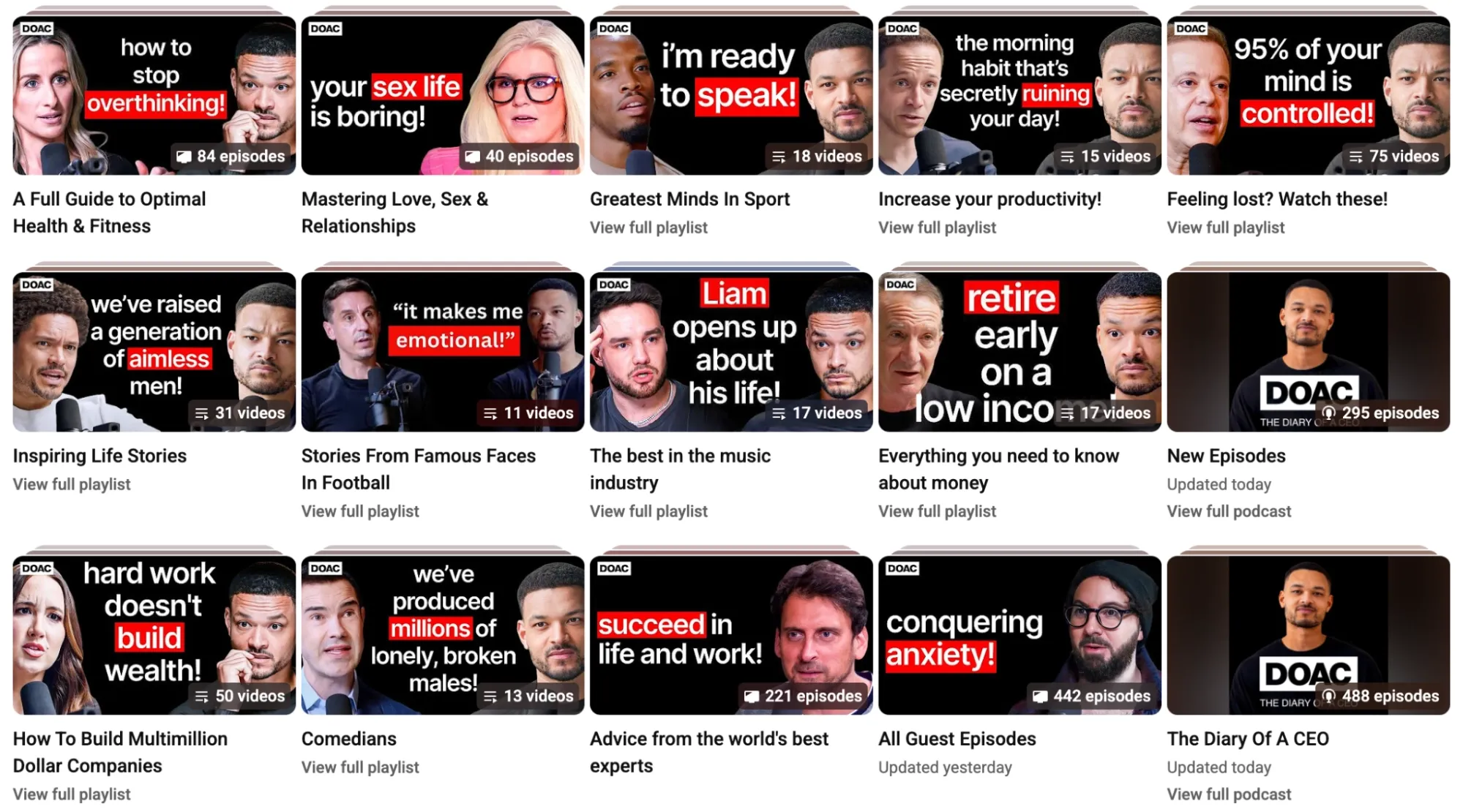
Another trick, especially if you really want to tempt viewers, is to make videos with a Part 1, Part 2, Part 3, etc. From there, you can create a playlist that must be watched in full!
Tip 3: Use YouTube Shorts To Pull In Viewers
YouTube Shorts pulls in a lot of traffic because these videos are published on a public, dedicated feed. So, they are ideal if you want to turn that traffic into views for your other videos.
All you need is to create a 30-second clip from the original video as bait. Using the ‘Related Video’ feature, you can then link these Shorts to the longer videos in your channel.
Every viewer who clicks on those links will start another session. Just like that, you’ll have compelled audiences to check out multiple videos.
You can even automate the process by using the Pollo AI YouTube shorts generator. With this, you can easily turn ideas into publish-ready Shorts that can be scaled repeatedly in minutes.
It’s an effective strategy that top creators like @EnesYilmazer are using to draw in more people and get them invested in watching their channel’s long-form content.
The key is to hook viewers with a compelling clip that triggers their curiosity for more. You can use tools like the Pollo Agent to help brainstorm ideas or even clone existing Shorts.
It’s an iterative, agent-driven tool, so you can just paste the link of the trending video and remake it by describing what you want to change via conversational chat.
Best of all, it tracks and automates the production for a polished, final cut. You can chat ideas, add references, and make edits in one seamless workflow. Zero manual editing needed!
Keep Audience Engaged with Your Content
Create quick community posts, teasers, and visual updates with Pollo Agent to keep your audience active between uploads.
Try Pollo Agent Free!
Tip 4: Push Your ‘Next Video’ In Pinned Comments
A lot of YouTube creators underestimate just how effective pinned comments can be at guiding audiences into a course of action. If your video was good, that’s where they’ll often look next.
So, why not use that to your benefit? By creating a pinned comment with a link to another related video in your channel, you can drive all that current engagement into new views.
It’s all about conveying value. Think something along the lines of: “If you liked this and want even more intense home workouts, then watch [this video link] to kick things up a notch.”
You’ll be surprised how simply asking people to watch another video on your channel can produce results. But don’t just stop there.
You should also try to engage more with them in the comments section. As you reply, this encourages more activity, which always looks good to YouTube’s algorithm.
Tip 5: Place Info Cards In Your Videos
Using info cards is an underrated strategy that lets you direct current viewers to watch another video on your channel. And most have often seen these cards in action.
They often pop up at the end of a video, but they can also be added at any point throughout the video. In fact, they can be a great way to re-engage audiences.
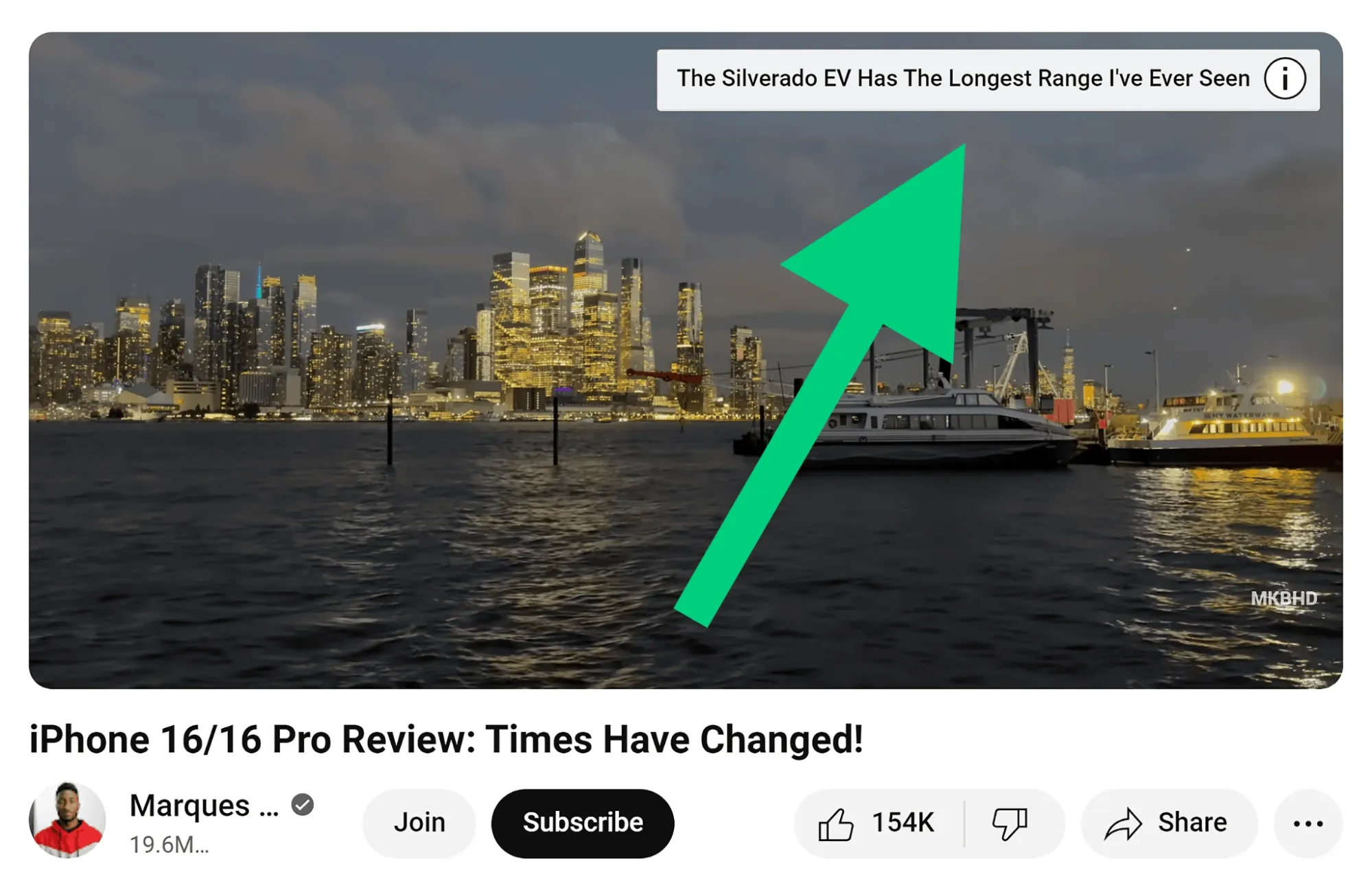
For example, if you check your YouTube analytics and discover that viewers often drop off after the first 3 minutes, 5 minutes, etc, then these are good points to place them.
This way, you don’t have to lose the viewer completely. You can simply direct them to a more engaging video on your channel, solving a problem for them and yourself.
You can even try to mention these cards while speaking in your videos. This way, it looks and feels like a more natural placement than simply sticking them in.
Conclusion
Nowadays, you can’t be too hyperfixated on getting one or a few of your YouTube videos to go viral. You need to look at your wider channel as a whole.
Ask yourself: How can I get more people to stick around and watch other videos? If you can do this, the YouTube algorithm will start to prioritize your content more often.
And remember, if you ever want to create more videos and scale, then explore Pollo AI for useful tools like the YouTube intro maker. It never hurts to optimize the production process!