



How to Make Fun and Engaging Boomerang Videos with AI
Short, looping videos are a common choice for social media because they are easy to watch and naturally catch the eye. These "Boomerang" clips add a sense of life to simple moments, which can help capture a viewer's attention more effectively than a still photo.
While many phone apps offer basic looping, using AI to generate these clips provides a much cleaner result with smoother transitions.
Posting these fun, short-form loops is a practical way to keep your feed active, increase engagement, and grow your follower count.
What is the Pollo AI boomerang video maker?
The boomerang video maker on Pollo AI helps with turning static images or short video clips into seamless, high-quality loops.
Unlike standard tools that often have a jerky transition when the video restarts, this AI focuses on making the back-and-forth movement look fluid and natural.
It is an ideal resource for creators who want to transform ordinary moments into viral-ready social media content for Instagram Stories, TikTok, or Facebook.
How to Make Boomerang Videos on Pollo AI?
Step 1: Upload Your Content or Provide a Prompt
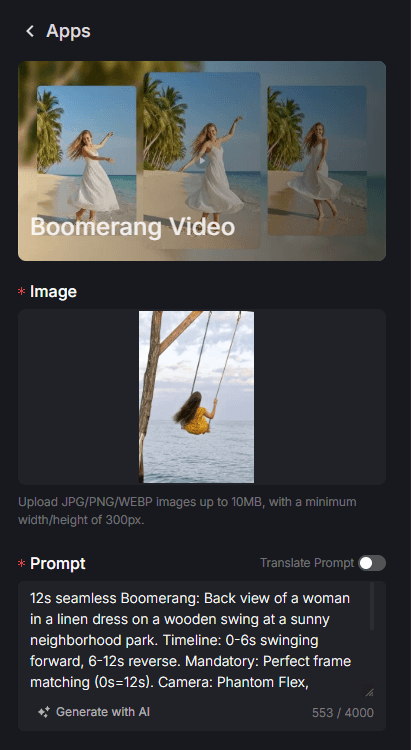
Go to the boomerang video maker page. Upload the photo you want to animate and provide a prompt describing the movement.
Step 2: Select Duration and Aspect Ratio
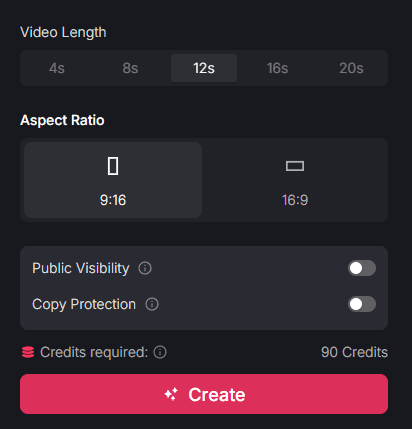
Choose how long you want your loop to be. The available lengths are 4s, 8s, 12s, 16s, or 20s.
Also, pick the aspect ratio—select 9:16 for Instagram Stories or TikTok to ensure the video fills the mobile screen of your viewers.
Step 3: Generate and Share
Click "Create" to render the final loop.
Once the AI has finished the processing, you can download the high-definition file and share it directly to your stories or feed.
Why Use the AI Boomerang Video Maker?
Professional Smoothness without Jerky Transitions
Traditional looping tools often suffer from "jumps" or jerky movements when the video restarts or reverses. The boomerang video maker uses AI to intelligently blend the frames, ensuring that the point where the video loops is nearly invisible.
Professional Results with Zero Editing Experience
Creating a smooth loop traditionally requires knowledge of keyframes and video masking. This tool removes that barrier entirely. You don’t need any technical skills to get a high-resolution result; the AI handles all the complex frame-blending, allowing you to focus purely on the visual idea.
Simplified High-Frequency Posting
This app feature generates loops in seconds without requiring any manual editing or keyframe experience. You can produce a week's worth of story content in a single session. This efficiency is a reliable way to maintain consistent visibility and grow your followers.
High Engagement and Viral Potential
Short, repeating loops are a proven format for high retention rates. By using AI to create more artistic and seamless loops, you increase the likelihood of your content being shared, leading to higher engagement and faster channel growth.
Final Thoughts
Pollo AI turns a simple photo into a tool for engagement, allowing you to fill the gaps in your posting schedule with high-quality motion. While boomerangs are perfect for quick, eye-catching updates, building a complete digital brand often requires a mix of different video styles.
Once you have mastered the loop, you can branch out into other creative formats within the ecosystem. For example, the video meme maker can help you add a layer of humor to your clips, while the brainrot video generator is a practical way to experiment with fast-paced, trending content for younger audiences. Using these tools together ensures your feed remains varied and professional.