



How to Make Heartfelt Tribute Videos with AI
Heartfelt tribute videos serve as a timeless digital bridge, connecting our present with the cherished memories of those who have shaped our lives. Whether you are honoring a family patriarch, a fallen hero, or a beloved public figure, the visual narrative must be handled with grace and cinematic precision.
This guide will show you exactly how to make heartfelt tribute videos with AI that capture the essence of a legacy and resonate deeply with viewers across the globe.
What is an AI Tribute Video?
A tribute video is a curated visual montage or narrative designed to honor, celebrate, and remember the life, achievements, or impact of an individual or a group. By leveraging a professional tribute video maker, creators can transform static memories into dynamic, high-definition stories.
These AI-generated videos are essential for memorial services, retirement celebrations, or creating viral storytelling content that preserves a person's digital legacy for future generations.
How to Create a Moving Tribute with AI in 3 Steps
Creating an emotional masterpiece doesn't require a Hollywood studio. Follow these steps to generate a high-quality tribute in seconds:
Step 1: Define the Narrative Atmosphere
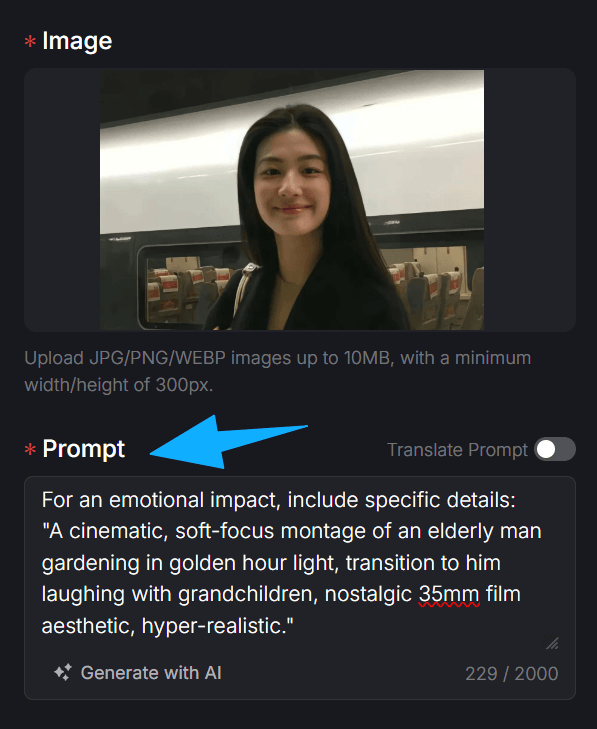
Go to the AI tribute video maker page and describe the tone of your tribute in the prompt box.
For an emotional impact, include specific details: "A cinematic, soft-focus montage of an elderly man gardening in golden hour light, transition to him laughing with grandchildren, nostalgic 35mm film aesthetic, hyper-realistic."
This helps the AI understand the emotional weight of your video production.
Step 2: Choose Your Visual Format
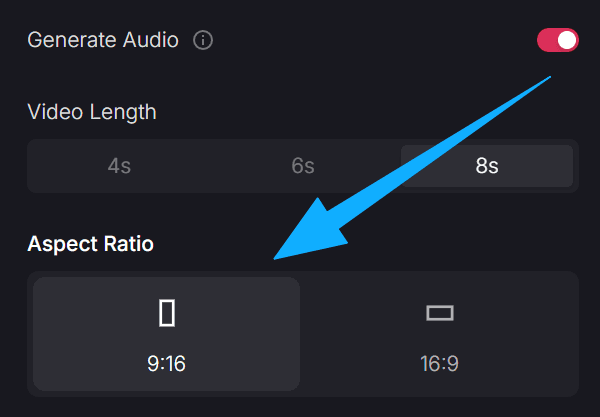
Select the aspect ratio based on where the tribute will be shared. Use 16:9 for memorial services and YouTube documentaries, or 9:16 for Instagram Reels and TikTok tributes. You can also adjust the video length (up to 20 seconds per clip) to ensure the pacing matches the background music or speech you plan to use.
Step 3: Render and Preserve the Legacy
Set your privacy preferences—use "Copy Protection" if this is a private family memorial. Click 'Create' to let the AI synthesize your description into a vivid, high-definition clip. The result is a cinematic tribute that is ready to share instantly, allowing you to focus on the emotional connection rather than the technical struggle.

Use Cases for Heartfelt AI Tributes Videos
- Memorials and Funerals: Create a dignified memorial video that celebrates a loved one’s journey with visuals that provide comfort and peace.
- Retirement and Milestones: Honor a colleague's decades of hard work with a professional montage that highlights their professional legacy and personal impact.
- Pet Tributes: Pay homage to a faithful companion with a pet tribute video that captures their unique personality and the joy they brought to your home.
Explore More Pollo AI Storytelling Tools
Once you have mastered the art of tributes, you can use our other specialized apps to tell even more stories:
- Family Chronicles: Use the AI family video maker to document your family's history or create a lasting gift for an anniversary video.
- Daily Vlogging: Share your daily reflections and current life events with the AI daily vlog tool for consistent follower growth.
- Documentary Styles: If you are creating a broader story, the AI faceless video generator is perfect for building narrative-driven content without needing to be on camera.
Final Thoughts
Every life story is a masterpiece waiting to be told. By learning how to make heartfelt tribute videos with AI, you are bridging the gap between history and the future. Pollo AI provides the emotional depth and technical power needed to turn a simple image into a profound legacy. Don't let your most precious memories stay static. Try Pollo AI today and start creating tributes that will be cherished for generations to come!