



How to Use Pollo AI Video Editor: Complete Guide, Pros & Features
Traditional editing can be time-consuming and complicated. Pollo AI’s new AI video editor changes all that, allowing users to edit videos instantly using simple text prompts.
Built on model Runway Gen4 Aleph, this tool offers a powerful yet intuitive way to create professional-quality videos quickly, all online and free to try.
This guide will walk you through everything you need to know about this next-generation editor. We’ll cover how it works, its powerful features, and advantages.
Why Should You Use Pollo AI Video Editor?
The core idea behind the Pollo AI video editor is simple: forget the slow, manual process you’re used to. Instead of clicking, cutting, and keyframing, you can now transform any video instantly using simple text prompts.
Want to change the background? Erase a distracting object? Turn a sunny day into a rainy night? Just describe what you want, and the AI does the heavy lifting.
With Pollo AI, video editing isn’t just faster — it’s fundamentally simpler, smarter, and accessible to everyone.
- Speed and Simplicity: Edits in seconds versus hours. Text prompts mean no tutorials required—if you can type, you can edit.
- Versatile and Powerful: Handles a wide range of changes with high realism, powered by Runway Gen-4 Aleph for coherent results. Great for quick social media tweaks or creative experiments.
- All-in-One: Combines multiple edits (e.g., background swap + effects) in one go, saving time over tools like CapCut or InVideo.
- High-Quality Output: Maintains original resolution and adds natural movements, avoiding the "AI weirdness" in lesser models.
How to Use the Pollo AI Video Editor: A Simple 3-Step Guide
Getting started with Pollo AI video editor is incredibly straightforward. Here’s the entire process from start to finish:
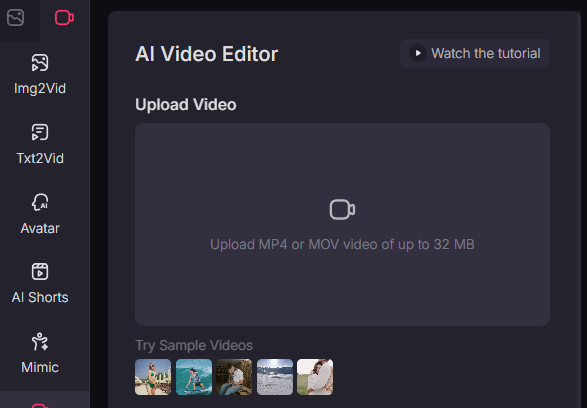
1. Upload Your Video
The first step is to select the video clip you want to edit. You can upload it directly from your computer to the AI video editor. The platform supports MP4 or MOV video of up to 32 MB.
2. Enter Your Prompt
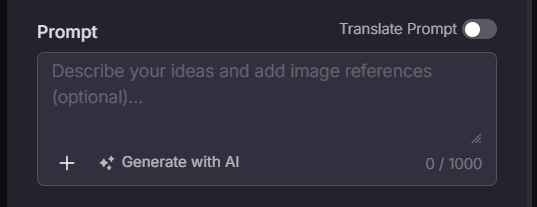
This is where the magic happens. In the Prompt box, simply describe the change you want to make. You can be specific and creative. For example:
To change the setting: "Change the background to a beautiful beach at sunset."
To add an effect: "Add falling rain and make the streetlights glow."
To modify a subject: "Change the person's shirt from blue to red."
To remove something: "Erase the car driving in the background."
You can also upload an image reference alongside your text prompt. This helps the AI understand your desired style, setting, or subject more precisely, ensuring your edited video matches your vision perfectly.
3. Generate & Download
After entering your prompt, click "Create." The AI will process your request and create the new video in seconds or minutes, depending on the complexity. You can then preview the result and download your polished, professionally edited video.
Who is the Pollo AI Video Editor For?
This tool is a game-changer for a wide range of users:
- Social Media Managers & Content Creators: Quickly produce engaging videos for TikTok, Instagram, and YouTube.
- Marketers: Create polished product demos and advertisements without hiring a large production team.
- Business Professionals: Enhance presentations and corporate communications with professional-looking video clips.
- Hobbyists & Beginners: Experiment with video creation and have fun transforming personal footage without a steep learning curve.
Enter A New Era of Video Editing
Pollo AI Video Editor, powered by the impressive Runway Gen4 Aleph model, represents a fundamental shift in how we create and manipulate video.
By replacing complex interfaces with simple language, it removes the technical barriers that have long defined video editing.
While it may not replace high-end professional software for every task, it provides an astonishingly powerful, fast, and accessible alternative that will empower a new generation of creators.
If you’ve ever been frustrated by the complexity of video editing, this tool is your chance to bring your ideas to life. Try it for free today!