



How to Create YouTube Thumbnails That Get More Clicks
With YouTube’s new algorithm prioritizing viewer satisfaction, it’s no longer all about clicks and views. It's about whether your video content is valuable enough to keep users on the platform.
Still, YouTube thumbnails dictate your click-through rate. Since the algorithm tests new videos with a small group to see if they are worth recommending, you need a high CTR.
Otherwise, your video gets suppressed. This brings us to two important questions: What types of YouTube thumbnails can you use? Also, how do you make them pull in more viewers?
Follow along as we look into everything thumbnail-related to help elevate your YouTube videos. Plus, we’ll also touch on how Pollo AI fits into all this!
How Important Have YouTube Thumbnails Become?
In the past, YouTube’s primary focus on traditional metadata like titles, descriptions, tags, etc, often meant that it would amplify videos to the wrong audience.
But now, the new algorithm can use AI to analyze videos and match them with the right audiences. Beyond that, it also measures how audiences behave after watching.
So, what does this mean? As we said before, YouTube tests new videos with small audiences. If the thumbnail gets a lot of clicks, but the video shows high viewer drop-offs, then that’s bad.
The AI will know that audiences weren’t satisfied, and it simply stops recommending your videos. So, the whole concept of clickbaiting won’t work anymore.
Yet, the quality of your thumbnail still matters. After all, even if the video content is good, a poor-choice of thumbnail can mean a low click-through rate, which is also bad.
These days, people scroll through online feeds like lightning. So, you need a compelling thumbnail that pushes both curiosity and action into their minds.
It’s all about balancing quality content and thumbnail design to signal to the algorithm that ‘my video is worthy’ (as Thor would probably say).
Speaking of which, if you need help with creating such images, try out Pollo AI’s image generator to explore new concepts and ideas.
But before doing that, we’ve laid out different thumbnail styles that you can incorporate into your videos today. Let’s dive into them, shall we?
#1. Question-Based Thumbnails
Placing a polarizing question in your YouTube thumbnail that gets people thinking or curious is a fantastic way to get more clicks from people.
The trick is to keep the question short and sweet, while also being relevant to the video’s content. You should also use keywords that make the value proposition clear.
For example, if it’s a car review video, a compelling question to use can be: “BMW M3 vs Porsche 911: Who Wins?” Such a YouTube thumbnail would raise instant interest.
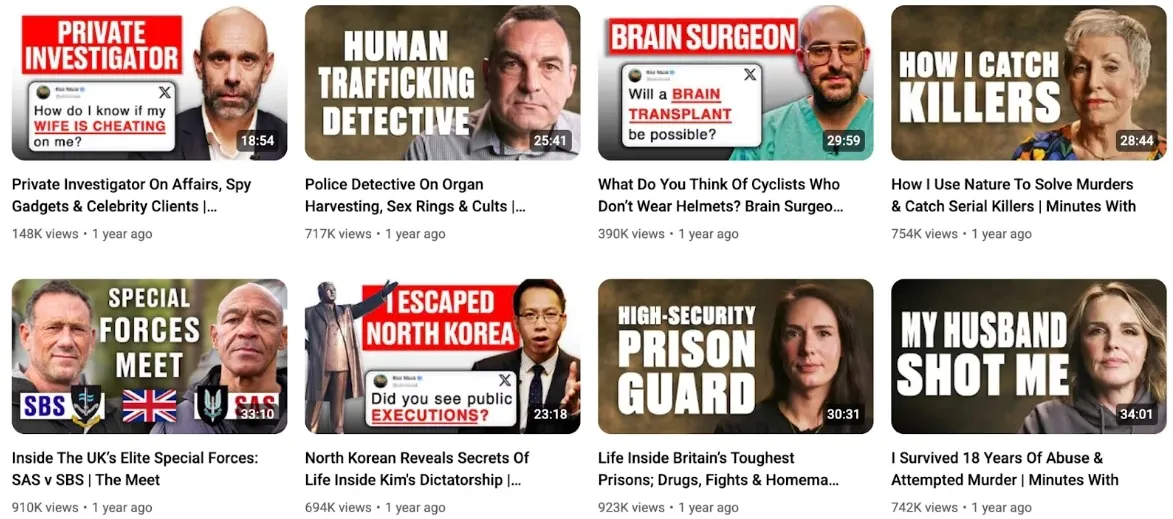
A popular YouTube channel that uses this format is @ladbiblestories, which frequently implements controversial questions in its thumbnails.
#2. Before-After Comparisons
When it comes to showing a clear value, before-and-after thumbnails take the crown. They work so well at getting clicks because viewers can instantly see the solution they seek.
If your chosen niche revolves around themes like fashion makeovers, home improvements, fitness gains, etc, then you are best suited to this type of YouTube thumbnail.
To make this work, you need a split image in the thumbnail that showcases the difference in results. The more dramatic the transformation, the better, but don’t clutter the image with text.
For this type of YouTube thumbnail, you can let the images do all the talking. A good example of this is @JeremyEthier, who often uses this format and secures high view counts.
#3. Sound Bites & Impactful Quotes
Nothing can trigger more interest in your YouTube videos than a thumbnail with a controversial quote, especially if what’s being discussed is a hot-button subject.
Take @jackneel, for example, whose YouTube channel uses these thumbnails to great effect, placing impactful sound bites that would cause a stir in viewers' minds.
With these YouTube thumbnails, always include an image of the speaker on the thumbnail. You can place a short but thought-provoking quote of what they said next to them in bold font.
This will ensure the thumbnail nails the impact you want. And if you ever need to produce YouTube Shorts on viral or controversial topics, go check out Pollo AI agent for help.
#4. Product Showcases/Features
If your channel handles product-based guides, reviews, comparisons, etc, then a YouTube thumbnail with a clear and prominent image of the product is necessary.
Ultimately, the point of the video is the product. It makes sense to show your viewers what to expect, so that they can decide if it’s relevant to them or not.
For this reason, you must let the product be the visual focus. So, don’t overdo it with text overlays; just a simple price tag or a concise opinion of the item is enough.
In fact, you can check out how @MKBHD does it, and you’ll see it’s all about keeping the thumbnail design minimal/straight-to-the-point.
#5. Facts & Statistical Graphics
Using facts and stats in YouTube thumbnails is a clear and direct way to reaffirm your knowledge and authority across any subject in the eyes of viewers.
So, if your content revolves around technical topics, like sports, history, business, marketing, etc, then you can use graphs and numbers to enhance your video thumbnail.
Focus on using bold text and numbers with clear visuals. You can see just how creators like @aliabdaal do it, with most of his YouTube videos hitting 100K+ views.
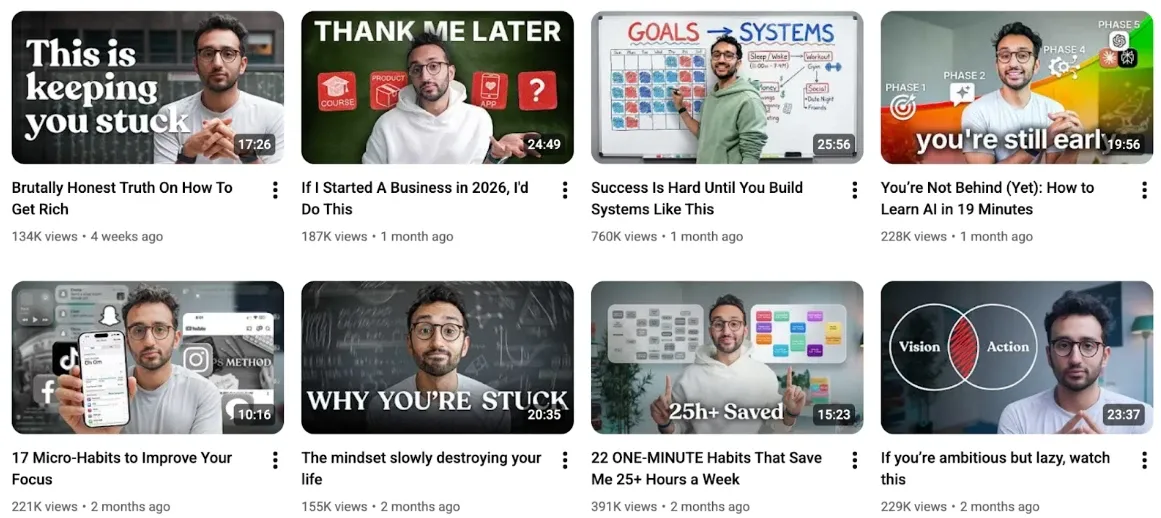
Best part? You can easily create such data-driven images using tools like Pollo AI’s text-to-image generator for simple and professional-looking results.
#6. Dramatic/Live Action Visuals
These are probably the most popular types of YouTube thumbnails, often being used by top creators like @Sidemen to stand out and pull in wider audiences.
For this format, you should focus less on text and more on using bold, eye-catching shots that build up excitement, suspense, and intrigue in viewers.
A good way to go about this is to take a dramatic screenshot from the video, then edit it in unique ways that look cinematic and unbelievably crazy to be true.
Just keep in mind that these types of YouTube thumbnails come with high expectations from viewers. So, be sure to deliver exciting video content that satisfies.
#7. Personal Vlog/Satire Thumbnails
Personal vlogging and satire content have been exploding on YouTube, and it’s down to the raw authenticity they offer, compared to the typical studio-based videos we often see.
As many of us have seen, these creators often carry that same unfiltered perspective to their thumbnails. For example, YouTubers like @Lindsiann use phrases like ‘Style for Dummies’.
To make these types of thumbnails, it’s all about keeping things unserious. You can use clear and unfiltered photos, then try to sum up the video with a short and witty excerpt.
Try to think of something about the video that tickles your funny bone and use it. Since these thumbnails don’t require much editing, they are much easier to create.
#8. Landscape-Themed Shots
Everyone likes to see bright and vivid landscape photos, especially of places they’ve never been to. So, it’s no surprise that using landscape-themed thumbnails works.
For creators like @BrettConti, this format has been quite effective at building up suspense among viewers for an exciting and adventure-filled story.

With these thumbnails, the location takes center stage, so the key is to avoid any excessive text overlays or graphics that would interfere with the view.
Simply add 2-3 words max to explain the video, and let the landscape do the rest. You can also consider using Pollo AI’s travel video maker to help with the video creation process.
Conclusion
You know how they say first impressions last? Well, think of your thumbnail as the first impression people will have about your video. To get them to click, you need to nail it.
The YouTube thumbnails on this list are high-converting formats that have been proven to be quite good at reeling in new viewers, so pick one that best suits your niche.
And remember that if you need help with both the image and video content creation, Pollo AI can provide you with all the advanced tools you need in one place!