



Pixverse V5 AI Video Generator
PixVerse V5 generates nuanced, multi-layered, hyper-realistic videos with precise prompt alignment that brings creative ideas to life. Try PixVerse V5 on Pollo AI for free!
Key Features
- Intricate Motion Dynamics: Render scenes with smoother, lifelike motion and cleaner detail
- Expansive Camera Control: Explore more complex shots for cinematic-level sequences
- Smarter Image Blending: Fuse multiple subjects into scenes even more cohesively
- Wider Stylistic Range: Generate videos across a greater range of artistic styles
- Faultless Prompt Interpretation: Experience pinpoint accurate prompt adherence
- Lightning Fast Rendering: Remarkably quicker processing of around 30-60s per video
Intricate Motion Dynamics
Pixverse V5 ensures superior motion rendering to deliver dynamic scenes with impeccably smooth and lifelike character movements.
With this new advancement, users can benefit from highly immersive, cinematic-grade realism even when producing complex and action-heavy sequences.
| Prompt | Generated Video |
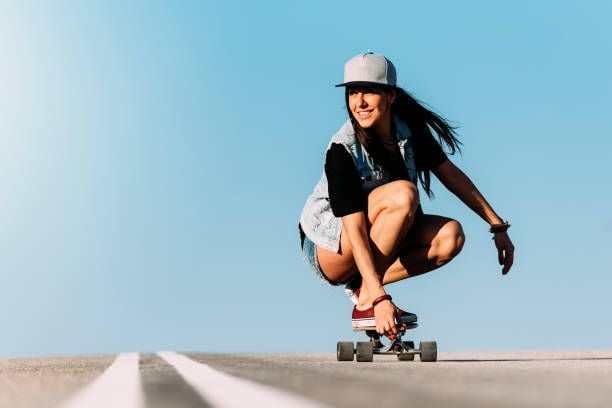 The young skateboarder girl glides effortlessly through the road, weaving from left to right, as her hair flows in the breeze. The atmosphere is warm and vibrant, with the camera tracking her movements, capturing the fantastic expression of freedom and joy on her face |
Expansive Camera Control
With Pixverse V5, users can explore greater camera control with even less complexity than before. From wider zoom, rotation, tracking, and pan options, this new release makes it easier to craft incredibly detailed visual sequences with dozens of film techniques that do better at conveying emotionally evoking scenes.
| Prompt | Generated Video |
| A sleek, high-performance car blazes through the open desert at full speed. Aerial drone shots capture its trail of dust from above with wide shots of the vast desert landscape rushing past under the blazing sun |
Smarter Image Blending
Improving upon Pixverse’s Fusion feature, the new V5 model blends images more seamlessly and intelligently to create impeccably natural-looking scenes with no distortions or artefacts. With simple prompting, users can now get more fine-tuned results that offer better stability and visual consistency frame by frame.
Wider Stylistic Range
Pixverse V5 introduces more stylistic options, providing users with greater creative flexibility while also ensuring better detail, clarity, and resolution than before.
You can experiment with unique and more nuanced visual compositions such as Ghibli, 2D and 3D, watercolor, vaporwave, cyberpunk, etc.
| Prompt | Generated Video |
| Generated in the studio-ghibli art style, a playful cat chases a clever mouse through tall grass and blooming flowers, leaving behind a trail of fluttering butterflies, with fluid, expressive animation capturing the lighthearted scene |
Faultless Prompt Interpretation
Pixverse V5 users get unmatched prompt alignment that is incredibly precise and significantly more reliable than its predecessors. The new model is also far more capable of understanding context, making it easier to produce complex scenes and accurately render text within videos across different fonts.
| Prompt | Generated Video |
| A breathtaking, cinematic view of the Egyptian pyramids under the blazing midday sun. Sweeping aerial shots glide over the golden desert, capturing caravans of camels and clusters of tourists, as they move slowly across the sands |
Lightning Fast Rendering
With generation times of around 30-60 seconds per video, Pixverse V5 offers a significant speed improvement that allows users to test multiple inputs. Explore various ideas and concepts with remarkably quick outputs that do well to maintain high visual detail and fidelity, even across different styles.
| Prompt | Generated Video |
| A joyful golden retriever runs alongside a smiling 5-year-old boy riding a small bicycle through a quiet suburb. The sun casts a warm, golden glow over the neighborhood, with the scene captured through soft camera pans and low-angle tracking shots |
How to Access Pixverse V5 on Pollo AI for Free
Select the Pixverse V5 model
Head to image to video AI and choose Pixverse V5 via the model drop-down menu.
Input Text or Image Prompt
Enter your text prompt or upload your image, then select your desired configurations.
Generate Your Video
Click ‘Create’ and patiently wait for your desired video to be created.










 5000+ reviewsTrustscore 4.4
Trusted by 10M+ Creators and Marketers Worldwide
Thousands of satisfied users have shared their Pollo AI experiences on Trustpilot, rating us as "Excellent." See what they love about our platform.
Liz Cassidy Dec 15, 2025Richard QuickOct 15, 2025armourdudeNov 19, 2025
 DuduJan 14, 2026
 Ray WarnesDec 30, 2025
 lawless clanNov 22, 2025
FAQs
What is Pixverse V5?
Pixverse V5 is a powerful model that presents users with the latest advancements in AI video technology. Catering to text & image-to-video generation, it can produce stunningly dynamic, high-resolution outputs with unparalleled motion realism and character consistency that particularly caters well to cinematic and stylized projects.
What makes Pixverse V5 better than V4.5?
Pixverse V5 builds upon its predecessor to offer users a more meaningfully refined set of features. With unmatched speed, extended creative control, superior visual quality, and near-perfect prompt coherence, it can more consistently generate professional-grade videos across numerous styles.
Can I generate videos with Pixverse V5 for free?
Absolutely. With Pollo AI text to video AI, you can use our free trial plan to access Pixverse V5 at no cost whatsoever. Simply sign up for an account to get started and in minutes, you can start exploring this AI model’s advanced capabilities with stunning results.
What kind of videos can Pixverse V5 create?
Because of its enhanced prompt adherence, you can be confident that Pixverse V5 will understand contextual cues and even process technical details with impeccable accuracy. So, feel free to rely on it to produce cinematic clips, animations, artistic performances, product demos, and so much more.
