



Grandma Joan Las Vegas Open-World Comedy VIDEO Breakdown (Prompts Included)
AI Generated Video
Recreating this Grandma Joan Las Vegas open-world comedy workflow works best when the character reference sheet is treated as the absolute identity anchor. Lock her face, short soft gray hair, purple floral blouse, dark navy pants, and beige walking shoes first. Then build every UI reference on a pure black background for clean compositing. Finally, drive the 30-second video with a persistent corner HUD, exact money changes from $420 to $3,420 to $3,388, logical location updates, and one chosen yellow highlight per temporary menu.
Step 1
Open pollo.ai, select Image Generation, paste the image prompt below and click Generate. Set GPT Image 2.5 as the default image model. Adjust the aspect ratio according to your video needs; multiple sizes including 16:9 and 9:16 are supported.
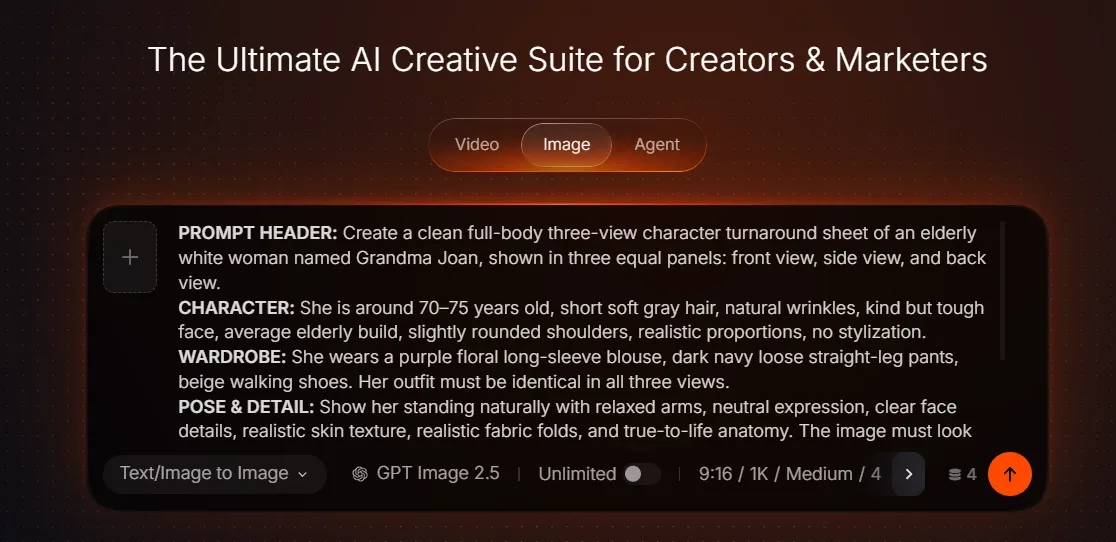
Image Generation Screen
Image Prompt 1
PROMPT HEADER: Create a clean full-body three-view character turnaround sheet of an elderly white woman named Grandma Joan, shown in three equal panels: front view, side view, and back view.
CHARACTER: She is around 70–75 years old, short soft gray hair, natural wrinkles, kind but tough face, average elderly build, slightly rounded shoulders, realistic proportions, no stylization.
WARDROBE: She wears a purple floral long-sleeve blouse, dark navy loose straight-leg pants, beige walking shoes. Her outfit must be identical in all three views.
POSE & DETAIL: Show her standing naturally with relaxed arms, neutral expression, clear face details, realistic skin texture, realistic fabric folds, and true-to-life anatomy. The image must look like a live-action costume and character reference sheet, not a 3D game render, not cartoon, not anime.
STYLE & QUALITY: Clean light-gray or off-white studio background, even lighting, sharp details, full body visible head to toe, no props, no UI, no extra people, no motion blur. Keep the layout neat and symmetrical, with the three views aligned consistently for production reference.
Image Prompt 2
PROMPT HEADER: Create a 9:16 vertical weapon-selection UI reference image on a pure solid black background. No character, no environment. Keep the persistent Grandma HUD small in the four corners for scale.
PANEL LAYOUT: In the central-left area place one compact vertical dark-charcoal selection panel occupying about 32% of frame width and 30% of frame height. Show exactly FIVE rows, each exactly once: "FLASHLIGHT" with flashlight icon, "SHOVEL" with unmistakable shovel icon, "WALKING CANE" with cane icon, "TRASH BAG" with tied trash-bag icon, "MONEY BAG" with money-bag icon. Every row has one icon on the left and one label on the right.
HIGHLIGHT STATE: Only the SHOVEL row is highlighted with a warm-gold border and soft gold fill. The other four rows remain dark gray.
RESTRICTIONS: No scrolling, no second page, no repeated SHOVEL, no prices, no other weapons. Top-right cash remains "$420".
Image Prompt 3
PROMPT HEADER: Create a 9:16 vertical game reward UI reference image on a pure solid black background. Show the standard Grandma corner HUD.
CASH DISPLAY: Top-right current cash should clearly display "$3,420".
REWARD ICON: In the lower-middle of the frame show exactly ONE glowing rectangular US paper-banknote pickup icon, clearly shaped like a physical dollar bill: long rectangular paper proportions, visible bill border, simplified portrait/ornament details, warm golden glow surrounding the paper. It should look like a floating collectible banknote, NOT a coin and NOT a standalone dollar sign.
RESTRICTIONS: No "KO". No large "+3000" text. Keep the paper banknote approximately 8–10% of frame width so it is readable but not oversized. Everything else remains black.
Image Prompt 4
PROMPT HEADER: Create a 9:16 vertical restaurant-menu UI reference image on a pure solid black background. Keep the standard Grandma corner HUD for scale, with current cash "$3,420".
PANEL LAYOUT: Place a compact dark-charcoal restaurant menu in the center-right, occupying about 38% of frame width and 27% of frame height. Title: "DINER MENU". Show exactly FIVE rows only: "CHEESEBURGER $32", "DOUBLE BURGER $46", "FRIES $12", "APPLE PIE $14", "COFFEE $6". Each row has one simple matching food icon on the left.
HIGHLIGHT STATE: Only CHEESEBURGER $32 is highlighted in warm gold. Other rows remain dark gray.
RESTRICTIONS: No weapons, no vehicles, no extra food items, no duplicate rows. Pure black background.
Create Grandma Joan Las Vegas Open-World Comedy Videos on Pollo AI
Paste the prompt to generate a 30-second vertical 9:16 ultra-photorealistic live-action gameplay-style video with one consistent elderly protagonist, a persistent GTA-style HUD, temporary selection menus, a glowing banknote reward, and cinematic comedic timing.
Start Creating Free
Image Prompt 5
PROMPT HEADER: Create a 9:16 vertical vehicle-selection UI reference image on a pure solid black background. Keep the persistent Grandma HUD in the corners, with cash "$3,388".
PANEL LAYOUT: Place one horizontal or compact grid selection panel across the middle, occupying about 52% of frame width and 18–20% of frame height. Show exactly FOUR vehicle cards: "BICYCLE" with bicycle icon, "MOTORCYCLE" with motorcycle icon, "CONVERTIBLE" with car icon, "HELICOPTER" with clear helicopter icon.
HIGHLIGHT STATE: Only HELICOPTER is highlighted with a warm-gold border and glow. The other three cards remain dark charcoal.
RESTRICTIONS: No fifth vehicle, no weapons, no food, no duplicated helicopter.
Image Prompt 6
PROMPT HEADER: Create a 9:16 vertical air-gear selection UI reference image on a pure solid black background. Keep the persistent Grandma HUD small in the corners.
PANEL LAYOUT: Place one compact horizontal three-card panel in the center-left or center, occupying about 42% of frame width and 18% of frame height. Title: "SELECT AIR GEAR". Show exactly THREE cards: "BINOCULARS" with binocular icon, "PARACHUTE" with a clearly recognizable parachute-canopy icon, "FIRST AID KIT" with medical-kit icon.
HIGHLIGHT STATE: Only PARACHUTE is highlighted in warm gold. The other two stay dark gray.
RESTRICTIONS: No food, no shovel, no vehicles, no repeated parachute. Pure black background.
Image Prompt 7
PROMPT HEADER: Ultra-photorealistic vertical 9:16 live-action frame, high-budget cinematic realism, real Las Vegas outdoor racetrack plaza / sportsbook-adjacent public area in bright natural daylight.
MAIN CHARACTER: One white Western elderly woman around 70 years old is the clear main character, short silver-gray hair, realistic lined face, purple floral blouse, dark loose trousers, beige walking shoes, natural elderly body proportions, calm confident posture. She is walking forward naturally through the plaza, shown in a cinematic rear three-quarter medium-full-body view, not centered like a stiff game avatar.
ENVIRONMENT: Real pavement, metal railings, modern venue buildings, ticket windows, scattered pedestrians, realistic depth, natural sunlight, real skin texture, real fabric folds, subtle motion in clothing and hair, no CGI, no Unreal Engine, no game-rendered people.
HUD OVERLAY: A refined open-world game HUD is composited over the real footage: top-left small clean text "LAS VEGAS / RACECOURSE PLAZA" with a second smaller line "PLAYER: GRANDMA JOAN"; top-right one clean current money amount such as "$420" and local time "12:23"; bottom-left small semi-transparent circular minimap with nearby paths plus thin health and stamina bars underneath; bottom-right three small minimal icons for character, inventory/bag, and settings. HUD must feel like a premium GTA-style sandbox interface but remain clean, readable, and under 15% of the frame. No giant mission banner, no floating weapon wheel yet, no "KO," no reward text, no giant buttons, no cluttered mobile-game UI.
BACKGROUND ACTION: In the mid-background ahead of Grandma Joan, a rude white Western man in his 30s is visibly bothering a young white woman near the walkway; the young woman looks uncomfortable and is stepping slightly away while the man leans in and blocks part of her path. They are not touching Grandma yet. Grandma is just beginning to notice them while walking closer. Her head is slightly turned toward the situation, suggesting she has seen something wrong. Keep everyone physically realistic and naturally posed, with believable crowd spacing and real-world body language.
IMPORTANT: Exactly ONE Grandma Joan, no duplicate elderly women resembling her; no shovel yet, no weapons yet, no floating cash yet; the first frame is BEFORE the weapon-selection UI appears. Real live-action movie still with game HUD added afterward, cinematic lens, natural depth of field, realistic shadows, no overexposure, no dramatic fantasy lighting, no game-character stiffness, no distorted hands, no duplicated people, no text corruption.
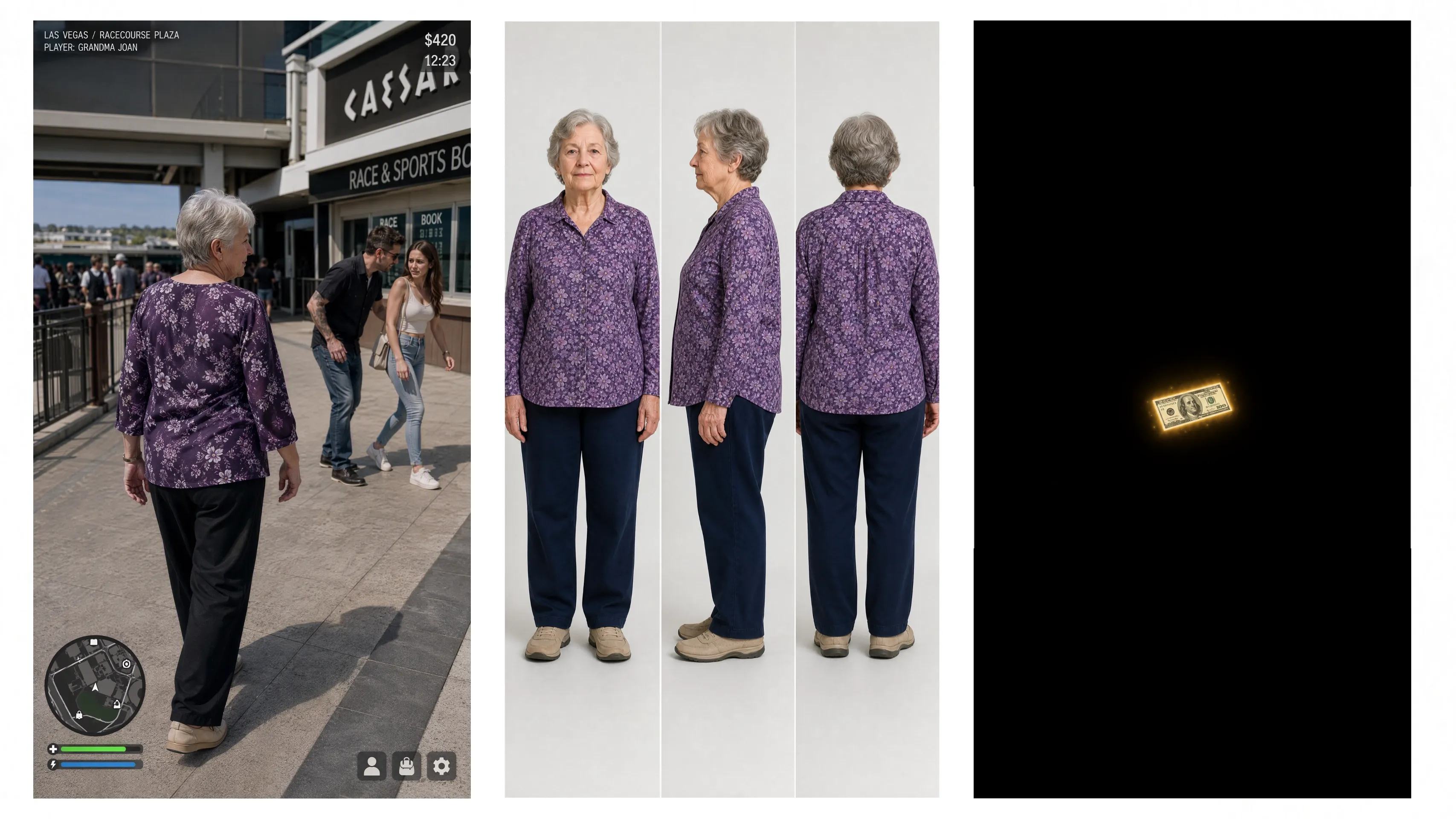
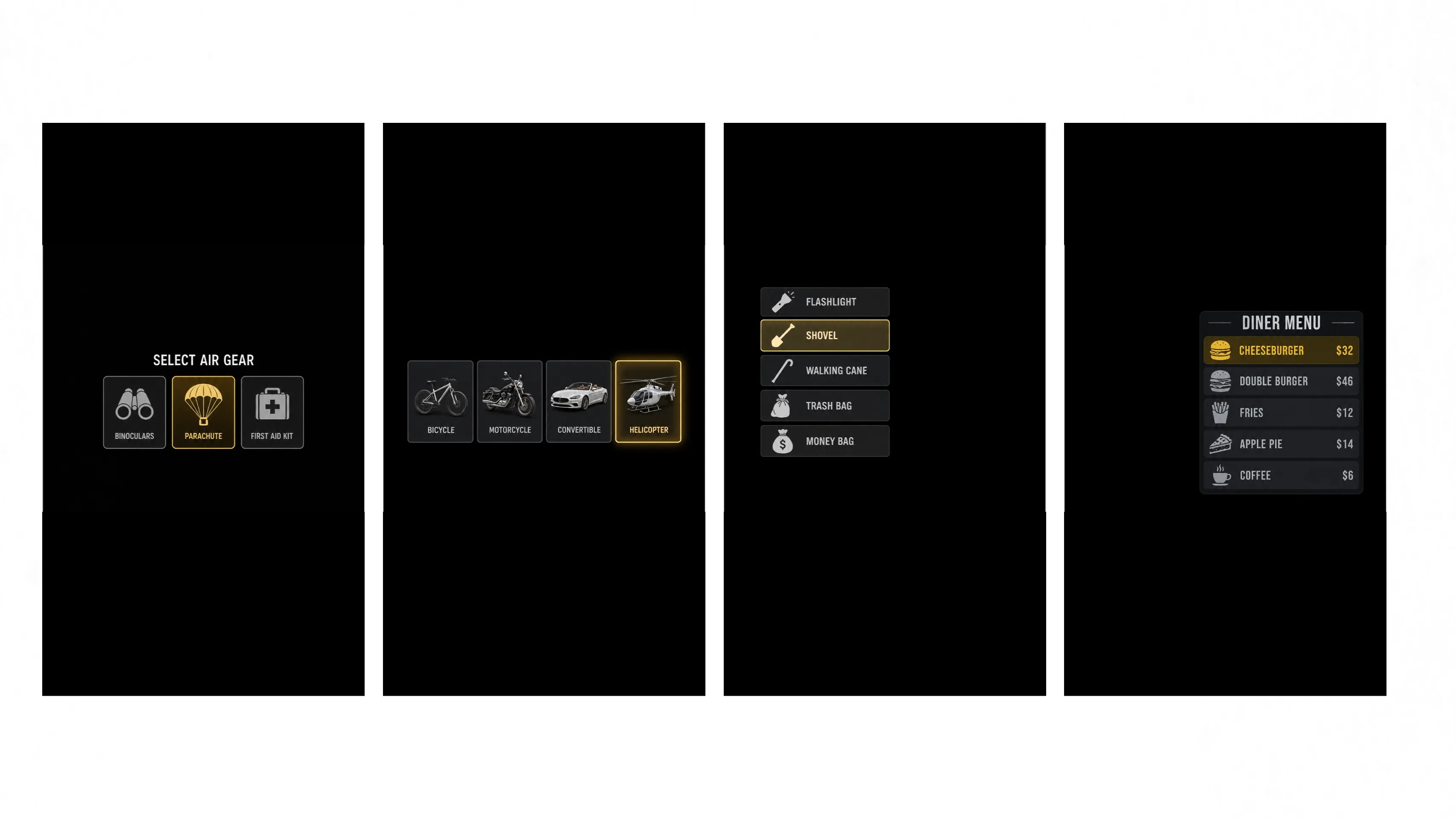
Results of the 7 generated images
Step 2
Once your image is ready, go to Video Generation. Upload your prepared image or pick assets from your Creations library. Select reference-to-video mode and paste your video prompt. You can also upload a video for motion reference.
Note: Add @your-image for image reference and @your-video for video reference inside the prompt. Pick any of these models: Seedance 2.5, Seedance 2.0, MiniMax H3 or Wan 3.0. Click Generate after confirming all settings.
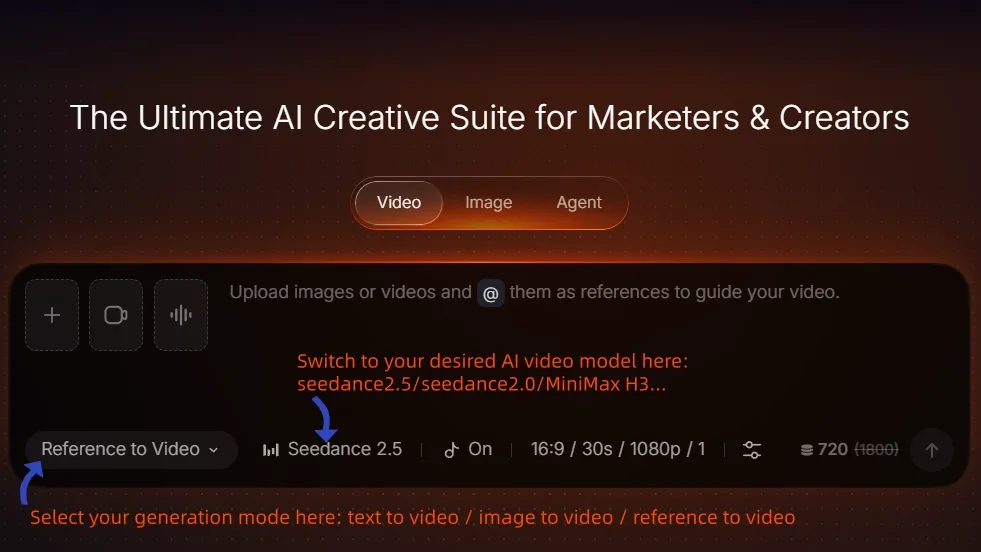
Video Generation Screen
Video Prompt
PROMPT HEADER: Create a 30-second vertical 9:16 ultra-photorealistic live-action gameplay-style video with smooth real-world camera motion, realistic humans, and polished open-world HUD overlays.
REFERENCE IMAGES: Use Reference Image 1 [@cmtvkwre304ous5v3p13e2xs5-] as the exact identity reference for GRANDMA JOAN: elderly white woman, short soft gray hair, kind but tough face, purple floral long-sleeve blouse, dark navy pants, beige walking shoes, average elderly body shape. Use Reference Image 2 [@cmtvh9kme0isagsxzl5k76kev-] as the exact first-frame composition and the base HUD style reference. Use the other UI reference images as style/layout references for the temporary selection menus and reward popups. The final video should look like a realistic cinematic live-action short with high-quality game HUD composited over it, not like a cartoon or low-end game render.
PERSISTENT HUD: Must stay on screen for the entire video unless a temporary selection menu overlays on top of it. Top-left HUD: "LAS VEGAS / RACECOURSE PLAZA" at the beginning, later updating by location when she moves. Under it: "PLAYER: GRANDMA JOAN". Top-right HUD: current cash amount and local time. Start at "$420" and "12:23". Bottom-left: circular minimap with player arrow and route/location context that updates when she changes area. Bottom-right: three small icons that always remain visible: character/person icon, bag/inventory icon, settings/gear icon. Lower-left also includes thin Health and Stamina bars, clean and readable. These persistent HUD elements should keep the same visual language, same screen positions, and stay readable through the full video. Money must visibly change when she earns or spends cash.
TEMPORARY MENUS: At the start, the player has no temporary menu open. Every temporary selection menu should appear as a clean transparent overlay inspired by the black-background reference UI images, but composited over the real scene. Default state: no option selected at first. Then exactly one chosen option turns yellow/highlighted. All unselected options remain gray/white. Menus should be simple, readable, and not overloaded.
TIMELINE:
[0–3s]: Grandma Joan is walking through the Racecourse Plaza outdoor walkway in Las Vegas. Use the same world and mood as Reference Image 2 [@cmtvh9kme0isagsxzl5k76kev-]. She is walking forward and then notices a rude adult man harassing a young woman ahead on the right. The young woman is uncomfortable and trying to pull away. Grandma looks directly toward them with concern and irritation. Camera follows behind Grandma, then slightly shifts to reveal the man and woman clearly in the same frame. Persistent HUD visible. Cash remains $420. Grandma line: "Seriously?"
[3–5s]: Move closer. The rude man grabs the woman's arm or blocks her path. The woman says, "Leave me alone." The man says, "Hey, back off." Grandma steps toward them. No menu yet for the first beat. Minimap still shows Racecourse Plaza.
[5–7s]: Weapon selection menu appears as a transparent overlay on top of the live-action scene, styled like the reference UI [@weapon]. Exactly 5 options only, arranged as a clean vertical selection list: FLASHLIGHT, SHOVEL, WALKING CANE, TRASH BAG, MONEY BAG. First show all five neutral. Then SHOVEL becomes the only yellow highlighted option. Grandma says firmly, "Wrong grandma."
[7–9s]: The menu disappears immediately after confirmation, and in the very next shot Grandma is already holding a real shovel in both hands. She swings once and knocks the rude man down in a comedic but bloodless way. The woman quickly moves away to safety. Instead, after the man falls, a glowing floating paper [@cash] banknote icon appears above or near the defeated NPC, resembling a glowing cash bill pickup, then fades out after a short moment. At the same time, the top-right money total increases from $420 to $3,420. Grandma says, "Much better." After the hit, the shovel should naturally disappear by the next transition.
[9–12s]: Location transition. Grandma walks into a diner. The persistent HUD updates location from "LAS VEGAS / RACECOURSE PLAZA" to "LAS VEGAS / DINER". [@diner_menu] Money stays at $3,420. Time advances slightly. Minimap updates to the diner location. She sits at the counter.
[12–15s]: Food selection menu appears as a transparent overlay over the diner scene. Use a clean restaurant menu style inspired by the reference. Exactly 5 options only: CHEESEBURGER $32, DOUBLE BURGER $46, FRIES $12, APPLE PIE $14, COFFEE $6. First all neutral, then CHEESEBURGER $32 becomes the only yellow highlighted option. Grandma says, "Cheeseburger."
[15–18s]: The menu closes. A cheeseburger is placed in front of her. She takes a bite and looks satisfied. At the same moment, the top-right money decreases from $3,420 to $3,388, with a brief small "-$32" purchase popup near the money total. Health or stamina can recover slightly after eating. Grandma says, "Worth it."
[18–21s]: Cut to Grandma back outside in a new street area. The persistent HUD updates location to "LAS VEGAS / SOUTH STRIP". Minimap updates to a new route and new district. Grandma walks along the sidewalk and looks ready for the next step.
[21–23s]: Transportation selection UI appears as a transparent overlay, clean and simple, with exactly 4 options displayed as cards or buttons: BICYCLE, MOTORCYCLE, CONVERTIBLE, HELICOPTER. First all neutral, then HELICOPTER becomes the only yellow highlighted option. Grandma says, "Helicopter."
[23–25s]: The transport menu disappears. Cut to Grandma already inside or boarding a helicopter in flight-ready context. The persistent HUD location updates to "LAS VEGAS / AIRSPACE". Top-right cash remains $3,388. Minimap switches to an aerial view context showing her airborne position. Grandma smiles slightly and says, "Now we're talking."
[25–27s]: Inside the helicopter, air gear selection UI appears as a transparent overlay with exactly 3 options only [@parachute]: BINOCULARS, PARACHUTE, FIRST AID KIT. First all neutral, then PARACHUTE becomes the only yellow highlighted option.
[27–28.5s]: The air gear menu disappears [@parachute]. Show a clear close-up of a parachute harness being secured onto Grandma, including a buckle/strap fastening close-up. The parachute gear is now visibly equipped. Grandma says, "Parachute. Obviously."
[28.5–30s]: Grandma jumps from the helicopter. Show a dramatic but clean live-action jump shot, then the parachute opens successfully. Persistent HUD remains visible. Location remains "LAS VEGAS / AIRSPACE". Cash stays $3,388. Minimap shows aerial position. Grandma, calm and confident, says, "See you downstairs!"
CONSISTENCY RULES: The video must preserve Grandma's identity and outfit consistently across all scenes. The temporary selection UIs must always begin in an unselected state, then only one chosen item turns yellow. The persistent HUD must remain consistent and readable throughout the whole video. The reward after defeating the rude man must be a glowing floating paper banknote icon, not KO text, not a gold coin, not a dollar symbol alone. Money changes must be clearly reflected in the top-right HUD: start $420, after defeating the rude man $3,420, after buying the cheeseburger $3,388. The minimap and top-left location label must change logically with scene transitions: Racecourse Plaza → Diner → South Strip → Airspace. Camera motion should feel fluid and cinematic, with believable live-action realism, correct object continuity, and strong comedic timing.
NEGATIVE PROMPT: AVOID: cartoon, anime, 3D game render, plastic skin, game-character stiffness, duplicated Grandma Joan, duplicate elderly women, distorted hands, duplicated people, text corruption, giant mission banner, cluttered mobile-game UI, KO text, gold coin reward, standalone dollar sign, wrong money amounts, static minimap, wrong location labels, menu with no selection, multiple yellow highlights, menu appearing before 5s, HUD missing in final shot, horizontal frame, overexposure, dramatic fantasy lighting.
Final Summary
Create a multi-reference image-to-video workflow centered on one consistent elderly white woman named Grandma Joan. Generate a full-body three-view character turnaround sheet, a first-frame composition, and five clean UI reference images for weapon selection, cash reward, diner menu, vehicle selection, and air gear. Then use all references to drive a 30-second vertical 9:16 ultra-photorealistic live-action gameplay-style video with a persistent GTA-style HUD.This tutorial covers the character sheet prompt, the first-frame prompt, the five UI reference prompts, and the main video prompt. The video follows a strict timeline: Grandma Joan walks through Racecourse Plaza, notices a rude man harassing a young woman, selects a shovel from the weapon menu, knocks him down, collects a floating banknote reward, buys a cheeseburger at a diner, selects a helicopter, equips a parachut.