



GTA-Style Grandma Mission VIDEO Breakdown (Prompts Included)
AI Generated Video
Recreating this GTA-style grandma mission scene is all about continuity: the same character faces, the same house geometry, the same HUD placement, and the same exact action order. With Pollo AI, you can prepare the character references first, generate the gameplay opening frame, then use the video prompts to build a complete mission sequence with cinematic timing and game-like visual logic.
Step 1
Open pollo.ai, select Image Generation, paste the image prompt below and click Generate. Set GPT Image 2 /GPT Image 2.5/Nano Banana as the default image model. Adjust the aspect ratio according to your video needs; multiple sizes including 16:9 and 9:16 are supported.
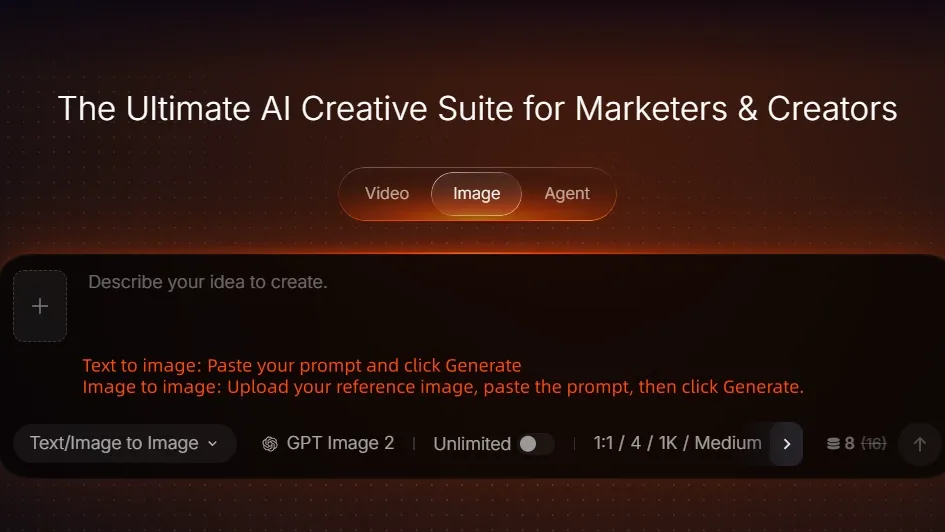
Image Generation Screen
Image Prompt
MAGGIE MILLER CHARACTER REFERENCE:
Create a clean full-body three-view character turnaround sheet of an elderly white American woman named Maggie Miller, shown in three equal panels: front view, side view, and back view.
She is around 70–75 years old, with short soft gray hair, natural wrinkles, a kind but tough face, an average elderly build, slightly rounded shoulders, realistic proportions, and no stylization.
She wears a purple floral long-sleeve blouse, dark navy loose straight-leg pants, and beige walking shoes. Her outfit must be identical in all three views.
Show her standing naturally with relaxed arms, neutral expression, clear face details, realistic skin texture, realistic fabric folds, and true-to-life anatomy.
STYLE:
Photorealistic live-action costume and character reference sheet, not a 3D game render, not cartoon, not anime.
BACKGROUND:
Clean light-gray or off-white studio background, even lighting, sharp details, full body visible from head to toe.
NEGATIVE PROMPT:
No props, no UI, no extra people, no motion blur, no watermark, no text labels, no stylized anatomy.
LINDA HARRIS CHARACTER REFERENCE:
Create a full-body three-view character reference sheet of Linda Harris, a 72-year-old American woman from New York, shown in three vertical panels: front view, left side view, and back view.
Keep the same person fully consistent across all three views.
Linda is an elderly white American woman with a slightly tough, no-nonsense neighborhood personality. She has short silver-gray hair, softly layered and lightly curled, with a practical everyday style. Her face shows age naturally, with visible wrinkles, a mature jawline, and a stern but lively expression.
She wears a dark green knitted cardigan over a plain inner top, straight-cut brown pants, and comfortable walking sneakers. Her outfit should feel like something a retired American woman from New York would realistically wear every day.
BODY TYPE:
Average height, slightly sturdy build, natural elderly proportions. Hands relaxed at her sides, neutral standing pose, full body visible from head to toe in every view.
STYLE:
Photorealistic studio character sheet, clean and realistic.
BACKGROUND:
Plain light gray studio background with soft, even studio lighting.
NEGATIVE PROMPT:
No fancy jewelry, no hat, no sunglasses, no bag, no weapon, no extra props, no UI, no text labels, no watermark, not glamorous, not stylized, not cartoonish.
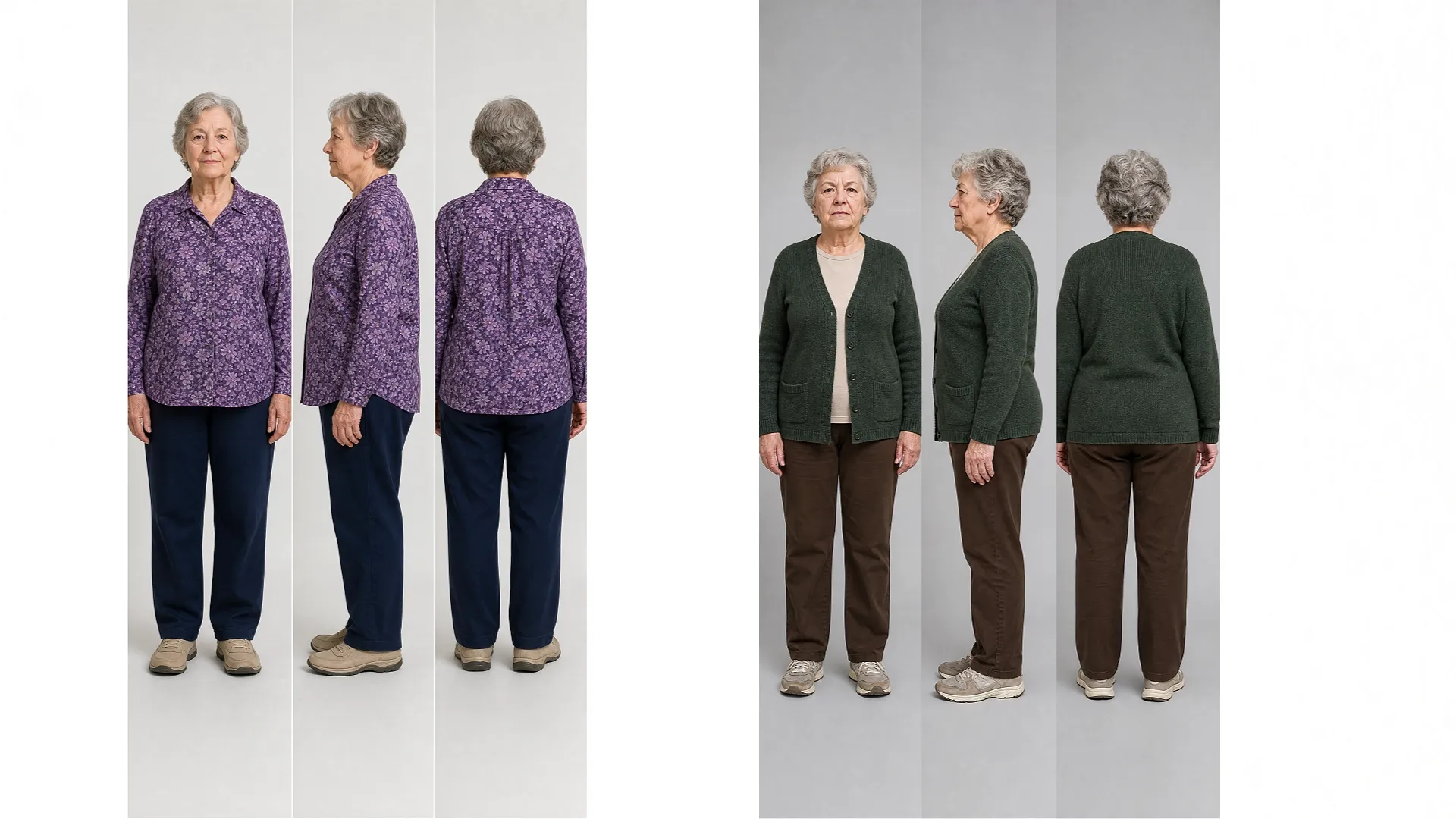
OPENING GAMEPLAY FIRST FRAME
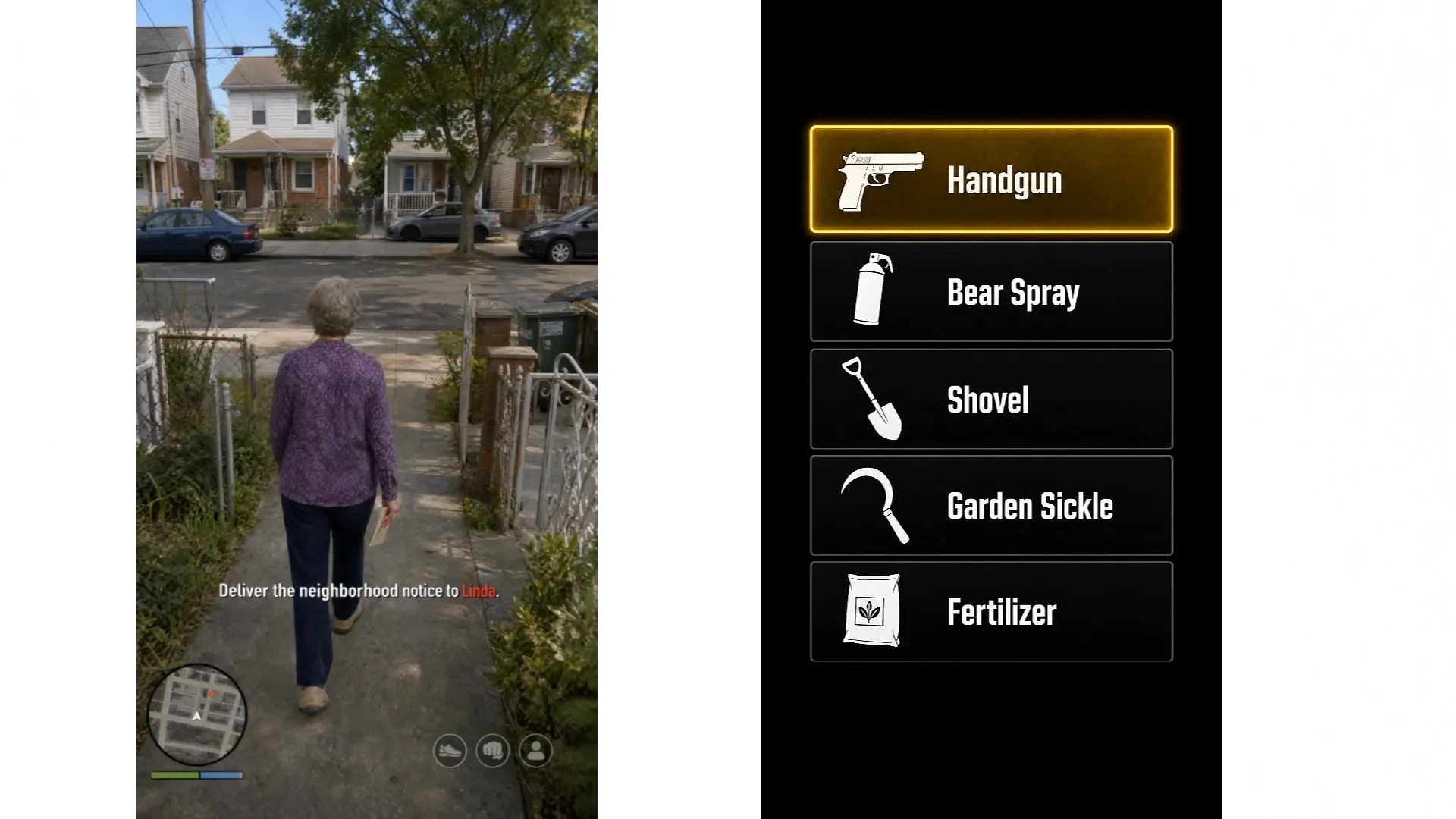
Use the uploaded three-view character reference as the exact identity and appearance reference for Maggie Miller. Create a photorealistic live-action GTA-style gameplay first frame set in a quiet Queens, New York residential neighborhood in daytime.
Maggie is a 74-year-old white American woman with the exact same face, short gray curly hair, body proportions, purple floral long-sleeve button-up shirt, dark navy pants, and beige walking shoes from the reference image. Keep her appearance fully consistent and do not redesign her clothing.
COMPOSITION:
Show Maggie in a classic third-person GTA gameplay camera, viewed from behind and slightly above, full body visible, walking away from her modest house toward the sidewalk and street. She is at the very beginning of the mission and holds a folded neighborhood notice paper naturally in one hand.
ENVIRONMENT:
A realistic Queens residential block with modest two-story brick-and-siding houses, small fenced front yards, concrete front path, sidewalk, parked cars, utility poles, street trees, trash bins, and believable outer-borough New York details.
LIGHTING:
Realistic natural daylight, neutral and soft. No cinematic glow, no dramatic shadows, no fog, no haze.
GAMEPLAY HUD:
Add a clean realistic GTA-inspired gameplay HUD.
Bottom-left: a circular minimap showing a small neighborhood street layout, with a white player arrow and a red destination marker.
Directly below the minimap: compact health/status bars in a GTA-style layout.
Bottom-right: three small semi-transparent circular action icons.
Mission objective text in English: “Deliver the neighborhood notice to Linda.”
HUD LAYOUT CORRECTION:
The mission objective text must be larger, bolder, and more readable. Keep it horizontally centered in the lower center area, but vertically higher than the minimap zone. The text should sit above the overall minimap height level, clearly separated from the bottom HUD cluster.
Keep the sentence white, with “Linda” highlighted in red. The mission text should look like a proper objective HUD element, not a subtitle.
CONTINUITY RULES:
This is the exact opening frame before Maggie reaches the street. No bicycle yet, no cyclist yet, no Linda visible, no weapons, no weapon selection menu, no money counter, no wanted stars, no police, no subtitles, no later-task elements.
NEGATIVE PROMPT:
No Manhattan skyline, no famous landmarks, no luxury mansion, no movie poster look, no concept art look, no misplaced mission text, no mission text beside or on top of the minimap, no UI crowding, no watermark.
WEAPON SELECTION UI ASSET:
Create a clean GTA-style weapon selection UI panel on a solid black background, designed as a standalone overlay asset.
The UI should be a vertical rectangular menu centered on screen, with a sleek semi-realistic game interface style. The menu contains five stacked horizontal selection bars, each with an icon on the left and a weapon or item name in English on the right.
ITEM ORDER:
Handgun
Bear Spray
Shovel
Garden Sickle
Fertilizer
DESIGN DETAILS:
Overall look: realistic modern video game UI, clean, sharp, minimal, slightly cinematic but practical.
Background: pure black.
Menu panel: dark charcoal to black, subtle transparency effect allowed, with soft edge glow.
Each row: dark background with thin borders.
Icons: simple white or light gray item silhouettes on the left.
Text: clean bold sans serif font, white or light gray.
Selected item: highlighted with a bright yellow or golden glowing rectangular border and warm highlight fill.
Unselected items: dark gray or black with no glow.
SELECTION RULE:
Only one menu item can be highlighted at a time. Handgun is the only selected item, highlighted with a bright yellow glowing rectangular border and warm yellow fill. All other items are dark and unselected.
NEGATIVE PROMPT:
No character, no environment, no subtitles, no extra HUD, no decorative clutter, no watermark, no logo.
WEAPON SELECTION UI ASSET:
Create a clean GTA-style weapon selection UI panel on a solid black background, designed as a standalone overlay asset.
The UI should be a vertical rectangular menu centered on screen, with a sleek semi-realistic game interface style. The menu contains five stacked horizontal selection bars, each with an icon on the left and a weapon or item name in English on the right.
ITEM ORDER:
Handgun
Bear Spray
Shovel
Garden Sickle
Fertilizer
DESIGN DETAILS:
Overall look: realistic modern video game UI, clean, sharp, minimal, slightly cinematic but practical.
Background: pure black.
Menu panel: dark charcoal to black, subtle transparency effect allowed, with soft edge glow.
Each row: dark background with thin borders.
Icons: simple white or light gray item silhouettes on the left.
Text: clean bold sans serif font, white or light gray.
Selected item: highlighted with a bright yellow or golden glowing rectangular border and warm highlight fill.
Unselected items: dark gray or black with no glow.
SELECTION RULE:
Only one menu item can be highlighted at a time. Handgun is the only selected item, highlighted with a bright yellow glowing rectangular border and warm yellow fill. All other items are dark and unselected.
NEGATIVE PROMPT:
No character, no environment, no subtitles, no extra HUD, no decorative clutter, no watermark, no logo.
Create GTA-Style Grandma Mission Videos on Pollo AI
Upload your character sheets, first-frame reference, and video prompt to generate a cinematic open-world gameplay scene with consistent characters, HUD, action timing, and mission continuity.
Start Creating Free
Step 2
Once your image is ready, go to Video Generation. Upload your prepared image or pick assets from your Creations library. Select reference-to-video mode and paste your video prompt. You can also upload a video for motion reference.
Note: Add @your-image for image reference and @your-video for video reference inside the prompt. Pick any of these models: Seedance 2.5, Seedance 2.0, MiniMax H3 or Wan 3.0. Click Generate after confirming all settings.
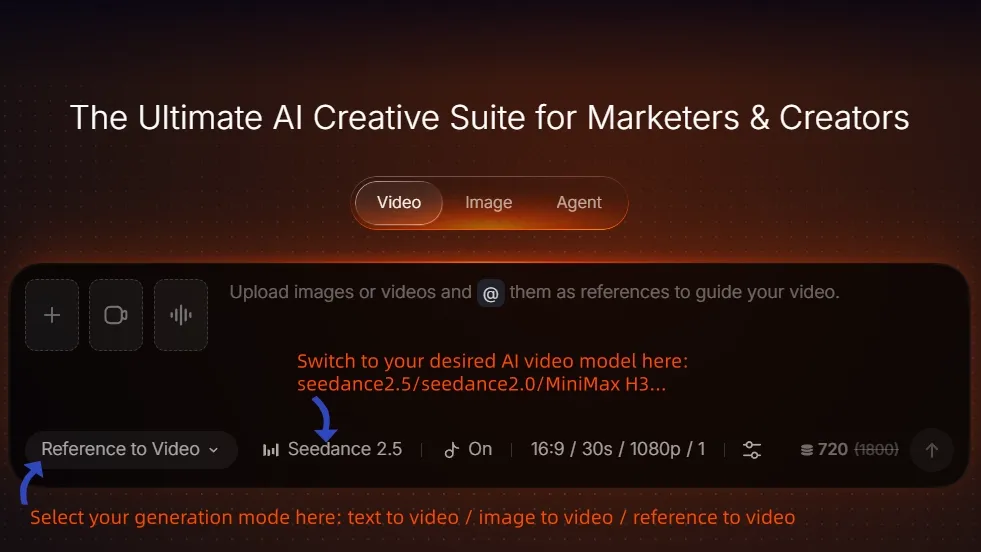
Video Generation Screen
Video Prompt
PART 1: 30-SECOND OPENING MISSION
Create a 30-second vertical 9:16 photorealistic live-action GTA-style gameplay video using the uploaded Maggie character reference as the exact identity and appearance reference for the main character Maggie Miller, the uploaded Linda character reference as the exact identity reference for Linda Harris, and the uploaded opening-frame image as the exact reference for the starting environment, camera framing, and HUD layout.
Set everything in a realistic quiet Queens, New York residential neighborhood. The result must look like real live-action footage with GTA gameplay UI, realistic physics, natural daylight, no animation look, no cinematic haze, no fade transitions.
IDENTITY LOCK:
Preserve Maggie’s exact face, short gray curly hair, elderly body proportions, purple floral long-sleeve shirt, dark navy pants, and beige walking shoes.
Preserve Linda’s exact face, short silver-gray curly hair, dark green cardigan, beige inner shirt, brown pants, and gray-beige sneakers.
Keep both women visually consistent throughout.
STORY ORDER:
Maggie leaves home carrying the neighborhood notice, runs into the street, kicks a male cyclist off his moving bicycle, steals the bicycle, rides to Linda’s house, jumps off the still-moving bicycle without stopping it, the empty bicycle keeps rolling forward by itself, Maggie approaches Linda’s door, throws the neighborhood notice hard at the front door and breaks or damages the door, Linda immediately fires from inside through the damaged doorway, Maggie is not hit, and Maggie rolls sideways behind the adjacent exterior wall for cover.
Do not alter this sequence.
GAMEPLAY HUD:
During gameplay, keep the same HUD structure throughout.
Bottom-left: circular minimap with grayscale neighborhood roads, white player arrow, and red destination marker.
Directly below: compact green and blue status bars.
Bottom-right: exactly three small semi-transparent circular action icons.
Mission objective: “Deliver the neighborhood notice to Linda.” in large bold white GTA-style text, with “Linda” in red.
The mission text must stay horizontally centered in the lower-middle area, clearly higher than the top edge of the minimap, not beside the map, and not touching the bottom edge.
No wanted stars, no money counter, no weapon menu, no subtitles during normal gameplay. HUD elements must not drift or change position between shots.
TIMELINE:
0:00–0:03 — OPENING GAMEPLAY:
Begin from the uploaded first-frame composition. Classic third-person GTA camera several feet behind and slightly above Maggie. Maggie walks away from the narrow front path of her modest Queens house toward the sidewalk and street, holding the folded neighborhood notice in one hand. HUD fully visible. Maggie says naturally, “Alright, let’s get this over with.”
0:03–0:06 — APPROACH THE STREET:
Maggie speeds up into a short jog. Camera stays behind her. A male American cyclist approaches along the street. HUD remains unchanged.
0:06–0:09 — KICK THE CYCLIST OFF:
As the cyclist passes close by, Maggie suddenly delivers a forceful sideways kick, knocking the man completely off the moving bicycle. He falls onto the pavement while the bicycle continues moving. Do not make this an accidental collision and do not make the cyclist stop voluntarily. Use a close GTA-style third-person action angle. Cyclist yells, “Hey! What the hell?!” HUD remains visible.
0:09–0:14 — STEAL THE BICYCLE:
Maggie immediately grabs the exact bicycle, mounts it, and rides away while the cyclist stays behind on the ground. Switch naturally into a third-person bicycle chase camera behind Maggie. The minimap player arrow rotates correctly as she changes direction. Mission objective remains unchanged. Maggie says, “Sorry!”
0:14–0:17 — JUMP OFF WITHOUT STOPPING:
Maggie reaches Linda’s house while the bicycle is still moving. She jumps or steps off immediately without braking, parking, or holding it. She continues walking toward Linda’s house while the riderless bicycle keeps rolling forward by itself for several feet due to momentum. Keep this visual gag clearly visible in the background. HUD stays unchanged.
0:17–0:19 — APPROACH LINDA’S DOOR:
Maggie walks quickly to the front porch or door while still holding the folded neighborhood notice. Third-person camera stays behind her. HUD remains fully visible.
0:19–0:21 — MAGGIE ATTACKS THE DOOR WITH THE NOTICE:
Maggie angrily throws or slams the folded neighborhood notice directly at Linda’s closed front door. The impact is exaggerated in a GTA-style comedic way: the paper strikes the door with surprising force and breaks or damages the door panel, cracking it open or creating a broken opening.
Maggie must use the document itself to hit the door. Do not have her knock politely, ring a bell, kick the door, or simply shout outside.
HUD TRANSITION RULE:
At the exact moment this door-breaking action finishes and the scene shifts into a cinematic reaction, all gameplay HUD disappears completely at once: minimap, health/status bars, mission text, and bottom-right icons all vanish. Only English dialogue subtitles may remain during the cinematic section.
0:21–0:23 — LINDA REACTS FROM INSIDE:
From inside the darker house, Linda is already holding a long gun. She reacts instantly to the broken door. Use a cinematic medium shot from inside or through the damaged doorway. Linda shouts, “Who’s there?!” No gameplay HUD.
0:23–0:27 — LINDA FIRES THROUGH THE BROKEN DOOR:
Linda immediately raises the long gun and fires multiple shots through the damaged doorway toward Maggie’s position. The bullets strike the broken doorframe, exterior wall, porch, and ground around Maggie. Show realistic muzzle flashes, wood splinters, dust, and impact debris.
ABSOLUTE RULE:
Maggie must not be shot or injured. No bullet may hit her body. No blood, no wound, no impact on Maggie. The purpose of the gunfire is to force her into cover, not to hit her.
Maggie yells, “Jesus, Linda!” Linda shouts, “Get off my property!” Use rapid cinematic cuts: Linda firing, muzzle close-up, bullets punching through the broken doorway, impacts around Maggie, Maggie reacting.
0:27–0:30 — MAGGIE ROLLS BEHIND THE WALL:
As Linda continues firing, Maggie immediately drops low and performs a desperate sideways ground roll toward the solid exterior wall beside the doorway, using the wall as cover. She rolls completely out of Linda’s line of fire and ends crouched behind the wall corner.
Bullets continue striking the doorway and wall edge but never hit Maggie. This must be a clear physical dodge and roll, not simply stepping sideways, kneeling in place, or being thrown by a bullet.
End with Maggie safely behind the wall, breathing hard, while Linda remains inside holding the gun. Maggie shouts, “It’s me! Stop shooting!”
ENDING:
End the 30-second video with Maggie safely behind the wall and Linda still inside, naturally setting up the next mission “Calm Linda Down.” Do not show the next mission text yet.
CRITICAL NEGATIVE RULES:
Maggie must never be hit by Linda’s gunfire. No blood, no gunshot wound, no body impact. Linda must fire from inside or through the broken doorway, not walk outside before shooting. Maggie must break or damage the door using the document before Linda fires. Maggie must then roll behind the adjacent wall for cover.
Do not replace the document hit with knocking, ringing the bell, kicking, or punching. Do not change the bicycle theft, the riderless bicycle rolling away, the HUD timing, or the cutscene transition. No police, no wanted stars, no money, no weapon menu, no fertilizer, no Richard, no later mission elements.
PART 2: 10-SECOND CONTINUATION MISSION
Create a 10-second vertical 9:16 photorealistic live-action GTA-style gameplay video continuing directly from the previous mission.
Use the uploaded Maggie character reference as the exact identity and appearance reference for Maggie Miller, use the uploaded Linda character reference as the exact identity reference for Linda Harris, and use the uploaded opening frame as the exact first-frame reference for Maggie’s pose, environment, camera position, and house geometry.
IDENTITY LOCK:
Preserve Maggie’s exact face, short gray curly hair, purple floral long-sleeve shirt, dark navy pants, and beige walking shoes.
Preserve Linda’s exact face, short silver-gray curly hair, dark green cardigan, beige shirt, brown pants, and gray-beige sneakers.
MOST IMPORTANT SPATIAL CONTINUITY:
Maggie begins outside the house exactly where the previous mission ended, sitting or crouched low on the grass with her back against the beige exterior side wall after rolling into cover. Loose neighborhood-notice papers remain on the grass near her.
From this exact camera position, Linda must not be visible at all. Linda is still inside the house behind the same badly damaged front door from the previous mission, but that doorway is located off-screen to the left of the current frame, hidden by the wall corner from Maggie’s current camera angle.
Do not move Linda into the visible background. Do not place her behind Maggie. Do not rotate the house or move the doorway. The viewer should understand that Maggie is hiding around the corner and cannot currently see Linda directly.
The video begins with Maggie and the beige wall dominating the frame. The damaged front door and Linda remain completely outside the left edge of the frame until Maggie attacks with the selected item.
PERMANENT GAMEPLAY HUD:
HUD must be overlaid directly on the live-action footage, with no white background.
Bottom-left: circular grayscale minimap with white player arrow and compact green/blue status bars below.
Bottom-right: exactly three small semi-transparent circular action buttons.
Lower-middle mission objective: “Calm Linda down.” in large bold GTA-style text, horizontally centered and vertically raised above the minimap height. White text with “Linda” in red.
No wanted stars, no money counter.
TIMELINE:
0:00–0:02 — GAMEPLAY RESUMES BEHIND COVER:
Maggie stays low against the same exterior wall, breathing hard after the gunfire. Linda is completely off-screen left and must not appear anywhere in this shot. Maggie cautiously glances toward the left side where the doorway is located but does not expose herself. She says, “Linda, calm down!”
Keep the normal gameplay HUD visible.
SOUND:
Distant traffic, birds, Maggie’s breathing, subtle wood debris settling off-screen, faint gun handling from inside the house.
0:02–0:06 — ITEM-SELECTION UI:
Maggie remains in exactly the same cover position and Linda stays fully off-screen. Overlay a vertical five-item selection menu in the left-center or center-left region of the screen, using semi-transparent dark charcoal panels over the live-action footage, never a full black background. The scene behind the menu remains visible.
EXACT ITEM ORDER:
Handgun
Bear Spray
Shovel
Garden Sickle
Fertilizer
Each row has a white item icon on the left and bold white English text on the right.
Selected row: bright yellow or gold border, soft gold glow, and subtle translucent warm fill.
All unselected rows remain dark gray. Exactly one item is highlighted yellow at a time.
SELECTION TIMING:
0:02–0:02.7 Handgun only yellow.
0:02.7–0:03.4 Bear Spray only yellow.
0:03.4–0:04.1 Shovel only yellow.
0:04.1–0:04.8 Garden Sickle only yellow.
0:04.8–0:05.7 Fertilizer only yellow.
Add a short clean game UI click each time the highlight moves. When Fertilizer becomes selected, Maggie says, “This should do it.” At 0:05.7–0:06, play a stronger confirmation click/chime and instantly close the menu.
IMPORTANT UI RULE:
While the item menu is open, Maggie physically holds no handgun, spray, shovel, sickle, or fertilizer bag. Linda must still remain completely off-screen. The permanent minimap, status bars, right-side buttons, and “Calm Linda down.” objective remain visible behind the menu.
0:06–0:07 — MAGGIE PRODUCES THE FERTILIZER BAG:
Only after the menu disappears does Maggie pull out a small fertilizer or powder bag. She stays low near the wall, then twists her upper body toward the left side of frame, preparing to throw it around the corner. Linda is still not visible yet.
Add bag crinkle, clothing rustle, and foot/grass movement.
0:07–0:08 — THROW TOWARD OFF-SCREEN LINDA:
Maggie suddenly swings and throws the fertilizer bag strongly toward the left, out of the current frame and around the corner toward the hidden doorway. The bag clearly leaves Maggie’s hand and travels off-screen left.
Do not reveal Linda before the bag leaves Maggie’s hand. Keep the camera on Maggie for the first part of the throw so the audience clearly sees the direction.
Immediately after the bag exits frame, the camera performs a fast GTA-style whip-pan/reframe to the left, following the bag’s trajectory around the wall corner.
0:08–0:09.5 — LINDA REVEALED ONLY NOW:
For the first time in this video, the camera reveals the same damaged front door from the previous mission. The wooden door remains in frame with a large irregular jagged hole torn through its center. Linda is still several feet inside the dark interior behind that broken door, holding the long gun.
The thrown fertilizer bag reaches Linda’s position and bursts into a thick greenish-yellow powder cloud through the broken doorway. The powder must visibly arrive from the right side of this new composition, matching Maggie’s throw direction.
Linda recoils, lowers the long gun, coughs, and becomes disoriented/subdued. She shouts, “What the—?!”
Add a strong bag impact, powder burst, Linda coughing, and powder particles hitting wood and floor. Keep the normal gameplay HUD visible during this action.
0:09.5–0:10 — END AND TRANSITION:
The powder cloud begins to spread around Linda inside the doorway. She stops aiming and is no longer attacking. Camera remains on Linda and the broken door for a brief beat, then begins to include Maggie cautiously approaching from the right/off-screen side.
At the exact gameplay-to-cutscene transition, all gameplay HUD disappears instantly: minimap, status bars, three action buttons, and “Calm Linda down.” all vanish together.
Maggie says, “You done shooting now?” Use a clean English subtitle only after the HUD disappears.
STRICT SPATIAL RULES:
Linda is not visible at the beginning. Linda is not visible during the item-selection menu. Linda is not visible when Maggie first pulls out the fertilizer. Linda becomes visible only after Maggie throws the bag toward the left and the camera follows the throw around the corner.
Linda remains at the original damaged front door location from the previous mission. Do not move the doorway into Maggie’s original frame. Do not place Linda in the visible background behind Maggie. Do not create a second doorway. Do not remove the damaged door. Do not change the house geometry.
STRICT STORY/UI RULES:
Normal HUD stays visible during gameplay and under the transparent item menu. Use exactly five menu items in the fixed order: Handgun, Bear Spray, Shovel, Garden Sickle, Fertilizer. Exactly one yellow selection at a time. Fertilizer selected last. Menu closes before the bag appears physically. Maggie throws the bag toward off-screen Linda. Camera reveals Linda only after the throw.
No police, no wanted level, no money, no bicycle, no Richard, no extra characters.
Final Summary
Build a photorealistic vertical GTA-style mission sequence with consistent elderly character references, a grounded Queens neighborhood setting, readable gameplay HUD elements, a bicycle theft action beat, a damaged-door cutscene transition, and a second mission built around item selection and spatial continuity.
This prompt workflow includes character sheets, a first-frame gameplay image, a standalone item UI asset, and two connected video prompts so the scene can stay consistent from reference setup to final video generation.