



How to Create Celebrity Biography Videos with AI (Creative Guide)
There is a reason why biographical documentaries remain a staple of digital media. People are naturally curious about the early lives and defining moments of the icons they follow.
Whether it is a historical leader or a modern-day artist, seeing the progression from a regular background to global recognition provides a level of context that a simple photo cannot capture.
The AI life story of celebrities generator is designed to help you tap into this interest by turning a single name into a cohesive visual timeline. This allows you to share human stories in a high-retention video format that is easy to digest and highly shareable.
What is the Pollo AI Biography Tool?
Pollp AI life story of celebrities tool is a specialized text to video AI engine that synthesizes the visual essence of a persona’s timeline. It doesn’t just show a face; it recreates the environments and atmospheres that defined a celebrity’s different eras.
This technology bridges the gap between imagination and a finished documentary, providing creators with a professional way to showcase the "human side" of fame.
If you want to combine these individual stories into a larger cinematic production, you can easily integrate them using our AI movie maker to build a more comprehensive narrative.
How to Generate a Life Story on Pollo AI?
Step 1: Designate Your Subject
Simply type the name of the celebrity or historical figure you want to feature. The AI analyzes the milestones associated with that name to prepare a visual storyboard.
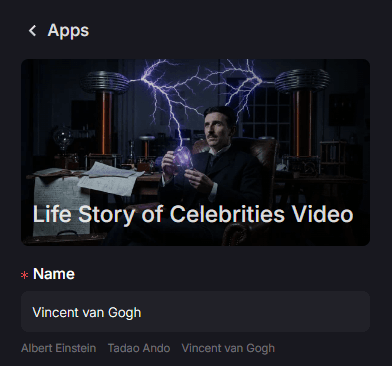
Step 2: Define Your Visual Canvas
Select the aspect ratio that fits the mood and destination of your story and set other parameters.
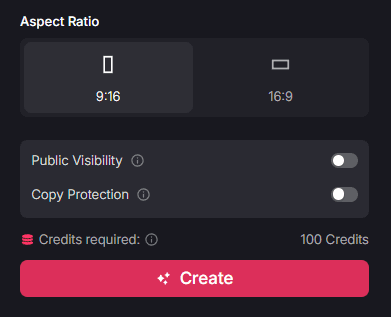
Use 9:16 for fast-paced vertical "Reels" that highlight quick facts and viral moments. Choose 16:9 for a more traditional, cinematic documentary feel on YouTube.
Step 3: Render and Export Your Story
Click "Create" to render the final sequence.
Once the process is finished, download the clip and prepare it for distribution across your social platforms.
Who Can Benefit from Biographical Video Stories?
Visual biographies are a versatile tool for anyone who wants to provide value-driven or educational content to their community.
- Educational Content Creators: Use these clips to supplement lessons on historical figures, making the subject matter more immersive and visually memorable for students.
- Fan Page Managers: Maintain a consistent posting schedule by sharing high-quality tributes during career anniversaries or birthdays of beloved stars.
- Trivia and Fact Accounts: Enhance your "Did You Know" segments with professional visuals that provide context to the facts you are sharing.
- Social Media Managers: Use biographical storytelling as a way to diversify your content feed and spark conversation among followers who are fans of specific icons.
Summary: Making Narrative History Accessible
The AI life story of celebrities tool on Pollo AI provides a straightforward way to transform a simple name into a professional visual timeline.
By automating the visual reconstruction of a person’s life, it allows you to focus on the narrative and the "vibe" of your content without the need for expensive production budgets.
To explore more ways to engage your audience, visit our use cases page to find other specialized apps.
For instance, if you want to transform a specific image of a celebrity into a video using your own custom prompts, try the AI celebrity video generator to create more interactive and personalized character footage.