



How to Create Beautiful Anniversary Videos with AI
Anniversary videos are the ultimate digital gift, turning cherished memories into a living narrative that celebrates a couple's unique journey. Whether it is your first year together or a golden 50th celebration, these videos serve as a timeless record of affection.
This guide will show you exactly how to create beautiful anniversary videos with AI that look professionally edited, helping you capture hearts and spark viral engagement on any platform.
What is an Anniversary Video?
An anniversary video is a curated cinematic presentation designed to commemorate a significant milestone in a relationship. By utilizing a specialized anniversary video maker, you can transform static photos into dynamic scenes with realistic movements and emotional depth.
These AI-generated videos are perfect for private celebrations, romantic social media posts, or as a surprise gift that expresses what words alone cannot.
Key Features of Pollo AI Anniversary Video Maker
Our platform is engineered to handle the delicate nuances of romantic storytelling with high-end technology:
- Image to Video Transformation: Breathe life into your favorite couple photos with smooth, natural-looking animations.
- Atmospheric Audio Generation: Automatically sync soundscapes to your visuals to double the emotional impact of your story.
- Cinematic Style Control: Whether you want a "nostalgic film" look or a "modern romantic" aesthetic, Pollo AI interprets your vision perfectly.
- Multi-Platform Optimization: Easily switch between formats to ensure your love story is ready to share on widescreen displays or vertical mobile feeds.
How to Create a Beautiful Anniversary Video with AI in 3 Steps
You don't need to be a professional filmmaker to produce a masterpiece. Follow these simple steps to generate your high-quality romantic video:
Step 1: Upload Your Couple Photo and Set the Mood
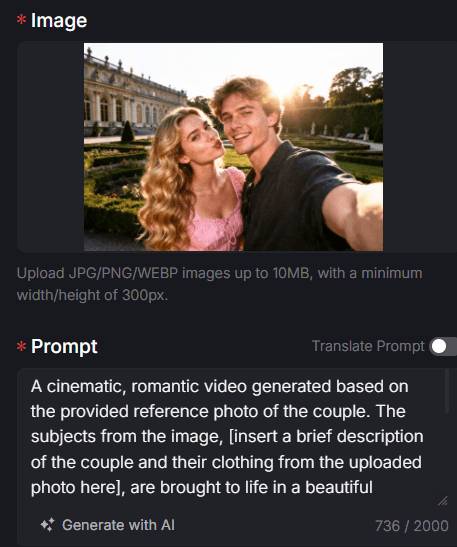
Start by going to the anniversary video maker and upload a high-resolution photo (JPG, PNG, or WEBP). In the Prompt box, describe the romantic scene you want to create.
For example: "A cinematic, romantic video of the couple walking in a sun-drenched garden, soft lens flare, realistic movements, hyper-realistic details."
Step 2: Adjust Audio and Video Specifications
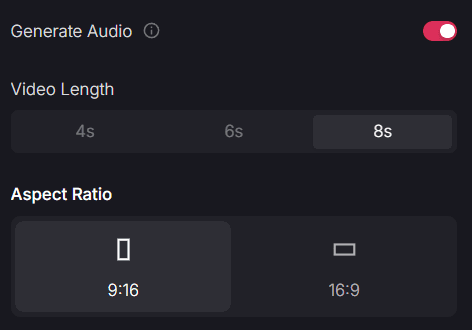
Toggle the "generate audio" switch to ON to add an immersive soundtrack.
Choose your video length (e.g., 8s for a focused, impactful clip) and select the Aspect Ratio. Choose 9:16 for TikTok or Instagram Reels to maximize your viral potential, or 16:9 for a traditional widescreen anniversary presentation at a party.
Step 3: Secure Your Privacy and Render
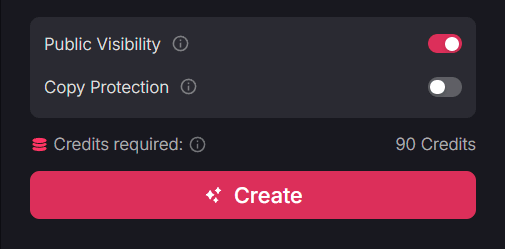
Manage your sharing settings by toggling "public visibility" (ON for community sharing, OFF for private use). Enable "copy protection" to keep your custom prompt logic private.
Once satisfied with the settings, click the pink 'Create' button. The AI will process your request, delivering a professional-grade, high-definition anniversary video in seconds.
Elevate Your Story with More Pollo Apps
A complete celebration often involves more than just one clip. Explore our other specialized apps to enhance your creative workflow:
- Capture Family Joy: Use our family video maker to include footage of children or extended family in your anniversary narrative.
- Artistic Romance: Transform your date-night photos into stylized art with the AI cartoon video generator, adding a playful and unique twist to your gift.
- Dignified Tributes: If you are creating a look-back at a couple's entire legacy, our tribute video maker provides the perfect tone for long-term commemorative stories.
Final Thoughts
A beautiful anniversary video is more than just a collection of pixels; it is a digital legacy of your love. By mastering how to create beautiful anniversary videos with AI, you can save time on editing while achieving results that were once only possible in a studio.
Pollo AI is here to ensure that every milestone is celebrated with the beauty and dignity it deserves. Visit Pollo AI now and start turning your love story into a cinematic legend!