



How to Create Stunning Real Estate Videos with AI (Step-by-Step Guide)
Video has become a standard requirement for property marketing because it gives potential buyers a better sense of a home's layout.
For many agents, hiring a professional video crew for every listing is not always a practical expense.
Using AI to generate property videos from existing photos or listing links allows you to maintain a consistent posting schedule.
Sharing these tours on platforms like Instagram and Facebook is a direct way to reach more viewers and grow a professional following.
Key Features of the Pollo AI real estate video maker
Pollo AI real estate video maker is built to help professionals produce property tours without needing advanced editing skills.
By converting static assets into motion, the tool helps you create a more engaging experience for potential buyers.
Feature-Driven Highlighting
The tool identifies the most attractive parts of your property and emphasizes them in the video. This creates a highlight-heavy presentation that allows customers to precisely understand the home’s unique selling points—like a luxury kitchen or a scenic view—making the listing much more attractive and memorable.
Elegant Background Music
The tool automatically generates sophisticated background music tailored to the mood of your property. This elegant soundtrack completes the professional atmosphere of your video, making it feel more cohesive and emotionally engaging, which helps attract more high-value clients.
Photo-to-Video Animation
Rather than static slideshows, the AI analyzes your photos to create dynamic clips with natural camera movements like pans and tilts. This simulates the feeling of a physical walkthrough, helping viewers visualize themselves in the space.
High-Definition Cinematic Export
Every video is rendered with professional-grade lighting and clarity. Whether the final content is viewed on a mobile phone or a large monitor, the high-resolution output ensures the property looks polished and authoritative.
How to Create Real Estate Videos on Pollo AI?
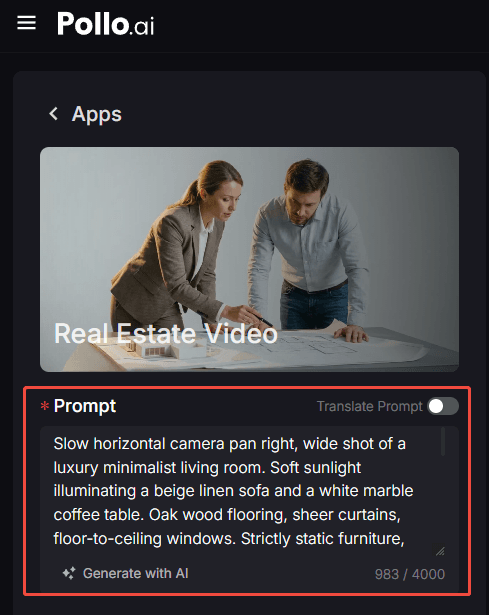
Step 1: Upload Property Photos or Describe the Scene
Visit the real estate video maker page. Upload the photos of the house or write a text description that highlights the home's key selling points.
Step 2: Select Ratio and Duration
Choose the aspect ratio based on where you plan to share the video, and define the length of the video.
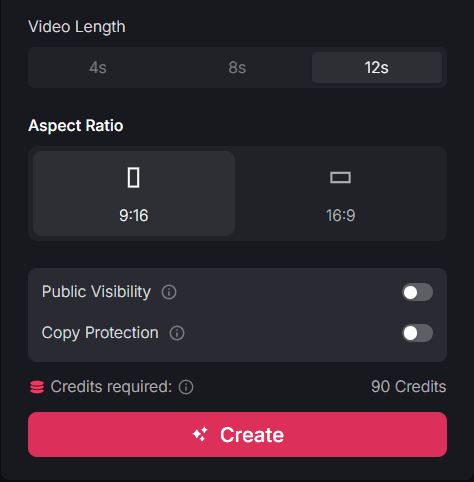
Step 3: Generate and Share
Click "Create" to render the final video. Once the process is finished, download the file or share to your social media platform.
Target Users and Use Cases
The real estate video maker is a practical resource for anyone who needs to show off a property's best features quickly and effectively.
- Real Estate Agents: High-quality video tours help agents stand out in a crowded market and build local authority. By posting these clips to platforms like Instagram or Facebook, agents can increase their listing visibility and attract new followers who are actively looking for local properties.
- Property Managers: Showcasing a rental unit's amenities through video allows managers to pre-qualify tenants before they even book a visit. This reduces the time spent on unnecessary in-person viewings while keeping their social media accounts active with a consistent stream of fresh content.
- Interior Designers: Designers can use the tool to create a visual journey of their projects. Turning portfolio photos into high-resolution videos is a practical way to show the flow of a room and demonstrate their expertise to potential clients browsing social media.
- Home Sellers: For individuals selling their own homes, a simple video highlight reel is more likely to get shared in local community groups or Facebook Marketplace. This increased visibility helps build social proof and find a buyer faster than a standard photo listing.
Summary
The real estate video maker of Pollo AI offers a straightforward way to manage property marketing. To further grow your reach and professional brand, you can use other tools in the ecosystem, such as UGC ads for creating relatable client testimonials or the PPT video maker to turn market reports into narrated video presentations.