



How to Create Viral ‘Working Cat’ Videos with AI
Pet-themed content is often considered the "ultimate cheat code" for visibility in social platforms. The "working cat" videos portray felines in relatable human professional roles. These videos achieve high retention rates by combining the natural appeal of animals with everyday situational humor.
Pollo AI’s working cat video maker allows you to generate these high-impact clips instantly. This guide explores how to leverage this technology to capture audience attention and expand your digital reach.
What is the Pollo AI working cat video maker?
The working cat video maker on Pollo AI is a generative tool designed to place various cat breeds into customized professional settings.
The AI ensures that the feline-to-environment interaction looks fluid and realistic, whether the cat is typing on a keyboard, wearing a chef’s hat, or inspecting a blueprint.
This tool is ideal for creators who need to maintain a high-volume posting schedule of original, funny content for platforms like TikTok and Instagram Reels.
If you are interested in exploring different artistic styles beyond professional settings, our AI cat video generator offers additional creative options for your feline projects.
How to Create Working Cat Videos on Pollo AI?
Step 1: Describe Your Cat’s Appearance & Scene
Briefly describe the breed, color, and appearance you would like to generate for the cat in the Appearance box.
In the Scene box, enter the work scenario you wish to generate.
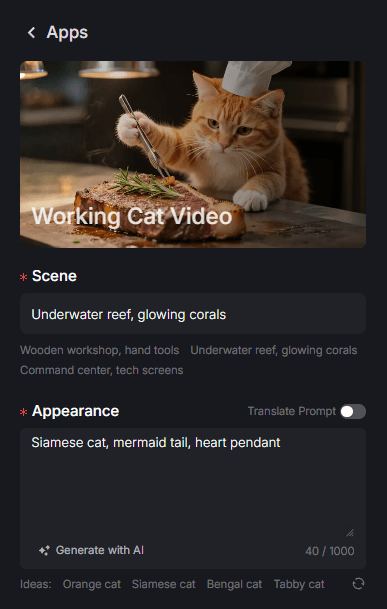
Step 2: Adjust Other Parameters
Choose the aspect ratio between 16:9 and 9:16, and set other parameters like Public Visibility
Copy Protection.
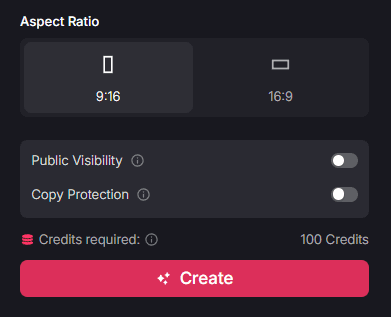
Step 3: Render and Get Your Lovely Working Cat Video
Click "Create" to begin the rendering process. After a short wait, your high-definition clip will be ready for download and distribution.
Target Users: Who Can Benefit from Working Cat Videos?
The ability to produce high-quality pet humor is a versatile resource for any creator looking to capitalize on the massive global interest in animal content.
- Pet Influencers: Add a creative twist to your pet’s profile by showcasing them in various career paths. This variety keeps your content fresh and encourages followers to return for new "episodes."
- Meme Account Owners: Speed is essential in the meme world. Use AI to generate original clips that tap into current trends, allowing you to be the first to post high-quality content that drives shares and comments.
- Small Business Owners: Introducing a "cat employee" is a lighthearted way to humanize your brand. It makes your company feel more approachable and gives you a unique way to promote your services or office culture.
- Digital Marketers: If you need to boost engagement on platforms like Instagram or LinkedIn, relatable office-themed humor is an effective way to break the ice. For high-energy sports-themed clips, you can also explore the animal olympics video maker to diversify your content strategy.
Summary: Professionalism with Zero Barriers
Even if you have no previous editing experience, you can start your working cat video project on Pollo AI to produce the kind of adorable and funny content that consistently trends worldwide.
To further expand your creative capabilities, visit Pollo AI apps page to discover more specialized apps. From high-converting ads to the video meme maker, we provide everything you need to build a dominant digital presence today.