



How to Make Personalized Birthday Videos with AI
Posting the perfect birthday update on social media often feels like a production in itself. Usually, you may need a professional setup or a dozen takes just to get one usable shot.
The birthday video maker on Pollo AI changes this dynamic by allowing you to use your existing photos as the foundation for a cinematic celebration.
By combining a personal image with AI-generated effects, you can create high-impact birthday content for your feed without needing any extra equipment or a dedicated film crew.
What is Pollo AI Birthday Video Maker?
Instead of just adding a filter, Pollo AI birthday video maker uses your uploaded photo and a short text description to synthesize a dynamic scene. This image to video AI app feature helps breathe life into static birthday portraits.
It handles complex elements like lighting, movement, and festive atmosphere, allowing you to turn a simple selfie into a professional-grade video highlight for your special day.
How to Create Personalized Birthday Videos on Pollo AI?
Step 1: Upload Your Photo and Describe the Scene
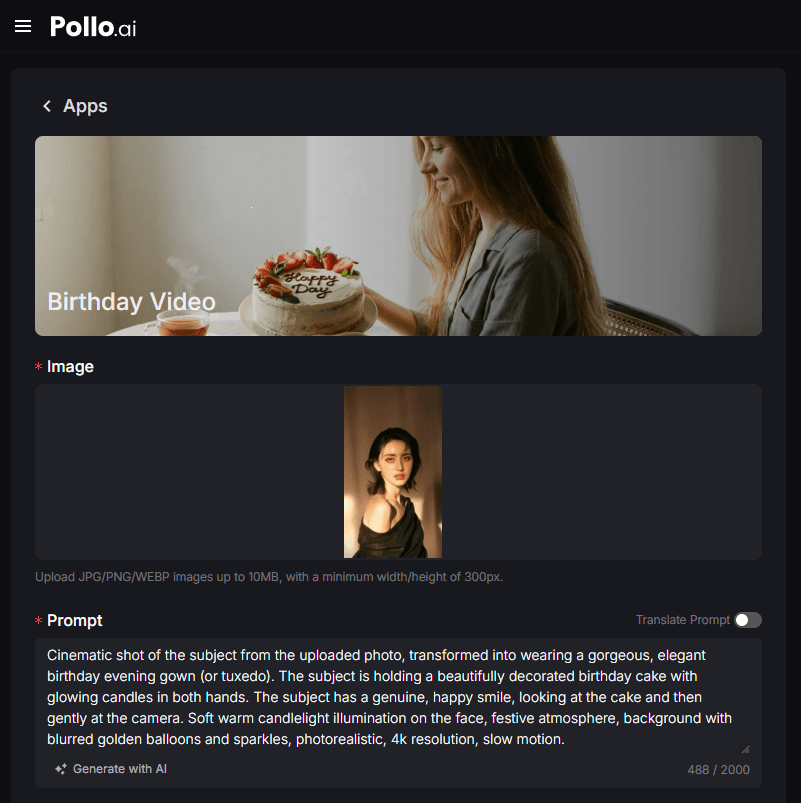
Start by uploading a clear photo of the birthday star. In the prompt field, describe the "vibe" or setting you want to achieve.
Step 2: Configure Technical Settings
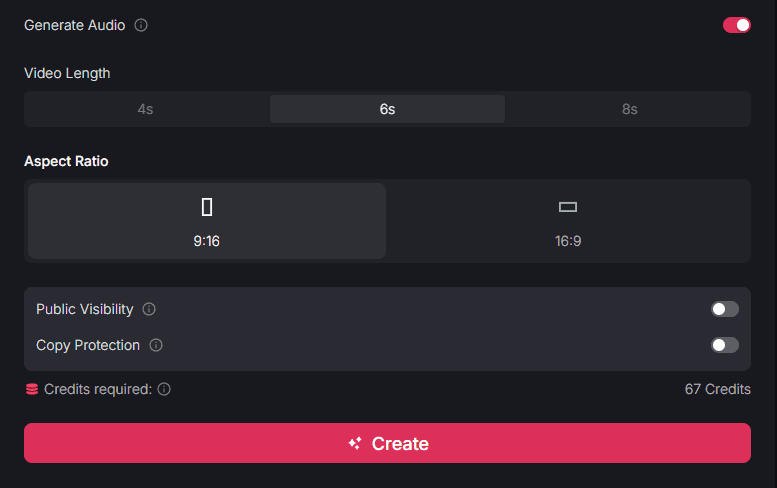
Select your desired video duration (4s, 6s, or 8s) and toggle the Audio option if you want a festive background track. Choose the 9:16 ratio for TikTok/Reels or 16:9 for widescreen.
Step 3: Render and Save Your Birthday Video
Once your settings are finalized, click "Create." Let AI process your image and prompt to deliver a high-definition birthday video ready for your feed.
Key features of the birthday video maker
To help your birthday posts stand out, the tool includes several professional settings that give you full control over the final output:
- Image-Centric Synthesis: The AI maintains the likeness of the person in the photo while seamlessly integrating them into a newly generated environment.
- Flexible Duration Control: Choose between 4, 6, or 8 seconds to match the pacing of your specific social media story or post.
- Integrated Audio Toggle: You can choose to generate a video with a festive soundscape included, making the content ready to share instantly.
Who can benefit from personalized birthday videos?
This tool is specifically designed for anyone who wants to elevate their personal brand or social media presence during a celebration:
- Social Media Influencers: Generate high-quality birthday "announcement" videos without the need for a professional photographer or studio space.
- Personal Branding Enthusiasts: Use your existing favorite photos to create a "premium" birthday post that reflects your aesthetic and style.
- Busy Professionals: Quickly create a polished celebration video for yourself or a colleague using a simple headshot and a brief description.
Streamline Your Content with Other Pollo AI Apps
To further enhance your celebration content and scale your digital presence, you can explore other specialized tools within the Pollo ecosystem:
- Holiday Branding: If you want to maintain this high-quality visual style throughout the year, the Christmas video maker offers the same image-driven ease for holiday posts.
- Thematic Variety: For different creative needs, visit the Pollo apps page to find tools for everything from gaming intros to narrative storytelling.
Conclusion
Using Pollo AI birthday video maker is a practical solution for anyone looking to share high-quality birthday content on social media. By utilizing your own photos as the starting point, you can generate cinematic results that would otherwise require professional equipment. It is an efficient way to celebrate your milestones while maintaining a premium digital image.