



How to Use Gemini 4 Argon to Create Cinematic Videos (Step-by-Step Guide)
I spent 16 hours with the Gemini 4 Argon workflow and found its edge is not direct rendering—it is high-fidelity video understanding and shot planning. This guide covers model selection, cinematic Gemini 4 Argon prompts, references, camera direction, first-cut refinement, and Pollo MCP.
TL;DR: How to Create Cinematic AI Videos with Gemini 4
To create cinematic videos with Gemini 4 Argon, select it as the main thinking model in Pollo Agent, ask it for a shot plan, then the agent will render and refine the scenes. Argon handles reasoning and video understanding; it is not the direct image or video renderer.
How to Use Gemini 4 Argon on Pollo Agent
The steps below put that workflow first so you can start creating before reading the background.
Step 1: Select Gemini 4 Argon and Set the Brief
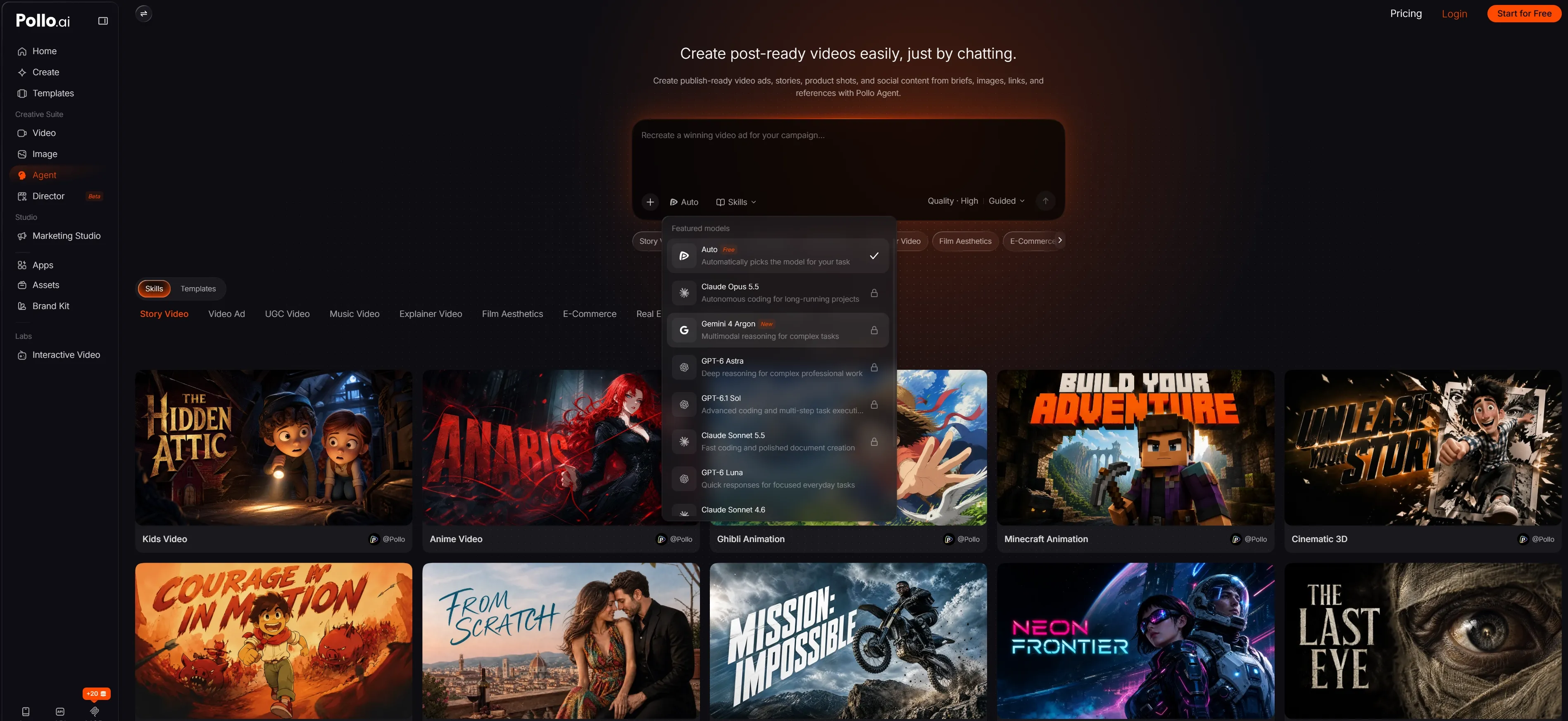
Pick Your Model: Open Pollo Agent. Below the input box, click the default Auto and select Gemini 4 Argon.
Feed the Brief: Provide your core goal, continuity rules, 1–3 reference assets, output format, and negative constraints.
Step 2: Write the Prompt and Add Control
A strong prompt reads like a shot list. Use Subject + Setting + Action + Camera Movement + Framing + Lighting + Timing + Continuity + Negative Constraints. Attach a product image for shape, a character frame for identity, a mood frame for lighting, or a source video for motion - each reference should have one job.
Prompt Example: Product Reveal
Create a 15-second cinematic product reveal for a matte-black skincare bottle on wet volcanic stone. 0-4s: macro close-up of water beads. 4-10s: slow dolly right as warm sunrise light crosses the label. 10-15s: gentle push-in to a clean hero frame with negative space for copy. Use shallow depth of field, charcoal and amber grading, realistic reflections, and stable product continuity. No extra logos, misspelled text, subtitles, watermark, or sudden shake.
Prompt Example: Image-to-Video Scene
Use the uploaded image as the exact character and costume reference. Create a 10-second vertical shot in which the character walks through light rain under neon signage. Begin with a static medium shot, then arc slowly left to right. Preserve face, jacket, silhouette, and palette. No face drift, extra fingers, duplicate subject, invented readable signage, or watermark.
Step 3: Generate, Review, and Refine
Click the arrow icon to generate your videos.
Here is my rapid-refinement checklist to avoid wasting credits:
- Generate the shortest useful version first.
- Review the entire motion, not just a single attractive frame.
- Ask Argon to audit the result for identity, camera path, and unwanted artifacts.
- If it fails, change only one variable at a time (action, then reference, then camera).
- Only extend the clip or add transitions if your last frame is perfectly stable.
Turn Ideas Into Polished Videos
Bring your brief, references, and camera ideas into Pollo Agent to plan and create cinematic videos with less manual work.
Try Pollo Agent for Free
What Makes Gemini 4 Argon Useful for Cinematic Video?
Google positions Gemini 4 Argon as a flagship reasoning and agent model. Its current documentation lists text, image, video, audio, and PDF inputs; video understanding is supported, while image generation is not. In practice, Argon is useful for shot order, continuity, pacing, visual logic, and targeted revisions.
It also supports a unified 1,048,576-token context window and low, medium, and high thinking levels. Use that context for a screenplay, character bible, reference frames, previous cut, and feedback without repeating every rule.
| Argon Capability | Current Documentation | Practical Video Use |
|---|---|---|
| Inputs | Text, image, video, audio, PDF | Analyze briefs, references, scripts, and cuts |
| Output | Text | Write shot plans, prompts, critiques, and revisions |
| Context | 1,048,576-token unified limit | Keep long project rules in one working context |
| Video understanding | Agentic video understanding supported | Review pacing, continuity, and deviations |
| Image generation | Not supported | Use a compatible Pollo generator for frames |
I treat Argon as the director's brain, not the camera. That distinction keeps expectations realistic and makes the workflow easier to debug.
Why Use Pollo Agent for This Gemini 4 Argon Workflow?
Pollo Agent is the orchestration layer that turns Argon's reasoning into a usable media workflow. Instead of copying a shot plan into multiple tools, you can ask the Agent to structure the idea, route the visual generation, review the result, and continue refining the same project.
The important difference is the output goal. Pollo Agent is built to move from a raw idea, script, image, or URL toward a structured, production-ready video with pacing, visuals, and audio handled in one workflow. Argon improves the thinking; Pollo Agent helps carry that thinking through to a post-ready result.
- Model flexibility: choose the reasoning model that fits the brief and check the displayed credit consumption before generation.
- Generation plus refinement: use compatible text-to-video or image-to-video tools, then review and revise without rebuilding the project elsewhere.
- Camera and motion control: direct pan, tilt, zoom, orbit, dolly, or performance movement where the selected tool supports it.
- Finishing workflow: add transitions, motion, audio, or effects after the core footage works instead of hiding weak shots under decoration.
Pollo MCP: Create Images and Videos in Claude or ChatGPT
If your creative workflow already lives inside Claude, ChatGPT, or Cursor, you don't need to switch tabs to use Gemini 4 Argon. With Pollo MCP, you can connect your preferred assistant directly to Pollo's media engine.
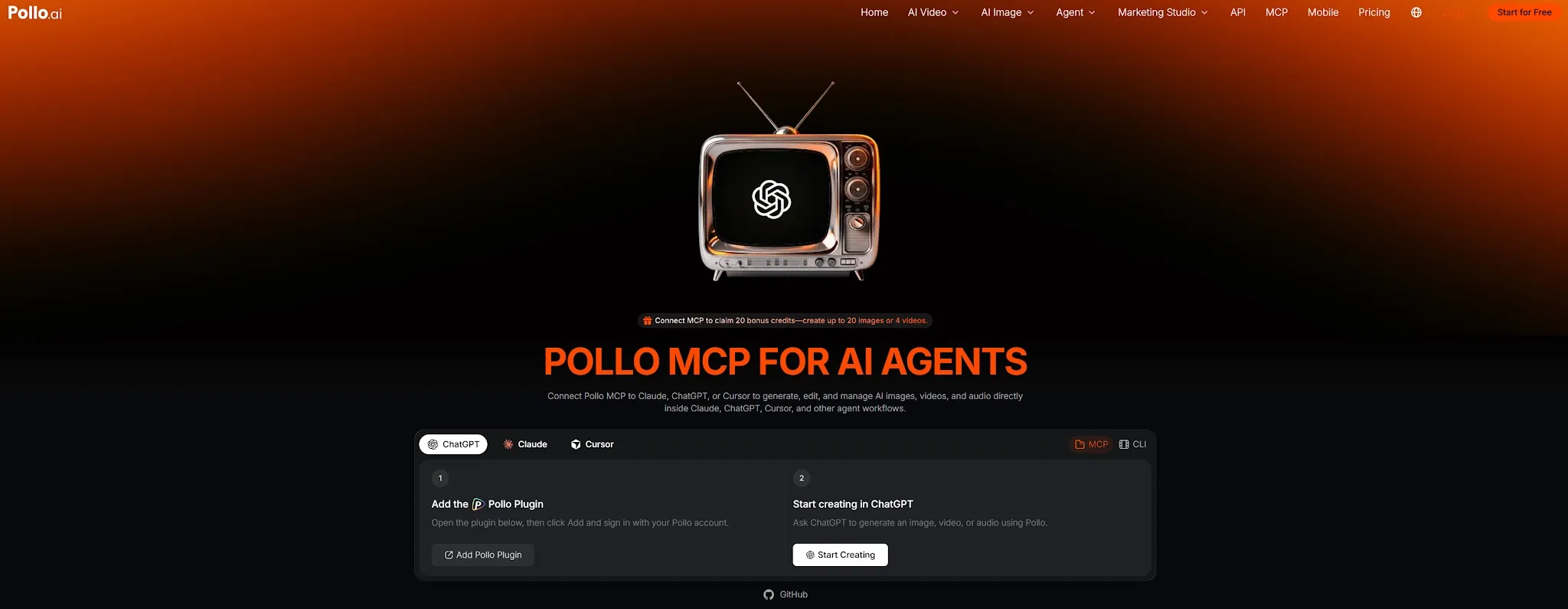
Simply ask Claude or ChatGPT to brainstorm your script, structure an Argon-optimized shot list, and immediately trigger image or video generation through Pollo in the same chat thread. It keeps your narrative context, asset links, and prompt revisions in one place while Pollo handles the heavy visual rendering behind the scenes.
Real-World Applications of Gemini 4 Argon
Argon becomes most useful when a video contains several connected decisions rather than one isolated visual.
| Use Case | How Argon Helps | Pollo Output Path |
|---|---|---|
| Product launch films | Turns product facts and references into a timed reveal | Render a hero sequence, then add camera movement and transitions |
| Short narrative scenes | Tracks character, setting, emotion, and continuity | Use reference-to-video or image-to-video with simple action |
| Social campaign variants | Adapts one concept for 9:16, 1:1, and 16:9 | Render channel variants and finish with motion or effects |
| Explainers and reports | Breaks dense source material into visual beats | Combine generated scenes with captions or a voice workflow |
| Storyboard and previs | Converts a script into shot order and camera language | Create fast visual references before final production |
The commercial benefit is fewer ambiguous handoffs: a marketer approves shot logic before spending credits, a creator preserves a character bible, and a seller keeps product details stable while testing scenes.
Common Mistakes and Pro Tips for Creating Videos with Gemini 4 Argon
- Do not treat Argon as the renderer. It is a reasoning model with text output; use a compatible Pollo video model for the frames.
- Write a shot, not a mood. Replace 'make it epic' with a subject, movement, speed, lighting, and ending frame.
- Keep actions simple. One product cannot rotate, transform, explode, and change locations cleanly in one short shot.
- Assign each reference one role. Conflicting references create drift instead of cinematic consistency.
- Use negative constraints. Say no subtitles, no watermark, no invented logos, no duplicate people, and no unwanted music when the output must stay clean.
- Change one variable at a time. Revise the action before replacing the reference, and the reference before changing the camera move.
- Check credits before batches. The Model Preferences panel shows the current consumption information available to your account.
Summary
Gemini 4 Argon is best used as the reasoning layer for cinematic video, not as a standalone video renderer. Select it in Pollo Agent's Model Preferences, ask for a shot plan, approve the continuity and camera logic, then let a compatible Pollo video model render the scene.
Keep the first shot simple, use references with clear roles, and refine one variable at a time. When you want an all-in-one workflow from idea to production-ready video, start with Pollo Agent.
FAQs about Gemini 4 Argon
Can Gemini 4 Argon generate videos directly?
No. Google's current model page lists video as an input, text as the output, and image generation as unsupported. Use Argon for planning and review, then use a compatible Pollo agent for rendering.
How do I select Gemini 4 Argon in Pollo Agent?
Open Pollo Agent, click Auto Match or Auto below the input box, open Model Preferences, and choose Gemini 4 Argon from the available list. Review the description and displayed credit consumption first.
What prompt format works best?
Use subject, setting, action, camera movement, framing, lighting, timing, continuity rules, and negative constraints. Ask Argon to turn the brief into a shot list before rendering.
Should I use text-to-video or image-to-video?
Use text-to-video to explore an idea. Use image-to-video when identity, product shape, costume, or composition must stay close to a reference.
Can Argon analyze an existing video?
Yes. Google's documentation lists video input and agentic video understanding. Ask it to review pacing, continuity, camera intent, and deviations from the brief.