



How to Use MiniMax H3 Max: A Guide to Faster AI Video Generation
Soon after I hit ‘generate’ on MiniMax H3 Max for the first time, I knew it would be the perfect AI video model for creative ideation and experimentation. Its rendering speed is truly next-level at just 30s for a 15s 768p video; I was stunned! So, for those of you who are still new to it, let’s take a deep dive into how you can use it and get the most out of it, shall we?
TL;DR
At just 13s for a 5-second 768p clip and 30s for a 15-second 768p clip, you can use MiniMax H3 Max for rapid text-to-video and image-to-video generation. At this level of speed, it's perfect for previsualization, storyboarding, and concept development, allowing you to test multiple ideas and make more creative decisions in a flash. You can start using it on Pollo AI now for free!
Practical Uses & Benefits of MiniMax H3 Max: At a Glance
Because of MiniMax H3 Max’s lightning inference times, I see it as a must-use tool for rendering short-form drafts, which opens up many creative possibilities. So, let’s sum up the how and why:
| Practical Use | How to Use MiniMax H3 Max | Key Benefit |
|---|---|---|
| Concept exploration | Turn campaign ideas, scripts, mood boards, or creative briefs into short video concepts. | Test more ideas in less time before choosing a final direction. |
| Product advertising | Animate product images into commercials, launch videos, social ads, and promo clips. | Create polished product variations without organizing a full shoot for every concept. |
| Image-to-video animation | Bring product photography, character art, fashion images, and storyboard frames to life. | Preserve an approved visual while adding movement, camera motion, and atmosphere. |
| Storyboarding and previsualization | Convert scenes, shot descriptions, and action sequences into moving references. | Help directors, cinematographers, and clients understand timing, composition, and camera movement before production. |
| Social-media content | Produce short vertical videos, event teasers, promotional posts, and platform-specific variations. | Respond quickly to trends, launches, and time-sensitive campaigns. |
| Audio-visual prototyping | Generate dialogue, ambience, sound effects, and music alongside the visuals. | Evaluate the emotional impact and timing of a scene in one draft. |
What You Need To Understand About MiniMax H3 Max
What I find so fascinating about MiniMax H3 Max is that it’s not just another AI video model that trades everything for speed. Optimized by fal.ai, this new variant has a faster inference engine and has received a large amount of post-training data targeting both adherence and aesthetics.
In fact, I carried out several tests using MiniMax H3 Max, Seedance 2.5 and Wan 3.0. The results I got from them were mind-blowing. With Seedance 2.5, I could generate a 15s video in around 5m49s. Sounds fairly reasonable, right?
For Wan 3.0, it took about 7m24s to get the same video output. Not so fast. But when it came to MiniMax H3 Max, it handled the entire generation in just under 30s! Now, it’s easier than ever to test ideas and take more creative risks because we can iterate them in record time.
And since MiniMax H3 Max is built to be more prompt-faithful than the base MiniMax H3, the outputs are a bit more predictable. But keep in mind that there are also a few limitations with this AI video model.
For one, rendered clips are capped at 15s max duration. I found this quite frustrating because it means I can’t rely on MiniMax H3 Max as a final production option. What’s more? It only supports 480p and 768p outputs, which eliminates cinematic-level detail.
Plus, it only supports text to video and image to video generation. So, it doesn’t offer as much directorial control compared to MiniMax H3, which includes audio and video inputs. Read our what is MiniMax H3 Max article for a closer look at its features.
Having said that, let’s dig into how you can start using MiniMax H3 Max today, shall we?
MiniMax H3 Max: Text-to-Video Generation
Like the base MiniMax H3 model, you can use prompts to direct aspects like subject, setting, action, camera, style, timing, and sound. And while this new variant boasts improved prompt following that makes it easier to get an accurate result, it also means that you need to be more intentional with your instructions. For instance, you can craft a short brief like this one below:
Prompt:
10s, 16:9, 24fps. Photorealistic gritty nighttime fashion/automotive footage outside a small convenience store after midnight. 14mm extreme-wide lens, subtle fisheye distortion, handheld chest/eye-level camera; spontaneous underground car-meet feel, not polished commercial.
Two young women: a platinum-haired woman in an oversized charcoal hooded jacket, calm and confident, looking into the camera and adjusting her hood; a curly-haired woman in an oversized brown top, playful, approaching the lens, touching her lips and running her hands through bouncing curls.
Two modified low street coupes behind them: metallic silver and graphite gray. Consistent geometry, reflections and details. Fluorescent storefronts and parking lamps provide realistic mixed warm/cool lighting.
Fast beat-synced cuts: close portrait → wide car shot → curly-haired close-up → graphite car → hood adjustment → both cars → hair movement. At 7.5s, electric-blue flash frame, then pure black to end. No text/logos. Natural skin, shadows, focus breathing, motion blur, hand tremor, rolling shutter: original 96 BPM instrumental, deep bass, punchy drums, no vocals.
Output Video:
This is a strong prompt because it gives clear visual direction, explains character actions, sets camera behavior, states the timing to follow, specifies sound design, and what errors to avoid. Seeing how MiniMax H3 Max delivered such a coherent and realistic result, I can’t complain.
Another approach is to use timestamp prompting. This is my personal preference because it lets me specify how each moment in my footage should be handled. Here’s a good example of how script to video looks in action:
Prompt:
12s, 16:9, one continuous intimate portrait shot. Young female adult close to fixed front-facing camera, upper chest-up, tiny handheld drift. Extreme photographic negative: skin is rendered nearly black with cyan/blue edge detail; hair and shirt luminous icy white. Soft cyan-gray textured wall, dark doorway left. Low-res compressed look, grain, sensor noise, motion blur, exposure breathing.
[00–01] Hands near cheeks, direct uncanny gaze, loose hair across face.
[01–03] Hands lower; head turns slightly, returns center; hair briefly covers eye.
[03–05] Centered portrait; eye movements, blink, chin lift, subtle expression shift.
[05–07] Gentle head tilt and return; shoulders still, natural hair physics.
[07–09] Hands reenter beside jaw/neck, relaxed five-finger anatomy, pause.
[09–10] Slight profile, strand crossing face.
[10–12] Return center, hands exit; quiet direct gaze.
No cuts, zoom, text, logos, glitches. Dark 128-BPM electronic pulse, sub-bass, reversed textures, faint hiss, atmospheric final swell, no vocals.
Output Video:
Rather than describing a long sequence, I have found this helps MiniMax H3 Max maintain chronology and pacing. Nothing frustrates me more than when an AI model fills in the blanks randomly; the outputs become far less predictable. But as you can see above, the model nailed every beat; when choreography and directorial precision are necessary, I say be time-specific.
MiniMax H3 Max: Image-to-Video Generation
For image-to-video, I like that MiniMax H3 Max offers first and last-frame referencing, which makes it easy to set how the scene starts and ends. After using this model several times, I will say that it works well when you simply need it to preserve identity and composition in AI videos.
But it can be a little unpredictable if you ask for a major image transformation. So, I suggest focusing on controlled motion and specifying which parts of the still should remain preserved, be it face, clothing, lighting, etc., like in the animated video below:
Prompt:
Maintain the exact ink-wash illustration style, delicate brushwork, monochrome palette, expressive linework, and soft paper texture. A curious kitten gently plays with a small puddle of water, carefully reaching forward with one paw to tap the surface. It keeps punching the puddle harder, creating huge expanding ripples and lively splashes. After watching intently, the kitten leans in to drink from the water, then shakes its fur vigorously, flinging droplets into the air in a playful, calm, whimsical scene.
| Ref Image | Output Video |
|---|---|
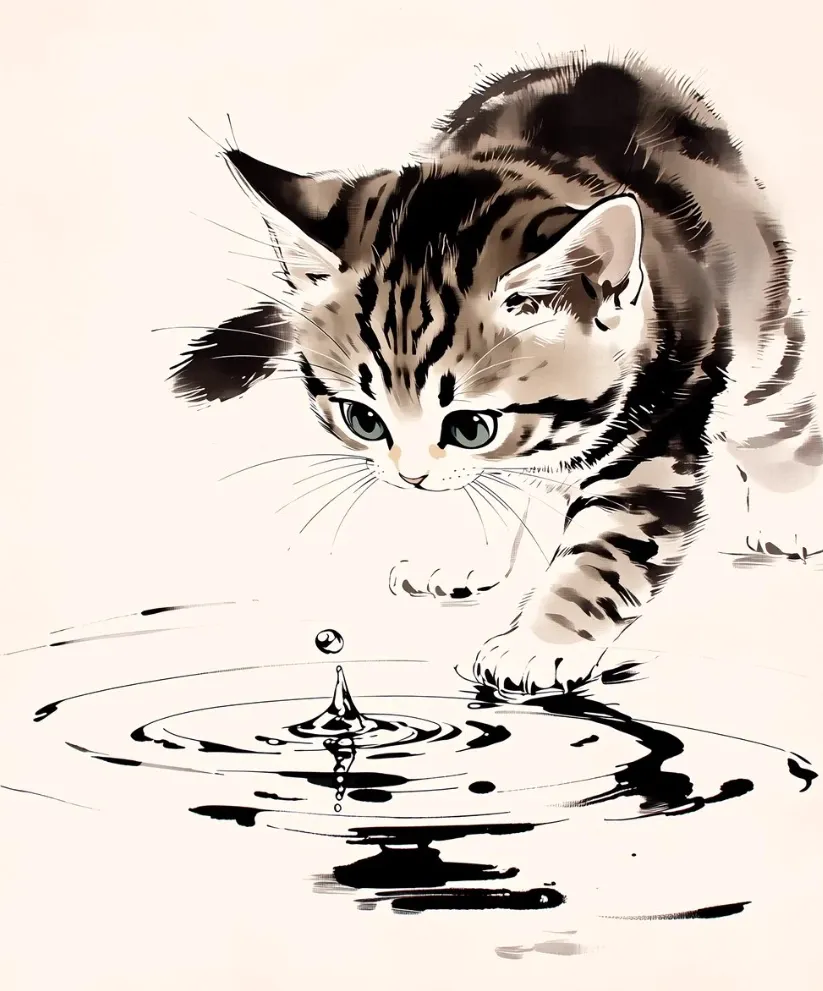 |
This is a result I was quite pleased with. It shows what MiniMax H3 Max can do well within the constraints of a source image, even without any complex motion instructions. And while it did alter the composition a little in the video, it’s a solid example of what works with this AI model.
As I said before, timestamp prompts are great for handling detailed/complex scenes. I also recommend them with reference images because you can direct specific character motions and time them perfectly for a more stable and consistent sequence. For example, I wanted to render a hyper realistic video, and this is how I went about it:
Prompt:
Use the supplied image as exact starting point; preserve barbarian woman, giant skeletal smoke creature, scale, costumes, lighting, cavern. 14-second live-action musical in sweeping theatrical gothic-romantic 1980s fantasy-film style: practical effects, real actress, animatronic suit, torchlight, 35mm grain. Passionate, sincere, slightly funny.
0.0–1.8s: Intimate side-profile two-shot, slow push-in, eye contact as score swells.
1.8–3.6s: Woman close-up sings:
3.6–5.4s: Creature close-up replies:
5.4–7.2s: Wide tableau, they step closer.
7.2–9.6s: Romantic close-ups, duet:
9.6–11.8s: Sweeping tracking arc.
11.8–14.0s: Final wide then push-in; together: Creature near-falsetto; she rests forehead on its skull.
No audio.
| Ref Image | Output Video |
|---|---|
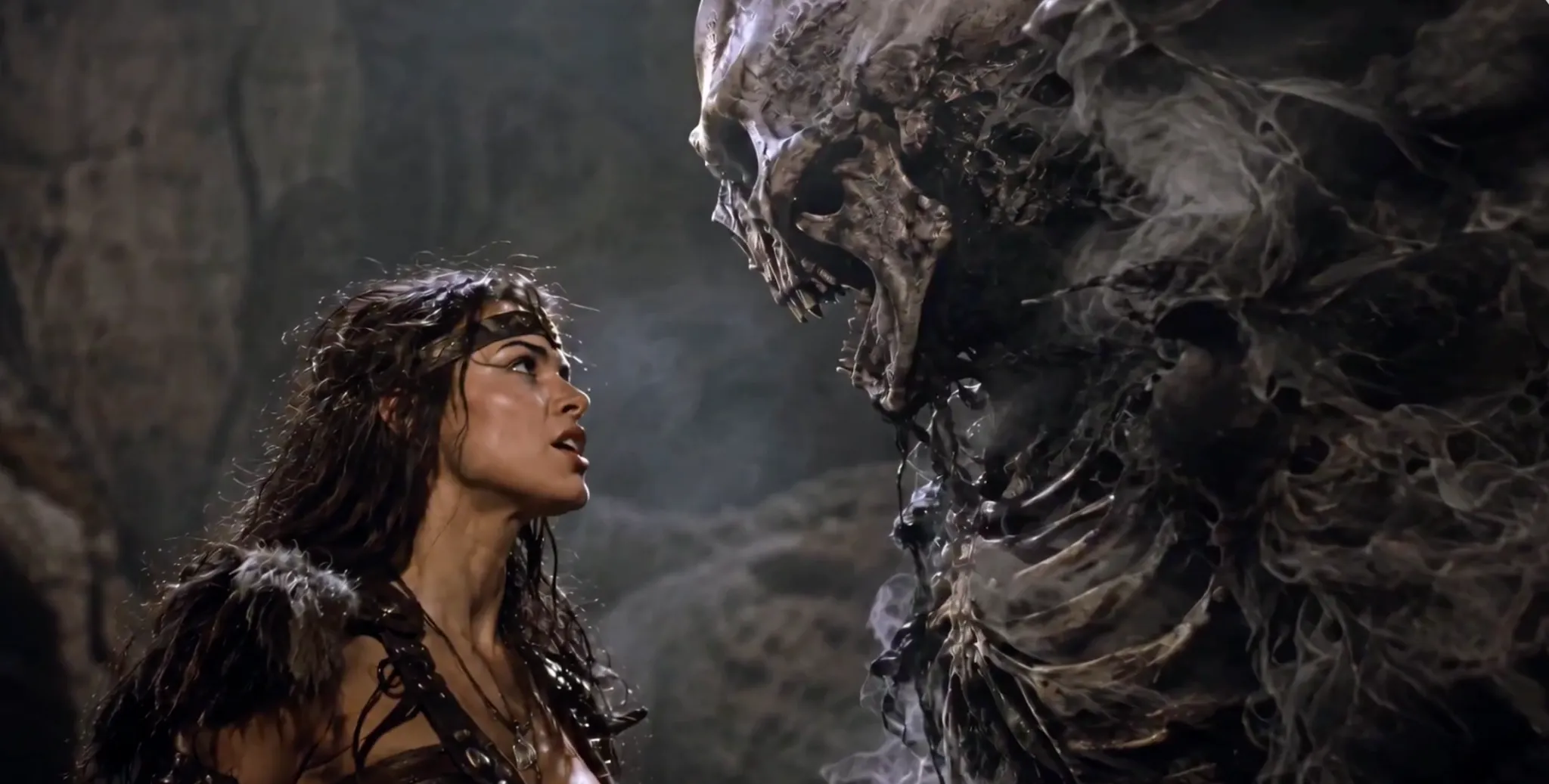 |
I’ll say it again: with image-to-video generation, just describe contained transformations that don’t drastically go against the original reference. In this case, I’m pleased with how MiniMax H3 Max did a great job of vocalizing the characters and rendering realistic movements that fit the subjects. Even with multiple camera shots, it delivered a visually consistent result.
You can also read our MiniMax H3 Max prompt guide to learn how to get better results through prompting.
Creative Use Cases to Consider for MiniMax H3 Max
I think any creative professional will love using MiniMax H3 Max. Its incredible rendering speed and capacity to maintain strong prompt adherence and visual aesthetics let me constantly create and iterate, making it easier to compare several visual directions in no time.
In this sense, I’m confident that it will prove useful in several ways for different users across multiple industries and niches. Some of these include:
- Advertising/Product Marketing: I would recommend MiniMax H3 Max to product teams looking to test rough concepts and ideas. With a simple product image, you can rapidly experiment with product shots, lifestyle scenes, UGC video ads, etc.
- Film/Ad Storyboarding: I often find it hard to determine the right shot, lighting or setting for a scene, and I’m sure any real director or cinematographer can relate. Using MiniMax H3 Max, you can test any theory you have in mind almost in real time before production.
- Animation/Game Development: We’ve seen how MiniMax H3 Max performs when animating images, so I’m sure it can be perfect for bringing any sort of character art to life. You can rapidly prototype film trailers, fantasy scenes, game combat clips, etc.
- Music/Performance Videos: From my experience, dialogue on MiniMax H3 Max can be a bit iffy, depending on the scene, but its capacity to sync character motion with audio is solid. In this sense, I think it can be great for visualizing dance routines with music.
Try MiniMax H3 Max Free on Pollo AI Now
Power Your Next Video With MiniMax H3 Max on Pollo AI.
Start Creating Free
Creating with MiniMax H3 Max: Use Pollo AI to Get Started
Now that I’ve given you the lowdown on how to use MiniMax H3 Max, let’s get into where you can and should be using it: Pollo AI! This is where I turn to for my video creation, and it’s because the platform makes my life so much easier.

As the ultimate AI creative suite for marketers and creators, I have full access not just to MiniMax H3 Max but to dozens of other leading models in one place. Whether it be Wan 3.0, Seedance 2.5, or Veo 3.1, this platform has me covered.
What’s more, I can turn to Pollo Agent if I have a rough concept in mind that I need help with. As an iterative tool, it automates visuals, pacing, audio, etc; no manual editing needed! I can get publish-ready designs like posters, flyers, creative video generations like video ads, story videos, and other marketing assets in minutes.
Better yet, it also has a Marketing Studio that I like using to create unique brand and social content, like cloning viral videos, product listing image sets, unboxing clips, etc. Just head to Pollo AI and you’ll see it all for yourself: a near-limitless range of tools and features!
FAQs about using MiniMax H3 Max
What is the best place to access MiniMax H3 Max?
Pollo AI is the best way to use MiniMax H3 Max. The interface is fast, seamless, and it’s integrated with leading AI models, including Seedance 2.5, Wan 3.0, and Kling 3.0. This lets you swiftly generate videos and switch between models to explore the best outputs.
How fast can MiniMax H3 Max generate videos?
Based on our tests, MiniMax H3 Max can render 480p 5-second videos in about 13s, 10-second videos in around 15s, and 15-second videos in roughly 19s. As for 768p, 5-second videos take about 15s, 10-second videos take around 19s, and 15-second videos take roughly 30s.
Which is better: text or image-to-video with MiniMax H3 Max?
With text-to-video, you can be a bit more imaginative, but the outputs may require multiple iterations to match your vision. Luckily, MiniMax H3 Max is incredibly fast. With image-to-video, you can get more predictable results, but the transformations you can make are limited.
How should I write a prompt for MiniMax H3 Max?
Describe the subject, physical action, setting, camera movement, lighting, pacing, and sound. But avoid broad descriptions like dramatic or cinematic; be precise, like a close-up pan from the woman to the man. For more precise outputs, try using timestamp prompting to set the scene.
Can MiniMax H3 Max generate native audio?
Yes. You can natively generate dialogue, sound effects, background music, and ambience with the video. But I strongly recommend using timestamp prompting in such cases. This ensures better control of pacing and synchronization of dialogue delivery and/or sound across shots.
What are MiniMax H3 Max’s limitations?
It only supports 480p and 768p resolution. On top of that, it lacks broad multimodal control like audio and video referencing. Plus, it can only render 15-second videos max, which makes it more tailored to short-form videos than full cinematic production.