



How to Use Seedance 2.5 for Polished Video (Step-by-Step Guide)
Seedance 2.5 pushes AI video creation further with longer generation, expanded reference inputs, stronger editing, and more precise prompt control.
This guide walks you through each step of generating high-quality videos with Seedance 2.5, from setting the parameters to writing timestamp-based prompts, adding references, refining the output, and exporting a cleaner final clip.
TL;DR
If you want the shortest route, open the Pollo AI image to video page and choose Seedance 2.5 from the model dropdown. Add a reference image or prompt, write timestamp-based scene directions, generate your first clip, then refine or extend it. Seedance 2.5 is especially useful for 30-second cinematic clips, larger reference sets, cleaner extensions, and clearer negative instructions.
What Makes Seedance 2.5 Different?
Seedance 2.5 is not just a small quality bump. The upgrade is mainly about control: longer output, more reference inputs, clearer extension, better multilingual generation, and fewer defects like duplicate-looking people.
| Area | Previous Spec | Seedance 2.5 Upgrade | Why It Matters |
|---|---|---|---|
| Duration | 15 seconds | 30 seconds | Better for ads, short stories, and complete visual beats |
| Image references | 9 images | 30 images | Stronger character, product, and scene consistency |
| Video references | 3 videos | 10 videos | More room for motion, camera, and style examples |
| Audio references | 3 audio clips | 10 audio clips | Better rhythm, mood, and multilingual scene support |
| Editing and extension | More limited | Improved editing and clearer continuation | Less blur after three consecutive extensions |
| Prompt control | Less precise | Better negative and timestamp instruction response | Easier to say "no subtitles," "no BGM," or plan timed beats |
| Compliance | More risk | Reduced celebrity/IP face fitting and platform watermarks | Safer for commercial and publish-ready content |
Longer 30-Second Generation
Seedance 2.5 extends the generation length from 15 seconds to 30 seconds. That extra time matters for story beats, product reveals, and social videos that need a real beginning, middle, and ending.
Larger Reference Capacity
Seedance 2.5 expands reference inputs from 9 images, 3 videos, and 3 audio clips to 30 images, 10 videos, and 10 audio clips. This is a major upgrade if you care about consistent products, characters, outfits, lighting, or motion style.
Better Editing and Video Extension
Seedance 2.5 improves video editing and continuation, which matters when a good clip needs more screen time. The key promise is that even after three consecutive extensions, the video should not become obviously blurry.
Stronger Prompt and Timestamp Control
Seedance 2.5 responds better to negative instructions and timestamp-style directions, making it easier to control pacing and unwanted elements. Prompts like "no subtitles," "no BGM," and "0-5s / 5-20s / 20-30s" should be more useful than before.
Safer Commercial Output
Seedance 2.5 reduces celebrity-face fitting, IP-character resemblance, and built-in platform watermarks. That makes it better suited for brand-safe production when you use original subjects and clean constraints.
Try Seedance 2.5 Free on Pollo AI Now
Join 10M+ creators using Pollo AI to generate scroll-stopping videos and images — all in one place, ready in seconds.
Start Creating Free
How to Use Seedance 2.5: Step-by-Step Walkthrough
Step 1: Select Seedance 2.5 and Set Your Preferred Parameters
Start from Pollo AI image to video page and choose Seedance 2.5 as your video model. This is the quickest path because you can generate, review, refine, extend, and polish the same clip without moving between separate tools.
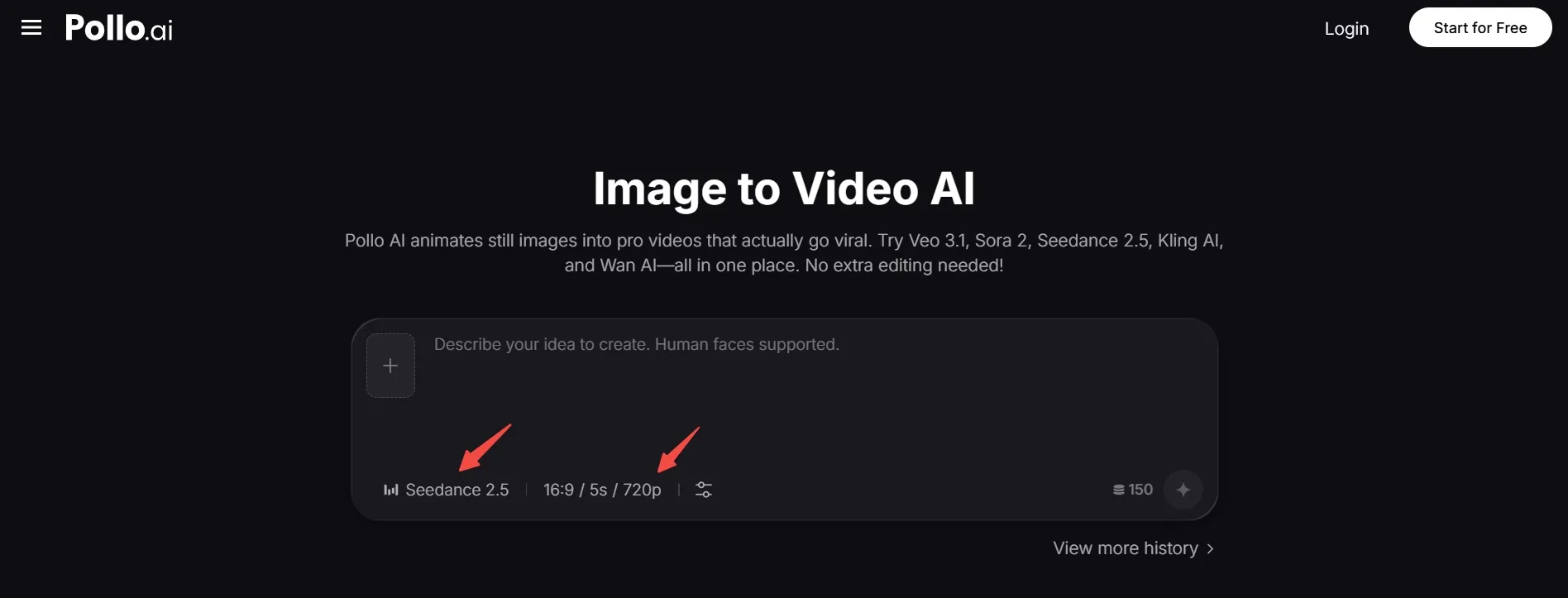
Next, set your basic video parameters before writing the full prompt. Choose the aspect ratio, video length, and resolution based on where the final clip will be used, such as 16:9 for YouTube or website videos, 9:16 for TikTok, Reels, or Shorts, and 1:1 for square posts.
You can also open the settings panel to adjust output number, generate audio, web search, seed, and public visibility. Keep the first run simple, then change one setting at a time once you know how Seedance 2.5 responds to your image and prompt.
If you are building with an integration instead of the web interface, check the Seedance 2.5 API guide for access details.
Step 2: Write a Timestamp-Based Prompt
A strong Seedance 2.5 prompt should describe the video as a timed scene, not a static image.
Use this formula:
Subject + Action + Timing + Camera Movement + Lighting + Reference Rules + Negative Constraints
For 30-second videos, break the prompt into timestamp beats:
- 0-5s: establish the subject and location.
- 5-20s: show the main action or transformation.
- 20-30s: land on the emotional, product, or story payoff.
For more examples, see these Seedance 2.5 best prompts. Start with this structure before trying more complex prompts.
Prompt Example
This prompt uses 30-second generation, timestamp control, consistency rules, and negative instructions.
“Create a 30-second cinematic short drama scene on a quiet train platform at blue hour. 0-5s: wide establishing shot of a young woman in a beige coat holding an old letter. 5-20s: slowly track toward her as train lights appear in the distance. 20-30s: move to a close-up as she smiles with relief. Use soft cool lighting, subtle wind, realistic motion, and emotional film color grading. Keep her face and outfit consistent. No subtitles, no BGM, no platform watermark, no duplicate people, and no sudden scene changes.”
The trick is to describe motion over time, not just the look. "A cinematic train station" describes a look; "the camera tracks toward her as train lights appear" gives Seedance 2.5 an actual shot to generate.
Step 3: Add References for Better Control
Add references when the subject, scene, or motion needs to stay consistent across the full clip. Seedance 2.5 supports far more references than before, but every uploaded asset should have a clear purpose.
| Reference Type | Use It For | Example Instruction |
|---|---|---|
| Product image | Shape, material, label, color | "Keep the bottle design identical" |
| Character image | Face, outfit, identity | "Keep the same face and beige coat" |
| Mood frame | Lighting and color style | "Use this cool blue-hour mood" |
| Video reference | Motion or camera style | "Follow this slow tracking movement" |
| Audio reference | Rhythm or emotional pacing | "Match the pacing, but add no BGM" |
Avoid mixing references that disagree with each other. If one reference shows a bright studio look, and another shows a dark cinematic street scene, the result may become visually confusing.
Step 4: Generate and Review the First Output
Generate the first version, then check whether it follows the brief. A useful output should follow timing, preserve the subject, respect references, and avoid unwanted elements.
At this point, look at the generated clip as a whole instead of judging one still frame. The finished video below gives you a simple reference for checking timing, subject consistency, camera movement, and overall visual polish.
Review these five points:
- Subject consistency: face, outfit, product shape, or character design.
- Motion quality: no broken limbs, strange jumps, or unnatural action.
- Timing: the clip follows the 0-5s, 5-20s, and 20-30s structure.
- Clean output: no unwanted subtitles, BGM, watermarks, or duplicate people.
- Extension readiness: the final frame is stable enough to continue.
If the result is close but not right, change one thing at a time. Adjust the action, camera move, reference, or negative prompt instead of rewriting the whole prompt at once.
Step 5: Refine, Extend, and Export
Use refinement after the main idea works. Seedance 2.5 improves editing and continuation, so it is better suited for extending a strong clip without obvious quality loss.
Refine in this order:
- Clarify the prompt if the model misunderstood the action.
- Replace references if the subject drifts.
- Strengthen negative instructions if subtitles, BGM, watermarks, or duplicate people appear.
- Extend only after the last frame looks stable.
- Export once the clip is clean enough for your platform.
Inside Pollo AI, this workflow stays simple: generate with Seedance 2.5, refine motion, add transitions, make small edits, and prepare the final clip without switching tools or rebuilding the project elsewhere.
Try Seedance 2.5 Free on Pollo AI Now
From concept to creation, Pollo AI helps you generate stunning visuals and videos faster than ever.
Start Creating FreeBest Use Cases for Seedance 2.5
Seedance 2.5 works best for videos that need more time to tell a complete visual story, stronger reference consistency across subjects or scenes, and more precise timed direction for camera movement, action, and final framing.
| Use Case | Why Seedance 2.5 Fits |
|---|---|
| Cinematic product ads | 30-second generation gives enough room for setup, movement, and a clean hero shot |
| Short drama or story clips | Timestamp prompts help control the beginning, middle, and ending of a scene |
| Creator videos and social reels | Expanded references help keep the person, outfit, and scene style consistent |
| Travel and lifestyle scenes | Better continuation helps extend scenic shots without obvious blur |
| Multilingual brand content | Improved multilingual generation makes global campaign variations easier |
| Reference-heavy visual concepts | 30 images, 10 videos, and 10 audio clips give more room for style and motion control |
For a deeper scenario breakdown, see these Seedance 2.5 best use cases.
Advanced Tips for Better Generated Results
Strong Seedance 2.5 results come from controlled direction, not longer prompts. Add detail only when it helps the model understand timing, motion, references, or constraints that affect the final video.
Use timestamp prompts for 30-second clips.
Seedance 2.5 can follow a clearer scene rhythm when the prompt separates setup, main action, and ending frame.
Assign each reference one role.
One image can define the character, one can define the product, one video can define motion, and one audio clip can define pacing.
Write negative instructions clearly.
Use phrases like no subtitles, no BGM, no platform watermark, no celebrity face, no IP character, and no duplicate people when the output needs to stay clean.
Common Mistakes to Avoid When Using Seedance 2.5
The main mistake is asking Seedance 2.5 to solve an unclear creative brief. Better model control helps, but it does not replace direction, especially when the clip includes references or timing.
Avoid these mistakes:
- Asking for too many actions in one clip.
- Mixing references with conflicting styles.
- Writing vague camera language like "make it epic."
- Forgetting negative instructions like "no subtitles," "no BGM," or "no watermark."
- Depending on the tiny readable text inside the video.
- Asking for celebrity faces, famous IP characters, or platform-style watermarks.
- Generating 30 seconds when the idea only needs 8.
- Revising the prompt, references, and camera move all at once.
Be careful with hands, complex object interactions, repeated background characters, and very fast motion. Physics-heavy scenes still need simple blocking.
Start Creating with Seedance 2.5 on Pollo AI
Seedance 2.5 is worth trying if you want longer clips, stronger reference consistency, cleaner extension, and better control over what should not appear in your final video output or campaign asset.
Try Seedance 2.5 on Pollo AI to get more than model access. Pollo AI lets you generate the first clip, test text-to-video and image-to-video inputs, refine motion, apply transitions, and make small edits within a single creative workflow.
The best way to understand the experience is to try it yourself. Instead of generating a clip and moving to separate tools, Pollo AI lets you continue with refinements, video extensions, motion adjustments, and final polishing in the same workflow.
Seedance 2.5 FAQs
Is Seedance 2.5 available on Pollo AI?
Seedance 2.5 is available on Pollo AI for users who want to test it inside a full video creation workflow. If it does not appear in your model menu yet, use Seedance 2.0 to prepare your prompt structure first.
How long can Seedance 2.5 videos be?
Seedance 2.5 extends the generation length from 15 seconds to 30 seconds. Test shorter clips first, then expand once the style and motion are stable.
Can I use reference images with Seedance 2.5?
Yes. Seedance 2.5 expands reference capacity to 30 images, 10 videos, and 10 audio clips. Give each reference a clear role instead of uploading random assets.
What prompts work best for Seedance 2.5?
Structured prompts work best. Use subject, action, timing, camera movement, lighting, reference rules, and negative constraints.
Is Seedance 2.5 good for ads?
Yes, especially for product hero shots, UGC-style story ads, branded videos, and short campaign assets. Pair it with Pollo AI's motion, transition, and editing tools for a more publish-ready workflow.