Owned by Bytedance, CapCut is an AI video editor that strikes a balance between one-click automation and manual control. It automates scriptwriting and offers AI avatars, scene templates, and more. It allows users to make and edit short-form videos like TikToks, Reels, and Shorts. But if you want to avoid template-based rigid results or short videos, switch to Pollo AI which offers 70+ AI video models, AI avatar, and 100+ workflow apps for more flexible and reliable creation. Try Pollo AI for free now!
One upload in. Your viral video out. Unlimited rewards await.
Pollo Agent x DeepSeek V4.1 FLASH
Faster completion at a much lower cost.
Pollo Agent x Gemini 4 Argon
Smarter reasoning. All through Pollo Agent.
WIN iPHONE DUO
Capture a city in one minute. Join the challenge now.
Pollo MCP
End-to-end content creation. Up to 4 Videos/ 20 Images for FREE.
Key Features of CapCut
Instant AI Video Generation: Produce ready-to-share videos using text-to-video in minutes
CapCut AI Brainstorming: Skip creative blocks with automated scriptwriting and storyboard outlines
Advanced AI Video Editor: Access AI editing controls for more detailed video refinement
Media-to-Script Matching: Upload multiple videos and a script to craft a tailored visual narrative
Stock Media & Template Library: Use stock media and AI video templates for quick video creation
AI Talking Avatars: Browse 100+ digital avatars or create a digital clone to produce presenter videos
Instant AI Video Generation
CapCut lets users produce full visual narratives in minutes by inputting a descriptive text prompt of the idea or an existing script. Even with no prior editing experience, all it takes is one-click for anyone to get a polished, ready-to-share video with the scriptwriting, storyboard structure, pacing, and visuals, all handled automatically.
CapCut AI Brainstorming
With CapCut, users can turn basic ideas into fully developed video topics, scripts, and storyboard outlines in just a few clicks. This allows brands, marketers, and online creators to skip over creative blocks and planning stages for faster iteration, making it easier to nail down a clear direction across all video projects.
Advanced AI Video Editor
CapCut offers smart AI editing tools that help users tailor and refine their videos with professional-grade results in just a few simple clicks, creating opportunities for branded content. Even as a beginner, you can effortlessly customize scenes by adding intros, outros, captions, visual effects, transitions, background music, voiceovers, and more.
Media-to-Script Matching
CapCut enables users to upload multiple existing videos and a script, allowing anyone to create a custom visual narrative with just one click. The AI automatically matches these scenes with the flow of the written script, while also providing access to AI voiceovers for narration, helping you skip hours of manual video editing.
Stock Media & Template Library
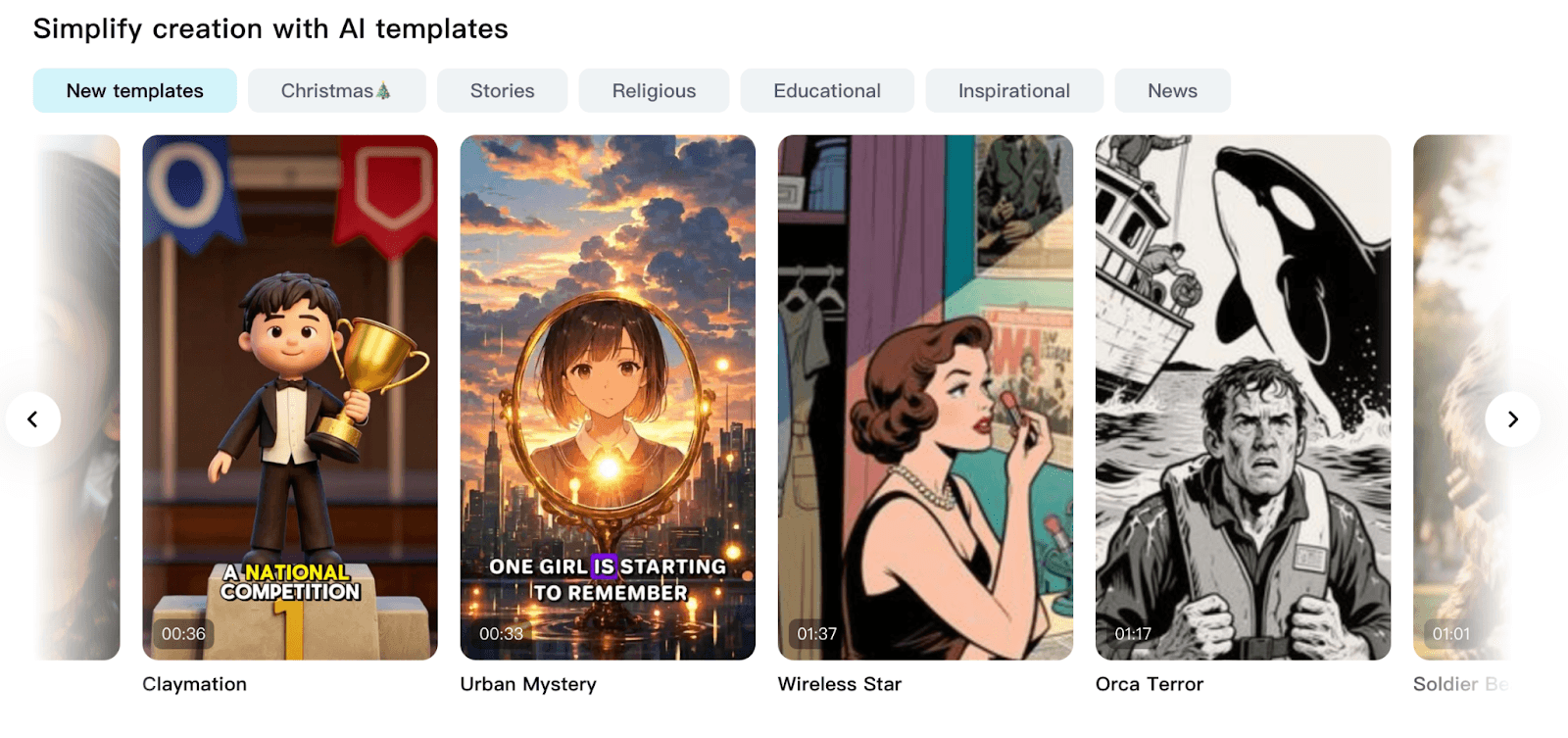
CapCut provides access to a vast library of royalty-free stock audio, animations, effects, and videos that you can freely use to edit and enhance your visual narrative in one click. Users can also use ready-made templates in different styles across themes like education, news, inspiration, and more, for specific video creation needs.
Realistic AI Talking Avatars
With over 100+ pre-built AI talking avatars available on CapCut, users can create presenter-style video content with custom narration by simply inputting a script or audio recording. Alternatively, you can upload a subject image or video recording to build a personal digital clone with accurate lip-sync for explainers, tutorials, ad campaigns, etc.
ByteDance Algorithmic Synergy and Trend Prediction
CapCut is uniquely engineered with the proprietary data of ByteDance, providing a direct bridge to the TikTok ecosystem. Unlike generic AI tools, it offers access to a commercially licensed music library and real-time trending audio that the social algorithms already favor.
This synergy allows creators to utilize "Viral Templates" that are pre-optimized for high retention rates. By building your video on a foundation of proven data, CapCut AI ensures your content aligns with shifting cultural trends the moment they begin to peak.
Synchronized Multi-Device Workspace Continuity
CapCut breaks the barrier between mobile agility and desktop precision through its seamless cloud-based workspace. Creators can initiate a project using AI on their smartphone and immediately refine the details on a desktop browser with zero file transfer lag.
This synchronized workflow is essential for modern creative teams who require real-time collaboration and version control. It empowers a frictionless transition from a quick social post to a highly polished, multi-layered marketing campaign within a single unified account.
Semantic Audio and Beat-Driven Visual Orchestration
The emotional impact of a video is often determined by its rhythm, a detail where most AI generators fail. CapCut utilizes advanced semantic audio analysis to perform "Match Cuts" and "Auto Velocity" edits that synchronize visuals to the specific beats of a soundtrack.
CapCut understands the energy of the audio, automatically adjusting clip duration and transition speed to create a cinematic flow.
Hyper-Realistic Avatar Synthesis and Multilingual Reach
For brands scaling without a dedicated spokesperson, CapCut offers enterprise-grade AI avatars that bridge the gap between human warmth and digital efficiency. These avatars are designed with hyper-realistic lip-sync and emotional tonal range.
This enables businesses to produce localized, presenter-style content in dozens of languages from a single script. It transforms CapCut from a simple editor into a global communication hub, allowing for massive campaign scaling with minimal production overhead.
CapCut AI’s Market Positioning
CapCut grew from JianYing and became a global product after ByteDance acquired Shenzhen Lianmeng Technology and rebranded it as CapCut in 2020.
Its market position is unusually strong because it is not just an editing app, but also part of ByteDance’s wider short-video ecosystem. CapCut benefits from TikTok culture, TikTok creators, and the constant demand for polished vertical videos.
CapCut is especially powerful in the prosumer market. It serves beginners who need templates and creators who want faster production. It also appeals to small businesses that need ads, product videos, and social posts without hiring editors.
CapCut is now moving beyond casual editing. Its official tools include AI avatars, text-to-video, AI templates, auto captions, voice tools, background removal, and image generation.
Taken together, CapCut bridges everyday editing and AI-powered content production. Its biggest advantage is convenience. Yet that same mass-market approach can feel limiting for teams that need deeper control, and more complete creative workflows.
What Users Think About CapCut AI
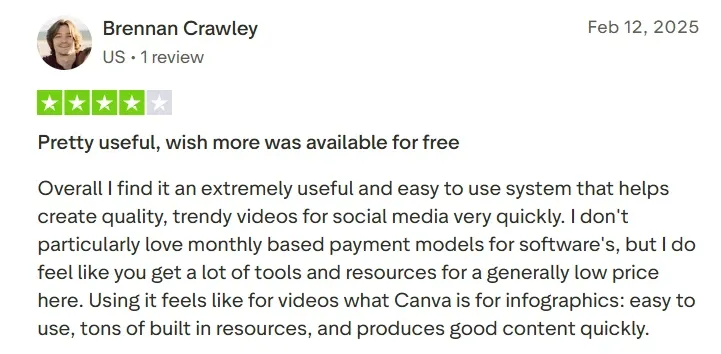
Users who like CapCut usually praise its speed and accessibility. They value the simple interface, ready-made templates, auto captions, filters, and effects.
For creators who need TikToks, Reels, Shorts, or quick product videos, CapCut can feel practical and efficient. It lowers the barrier to decent-looking video.
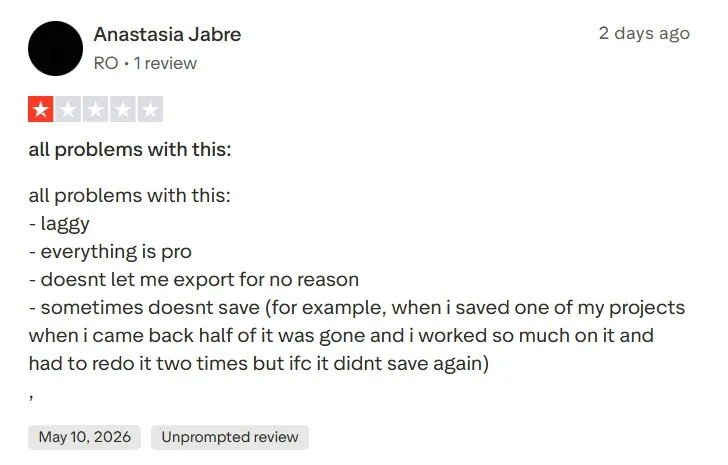
But some users also complain about technical issues like lag, crashes, freezing, failed exports, and lost projects.
These issues matter because CapCut is often used for time-sensitive social content. When the tool breaks near publishing time, convenience quickly turns into risk.
Reviewers also note that some templates look tacky and are not suitable for professional creators.
Editing comes first. Users shape videos through templates, timeline tools, captions, effects, and AI assistance.
Creation workflow comes first. Users move from idea, image, text, or URL to publish-ready output.
Repurposing comes first. Users upload long videos, then turn them into short social clips.
AI Feature Set
Strong in captions, text-to-speech, avatars, background removal, AI templates, and text-to-video generation.
Strong in text/image/reference-to-video, talking avatars, workflow apps, and Pollo Agent.
Strong in AI clipping, animated captions, auto reframe, filler removal, AI B-roll, and social publishing.
Asset Library
Broad social assets, including templates, effects, fonts, music, stickers, stock-style assets, and creator trends.
Built around models, avatars, effects, workflow apps, and image/video creation tools.
More limited. Assets support repurposing, such as captions, B-roll, brand templates, and post formats.
Best for
Best for hands-on editing. It suits creators who want control inside a familiar video editor.
Best for end-to-end production. It suits marketers who want finished videos without heavy editing.
Best for content recycling. It suits podcasters, educators, and creators with existing long videos.
Creative Control
High timeline control, but users may still need manual edits to polish outputs.
Control comes through model choice, workflow selection, prompts, talking avatar, and purpose-built workflow apps.
Control is narrower. Users guide clipping, captions, formats, and branding after AI selects moments.
Why Top Creators Are Switching to Pollo AI
Step 1
Post-Ready Videos with No Editing
Pollo Agent automates structure, pacing, visuals, and sound in one workflow. You can receive a post-ready video without any editing.
Step 2
Multiple Models for Every Need
Access leading AI models such as Sora 2 and Veo 3.1 in one place. Pick the right one for each project to achieve better style fit, visual quality, and creative control.
I’ve been using Pollo AI mainly for short videos and quick image-to-video tests. The interface is straightforward and it works well even with simple prompts, which is a big plus compared to tools that need long, complicated instructions. The results can be really impressive, and it’s honestly been fun to experiment with. I’d love a bit more consistency on faces when there’s movement, but overall it’s been a solid experience for what I needed.
Awesome website. loads of options and a great way to learn how to work with 'AI' my reasoning for 5 stars is based upon price, versatility and ease of use. Also I would like to add, Pollo AI runs a lot of promos on different AI products as well. I rate their customer service at 5 stars, when I purchased my first subscription my computer crashed the following weekend and I lost all my data and info passwords you name it I lost it, contacted pollo by email they responded quickly and found my info/username and account, and I was able to restore my account.
I have been using Pollo AI for short videos. It is easy to use and works well with simple prompts. Other generators seem to need long drawn out complicated explanations to get even close to what I want.
i tried 220 online img to vid in 2 months, and this is the best online video.I will subscribe for a year; there are many reasons. But freedom is the most important.
FAQs
What is CapCut?
CapCut is an AI video maker and editor that automates tasks like script writing, scene generation, captions, AI voiceovers, etc, to deliver polished, ready-to-share video content. All it takes is a few clicks for users to scale their video production, minus the slow pace of complex manual editing.
Why should I use CapCut?
With automated text-to-video generation, instant video editing, and numerous one-click templates, CapCut simplifies video production to be swift and scalable. Even on mobile, it can be relied on to work seamlessly and help any individuals or teams create structured, story-style videos in minutes.
What type of video content is CapCut best-suited for?
CapCut’s ability to take one-sentence instructions and produce short-form videos with minimal video editing has made it popular among online creators. Its match media capabilities can be particularly helpful in quickly replicating viral video content to create polished final cuts of TikToks, Instagram Reels, YouTube Shorts, etc.
What’s CapCut’s maximum video duration?
While CapCut is optimized for producing short-form videos, it lets users generate visual narratives of up to 10 minutes long from a single prompt or script. This means you still have the flexibility to craft simple short films, animations, tutorials, explainers, product videos, etc.
Does CapCut have a wide selection of AI voiceovers?
Absolutely. You can browse through dozens of options that span different ages, genders, occupations, ethnicities, and more. What’s more, CapCut’s selection lets you use various parody voice clones from film & pop culture like Lois, Half-Blood Prince, Alastor, and others.
Create Complete Videos with Pollo AI for Free!
Generate polished videos from ideas, images, or prompts with no manual work.








 Liz Cassidy


