Dzine was founded in 2023 (USA) and completed its brand evolution from Stylar AI to Dzine in 2024. Its workflow-centric engine ensures frame-to-frame consistency, allowing creators to reskin raw footage into high-fidelity assets without losing motion integrity. Dzine AI is where generative power meets surgical editing for true cinematic coherence. However, if you find that piecing together short, stylized clips into a coherent marketing message is too time-consuming, Pollo AI offers full-length, publication-ready video in one go. Try Pollo AI Now!
One upload in. Your viral video out. Unlimited rewards await.
Pollo Agent x DeepSeek V4.1 FLASH
Faster completion at a much lower cost.
Pollo Agent x Gemini 4 Argon
Smarter reasoning. All through Pollo Agent.
WIN iPHONE DUO
Capture a city in one minute. Join the challenge now.
Pollo MCP
End-to-end content creation. Up to 4 Videos/ 20 Images for FREE.
Key Features of Dzine
AI Video Style Transfer: Instantly transform existing footage into 20+ high-end artistic styles.
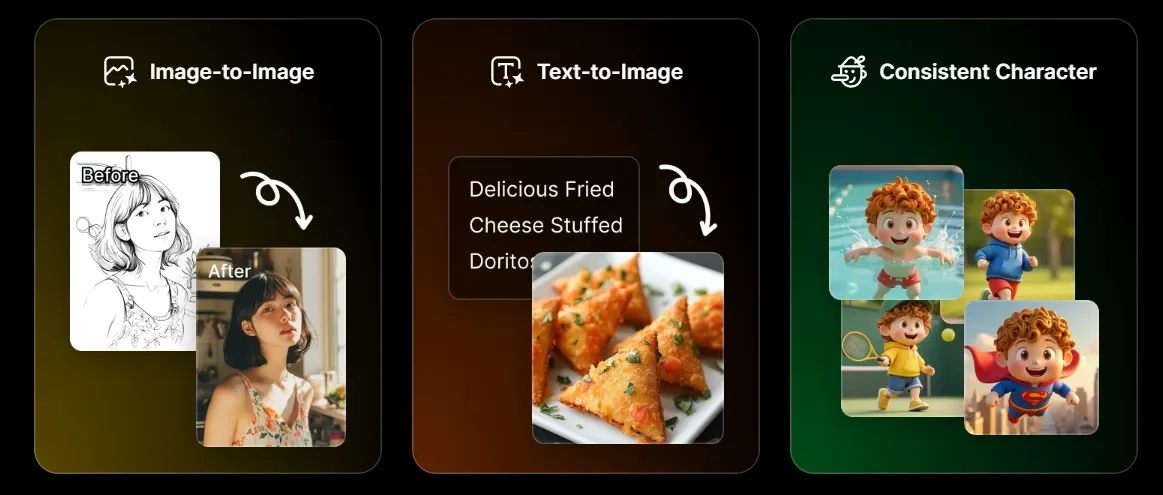
Character Consistency Lock:Maintain the same face and outfit across 100% of your project frames.
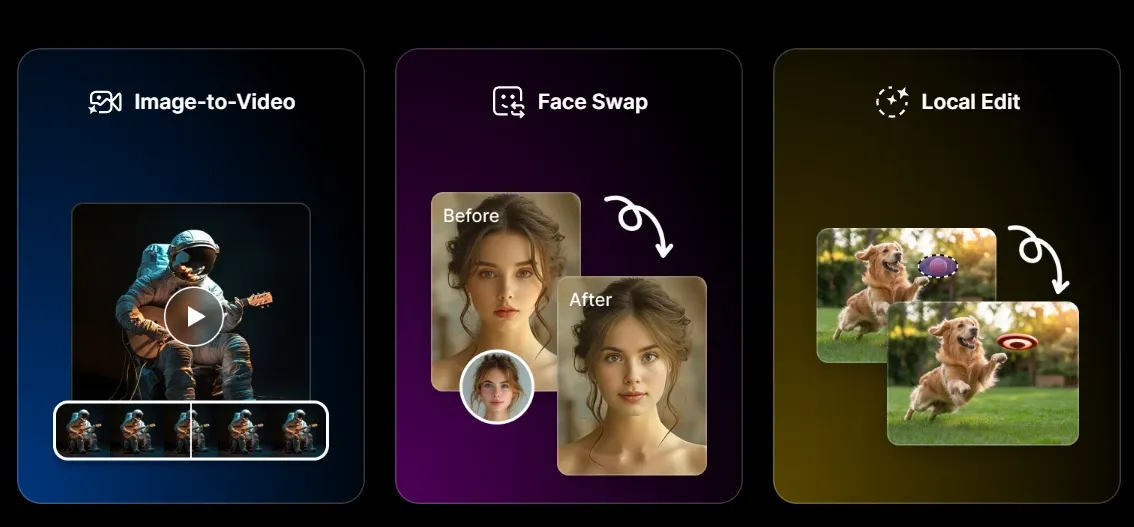
Generative Fill & Inpainting: Seamlessly add or change objects in your video frames with 'Inpainting.'
AI Face Swap: High-fidelity facial replacement for localized marketing or personalized content.
Canvas Outpainting: Expand the background of any asset to fit 16:9 or 9:16 layouts perfectly.
Background Remover: One-click isolation of subjects to create 'floating' assets for social overlays.
Sketch-to-Image/Video: Convert rough hand-drawn doodles into polished, realistic commercial visuals.
Multi-Model Logic Integration: Orchestrates top-tier architectures like Flux and Stable Diffusion.
AI Video Style Transfer
Dzine AI distinguishes itself with a 'Style Transfer' engine that is arguably the most stable in the current market. Instead of getting 'jittery' AI artifacts, users can take a raw mobile recording and reskin it into 3D animation, claymation, or cyberpunk aesthetics. It allows creators to produce high-budget looks without a massive VFX team, making it a favorite for music video directors.
Character Consistency Lock
The biggest 'pain point' in AI video is the 'melting face' problem. Dzine AI solves this with a dedicated character management system. You can 'train' or 'lock' a specific character’s visual DNA, ensuring that your protagonist looks identical across multiple scenes. This is a massive win for creators building episodic content or brand mascots who need to remain recognizable.
Generative Fill & Inpainting
Unlike basic generators, Dzine AI offers 'surgical' editing. If you have a perfect video but hate the shirt the actor is wearing, you can use the 'Inpainting' tool to brush over the area and prompt a new outfit. This level of control moves the tool away from 'random generation' and toward 'intentional design,' saving hours of costly reshoots for minor visual errors.
High-Fidelity AI Face Swap
For global brands, localization is key. Dzine AI allows users to swap faces onto existing video templates with impressive lighting and expression matching. It is built for 'realistic' integration rather than just 'pasting' a photo on top. This feature is particularly useful for influencer marketing agencies that need to swap talent across different regional campaign variations.
Canvas-Based Outpainting
Many creators struggle with assets that are the 'wrong' shape. Dzine AI’s infinite canvas allows you to 'Outpaint,' effectively imagining what lies outside the frame of your original photo or video. It can turn a tight square shot into a sweeping landscape, providing the necessary 'safe zones' for text overlays on platforms like TikTok and Instagram Reels.
Background Remover
Removing and replacing backgrounds in video usually requires complex green-screen setups. Dzine AI uses advanced rotoscoping AI to separate the subject from the background instantly. Once isolated, you can drop your subject into entirely new 'AI-generated' environments, allowing a product shot taken in a garage to look like it was filmed in a luxury penthouse.
Sketch-to-Life Transformation
Dzine AI bridges the gap between 'concept' and 'final asset.' Designers can upload a rough sketch of a product or a scene, and the AI will interpret the lines to create a photorealistic render. This 'guided' generation is much more reliable for industrial designers and architects who have a specific vision that simple text prompts cannot accurately describe.
Multi-Model Logic Integration
Dzine AI functions as a 'White-box' workflow rather than a mystery machine. It combines the best of various AI architectures, including Flux and SDXL, within a 'Canvas + Layer' logic. This allows users to set a visual baseline on the canvas before applying it to video streams, ensuring that the output adheres to a specific artistic standard rather than a randomized guess.
Product Positioning & Background: The Design-Centric Editor
Dzine AI ’s core philosophy is that AI should be a 'Co-pilot' for designers, not just a 'black box.'
Today, it sits in a unique niche as a 'Design-Centric AI Workspace.' It appeals to those who find tools like Runway too complex and Midjourney too 'uncontrolled.' It is the middle ground where professional aesthetics meet user-friendly automation, specifically focusing on 'Structure Preservation' and 'Precision Remastering.'
Strategic Use Cases for Dzine AI Video Generator
Creative Agencies & Illustrators: Ideal for teams that need to maintain strict 'Art Direction.' The character lock and style transfer allow agencies to deliver consistent visual campaigns that do not look like 'generic AI.'
Social Media Content Creators: Perfect for 'Aesthetic' creators on Instagram who want to transform mundane vlog footage into stylized, 'viral-ready' art pieces or high-quality 'Face Swap' parodies.
E-commerce & UI Designers: Used to create 'motion mockups.' Designers use the sketch-to-image and outpainting features to build immersive environments for products without needing a 3D rendering suite.
Game & Anime Studios: A cost-effective solution for turning 'Live Action' reference footage into stylized cinematic assets or overworld animations while maintaining frame-to-frame integrity.
Dzine AI Review: User Experience for Dzine AI
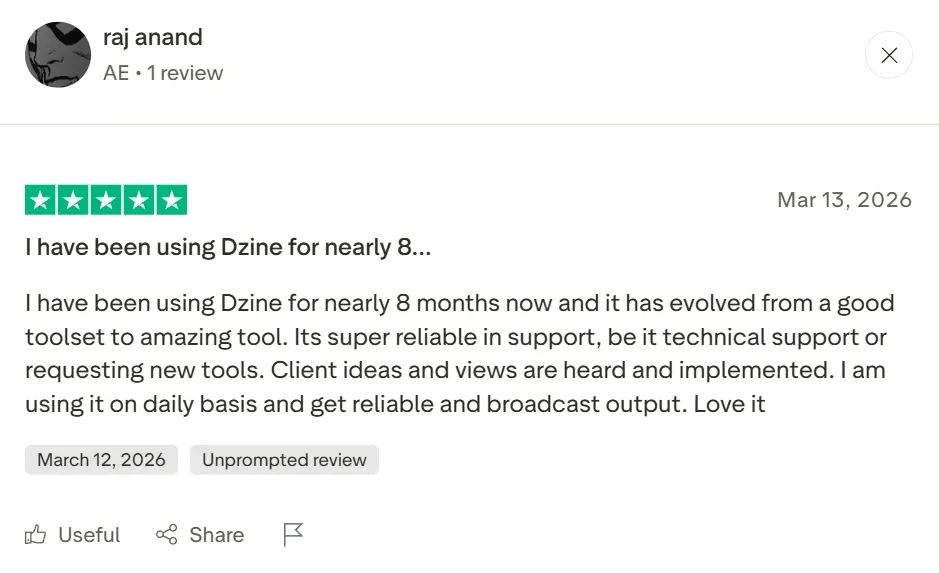
On platforms like G2 and Product Hunt, Dzine AI is praised by instructional designers for its 'intuitive' workflow. One verified user noted, 'Its super reliable in support... I am using it on a daily basis to get reliable broadcast output.' It is a top choice for those who value 'visual precision' over 'speed.'
However, the 'darker' side of user feedback reveals a significant 'creative wall.' Some users find that while the clips look beautiful, the tool is essentially a 'fragment generator.' It produces 4-second masterpieces, but 'stitching' them into a coherent 30-second marketing ad requires a lot of manual labor in external editors.
Furthermore, real-world users have reported 'credit anxiety.' As one user noted, 'You will throw away a lot of credits/money before you realize how things work.' Another mentioned being charged 90 after a trial ended, emphasizing that the 'learning curve' can be expensive.
This is where Pollo Agent redefines the category. Instead of forcing you to 'babysit' individual stylized clips or lose credits on failed tests, Pollo AI functions as a true marketing video agent. It understands the 'context' of your entire brand, generating original, publication-ready videos that flow naturally from the first second to the last. While Dzine focuses on the 'frame,' Pollo AI crafts the 'film.'
Dzine AI vs OpenArt vs Pollo AI: Feature Comparison
I’ve been using Pollo AI mainly for short videos and quick image-to-video tests. The interface is straightforward and it works well even with simple prompts, which is a big plus compared to tools that need long, complicated instructions. The results can be really impressive, and it’s honestly been fun to experiment with. I’d love a bit more consistency on faces when there’s movement, but overall it’s been a solid experience for what I needed.
Awesome website. loads of options and a great way to learn how to work with 'AI' my reasoning for 5 stars is based upon price, versatility and ease of use. Also I would like to add, Pollo AI runs a lot of promos on different AI products as well. I rate their customer service at 5 stars, when I purchased my first subscription my computer crashed the following weekend and I lost all my data and info passwords you name it I lost it, contacted pollo by email they responded quickly and found my info/username and account, and I was able to restore my account.
I have been using Pollo AI for short videos. It is easy to use and works well with simple prompts. Other generators seem to need long drawn out complicated explanations to get even close to what I want.
i tried 220 online img to vid in 2 months, and this is the best online video.I will subscribe for a year; there are many reasons. But freedom is the most important.
FAQs
What is Dzine AI best used for?
Dzine AI is primarily used for 'Style Transfer' and 'Character Consistency' in short video clips. It is a favorite for designers who want to turn existing footage into specific artistic styles like anime or 3D renders with frame-to-frame stability.
Is Dzine AI any good?
It is a powerful tool for visual precision, but be prepared for a 'trial-and-error' phase. Many users find they 'throw away a lot of credits' learning how the system works before producing a usable asset.
What is the primary use of Dzine AI?
Dzine AI is an all-in-one editor that bridges image and video. It supports 120+ effects and allows users to 'lock' specific design elements across different generations, making it a 'white-box' alternative to more random AI generators.
Does Dzine AI support long-form video?
While you can stitch clips together manually, Dzine AI is optimized for short-form, high-stylized content. Generating a 60-second coherent marketing story is much simpler with an agent-based tool like Pollo AI.
Can Dzine generate videos from a URL?
No, Dzine is focused on 'visual-to-visual' transformation. For 'URL-to-Video' or 'PDF-to-Video' workflows, you should use Pollo AI.
Stop stitching clips and start generating seamless, high-converting brand stories with Pollo AI!








 Liz Cassidy


