MiriCanvas utilizes its "miricle" AI assistant to automate social media graphics and short promotional clips. Its core strength is a template-driven AI product video generator, allowing e-commerce sellers to turn static images into dynamic ads with automated camera motion. While MiriCanvas focuses on quick, template-based snippets, Pollo AI builds publication-ready videos from scratch without the need for manual timeline editing. Try Pollo AI Now!
Create your own influencer. Then jump into any trend with Recast.
Kling 4.0
Up to 10 keyframes. Unlimited for 10 days with Ultra.
Pollo Recast
Recreate viral videos. Remix new versions.
Pollo Recast Challenge
One upload in. Your viral video out. Unlimited rewards await.
Pollo Agent x DeepSeek V4.1 FLASH
Faster completion at a much lower cost.
Pollo Agent x Gemini 4 Argon
Smarter reasoning. All through Pollo Agent.
WIN iPHONE DUO
Capture a city in one minute. Join the challenge now.
Pollo MCP
End-to-end content creation. Up to 4 Videos/ 20 Images for FREE.
Key Features of MiriCanvas
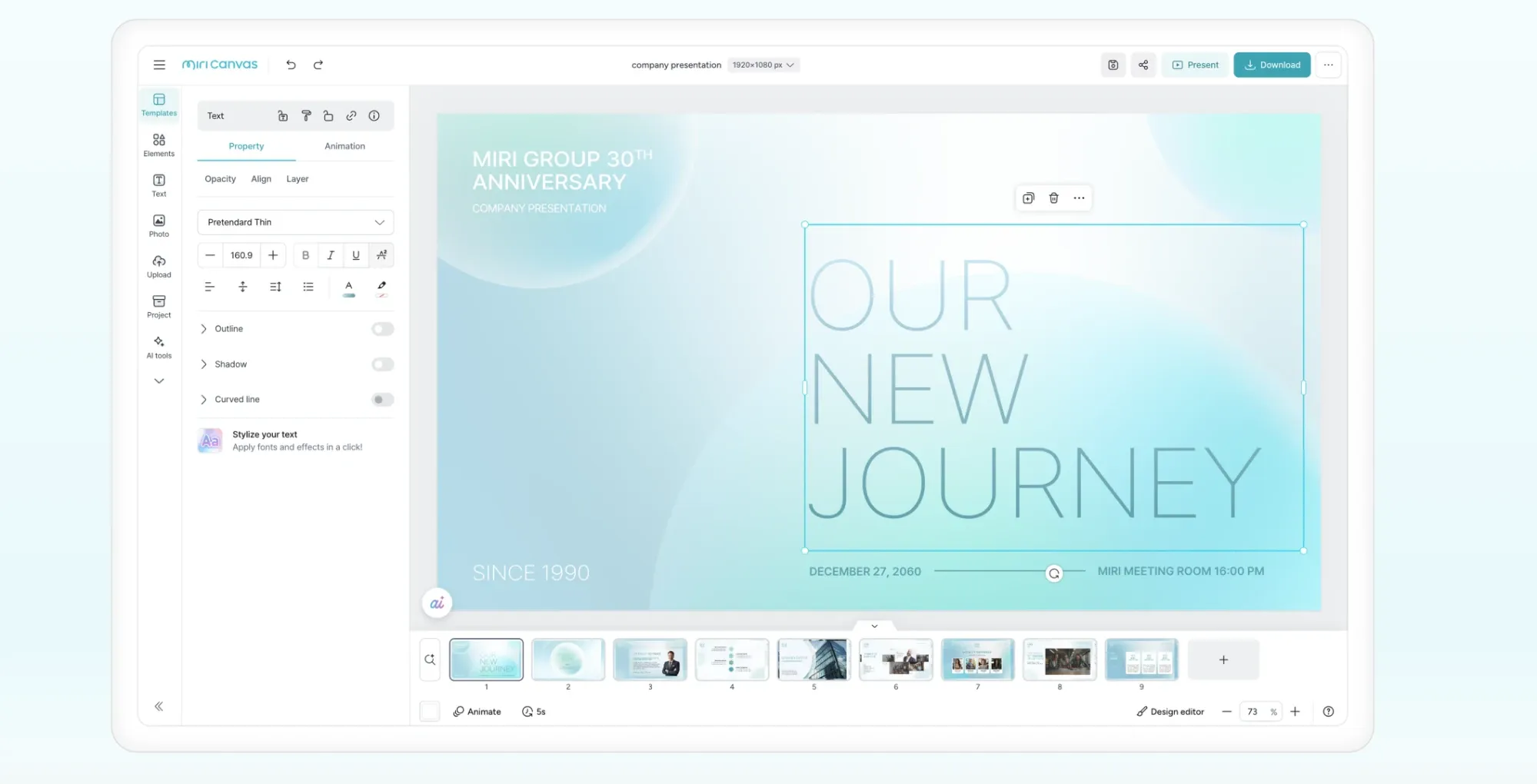
Massive Template Ecosystem: Offers thousands of professionally designed video layouts tailored for e-commerce and social media marketing.
Miricle AI Assistant: A centralized AI prompt interface that generates images, presentations, and short videos based on simple text descriptions.
Motion Graphic Elements: Provides a specialized library of animated stickers, icons, and transitions that align with modern aesthetic trends.
Dynamic Auto-Resizing: Intelligent layout adjustments that convert a single video project into multiple formats for TikTok, Instagram, and YouTube.
Professional Typography Hub: Features a vast collection of licensed fonts and text animations that are optimized for high-impact social ads.
Collaborative Design Workspace: Enables marketing teams to share, comment, and edit video projects in real-time in a cloud environment.
Massive Template Ecosystem
The core strength of MiriCanvas lies in its aesthetic library. Unlike many AI tools that produce generic results, MiriCanvas offers curated templates that follow current design trends in Asia and beyond. Users can pick a layout, swap the text, and use AI to animate specific sections. This "Template-First" logic ensures that the output always looks professionally branded rather than just "AI-generated."
Miricle AI Assistant
The "miricle" AI acts as the creative engine behind MiriCanvas. It is a multimodal assistant that allows users to generate diverse creative assets—ranging from AI illustrations and logos to presentations and short animations—through a unified text-prompt interface . By selecting a specific style and attaching reference images, users can rapidly prototype visual concepts.
Motion Graphic Elements
To prevent videos from looking static, MiriCanvas provides a specialized hub for motion graphics. These are not standard videos but vector-based animations that remain crisp at any resolution. Marketers use these to highlight sales, call-to-actions, or brand logos. These elements add a layer of "visual polish" that is often missing from raw AI video outputs.
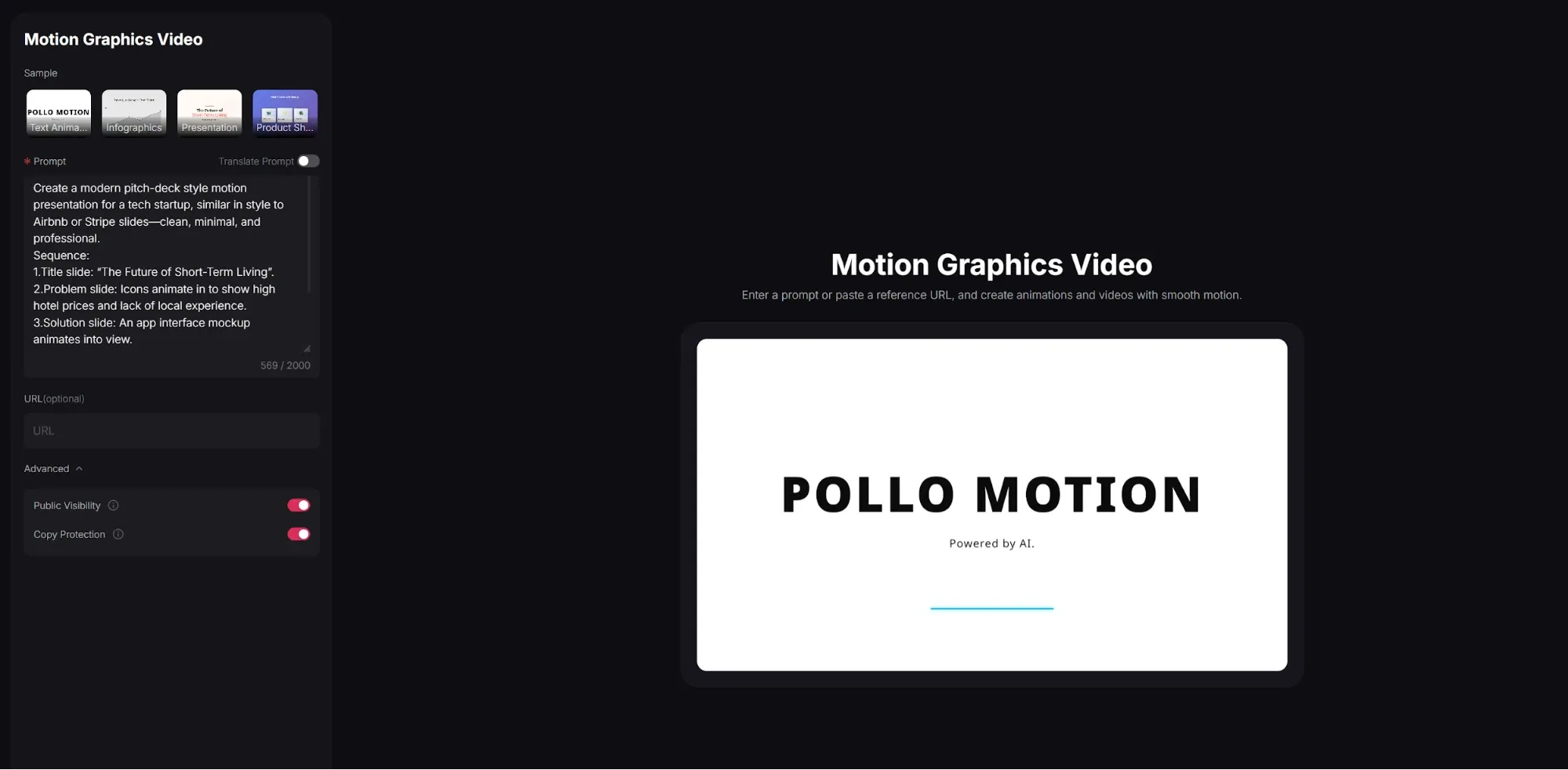
Pollo AI takes this a step further with AI motion graphics video generator. Instead of manually placing individual elements, users can enter a prompt or paste a reference URL, and create animations and videos with smooth motion.
Dynamic Auto-Resizing
Social media managers often struggle with the "multi-platform bottleneck." MiriCanvas solves this by allowing one-click resizing. A horizontal YouTube ad can be instantly converted into a vertical TikTok clip. The AI intelligently repositions text and subjects to ensure the most important content remains visible in the new aspect ratio.
Professional Typography Hub
Text is often the most overlooked part of AI video, but MiriCanvas treats it as a priority. The platform offers thousands of licensed fonts, specifically focusing on stylized Asian and Western scripts. Users can apply "Motion Text" effects that sync with the video's rhythm, making it ideal for high-conversion e-commerce ads.
Collaborative Design Workspace
MiriCanvas is built for teams. The workspace allows multiple users to work on the same video project simultaneously. Agencies can invite clients to leave comments on specific timestamps, streamlining the approval process. This removes the friction of sending large files back and forth, keeping the entire creative pipeline in the cloud.
MiriCanvas AI Product Positioning & Background
Founded in 2008 by South Korean tech firm MIRI DIH Co., Ltd., MiriCanvas has established itself as a dominant SaaS-based design platform, particularly in the Asian market. Backed by Series B funding from investors like Kiwoom Investment and the Industrial Bank of Korea, the company has expanded its user base to over 18 million globally.
MiriCanvas positions itself as an accessible, all-in-one creative suite for non-designers, small business owners, and marketing professionals.
MiriCanvas High-Impact Use Cases
High-Conversion E-commerce Advertising
Sellers on platforms like Amazon or Shopee use MiriCanvas to turn static product photos into dynamic video ads. By layering "Sale" motion graphics over an AI-animated background, they create high-energy content that stops the scroll.
Social Media Brand Building
Instagram and TikTok influencers leverage the platform's aesthetic templates to maintain a consistent "Visual Identity." The auto-resizing tool allows them to maintain a presence across all platforms without doubling their workload.
Corporate Presentation and Training
Educational organizations use the AI Script-to-Video feature to turn dry training manuals into engaging visual clips. The professional typography hub ensures that even complex information is presented in a readable, modern format.
MiriCanvas AI Review: What Users Actually Say about MiriCanvas AI
On platforms like G2, MiriCanvas generally receives high praise for its intuitive interface and accessibility. Users consistently highlight that the platform allows individuals with zero design experience to create professional-looking presentations and social media posts quickly.
A common frustration revolves around the precision and fluidity of editing, particularly with element manipulation. One user expressed, "It is hard to make changes..." This indicates a lack of refined control and efficiency for detailed adjustments.
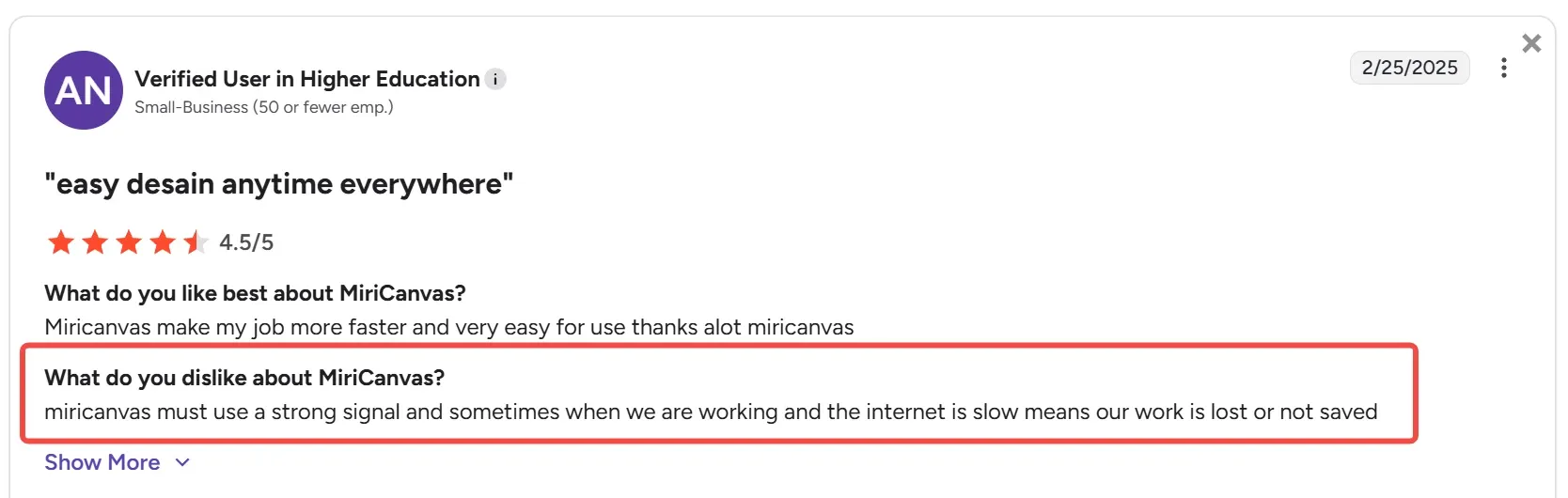
Another recurring issue is related to content saving and platform stability. A user highlights, "Miricanvas must use a strong signal and sometimes when we are working and the internet is slow means our work is lost or not saved," pointing to potential data loss risks.
Furthermore, while the platform is easy to pick up, some users find it can be "a bit limited in customization" for more intricate projects, and "larger projects may get cluttered if not organized carefully."
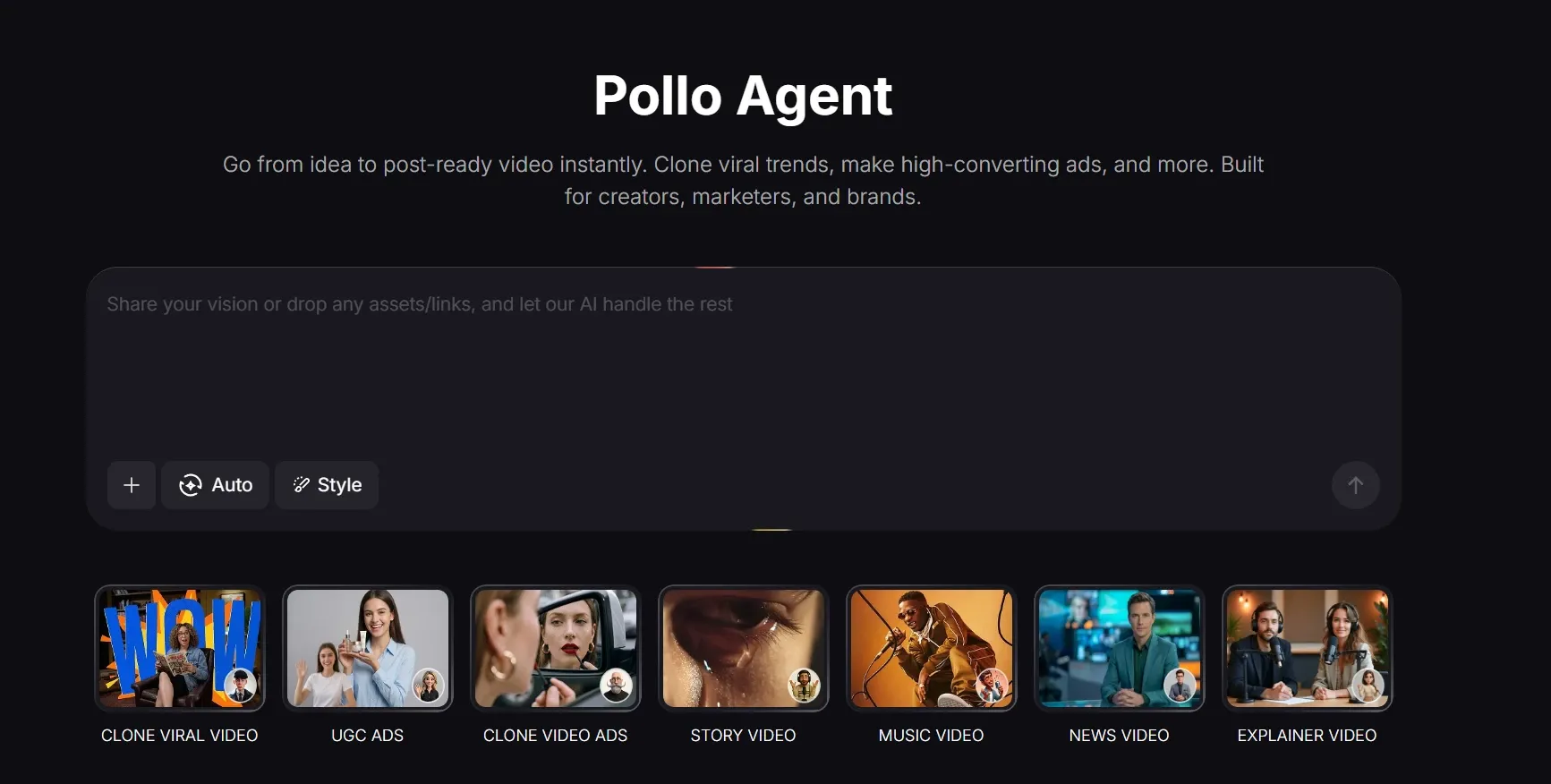
While MiriCanvas users are stuck dragging boxes and fighting with slow interfaces, Pollo AI users simply provide a prompt or a URL.
The Pollo Agent handles the entire visual arrangement, pacing, and subject consistency automatically. Instead of manually "sewing" clips and elements together, you receive a publication-ready video that requires zero manual manipulation.
Feature Comparison: MiriCanvas vs Pollo AI
Comparison Factor
MiriCanvas
Pollo AI
Primary Logic
Template-driven design with embedded AI generation features.
Agentic Generation: Creates full-length videos from scratch.
Output Type
Short promotional clips, UGC snippets, and presentations.
Publication-ready, post-ready videos.
Technical Edge
"miricle" AI assistant and dedicated Product Video Generator.
I’ve been using Pollo AI mainly for short videos and quick image-to-video tests. The interface is straightforward and it works well even with simple prompts, which is a big plus compared to tools that need long, complicated instructions. The results can be really impressive, and it’s honestly been fun to experiment with. I’d love a bit more consistency on faces when there’s movement, but overall it’s been a solid experience for what I needed.
Awesome website. loads of options and a great way to learn how to work with 'AI' my reasoning for 5 stars is based upon price, versatility and ease of use. Also I would like to add, Pollo AI runs a lot of promos on different AI products as well. I rate their customer service at 5 stars, when I purchased my first subscription my computer crashed the following weekend and I lost all my data and info passwords you name it I lost it, contacted pollo by email they responded quickly and found my info/username and account, and I was able to restore my account.
I have been using Pollo AI for short videos. It is easy to use and works well with simple prompts. Other generators seem to need long drawn out complicated explanations to get even close to what I want.
i tried 220 online img to vid in 2 months, and this is the best online video.I will subscribe for a year; there are many reasons. But freedom is the most important.
MiriCanvas is a web-based design platform used to create presentations, social media graphics, posters, and short promotional videos. It is designed to help non-designers produce professional-quality visual content using customizable templates and AI-powered generation tools.
Does MiriCanvas have an AI video generator?
Yes, MiriCanvas features an AI Product Video Generator and the "miricle" AI assistant, which can turn text prompts, product images, and storyboards into short video advertisements, UGC-style clips, and moving illustrations.
Can I create ecommerce ads with MiriCanvas?
Yes, the platform includes a dedicated AI Product Video Generator specifically built for ecommerce. Users can upload a product image, and the AI will automatically apply camera motion and lighting to create a video ad suitable for platforms like Shopify and TikTok.
What are the limitations of MiriCanvas video features?
While excellent for quick promotional clips, MiriCanvas lacks advanced timeline editing and detailed animation controls. Users cannot deeply manipulate keyframes or execute complex, multi-scene narrative video editing within the platform.
How does the MiriCanvas AI Presentation tool work?
Users simply enter a topic or a brief text prompt, and the AI automatically generates a complete slide deck. It selects appropriate layouts, inserts relevant graphics, and provides placeholder text that users can then customize.
Does MiriCanvas support collaborative design?
Yes, MiriCanvas allows users to invite team members to a shared workspace via an email link. This enables real-time collaboration, allowing multiple people to view, edit, and approve designs simultaneously.
Move Beyond Manual Editing with Pollo AI
Transition to a true video agent that understands your vision and delivers a finished, publication-ready video every time!








 Liz Cassidy


