Runway’s Motion Brush feature allows you to select specific areas of an image and define how those areas should move, creating a more interactive and engaging visual experience. It is currently available in both the Gen 2. Try the tool below!
POLLO AI INFLUENCER
Create your own influencer. Then jump into any trend with Recast.
Kling 4.0
Up to 10 keyframes. Unlimited for 10 days with Ultra.
Pollo Recast
Recreate viral videos. Remix new versions.
Pollo Recast Challenge
One upload in. Your viral video out. Unlimited rewards await.
Pollo Agent x DeepSeek V4.1 FLASH
Faster completion at a much lower cost.
Pollo Agent x Gemini 4 Argon
Smarter reasoning. All through Pollo Agent.
WIN iPHONE DUO
Capture a city in one minute. Join the challenge now.
Pollo MCP
End-to-end content creation. Up to 4 Videos/ 20 Images for FREE.
Key Features
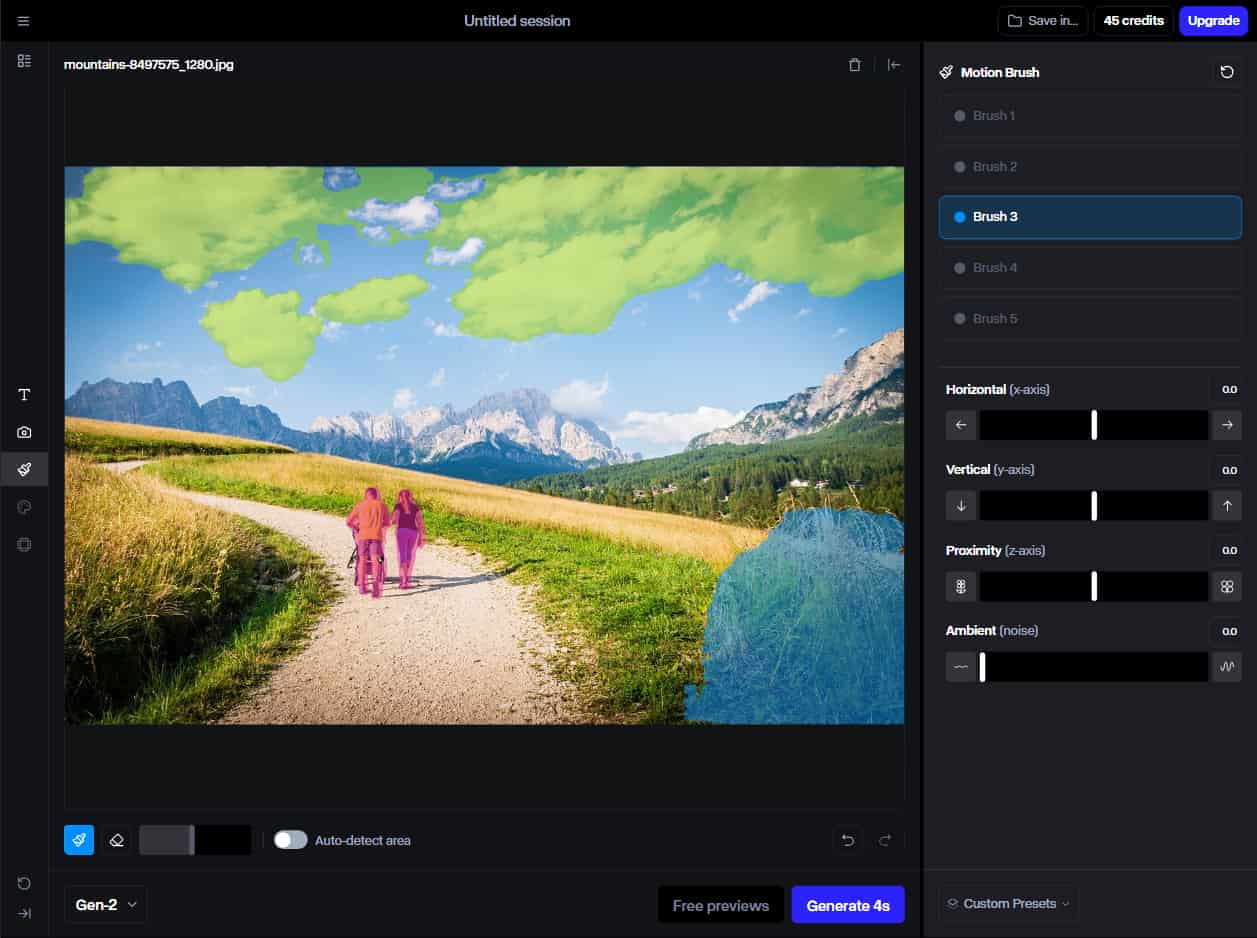
Motion Brush: Bring subjects or elements of still images to life by painting motion pathways onto them.
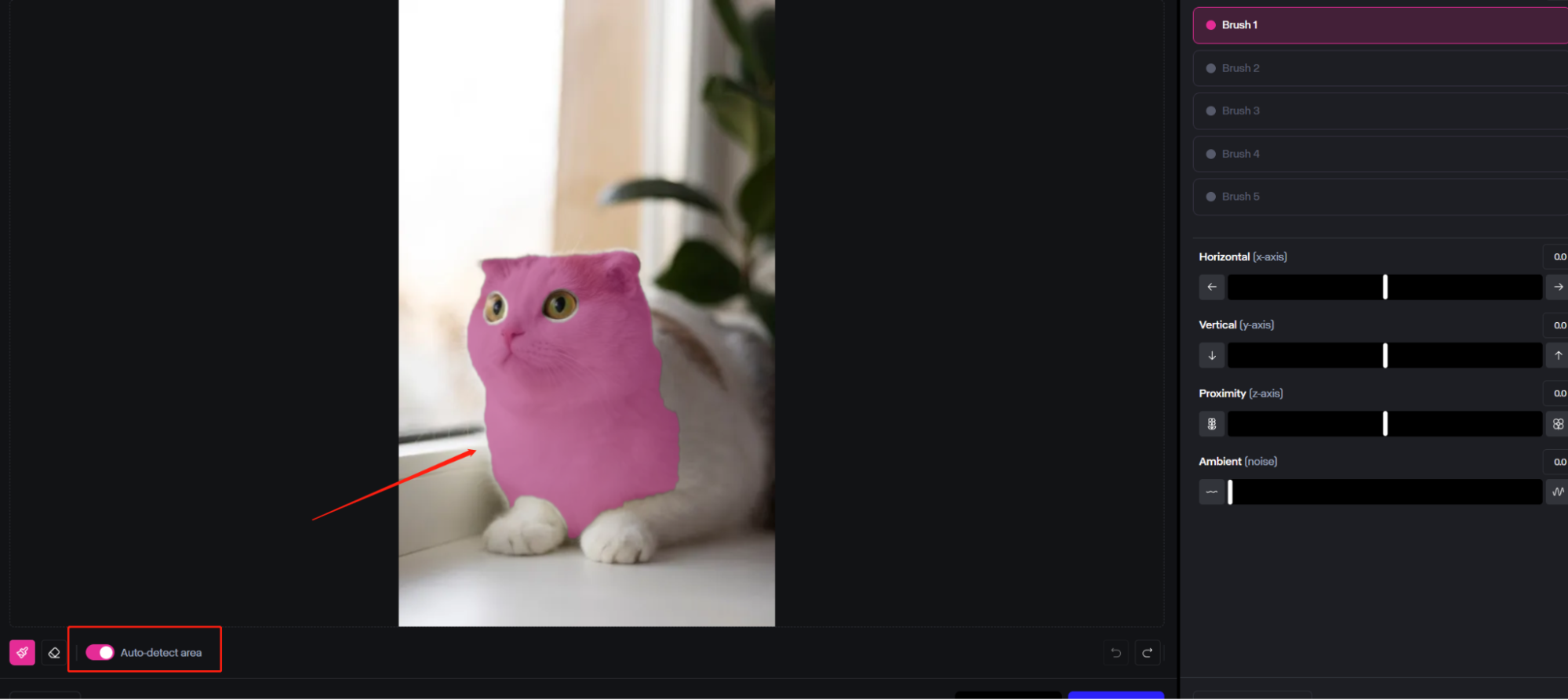
Auto Detect Area: The Motion Brush can automatically identify the areas you want to add motion to.
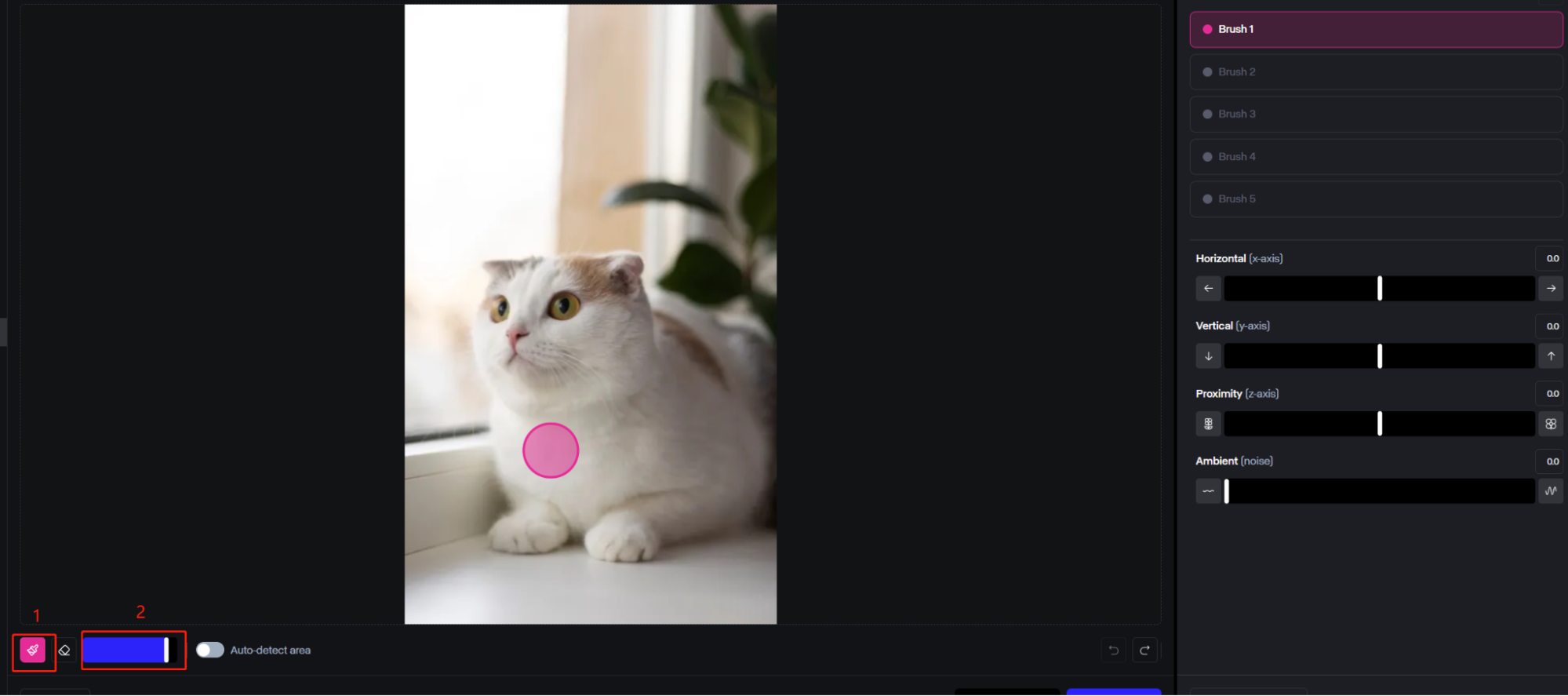
Adjustable Brush Sizes: Switch between larger or smaller brushes to cover bigger or more precise areas, respectively.
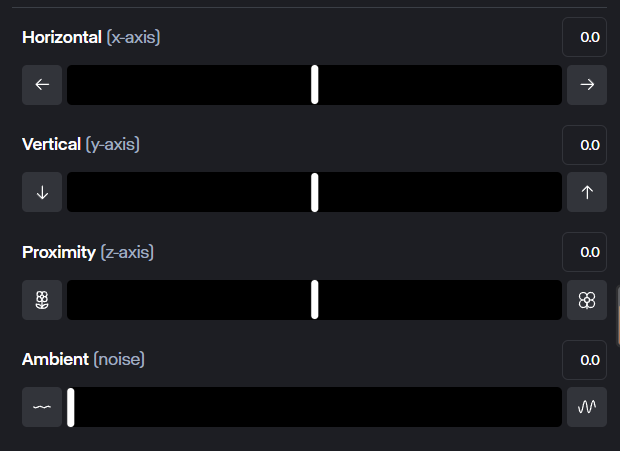
Movement Direction and Speed: Use sliders to easily control the exact way your elements move, and how fast or slow the motion is.
Bring Images to Life with Runway Motion Brush
Runway's Motion Brush lets you breathe life into still pictures. You can just “paint” with the brush onto the image, selecting the areas you want to see moving. It can be anything from clouds in the sky to individual limbs of a human figure.
Automatically Detect Subjects and Sections
You don’t have to worry about being exceptionally precise when applying the Motion Brush, as it can automatically figure out which areas or segments of the picture you’re trying to highlight and then fill them in for you.
Variable Brush Size for Easy Painting
Users can adjust the size of the Motion Brush applicator, making it bigger or smaller using a simple slider. You can make it larger if you want to brush over big elements of the image, like a large cloud, or smaller if you need to be more specific or target a tiny element.
Handy Direction and Speed Sliders for Maximum Control
Once you’ve selected a part or element of your image, you can use the provided sliders to control its movement. There are sliders for horizontal, vertical, and proximity (depth) movement, and you can set them to be faster or slower.
Precise & Independent Motion Control
Runway's Gen-2 Multi Motion Brush offers independent control over different areas within the video, allowing for more precise and customizable motion effects. It also works independently from Camera Motion, giving you even more flexibility in your animations.
Gen 2 Motion Brush Techniques
By applying these techniques, you'll maximize the potential of Gen 2 Motion Brush and produce impressive, professional motion effects.
Combine the tool with Image + Description mode for precise control, using simple prompts for better interpretation.
Pair Motion Brush with camera movements to achieve a more immersive and cinematic effect.
Adjust brush sizes according to your needs for both broad and detailed control.
Enable Auto-detect to save time and effort by automatically identifying areas of motion.
Apply easing functions to create more natural-looking movements.
Keep refining your prompts and adjustments, as even minor tweaks can significantly enhance the final output.
Comparing Gen 2 Motion Brush and Gen 3 Motion Brush
While Runway's Gen-2 motion brush may fall short in understanding the nuances of real-world motion, Gen 3 Motion Brush surpasses these limitations, offering unparalleled control and accuracy in every frame.
Hyper-realistic motion understanding
Precision control for intricate animations
Seamless integration with industry-leading video editing tools
I’ve been using Pollo AI mainly for short videos and quick image-to-video tests. The interface is straightforward and it works well even with simple prompts, which is a big plus compared to tools that need long, complicated instructions. The results can be really impressive, and it’s honestly been fun to experiment with. I’d love a bit more consistency on faces when there’s movement, but overall it’s been a solid experience for what I needed.
Awesome website. loads of options and a great way to learn how to work with 'AI' my reasoning for 5 stars is based upon price, versatility and ease of use. Also I would like to add, Pollo AI runs a lot of promos on different AI products as well. I rate their customer service at 5 stars, when I purchased my first subscription my computer crashed the following weekend and I lost all my data and info passwords you name it I lost it, contacted pollo by email they responded quickly and found my info/username and account, and I was able to restore my account.
I have been using Pollo AI for short videos. It is easy to use and works well with simple prompts. Other generators seem to need long drawn out complicated explanations to get even close to what I want.
i tried 220 online img to vid in 2 months, and this is the best online video.I will subscribe for a year; there are many reasons. But freedom is the most important.
Helpful Articles About Runway Motion Brush
Learn how to use motion brush and discover more about Runway!
The Motion Brush lets you add motion to still images. You can brush or paint over the parts of the image that you want to see moving. Then you can use the sliders to control the direction and speed of movement.
Using the Runway Motion Brush is quite simple. Just create a new session, upload an image (or create one with the Runwayml), then select the Motion Brush, draw onto the parts you want to animate, and set the sliders to control movement.
Does Runway Gen 3 have Motion Brush?
No. Motion Brush in not available in the Gen-3 version. Both Gen-3 Alpha and Gen-3 Alpha Turbo does not support motion brush.
Is Runway Gen 2 Motion Brush free to use?
Yes, there is a free plan of RunwayML that allows you to explore the tools and features of Runway without having to spend any money. But you'll only have a limited number of uses on the free tier plan.
What's the best motion brush?
There are several Motion Brush tools available, and the best one depends on your specific needs and preferences. Pollo AI's motion brush excels in its comprehension of real-world movement and physics, leading to more natural and convincing motion. In contrast, Runway's motion brush occasionally has difficulty in this area.







 Liz Cassidy

