



6 YouTube CTR Tips to Get More Clicks and Views
As a YouTube creator, your CTR (click-through rate) is the first metric that you must optimize if you want any chance of ever going viral and/or growing your channel. You know why?
Because CTR measures the first point of contact between your video and audiences. If people see your videos on their feeds but aren’t clicking, then the game’s over before it even starts!
So, how can you improve CTR? Your videos need to look so appealing at first glance that people can’t resist clicking. Read on, and we’ll explain all this, including how Pollo AI can help.
TL;DR
To improve YouTube CTR, make your thumbnails, titles, intros, and metadata more clickable while keeping viewers engaged after they click. CTR measures how often people click after seeing your video, and you can calculate it with Clicks ÷ Impressions × 100.
A good YouTube CTR is usually 4% to 10%. To get more clicks and views, redesign thumbnails, write stronger titles, A/B test ideas, track CTR in Analytics, improve the first 10–15 seconds, and use Pollo AI to create stronger thumbnails and video intros faster.
What You Need To Know About YouTube CTR
CTR is the metric that measures how often people click on your YouTube videos once they see the thumbnail on their feeds.
So, how do you calculate it? Clicks / Impressions x 100 = CTR. In fact, here’s a quick example: If 500 people saw your thumbnail and about 25 of them clicked on it, then your CTR is 5%.
The higher your CTR is, the better, but it is also important to remember that having a good CTR is entirely dependent on the number of impressions and the traffic source.
For instance, a video passively shown to viewers on the home feed with a 5% CTR is fantastic. But when actively shown on search results, a video with a 5% CTR is low performing.
You also need to remember that YouTube’s new algorithm prioritizes viewer satisfaction and retention. So, it’s not enough to just have people clicking on your thumbnail.
Even if your CTR is high, if it fails to retain viewers in the first 15-30 seconds, then the algorithm will likely assume the thumbnail and title were clickbait.
In turn, this discourages it from pushing it to wider audiences. You can feel free to use tools like the YouTube intro maker of Pollo AI to help with creating more compelling openings.
What Is Considered To Be a Good YouTube CTR?

Overall, a good YouTube channel CTR typically ranges between 4% and 10%. In most cases, that’s usually a healthy target for you to aim for. But don’t just look at the channel average.
You also need to check per traffic source. For YouTube CTR for Search, a good range is around 8%-15%. If it's lower than that, it means your video titles need to be better optimised.
As for YouTube CTR for Browse (Home Feed), a good range would be 3%-7%. If it’s under that, then your thumbnails are probably not appealing enough to random viewers.
There’s also YouTube CTR for Suggested, which is when viewers are presented with related videos to watch. For this, the ideal CTR would fall around 5%-10%.
But even with this data, remember that CTR and retention go hand in hand. Even if your CTR is high, having a low retention rate in your videos will not do you any favors with the algorithm.
How Can You Improve Your YouTube CTR?
YouTube CTR is primarily governed by the quality of your thumbnails and titles, but there are other aspects to consider as well. Let’s break them down one at a time, shall we?
#1. Redesign Your YouTube Thumbnails
Your YouTube thumbnail is somewhat like the packaging of a product in a supermarket. Like any item on the shelf, its appearance can affect whether someone stops to pick it up.
It’s all about first impressions. On the homepage, search results, and suggestions, your videos will compete against other channels for people’s attention, so you need to grab it fast.
In this regard, simplicity, visual impact, and compelling texts are the way to go. So, don’t over-complicate it by adding too many elements.
Focus on showcasing expressive faces, use bold colors, and try to add short texts (3-4 words max) that impactfully describe the video.
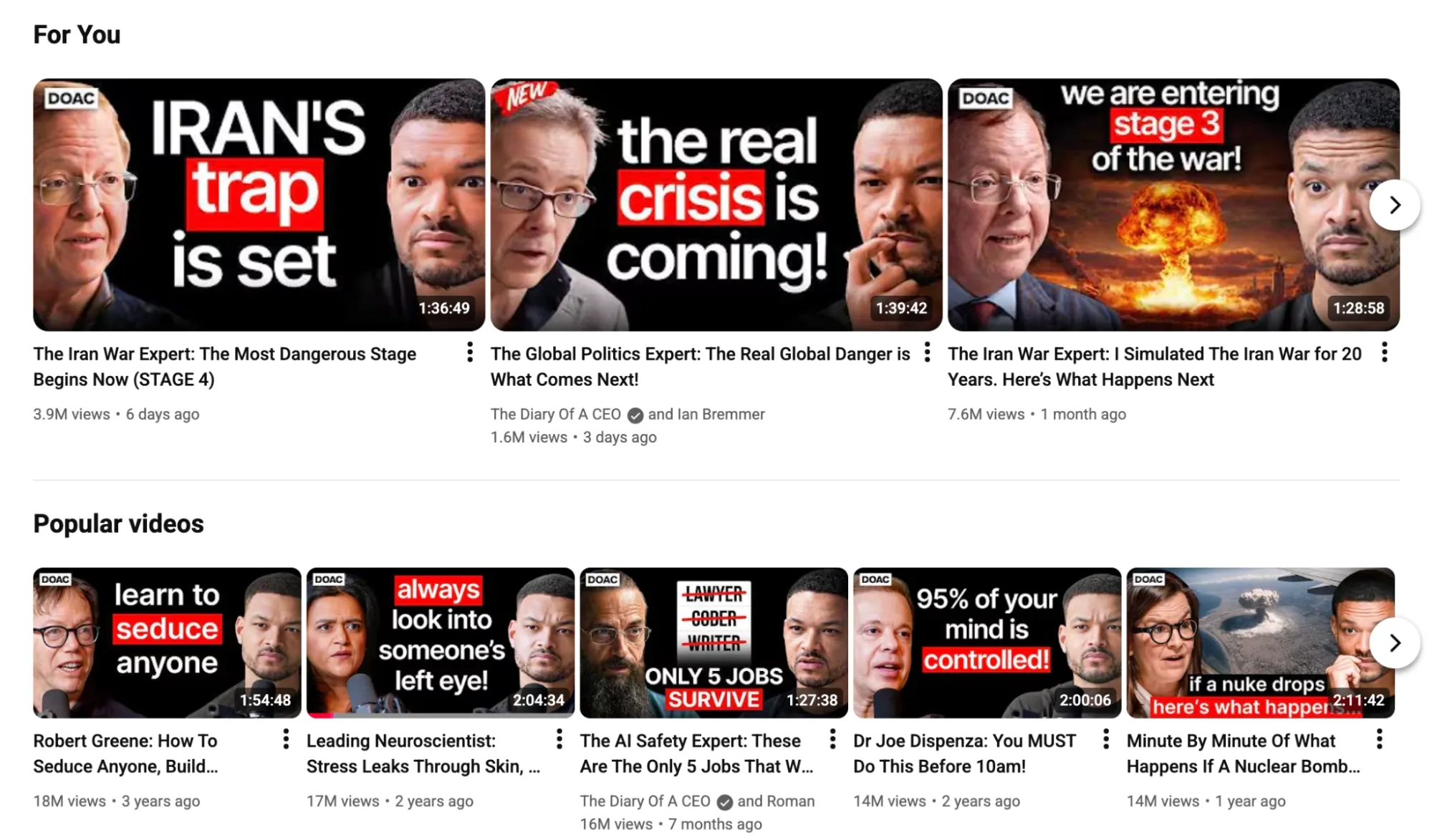
You can see this in perfect action with @TheDiaryOfACEO above. By sticking to such a format, audiences will often recognize your thumbnails almost immediately on their feeds.
#2. Optimize Your Titles for Viewer Impact
While your YouTube thumbnail is what will catch the viewer’s eye, ultimately, it is the video title that will convince them it’s worth clicking.
So, you need to optimize your titles for curiosity. For instance, “Why I No Longer Enjoy [X]”, “You Have The Wrong Idea About [X]", or “I Tried [X] for 1 Week, Here's What Happened.”
The key here is to draw people in with something they would be interested in learning more about. You can even use high-impact words like “Hack”, “Expose”, or “Secret” for greater effect.
A simple rule of thumb is to always craft a title that would make you want to click the video in a hurry. But don’t neglect the importance of YouTube SEO, either.
This means adding a relevant keyword or two. Also, don’t forget that on mobile view, audiences may not see the full video title, so always place the most important words at the front.
#3. A/B Test Your Titles/Thumbnails
Even if you like a specific format, it helps to experiment with different designs to see which one yields the best results. You can use the A/B test feature in YouTube Studio.
This lets you upload multiple titles and thumbnails per video, which YouTube will automatically alternate for a limited period. The one with the best watch time is set as the winner.
You can explore new ideas to use by checking out the recent videos of the top competitors within your niche. Review their thumbnails, text use, colors, title choices, etc.
And if you want a simple way to experiment with different concepts, then try using the Pollo AI image generator. This way, you can test multiple variations in a short amount of time.
If you can consistently nail the titles and thumbnails that deliver the strongest impact, you can start maximizing your CTR per video to a whole new level.
#4. Keep Assessing Your CTR via Analytics
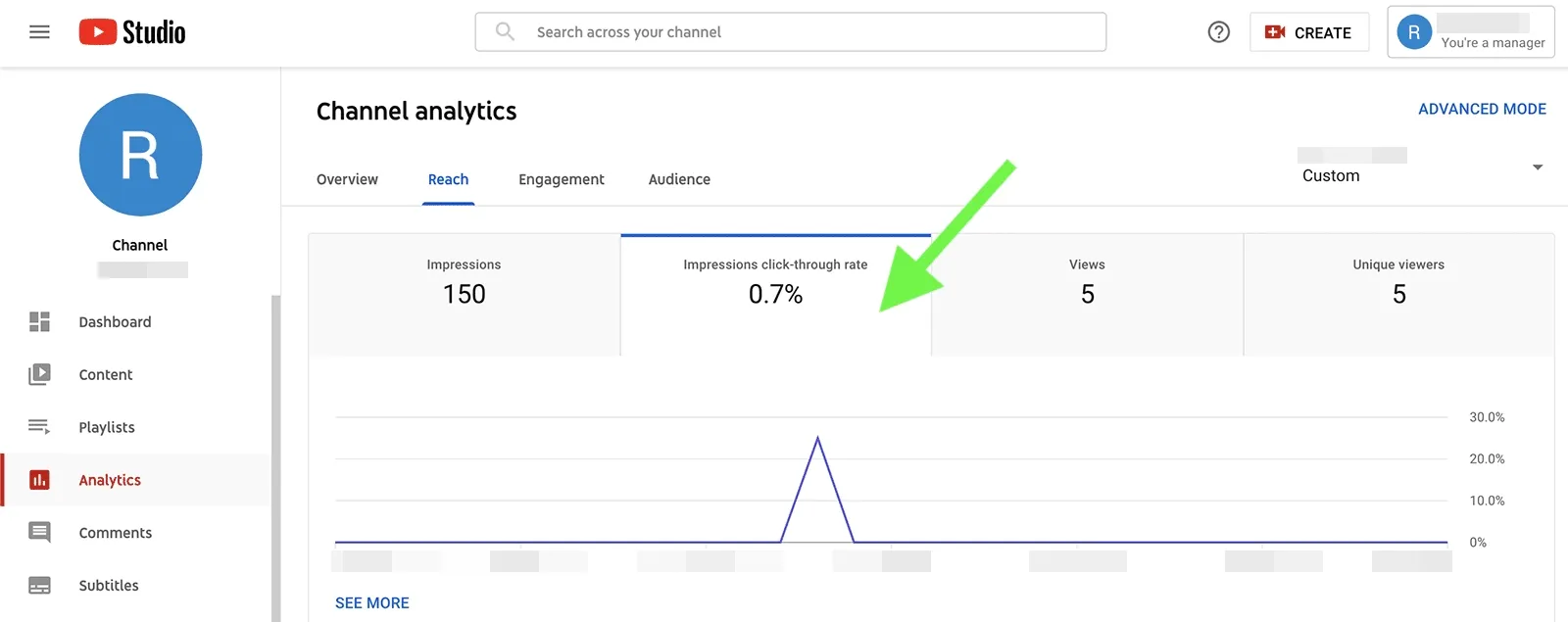
The key to good CTR growth lies in your channel analytics. The more you check your performance and adjust accordingly, the better your CTR can be.
Head over to Analytics > Reach > Impressions Click-Through Rate daily to see how your channel is progressing. You can also check the CTR data per individual video.
This is especially important for new videos. Remember, YouTube tests new videos on a small, core audience, so if the CTR is high, then it will keep pushing them, which leads to more views.
But if it’s low, then checking analytics ensures you can act quickly to refresh their thumbnails and titles to help improve performance.
And if you already have several videos uploaded, a good rule of thumb is to check which ones have the highest impressions but lowest CTR. Such underperformers could also use refreshing.
#5. Improve Your Intros (First 10-15 seconds)
We’ve already mentioned how retention is just as important as a high CTR, which is why improving your video openings is crucial.
If people click on your videos but end up abandoning them within the first few seconds, then the algorithm will be less inclined to amplify your videos to others.
In fact, it can be better to have high retention and low CTR because over time, those videos will steadily rack up views. Many instructional videos or educational videos are like this.
But ultimately, you want to have a high CTR and high retention. And the best way to ensure this is by delivering value right away, like how @LeilaHormozi dives into her subject matter ASAP.
Another strategy is placing engaging/dramatic scenes at the start of the video to grab attention. You can use the text to video of Pollo AI to create cinematic or animated sequences for that.
The main goal here is to keep viewers hooked for longer. If you can do that, it tells the algorithm to keep recommending your video, which leads to more impressions and clicks.
Create Intros That Keep Viewers Watching.
Make dramatic opening scenes with Pollo AI text to video and give viewers a reason to stay after they click.
Try Pollo AI Text to Video Now
#6. Properly Optimize Your Video Metadata
Optimizing your description and tags may not directly affect CTR, but they play a huge role in impacting search results. After all, the algorithm uses this metadata to categorize your videos.
By optimizing it, you can improve the chances that your videos will be pushed to the right people, most likely to click on them. In turn, this improves your CTR.
This means taking trending topics and keywords of viral videos into consideration. The more relevant, the better for improving your chances of being recommended.
If the video is somewhat long, then try to add timestamp chapters with optimized titles. This can work well to draw clicks, especially from people using Google Search.
Ultimately, the goal here is to improve discoverability. If you can do that, then improving your YouTube CTR will be a bonus.
Conclusion
Improving YouTube CTR is something a lot of creators get stuck on, but don’t fret. These 6 proven tips will guide you along the process, especially if you abide by them often.
Also, keep in mind that a declining CTR isn’t always a bad thing. It can mean that your videos are being shown to new audiences, so these viewers may need a bit more convincing.
And if you need help with image or video creation, check out Pollo AI. From designing thumbnails to producing publish-ready videos, it has all the tools you need for YouTube.