
A Week of Faceless Social Videos From One ChatGPT Workflow
What I like about faceless videos is that you seldom run out of ideas. But what I often see many creators struggle with is research, scripting, scene generation, voice-overs, editing, etc., all handled in isolated workflows that take up a lot of time. But with Pollo MCP, you can produce a week of faceless social videos in one ChatGPT workflow. Curious to know more? Then read on!
TL;DR
To create a week of faceless social videos in ChatGPT, start by connecting and authorizing Pollo MCP. This enables access to Pollo AI’s supported image/video generation tools, which makes it possible to brainstorm topics, create scripts, generate AI videos, refine outputs, and plan posting schedules, all within the same conversational ChatGPT workflow.
Video Production Workflow in ChatGPT: Connect Pollo MCP
Instead of switching between multiple apps and tools to create one faceless video, what if I told you that you could do it all in a single chat thread? Picture it: a single ChatGPT workflow that compresses and coordinates your video production into one conversation that can be reused!
In other words, I can ask ChatGPT to help research topics, write scripts, request visual assets, refine the results, and develop new ideas for what comes next in one place. And the best part is that I only need to connect Pollo MCP to ChatGPT, which takes minutes, if not seconds.
From there, the AI assistant has access to the Pollo AI creative suite. This lets me start generating AI videos directly in my chats, with support for text-to-video, image-to-video, and an extended workflow that also covers images, audio, etc.
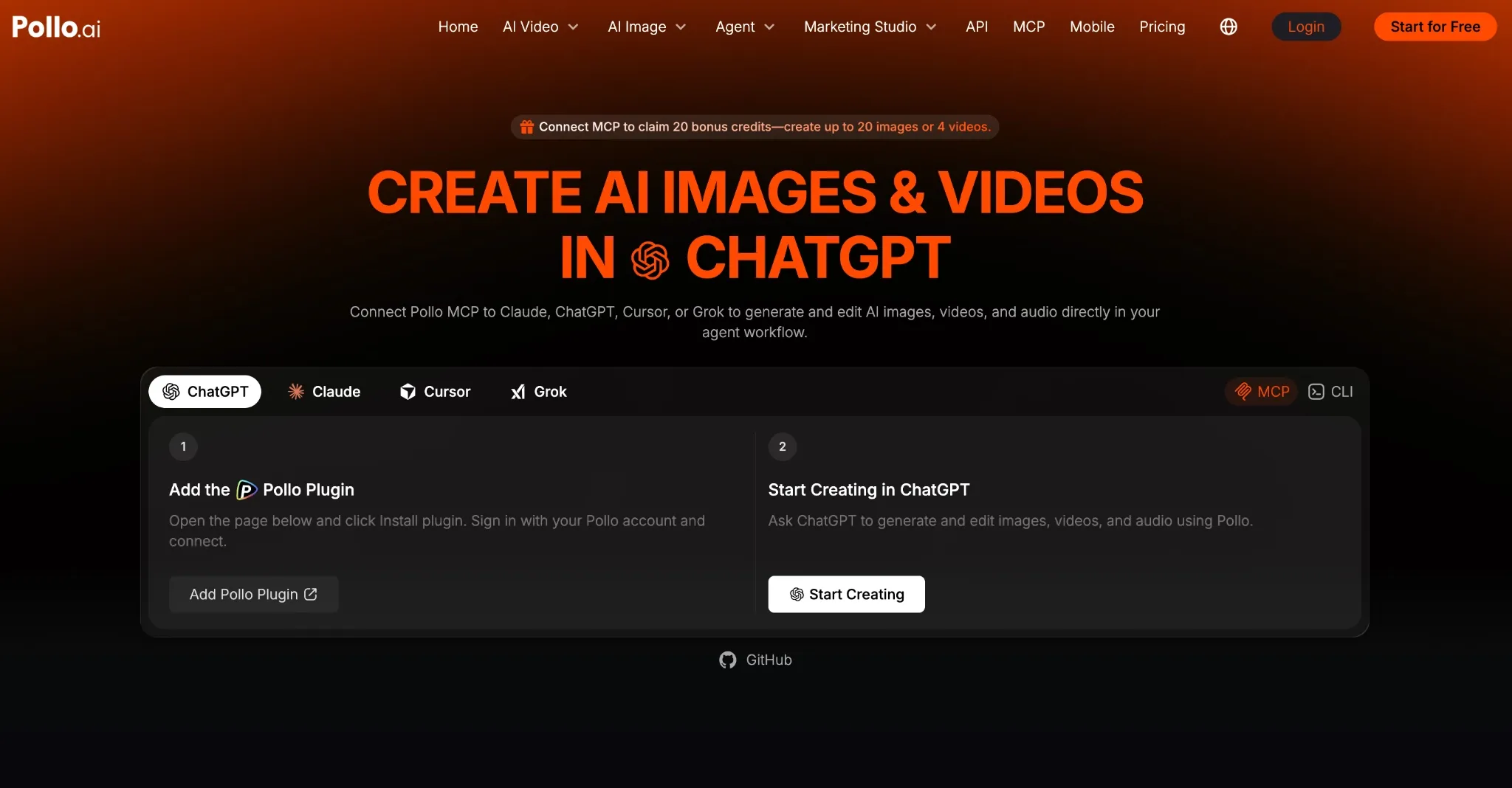
Naturally, this raises the important question: how do you set this up? I’m here to tell you that you can connect Pollo MCP in a few steps. Just make sure you have a ChatGPT and Pollo AI account:
- Sign in to ChatGPT
- Open this page and click Install plugin, which redirects you to the Pollo AI login.
- Sign in to your Pollo account, then click ‘Connect’ to authorize the plugin.
- Once done, you’re free to generate faceless social videos in chat.
Create Weekly Faceless Videos with Pollo MCP
Research topics, write scripts, generate clips, and plan your social calendar with Pollo AI in one repeatable workflow.
Create Videos with Pollo MCP
Faceless Social Videos In ChatGPT: Practical Workflow Example
After connecting Pollo MCP, you’re ready to start creating a week’s worth of faceless social videos in chat. So, let me show what that looks like:
Step 1: Request for Popular Topics In Your Niche
With ChatGPT as your assistant, the first step is using its research capabilities to determine which topics in your niche are making the most waves online at the time. You can start with a simple prompt like this, for example:
Research the hottest trending topics in the pet care niche for faceless videos. Find viral ideas, emerging trends, and untapped angles with high views and monetization potential using current data.
Step 2: Ask for a Script and Review It
Once you’ve decided on a topic, you can request ChatGPT to build you a script. This is important because you need to fact-check and ensure the recommended visuals match the script. Otherwise, you may spend credits on scenes that need replacing.
Write a 10-minute video script titled “How to Make Pet Grooming and Cleanup Easier.” Cover simple, safe ways to clean and care for pets’ eyes, ears, paws, teeth, coat, and other body parts. Explain common mistakes, practical grooming tips, and how to make the process easier and more comfortable for pets. Use accurate research, engaging storytelling, and smooth transitions. Include narration, visual suggestions, and moments suitable for short-form clips.
Step 3: Proceed to Generate Your Videos
If the script looks fine, then the next step is generating the videos. You can ask ChatGPT to choose a compatible model for the task or use the one you specify. I also suggest asking the AI agent to estimate costs and check credits before initiating the request, like so:
Analyze the full script and identify the most viral-worthy moments for TikTok, Reels, and Shorts. Select engaging, self-contained segments with strong hooks, surprising facts, and high retention potential.
For each clip, identify the exact script passage to extract, estimated duration, catchy title, strongest existing opening line, and suggested visuals. Keep the original wording unchanged so each segment can be matched to the original script.
Before generating the clips through Pollo MCP, estimate the total cost and check available credits. Flag insufficient credits or unclear costs before proceeding.
Output Example
Based on this workflow test, here’s an example of a faceless social video clip that I got back and can be shared online with realistic visuals, not to mention excellent narration:
Step 4: Plan the Week Ahead
For the final step, you can request ChatGPT to map out your content plan for the upcoming week. One simple way to do this is by asking:
Create a content plan for the upcoming week based on the social clips generated. Recommend what to post each day on YouTube, TikTok, and Instagram, including posting times, captions, titles, and hashtags. Prioritize a schedule that maximizes engagement, reach, and audience growth while making the most of the existing content.
Frankly, I can’t imagine you’d want to produce faceless videos any other way. With this workflow guide, you can create an automated video content pipeline for all your social accounts. All you’ll need to do is sit back, request, review, and approve to get finished clips! It’s really that simple.
Conclusion
It’s time to stop using separate tools and workflows to generate such videos, don’t you think? I’ve shown you how to connect Pollo MCP to ChatGPT and what to do after, so you’re all set. Feel free to create weeks' worth of faceless social videos using Pollo AI now!