MCP for Marketers: Create Video Ads Inside Agent Chat
Making AI video ads to fuel campaigns online has quickly become the norm for most marketing teams. But what if I said that you could generate them without leaving ChatGPT, Claude or whatever AI assistant you used to develop the scripts? With Pollo MCP, this is possible: from brief to final clip in a single chat thread! If you want to know how, then be sure to read on!
TL;DR
Using MCP, marketers can enable AI assistants to expand their capabilities and generate AI video ads within conversational chats. Start by connecting Pollo MCP to any compatible AI app you frequently use, be it Claude, Grok, or ChatGPT. Within minutes, you’ll be able to generate video ads using Pollo AI within your existing chat-based workflows.
How Pollo MCP Can Help Marketers: What You Need To Know
Ever heard of MCP or Model Context Protocol? If you haven’t, it’s an open standard for connecting AI apps like ChatGPT or Claude to external tools like Pollo AI. I think of it as a convenient way to give compatible AI apps access to new capabilities.
Instead of switching between separate tools and apps to create briefs, storyboards, and ultimately, video ads, I’m going to tell you that you can just use an open standard like Pollo MCP to handle it all in the same agent-led workspace. Seriously!
For instance, I can upload a product image on ChatGPT, then request a 15s video ad script based on that. Next, I can ask ChatGPT to recommend a model best suited to the task before instructing Pollo AI to generate the video and then get the final result back in the same chat.
As a marketer, you’ll no longer need to manage every production step. In fact, even if faced with a wide selection of models to choose from, you don’t need to become an expert. And this can be crucial because Pollo AI hosts dozens of AI models, including Seedance 2.5 and Wan 3.0.
You don’t even need to choose the best model for a specific task; let the AI assistant recommend one and automate most of the decision-making. In doing so, you get to enjoy faster production speed and better workflow continuity within a single chat session.
Plus, the Pollo MCP setup is straightforward, even for marketers with no technical expertise:
Here’s how it works with ChatGPT:
- Sign in to ChatGPT, then click on this page and select Install the Pollo MCP plugin.
- After that, you’ll be redirected to the Pollo AI login page to authorize access.
- Once done, you can request video ads in ChatGPT.
For Claude users, here’s the setup:
- Log in to Claude and go to Settings > Customize > Connectors.
- Select Add Custom Connector, name it Pollo, and paste this https://mcp.pollo.ai/mcp into the MCP server box.
- You’ll be redirected to sign in to your Pollo AI account.
- Once the connection is authorized, you can generate video ads in Claude.
If you use Grok, here’s how to set it up:
- Sign in to Grok, click on this page, then select New Connector > Custom.
- You can name it Pollo, then paste the Pollo MCP server URL, and click Add Connector.
- After that, log in to your Pollo AI account to authorize the connection.
Create Video Ads in Agent Chat with Pollo MCP
Turn product briefs, reference images, and campaign ideas into ready-to-review ad variations with Pollo AI in your existing AI workspace.
Create Video Ads with Pollo MCP
Using Pollo AI to Generate Video Ads Inside Agent Chat
Once Pollo MCP is connected to your AI agent, you’re free to create any type of video ad. Whether you need UGC-style product ads, product showcases, brand commercials, etc., Pollo AI can handle any request in chat. Here’s how I used it to create a product ad with ChatGPT:
Step 1: Create the Face of the Campaign
Any successful ad campaign needs a prominent face/subject to showcase and promote the product, especially given how UGC-style videos dominate social media. So, this is what I requested from ChatGPT using Pollo AI, and this is the result:
| Prompt | Image |
| Generate an image of a cool, edgy young girl with long black hair and bold makeup, wearing a casual white graphic top and carrying an orange bag. She has a unique street-style look, photographed on a quiet Japanese street. Aim for a natural, realistic fashion editorial vibe. | 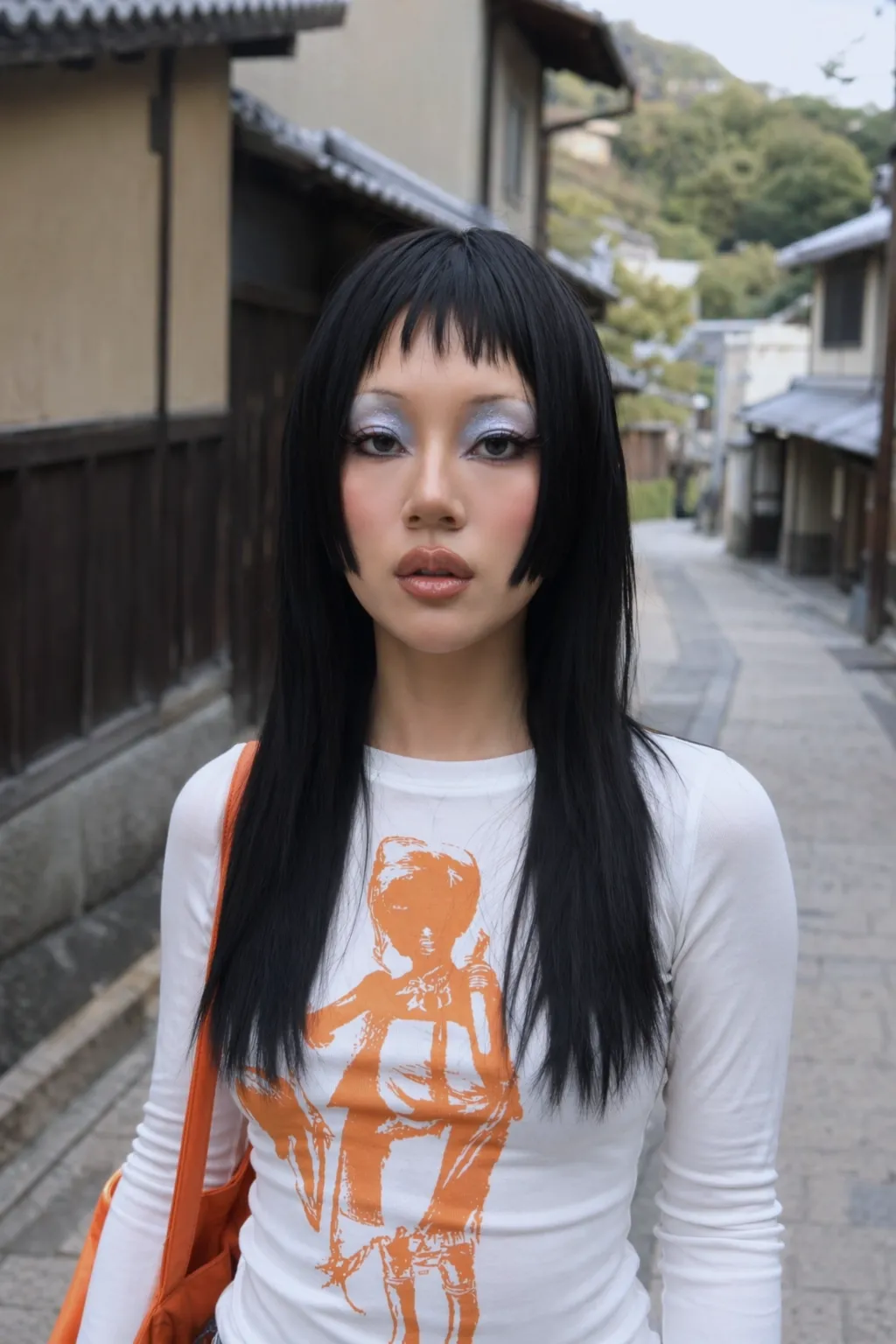 |
Step 2: Upload the Product Image
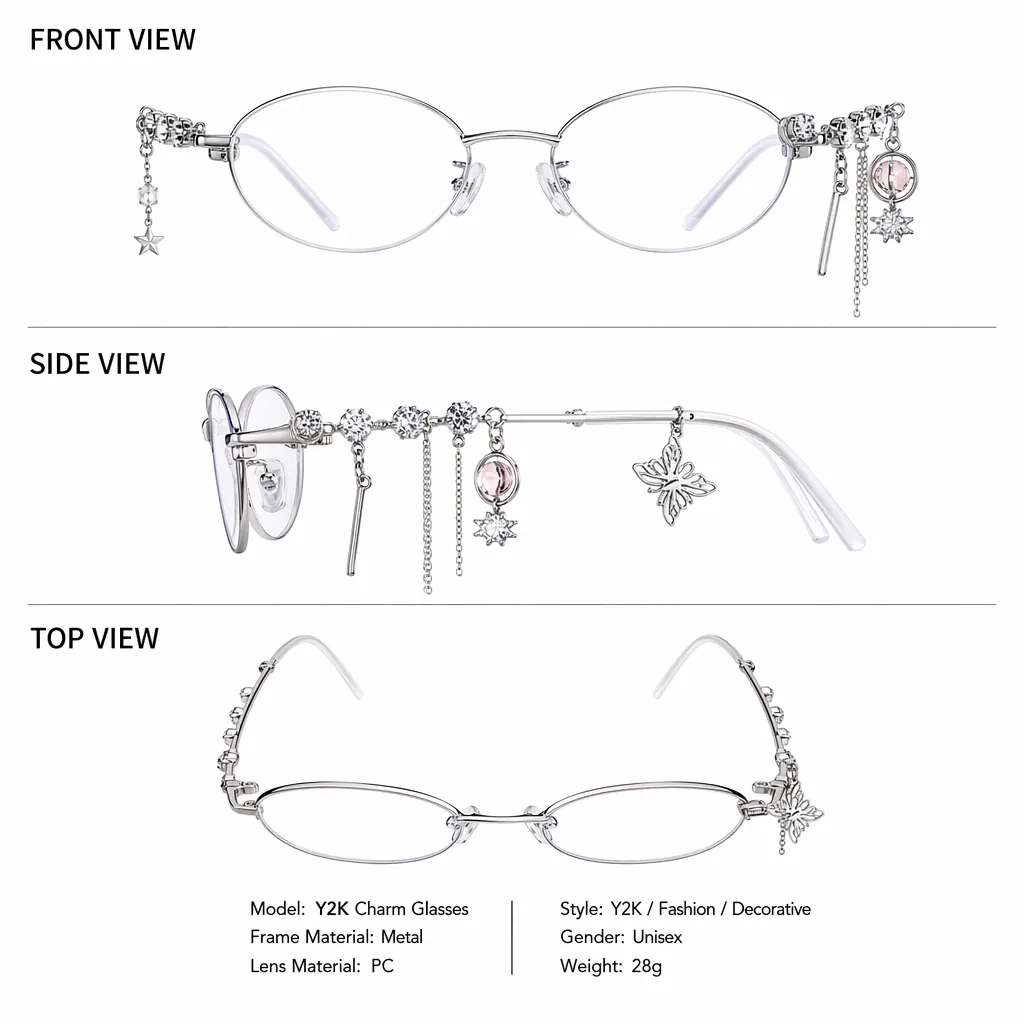
I sought to try to create a cinematic video ad for a unique set of Y2K-style glasses that are still in their design stage. So I started by uploading the reference image below to the chat.
Step 3: Generate Script/Prompt
Next, I asked ChatGPT for a short production brief for a 13s video ad, based on the two images. I wanted it to feel like a casual try-on video ad to share on socials. Here’s what it generated:
Vertical 9:16, 24fps, 13s. TikTok fashion UGC, fixed camera, natural daylight, quiet Kyoto street. A Japanese street-style creator inspired by @image1 showcases the Y2K charm glasses from @image2.
0–1s: She puts on the glasses, pleasantly surprised. VO: “Wait… these are actually so cute.”
1–3s: She adjusts the frames as charms sway. VO: “The little details… they move; I love that.”
3–6s: Full-body shot; she turns to show her outfit. Upbeat music.
6–8s: Close-up highlighting the decorative frames. VO: “It just makes the whole look feel different.”
8–13s: She walks forward, then smiles over her shoulder.
Realistic visuals, playful Y2K vibe, soft street ambience. No subtitles, watermark, or UI.
Step 4: Request for Video Ad
After reviewing the brief, I asked it to generate the finished video ad and choose a compatible model that can deliver the best result at a reasonable credit cost.
It didn’t take long to return a result, which you can see below:
In just one conversational chat, I managed to create a character, share the video idea, generate a short production brief, and produce a full video ad. If I wanted, I could continue to request edits in the chat thread, making it easy to keep developing campaign ideas.
Creating Video Ads Inside Agent Chat: What To Consider
Connecting Pollo MCP to your AI assistant reduces the need to switch between multiple tools, which is fantastic for your video ad workflow. But I must point out that you will still need to review the outputs it returns manually and refine your prompts/requests to nail the right result.
I also urge you to manage costs because it’s easy to generate videos in your AI agent and forget to consider your credit balance. I often recommend requesting the AI agent to check your balance and estimate costs before submitting a generation.
Also, since you can submit multiple image or video tasks in a batch via chat, you don’t need to repeat the same requests over and over to test different concepts. With just one brief, you can test a wide matrix of hooks, presenters, pacing, offers, etc.
I will also point out that connecting Pollo MCP includes access to refinement tools on Pollo AI such as video upscaling, extension, etc. So, you’re not just limited to generating videos in chat. You can request edits and other video adjustments for different results.
Conclusion
With Pollo MCP, any marketer can automate their video ad workflow in minutes. Instead of multiple apps, you can just describe the entire campaign in chat and let the agent coordinate generation with Pollo AI. It makes it all far easier in the long run, don’t you agree? I know I do!