



How to Build Fascinating Miniature Worlds with AI
What is miniature world AI?
The Pollo AI miniature world AI is a specialized engine that focuses on the specific physics of small-scale photography. Instead of simply shrinking a standard scene, the AI prioritizes depth-of-field and texture mapping to create an authentic "macro" look.
It understands how light filters through a blade of grass or how surface tension makes a water drop appear like a crystal ball. This attention to detail is what gives your videos a "living diorama" feel that is both soothing and visually striking.
Key features of miniature world AI
To ensure your small-scale scenes look physically convincing, the tool utilizes several automated rendering techniques:
- Cinematic Depth Control: The tool automatically blurs the background and foreground to create the "tilt-shift" look that is essential for a high-end miniature aesthetic.
- Delicate Texture Mapping: It excels at rendering surfaces like damp soil, intricate insect wings, and weathered wood at an extreme-detail level.
- Macro Lighting Effects: The AI creates diffused, studio-quality light that mimics the way light hits a desk surface or filters through foliage at close range.
How to build miniature worlds on Pollo AI?
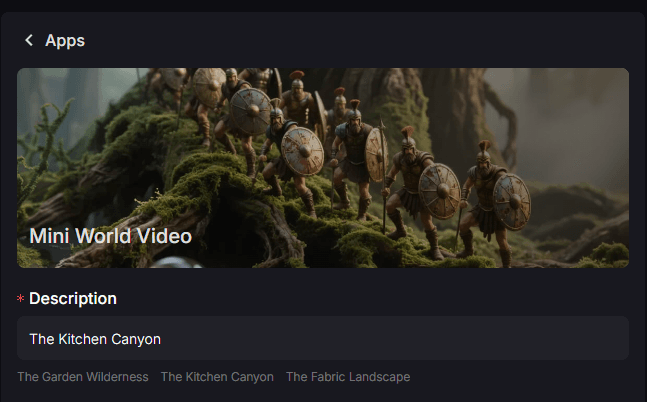
Step 1: Input a Short Scene Description
Visit the tool page and enter a short phrase (under 50 words) describing your scene. The AI uses this brief input to automatically establish the scale, textures, and macro perspective.
Step 2: Select Your Ratio and Render
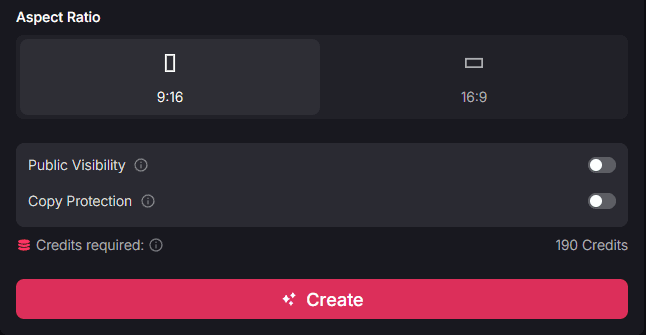
Choose the aspect ratio that fits your project. We recommend 16:9 for horizontal cinematic scenes that show off the breadth of your micro-world.
Once you’ve made your choice, click "Create" to render the sequence.
Step 3: Download or Share Your Video
Review the result you get, download or share directly if you are satisfied with it.
Streamline Your Content with Other Pollo AI Apps
Want to improve your mini world video or explore other possibilities? Pollo AI offers a comprehensive suite of tools designed to streamline your entire content creation workflow and help you build a complete digital ecosystem:
- Structural Design: If your tiny world needs more permanent homes, use the miniature building video maker to design the specific architecture your characters inhabit.
- Professional Branding: For those looking to tell a longer story, you can use the AI movie maker to weave your miniature clips into a larger, professional-grade narrative.
Who can benefit from miniature world videos?
The "small-world" aesthetic is a powerful visual hook that creators across several niches can use to build a unique brand identity:
- ASMR and Relaxation Channels: Create "Zen loops" of tiny characters in nature to provide soothing content that encourages high repeat-watch counts.
- Hobbyists and Model Makers: Use this tool to visualize complex diorama ideas or to create cinematic backgrounds for your physical figures.
- Digital Marketers: Showcase a product—like a watch or jewelry—as a "giant landmark" in a miniature world to create a unique visual hook that standard photography cannot match.
Summary
Using miniature world AI is a simple way to turn ordinary life into an enchanting secret universe. It is a tool that rewards curiosity, allowing you to build scenes that feel like they have a life of their own without needing any previous animation experience. By mastering this micro-perspective, you can provide your audience with a truly unique and immersive visual experience.