



How to Turn Off Age Restriction on YouTube
Encountering the "sorry this content is age-restricted" message is one of the most frustrating experiences for any viewer. Whether you are trying to access educational documentaries or trending entertainment, the youtube age restriction filter often acts as a digital wall. Understanding how to turn off age restriction on youtube is essential for regaining control over your viewing experience.
While you navigate these settings, remember that professional content creators use tools like the Pollo AI to ensure their marketing videos are high-quality and compliant, avoiding these filters altogether.
In this guide, we will provide a comprehensive roadmap to how to remove age restriction on youtube so you can enjoy a truly open platform.
Difference Between YouTube Restricted Mode and Age Restriction
Before diving into the steps, it is vital to distinguish between two different features.
Youtube age restriction is applied to specific videos that the platform deems unsuitable for users under 18. This is usually based on content involving violence, sensitive topics, or language. You cannot simply toggle this off with a switch; it is tied directly to your verified identity.
On the other hand, how to turn off youtube restricted mode is a different process. Restricted Mode is an optional setting used by schools, parents, and libraries to filter out potentially mature content. If you see the message this video is age-restricted and only available on youtube, you might be dealing with either a hard age wall or a soft restricted mode filter.
How to Turn Off YouTube Restricted Mode on Desktop
If you are on a computer and want to turn off restricted mode for youtube, the process is straightforward.
First, click on your profile picture in the top right corner of the screen.
Scroll to the bottom of the drop-down menu where you will find "Restricted Mode." Click it and toggle the switch to "Off."
If the setting is grayed out, your network administrator or ISP might have locked it. This is common in workplace or educational environments. Once toggled off, you should be able to view most hidden content videos that were previously filtered out by the general safety settings.
Disabling Restricted Mode on Mobile Devices
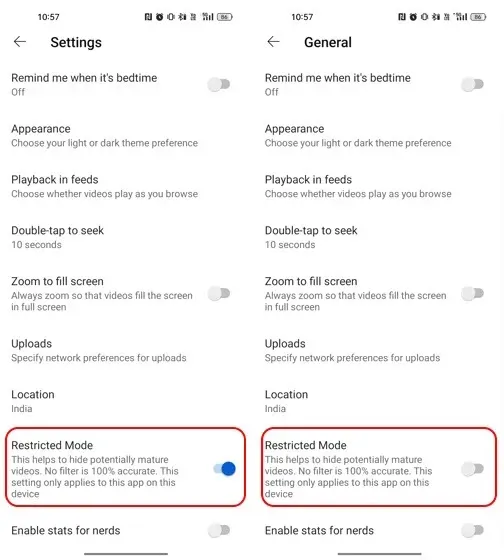
For those wondering how to take off age restriction on youtube via mobile, the steps vary slightly between Android and iOS. Open the YouTube app and tap your profile icon.
Go to Settings > General. Here, you will find the "Restricted Mode" toggle. Switch it off to see a wider range of content.
On iOS, you may need to go to Settings > Account within the app to find the same toggle.
Remember, this only removes the "Restricted Mode" filter; it does not bypass the strict YouTube age restriction that requires a verified birthdate over 18.
How to Edit Your Age on YouTube to Remove Restrictions
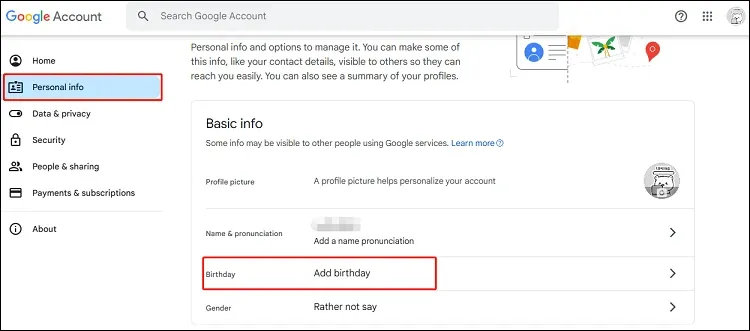
If you are still seeing the message sorry this content is age-restricted, your Google Account birthdate might be incorrect or missing.
To fix this, you need to know how to edit your age on youtube through your Google profile. Visit the "Personal Info" section of your Google Account and locate the "Birthday" field.
Ensure the year is set so that you are at least 18 years old. Google may require you to verify this with a credit card or a valid ID to prove your age. Once verified, the youtube age restriction turn off process happens automatically across all your devices linked to that account.
Troubleshooting the Age Restriction Error
Sometimes, even after updating your settings, you might still see this video is age-restricted and only available on youtube. This often happens if you are using a Brand Account. YouTube frequently restricts Brand Accounts from viewing mature content regardless of the owner's age.
Checking Brand Account Settings
To resolve this, try switching back to your personal profile. If the video suddenly becomes available, you have identified the issue. If you must use a Brand Account, ensure the primary owner account has completed the age verification process. This is a common hurdle when trying to get rid of youtube age restriction.
Browser Cache and VPN Issues
A cluttered browser cache can also lead to persistent restriction messages. Clearing your cookies and cache can force YouTube to recognize your updated age settings. Additionally, if you are using a VPN, the local laws of the server location might enforce a stricter youtube age restriction than your home country.
How to Watch Age Restricted YouTube Videos Safely
If you cannot change your account settings, you might look for ways on how to watch age restricted youtube videos without logging in.
While some third-party websites offer "bypass" tools, these are often filled with ads and security risks. The safest method is always through official account verification.
Creating YouTube Friendly Content with Pollo AI
As a creator, having your video age-restricted can kill its reach.
The Pollo Agent is designed for marketers and e-commerce professionals. It creates post-ready videos that are immersive and engaging without relying on "edgy" content that triggers the youtube age restriction. It understands the nuance of safe-for-work (SFW) marketing, ensuring your ads and tutorials reach the widest possible audience.
Popular Pollo AI Use Cases for Professional Growth
These use cases allow you to maintain a high frequency of post-ready content that is "Advertiser Friendly," which is the key to maximizing both monetization and organic growth.
- AI YouTube shorts generator: Create viral, compliant shorts in seconds.
- Teaser video maker: Build hype for your main launch without "edgy" content.
- Explainer Video Maker: Turn complex, sensitive topics into clear, educational guides.
Why YouTube Enforces These Restrictions
It is important to understand the "why" behind the youtube age restriction. The platform faces immense pressure from advertisers and regulators to keep children safe. For advertisers, being associated with "Restricted" content can be a brand safety nightmare. This is why the algorithm is so aggressive in filtering out hidden content videos.
By following the rules and knowing how to turn off age restriction on youtube legally, you maintain a healthy relationship with the platform's algorithm.
For creators, using the Image to Video AI or Text to Video AI tools from Pollo AI ensures your content is "Advertiser Friendly," which is the key to maximizing monetization and growth.
Final Checklist for Unlocking YouTube Content
If you are still struggling to view content, run through this quick final checklist:
- Confirm that "Restricted Mode" is toggled "Off" in your account settings.
- Verify that your Google Account birthday makes you older than 18.
- Ensure you are not using a Brand Account that lacks age verification.
- Check if your network or school administrator has enforced a filter.
- Clear your browser cache and disable any conflicting VPNs.
Conclusion
Learning how to turn off age restriction on youtube is the key to a limitless viewing experience. Whether it is adjusting your birthdate or toggling off Restricted Mode, these steps empower you to see the full spectrum of content available. As the digital landscape evolves, staying informed about these settings is vital for both viewers and creators.
For those in the marketing space, the goal is to never have your content restricted in the first place. By leveraging the Pollo AI suite, you can produce production-ready and post-ready videos that are both viral and professional. Start creating content that speaks to everyone, and leave the frustration of age restrictions behind.