



How to Delete Kling AI Account (3 Simple Steps)
Deleting your Kling AI account is a quick and straightforward process that can be completed in just three simple steps.
This guide will walk you through the necessary steps and preparations while introducing a more powerful video generator. Let’s get started!
Preparing to Delete Your Account
Before you delete your Kling AI account, there are a couple of things you should do. These preparations will make sure you don't lose anything important or regret your decision later.
- Back-up Your Data: If you have any video files, projects, or other stuff saved in your account, make sure you save them somewhere safe. Once your Kling AI account is gone, your data is gone, too.
- Cancel Subscriptions: Make sure to cancel any subscriptions paid through Kling AI before deleting your account to avoid being charged afterward.
When you do all of these, you can then proceed to get rid of your Kling AI account.
Steps to Delete Your Kling AI Account
You can simply follow these 3 steps to delete your Kling AI account:
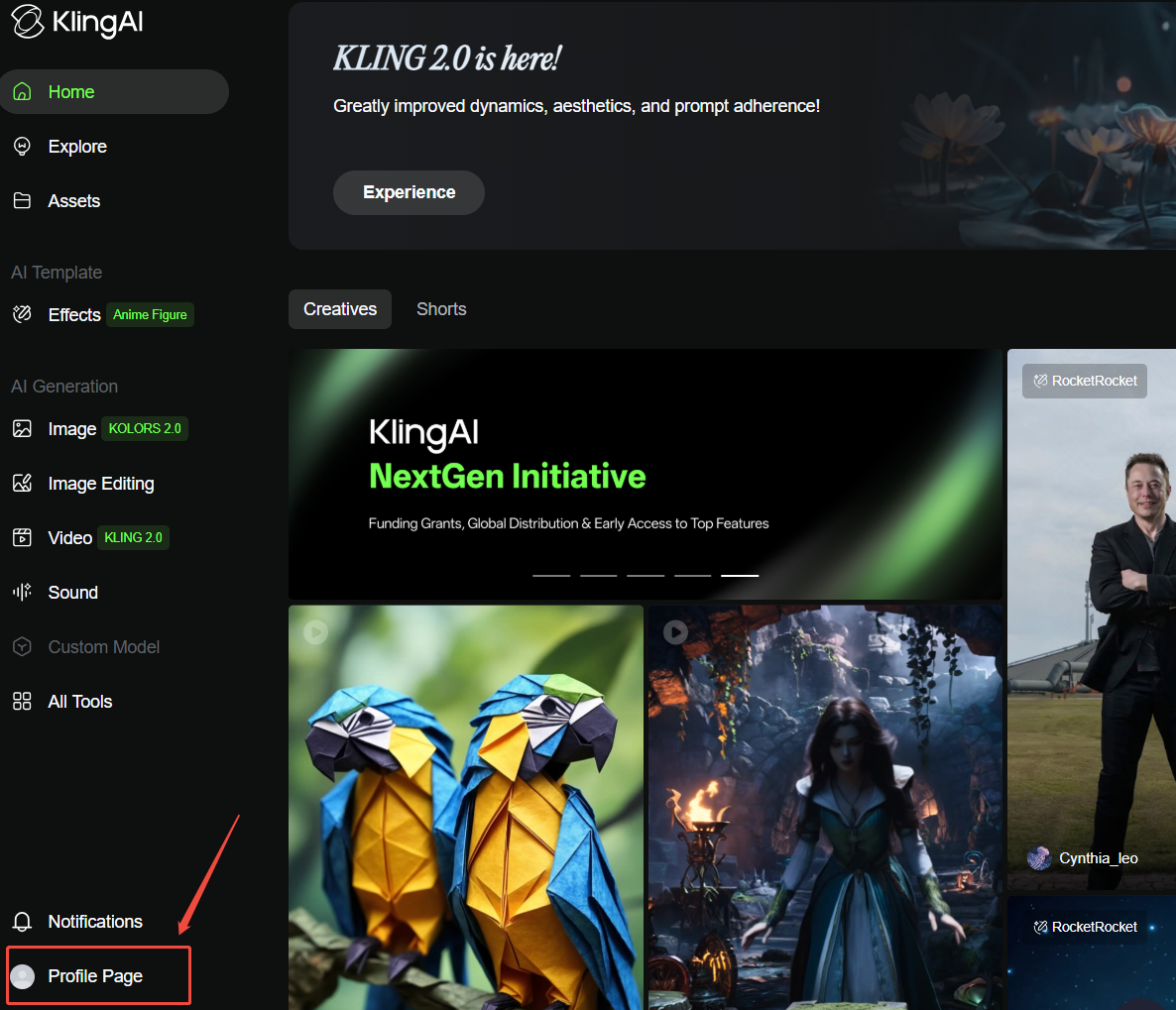
Step 1: Login and Head to "Profile Page"
Go to the Kling AI website and log into your account using the email you’re trying to delete. Once you’re in, click on the profile page button in the lower left corner.
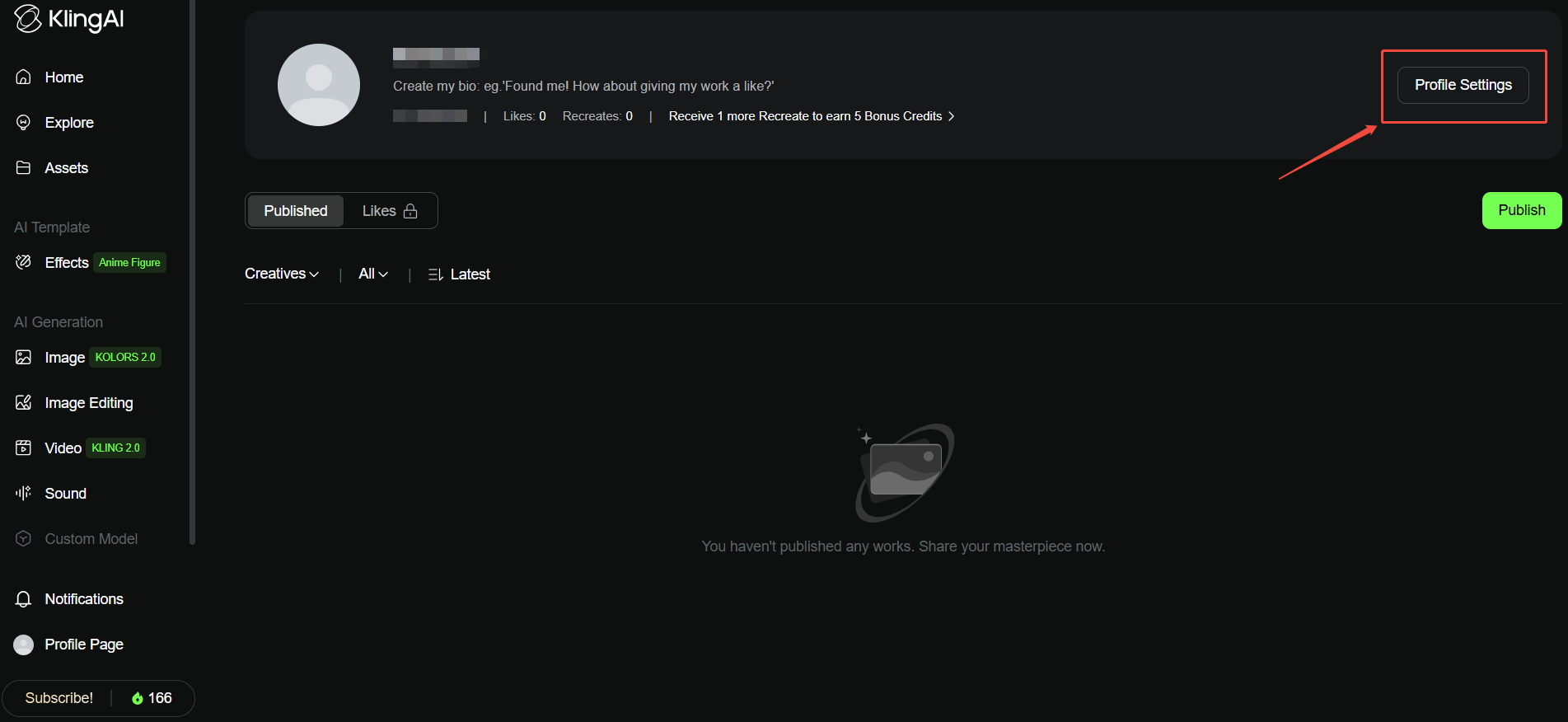
Step 2: Open Profile Settings and Hit on Delete Account
You will find the Profile Settings button on the upper right corner. Directly click on it.
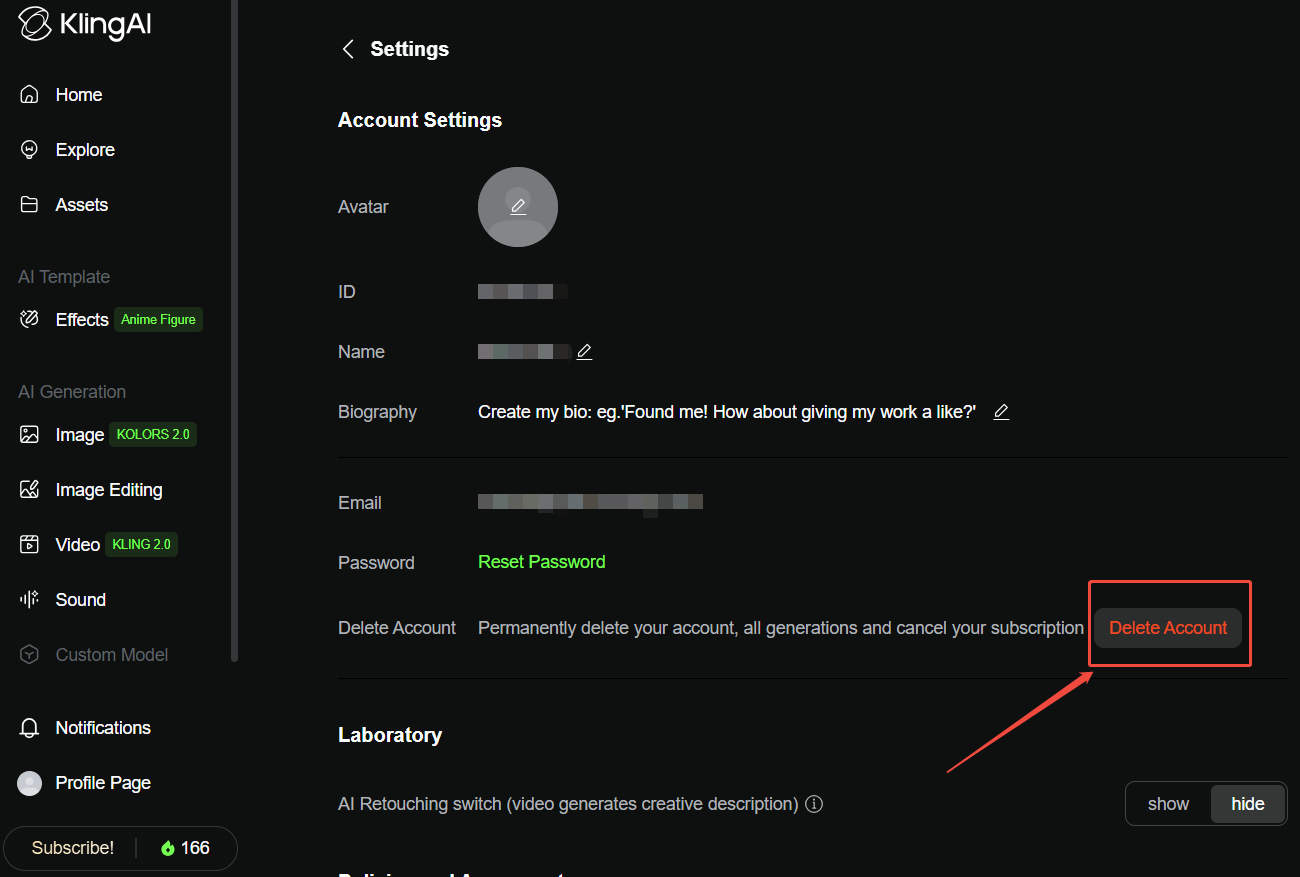
And then, it will show you your account settings. Find the red button “Delete Account”. If you are ready, hit on this button to move on!
Step 3: Input Verification Code and Complete
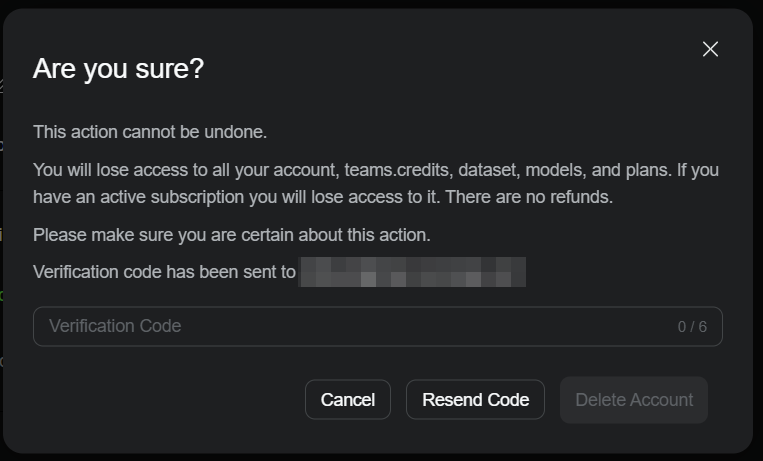
Now, a verification code has been sent to your email address. All you have to do is to open your email account, find the latest email by Kling AI, and enter the code here. And then hit on the Delete Account button. Your Kling AI account will be deleted forever. That’s it!
What Happens After Account Deletion?
Deleting your account might seem final, but it's good to know what will happen next. Here's what you can expect once it's done.
Loss of Data Access
When your Kling AI account is deleted, all the data on the platform is wiped out. This means projects, files, and anything else you saved in the platform will be gone forever. If you didn't back it up, there's no way to recover it.
Termination of Subscriptions
Any subscriptions tied to your account will stop immediately. This is great because you won't get billed anymore. But it also means you lose access to any premium features.
Restricted Re-Registration
In some cases, you might not be able to sign up again using the same email or username. If you think there's even a small chance you'll want to come back, consider this before deleting your Kling AI account.
Reasons for Deleting Your Kling AI Account
Here are some common reasons why people decide to delete their Kling AI account:
No Longer Needed
If you've switched to another video generation platform or no longer create AI videos, deleting an unused account simplifies your digital life.
Unwanted Emails or Notifications
Stop incessant emails or notifications from Kling AI by deleting your account, ensuring no further contact.
Dissatisfaction? Try Pollo AI as a Better Alternative

If Kling AI didn't live up to your expectations, it's natural to consider deleting your Kling AI account.
Regarding these, Pollo AI is your best option. As an all-in-one video generator, you can get access to most of the other top video models such as Runway, Hailuo AI, PixVerse AI, Vidu AI, and more.
You can also get access to Pollo AI’s own video generation model, plus all of its fun and interesting video effects for specific kinds of videos. There are still more great generation features such as video to video, consistent character video for you to explore. This platform is indeed a perfect package for those who are interested in AI video generation.
Conclusion
Deleting your Kling AI account is simpler than it sounds. As long as you back up your data and cancel any subscriptions first, the process is quick and painless. Just follow the steps above, and you’ll be ready to move on without any hassle.
FAQs
Can I recover my Kling AI account after deleting it?
Unfortunately, no. Once you delete your account, it's gone for good. All your data, projects, and subscriptions are erased permanently.
Do I lose access to premium features after deleting my account?
Yes, you lose access to all premium features and services as soon as your account is deleted. Make sure you've used up any remaining benefits or services before you proceed. This way, you won't feel like you're leaving anything behind.
Do I need to cancel my subscription before deleting my Kling AI account?
It’s best to cancel your Kling AI subscription first before deleting your account. It will save you from any billing confusion later. Once that’s done, you’re free to delete your account without any worries.