



LitVideo Review: I Tested LitMedia's AI Video Generator for a Week
LitVideo is worth trying if you want fast AI video generation with multi-model access, animation effects, and social-ready clips — all without juggling different tools.
I like LitVideo most when it works as a smart content model You upload an image or write a prompt, pick a template, and get a usable video clip in seconds. It removes the friction of choosing which AI model to use. But LitVideo is not perfect. It still falls short when you want a finished, publish-ready video rather than a raw generated clip.
LitVideo Review TL;DR: Fast Clips, Real Limits
LitVideo is a great AI video generator for creators who want fast clip generation, multi-model access, and animation variety. Its best idea is automating the model selection process so you do not have to think about it.
The catch is that LitVideo works best for short clips and quick experiments. If you need a complete video workflow — from generation to editing to publishing — it starts to show its limits.
Review Criteria | Verdict |
|---|---|
| Multi-Model Model | Strongest area. Automatically picks the best model for your scene. |
| Video-to-Animation | Great for turning real footage into stylized anime clips. |
| Template Library | 400+ templates make it easy to start fast, especially for social media. |
| Style Customization | Good variety of filters and effects for quick brand tuning. |
| Workflow Depth | Better for single clips than full campaign production. |
| Best Fit | Content creators, social media teams, e-commerce sellers, and meme makers. |
What Is LitVideo AI, and Who Is It Actually For?

LitVideo is an AI video generator built under the LitMedia platform — a broader AI creation suite covering video, image, music, and avatar tools.
What makes LitVideo different from a basic text-to-video tool is how it handles model selection. Instead of locking you into one model, LitVideo runs a multi-model system that automatically picks the best generator for your prompt. That means you are not choosing between Kling AI and Vidu AI yourself — the platform handles it for you.
In my testing, that approach felt genuinely useful for fast content work. You describe a scene, and LitVideo figures out which model handles that scene best.
How I Put LitVideo AI Video Generator Through Its Paces
I tested LitVideo across the use cases that matter most to real creators.
I tried text-to-video prompts, image-to-video animation, video-to-anime conversion, and template-based generation. I paid attention to speed, output quality, ease of use, and where the results started to feel inconsistent.
My focus was always practical: does this save time and produce something usable? My answer is yes — with conditions.
LitVideo AI Features I Actually Used and Rated
1. Multi-Model Intelligence: The Feature That Sets LitVideo Apart
LitVideo's core feature is its ability to aggregate top AI video models — including Kling AI, Veo AI, and Wan AI — and automatically recommend the right one for your scene.
For most users, model selection is a pain point. You never know if one model handles fluid human motion better or realistic physics more naturally. LitVideo removes that decision entirely.
In my testing, this worked well for straightforward prompts. The output felt relevant to the input rather than generic. The limitation is that for highly specific creative briefs, you may still want to override the recommendation manually.
2. LitVideo's Video-to-Animation: Where It Really Shines
LitVideo's video-to-anime tool is one of its most impressive features. You upload a real-life clip, and the system maps the movement and reskins it into a stylized animation sequence.
This is not a simple filter. It uses deep learning to preserve motion quality from the original footage. I found the results were noticeably more stable than basic anime-style effects I have tried elsewhere.
The caveat is that source clip quality matters. Low-light or shaky footage can produce less clean animation output.
3. 400+ LitVideo Templates: A Real Shortcut for Non-Technical Users
For users who struggle with blank prompts, LitVideo's template library is a fast shortcut. The templates are categorized by use case — marketing, education, social media trends — and you just select one, upload your image, and generate.
This makes LitVideo approachable for non-technical users. I noticed the templates are especially well-suited for Reels and Shorts-style video.
The downside is that heavy reliance on templates can make content feel similar across creators using the same platform.
4. Style Customization in LitVideo: Quick Tone Shifts Without Post-Production
LitVideo gives you a library of visual filters and effects to shift the tone of a clip. You can move from a cinematic dark look to a bright commercial style without post-production color grading.
For creators who need to maintain a consistent content identity across videos, this is a real time-saver. In my testing, the style shifts were quick and clean for simple clips.
That said, for brand-sensitive campaigns, the results still benefit from a final review before publishing.
LitVideo AI Pros and Cons: The Honest Breakdown
Pros:
- Multi-model model removes manual model selection
- Video-to-animation output is stable and high quality
- 400+ templates make it fast to start
- Style filters are quick and easy to apply
- Good for short-form social clips and product animations
Cons:
- Prompt rejections can disrupt the creation flow
- Finished video production still requires external editing
- Heavy template use can produce similar-looking content
- Some users report features being removed or restricted over time
- Less suited for full campaign or brand video workflows
Where LitVideo AI Falls Short for Serious Creators
The Output Is a Clip, Not a Finished Video
LitVideo generates strong raw clips. But if you need a complete, publish-ready video — with captions, transitions, voiceover, and pacing — you are still doing that work elsewhere.
This is the most common gap users feel after their first few sessions. The generation is fast, but the post-production gap remains.
LitVideo Prompt Rejections Are a Real Friction Point
Some users report that prompts get rejected without clear explanations. This creates friction when you are trying to iterate quickly on a creative idea.
In testing, I noticed that specific or stylized prompts sometimes triggered stricter content filters. It is manageable, but worth knowing before you rely on the tool for time-sensitive content.
LitVideo Works Best for Short Clips — Not Long-Form Production
LitVideo is clearly optimized for short-form content. Reels, Shorts, product demos, meme clips — these are its natural zone.
If your goal is a longer brand film, a full tutorial video, or a structured campaign asset, LitVideo's workflow starts to feel incomplete.
Go From Clip Generation To Publish-Ready Videos
Use Pollo AI to turn prompts, images, and ideas into publish-ready videos for social, product, and campaign content.
Try Pollo AI for Free
Who Should Actually Use LitVideo AI?
LitVideo is right for you if you create short-form video content regularly and want to move faster without managing multiple AI subscriptions.
It works well for social media teams, e-commerce sellers animating product images, content creators building clip libraries, and meme makers who need speed above everything else.
Skip it if you need complete video production in one place — or if prompt control and workflow depth matter more than generation speed.
The simplest way to think about it: LitVideo is a fast clip model. Pollo AI is a complete video workflow.
LitVideo AI Across Real Use Cases: How Does It Actually Perform?
Use Case | My Take |
|---|---|
| Social Media Reels and Shorts | Strong fit. Templates and fast generation make this the best use case. |
| Product Animation for E-commerce | Good fit. Image-to-video works well for simple product demos. |
| Video-to-Anime Content | Strong fit. One of the most stable animation tools I tested. |
| Marketing Campaign Videos | Partial fit. Good for clip generation, but post-production is still separate. |
| Educational Content | Decent fit. Templates help structure lesson visuals quickly. |
| Long-Form Brand Video | Weak fit. LitVideo is not built for full-length video production. |
My Honest Take on LitVideo After 2 Weeks of Testing
LitVideo solves a real problem: choosing the right AI model is confusing, and most creators just want the best result for their input.
The multi-model is genuinely useful. The animation quality is above average. The template library makes it beginner-friendly in a way that feels intentional, not just padded.
What I kept noticing, though, is that LitVideo is built around the generation step — not the full video production step. That is fine if clips are your output. But if your audience expects polished, publish-ready content, you will always feel like you need one more tool after LitVideo.
That gap is where the frustration often starts for more advanced users.
Why Pollo AI Is the Stronger LitVideo Alternative for Creators
Pollo AI is a better LitVideo alternative if you need more than fast clip generation. LitVideo is genuinely useful when you want to generate short clips, animate product images, or experiment with video-to-anime effects. For social-first creators, it covers a lot. But once you need a finished, publish-ready video — one that is ready to go live without extra editing — it reaches its limit fast.
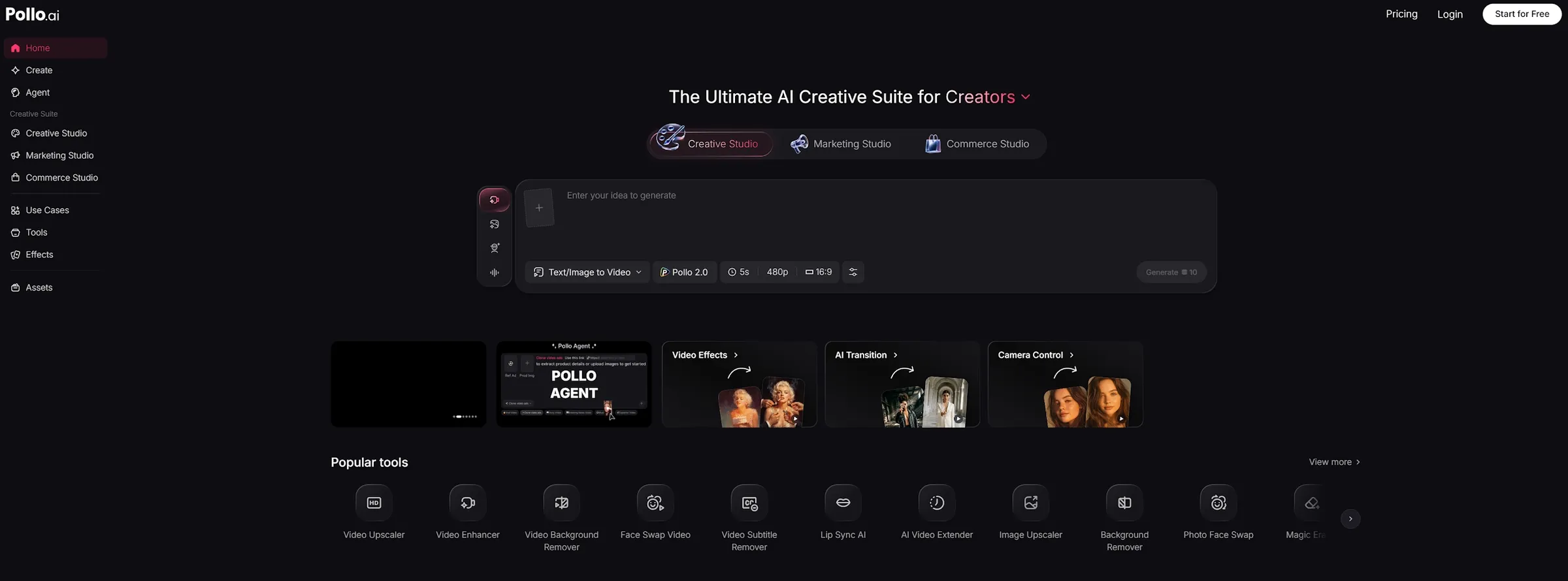
That is where Pollo AI makes more sense. Pollo AI is the ultimate AI creative suite for marketers, creators, and sellers & brands. It brings together video generation, AI video editing, talking avatar creation, and intelligent automation in one connected workflow.
What stands out is Pollo Agent — a purpose-built workflow tool that takes you from input to a publish-ready video without manual editing steps. That is a meaningfully different experience from generating a raw clip and then figuring out the rest.
Pollo AI is also organized around real use cases. Marketing Studio handles ads and campaign content. Commerce Studio covers product visuals and e-commerce assets. Creative Studio is where image-to-video, text-to-video, AI animation, and video-to-video tools live.
The difference is clear: LitVideo is fast and flexible for short clips. Pollo AI is better when your goal is a finished video, not just a generated one.
Final Verdict: Is LitVideo Worth It?
LitVideo is worth trying if short-form video creation is your main workflow. The multi-model model is its strongest idea. The animation tools are genuinely impressive. And the template library gives new users a real shortcut into AI video creation without a steep learning curve.
The honest limitation is that LitVideo stops at the clip. If you need a complete video ready to publish — with structure, pacing, and production polish — you will find yourself reaching for additional tools. For fast social clips and creative experiments, LitVideo delivers. For a full production workflow, Pollo AI is the strongest choice.