



Media.io Review: I Tested Media.io, And Have A Lot To Unveil About This Multimodal Content Generation Platform
I have often been frustrated that most generative AI tools fail to offer comprehensive support for multimedia creation.
Most of them specialize in one area, like images, audio or video, rarely all of them. And even those that do, I often see fail to meet quality expectations.
Recently, I discovered Media.io, which allows users to generate VIDEO, IMAGE, and MUSIC all in one place.
My interest was piqued, but so were my doubts.
Can this one-stop shop for media and audio produce great results? Or will it be a letdown?
To find out, I explored its extensive features, which also included testing its capabilities.
After a few days' tests, I found out that some outputs fall short of professional-grade standards, requiring additional refinement.
And it has a limited selection of AI models and visual styles, which can constrain creative variety.
To make it worse, the pricing can be expensive, especially for advanced plans or heavy users.
But it's not without its merits.
For those of you who would like a quick rundown, let me try to sum up what I liked and disliked about Media.io with a simple pros and cons breakdown.
| Pros | Cons |
| Multimedia AI generation tools and effects | Expensive pricing options |
| Versatile video editing features | Free plan is extremely restrictive |
| High-resolution outputs | Outputs fall short of professional standards |
| User-friendly interface | Few AI models to choose from |
| Expansive user community feed | Limited visual styles available |
Having tested Media.io, I have a lot to share about my experience with it. But before I get into all that, let me give you an insightful overview of what this platform represents.
What Does Media.io Have To Offer?
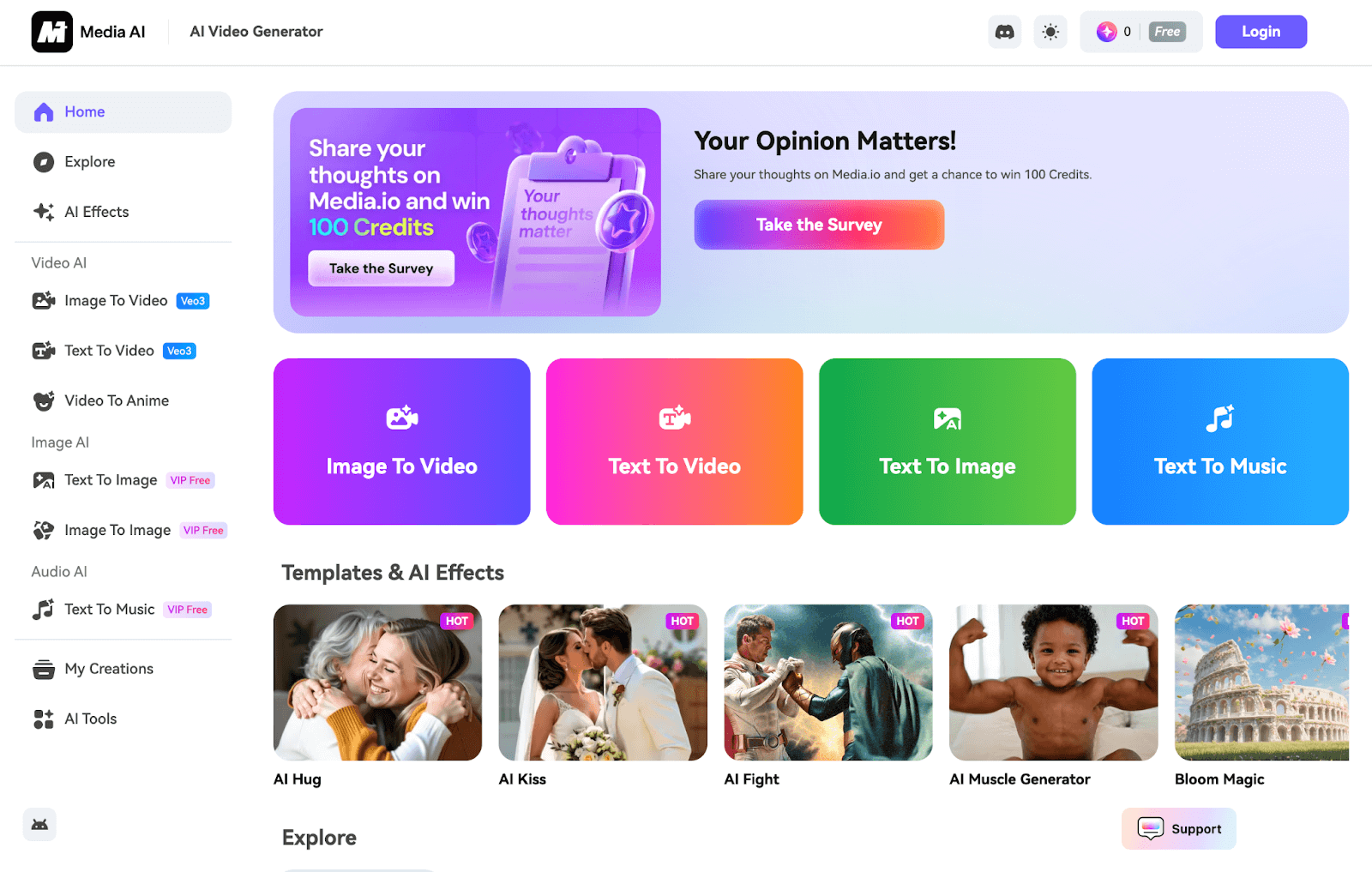
Designed to accommodate various multimedia creation needs, Media.io allows me to generate all kinds of unique images, videos, and even audio content.
To be precise, I can create images using its text-to-image and image-to-image AI tools that support various art styles like 3D, Pixel, Cyberpunk, Sci-fi, Ghibli, and others.
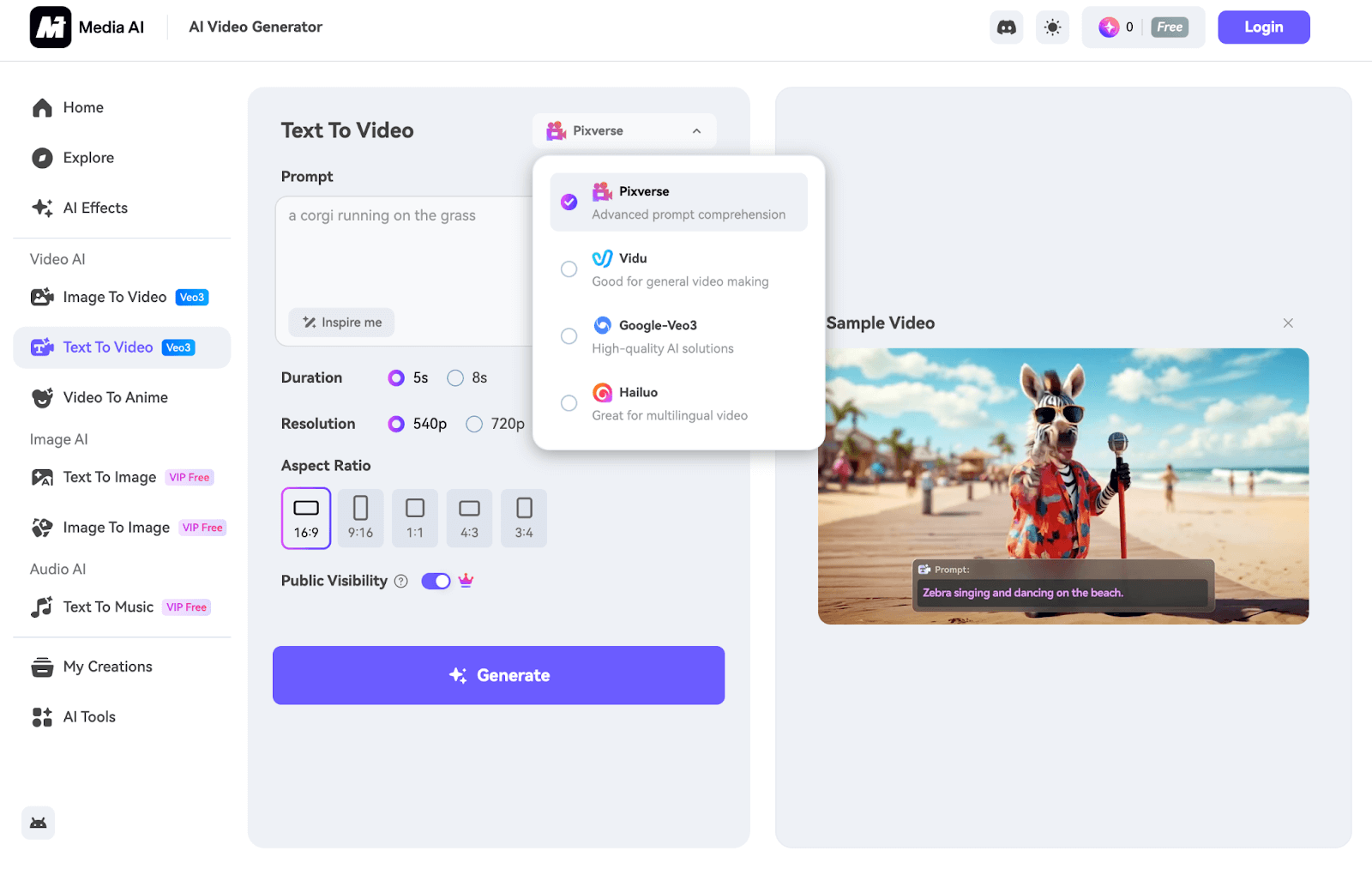
When it comes to video generation, I can access text-to-video and image-to-video capabilities with the benefit of being able to switch between multiple AI models.
The available AI models I can choose from include Pixverse, Vidu, Google-Veo 3, Runway, and Hailuo. This gives me some versatility to work with for more varied outputs.
On top of that, Media.io supports AI music generation. This lets me produce tracks using descriptive prompts across various genres like pop, rock, hip-hop, R&B, and more.
But that’s not all. I can also access various AI image and video effects that let me reimagine my existing media to create unique, novelty outputs.
And if I ever need to customize my content, I can access numerous video editing tools to convert videos, trim videos, translate videos, add subtitles across 90+ languages, etc.
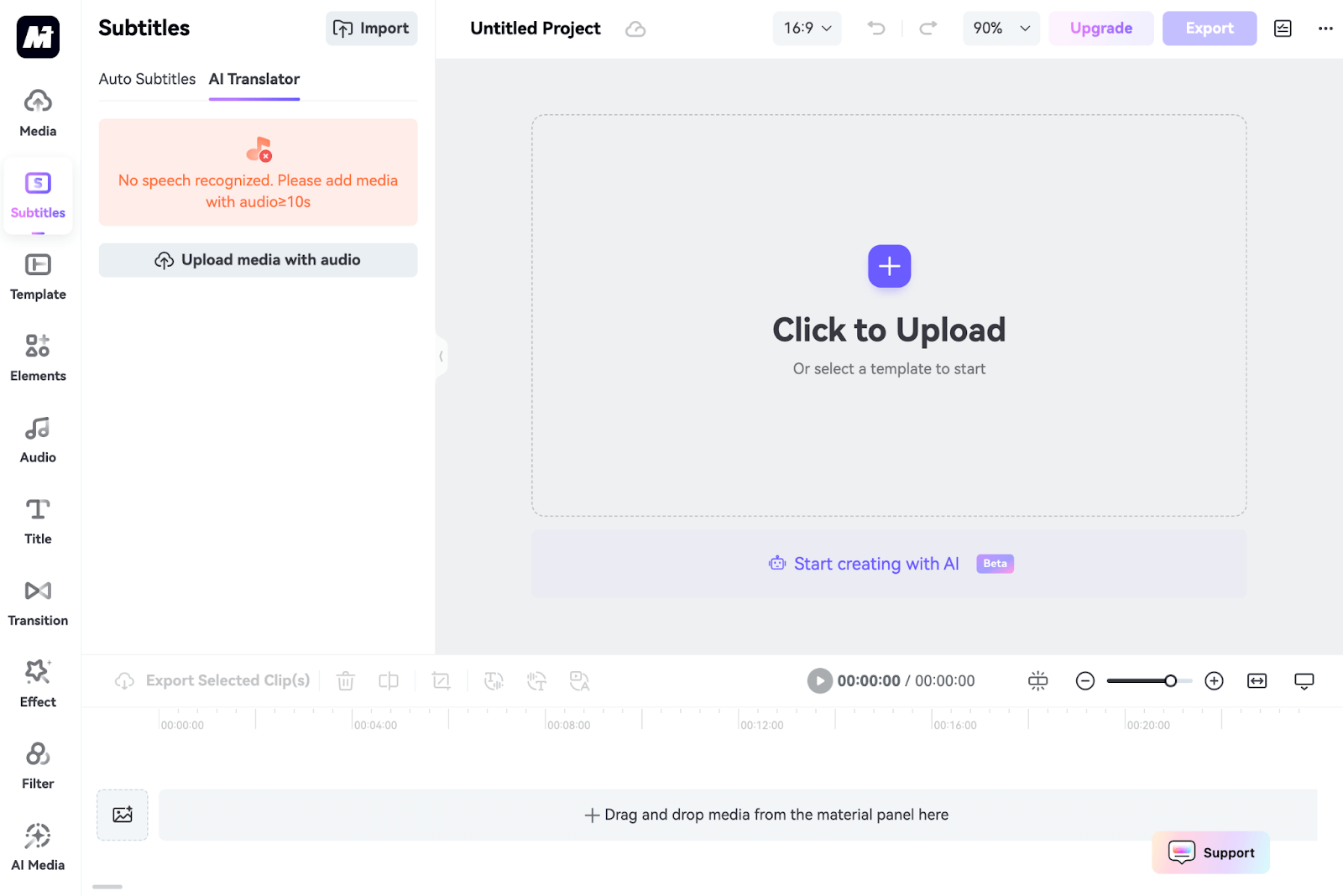
This makes it a little easier to fine-tune my videos for more personalized results. I can also freely browse through what other Media.io users create via the ‘Explore’ page.
This way, I can get inspiration or even choose to rework their prompts for my projects. When all this is combined, it makes Media.io a comprehensive content production tool.
And when paired with its simplistic and intuitive interface, I find that it can be an easy-to-navigate generative AI solution for use in various projects.
Plus, it even has a mobile app that I can download from the Google Play Store. With this, it’s easier than ever to access all these AI features and tools while on the move.
How Was My Personal Experience with Media.io?
To start with, I headed over to the image AI tool and entered this prompt for my first request:
[A silver-haired woman stands confidently outside a neon-lit nightclub in a futuristic cyberpunk city. She's dressed in a sleek, high-tech jacket and black combat boots. In the background, hover cars zoom past in the sky above with the buildings covered in neon lighting and animated ads.]
This was the image output it generated below:
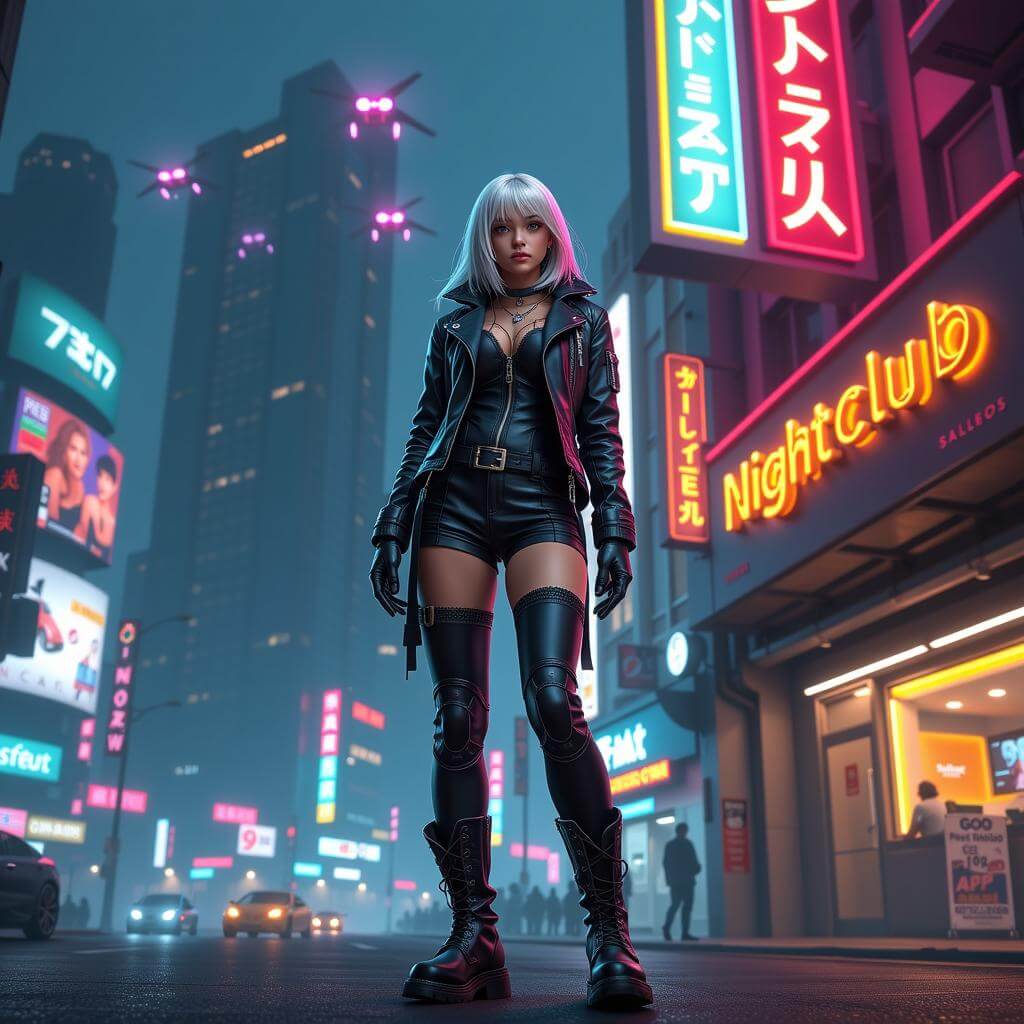
Based on the output, I will confess that I do appreciate the platform’s prompt adherence. It matched my instructions relatively well to match the desired theme.
The character design is quite accurate, and even the various background elements I expected to see were included. However, I ultimately expected something a bit more realistic.
If anything, the image looks more like a still from a video game than a lifelike render. The crowd silhouettes and cars in the background also lack any detail.
I also thought the AI generator was a bit too literal by adding a basic ‘nightclub’ neon sign. Plus, some of the signs are a bit nonsensical, so it seems to have issues rendering text in images.
If I had to objectively rate it, I’d give the output a 6.5/10.
For my next test, I wanted to test out its capacity for lifelike imagery. So, this time, I aimed to be more precise with the prompt I used:
[Generate a photorealistic image of a young 10-year-old boy wearing a white T-shirt, jeans, and helmet, as he rides a bright red bicycle along a quiet suburban street in the late afternoon sun, while his golden retriever runs joyfully beside him.]
You can see the image result it generated below:

This time, Media.io produced a more natural result. At first glance, I’m impressed by how consistent its ability is at following my prompt instructions.
From the child’s clothing to the dog’s expression, it seems to be capable of understanding what I need and following through with a relatively accurate render.
However, there are subtle indications of AI involvement. For instance, some parts of the golden retriever's fur look too glossy/smooth. There is also no motion blur in the shot whatsoever.
Because of this, the scene composition looks to be too crisp and polished to be believably lifelike. So, while I find the image to be generally well-rendered, it just fails to hit the mark.
Nevertheless, not a terrible result. If I were to give it a rating, I’d say a 7/10 for effort.
Up next, I wanted to test Media.io’s AI video generator. For the first test, I started with something rather simple. This was the prompt I used:
[Generate a realistic video of a man driving a sleek red convertible along a sunny California coastal road. In the background, the shimmering ocean can be seen with the entire scene radiating a cool and effortless summer vibe.]
I will say the output totally fell short of expectations. For starters, the tool failed to adhere to my instructions and only rendered the car. There’s absolutely no subject to speak of in sight.
This automatically makes the video unusable. Besides that, I can see visible distortion as the car interacts with the road, which makes the scene look unnatural.
Also, the background view has been almost entirely neglected. There is very little detail, and it even feels more like a still image backdrop, especially when I focus on the ocean.
All in all, it was a failed video render. And even if it was accurate, it would be hard to convince anyone that it is not AI-generated. For this reason, I would give it a 3/10 rating.
For my next attempt, I was eager to see if it would fare better with more creative requests. So, this is the prompt instruction I provided:
[Generate a video of a cute girl wearing a black witch dress riding high above the clouds on a flying wooden broomstick on a hot summer day. She looks happy and content with her black hair flowing in the wind while her black cat sits calmly on the far end of the broomstick.]
As you can see, it was not a great result. Once again, the video render failed to capture most of what I requested. I believe the AI video tool is lacking when it comes to prompt adherence.
For the most part, the character design was what I expected, like her clothes and facial expression. But it’s pretty evident that her movements and expressions are very stiff.
If anything, she looks unnaturally awkward sitting on the broom. Besides that, the broom design is highly strange. And like before, the tool neglected to render an important subject.
There is absolutely no cat to be seen. I’m not sure why, but it seems the tool was either unable to render that into the scene or simply ignored the instruction entirely.
Basically, Media.io just failed to generate a visually compelling or convincing scene. It was a totally average AI video render that fell short of what I wanted.
I surmise that while the platform can perform somewhat with AI imagery, its AI video generator is still a rather lacklustre tool. If I were to rank this video output, I would give it a 4/10.
What Is My General Opinion of Media.io?
I think Media.io is an exasperating platform. The reason I say this is because it shows potential, but its capabilities fall short of professional standards to be a reliable solution.
When it comes to image generation, this is where I find Media.io shows the most promise. Most of its image renders are just above average with minimal faults, distortions or errors.
I can also attest to its AI image prompt adherence being consistent and relatively precise, with most of the tests I’ve conducted proving that to be true most of the time.
And while the image quality is not at a top-tier level, I do think it can be a useful tool for any user who wants to quickly visualize new ideas and concepts without breaking the bank.
On the other hand, video generation is a cause for concern. Having tested it and also explored what other users have created, I think it’s safe to say that Media.io has a few kinks to work out.
Namely, I find that the outputs look too AI-generated, and it’s obvious. Even if I use a different prompt, it still presents certain quality issues that are impossible to ignore.
The visual detail is extremely lacking, there are often visible distortions, and the prompt adherence in its AI videos tends to be poor. Most of its outputs can’t be used, frankly.
But what really frustrates me is how costly its pricing can be. Each video generation costs a significant amount of credits, which can be typically impractical for budget users.
Ultimately, while Media.io is a comprehensive all-in-one media generator, I don’t think it is capable of producing highly sophisticated visual content, at least for now.
Is There A Better All-In-One Media Alternative? Try Out Pollo AI!
Just because Media.io falls short of high-quality standards doesn’t mean all other similar platforms will. In fact, I have the perfect alternative, and it’s called Pollo AI.
This all-in-one image and video generation platform lets me create high-fidelity images and videos in almost any visual style that I want with impeccable results. The heart of this is its AI video generator, which lets me bring almost any concept to life with ease.
Whether it’s 3D, anime, cinematic, cartoon, pixel, or any other concept, I have far more versatility to work with on Pollo AI than with Media.io - whether I want to create a video from text, bring still images to motion, or make engaging AI short video clips.
Not only that, but it also comes integrated with more industry-leading AI models. I can access Veo 3, Runway, Hailuo AI, Kling AI, and PixVerse AI to generate stunning visuals.
In terms of images, I can switch between powerful AI models like GPT-4o, Recraft, Stable Diffusion, Imagen and Flux to create all sorts of imaginative art.
Besides, Pollo app makes video creation easier for different personal and marketing needs. I can use it to generate personalized videos, YouTube videos, and marketing videos for many platforms. It is an ideal choice for users who want faster, simpler, and more flexible video production.
On top of that, Pollo AI offers several AI tools, effects and LoRAs. For example, I can transform photos into animated avatars with just a few clicks using its AI avatar video generator, and build consistent brand identities with the AI product avatar.
Frankly, this platform exceeds Media.io’s capabilities but seeing is believing. So, I recommend that you don't waste any time and go check out Pollo AI for yourself now!
Conclusion
I will say that having image, video, and audio capabilities under one umbrella creates a streamlined workflow that makes content production a breeze. But the output quality that Media.io delivers is just above average at best. If you want to consistently produce professional-grade image and video content, then I’m confident Pollo AI is your best bet.