



Artguru Review: I Tested Its One-Click Photo Enhancer
Artguru is an AI enhancement platform whose photo tools sharpen soft images, improve multiple faces, upscale files, and repair old photographs with minimal setup.
I wanted to test that one-click promise because a technically cleaner image is not always the right image for its next use, especially when faces or old-photo detail are involved.
My verdict: Artguru is a useful first pass for blurry, small, noisy, or damaged photos; it is less suitable when the user needs to choose exactly what changes, preserve a specific mood, or build a new composition.
Artguru Review: TL;DR
| Area | My Take |
|---|---|
| Category | AI photo enhancer and upscaler |
| Core input | Existing photo or batch of photos |
| Key mechanics | Multi-face enhancement, 8K upscaling, old-photo repair, batch processing |
| Output shape | Cleaner or larger versions of the original images |
| Better alternative | Pollo AI for new image direction and prompt-based selective changes |
What Is Artguru?

Artguru is a one-click photo enhancement platform. Its core workflow is direct: upload an existing image, let the system improve clarity or scale, preview the result, and download the revised file.
That is a different starting point from an AI image generator. Artguru assumes the subject and composition already exist, then applies a technical quality pass through tools for sharpening, face enhancement, upscaling, restoration, and cleanup.
The product's clearest promise is enhancement. Users arrive with a photo they want to preserve, then choose a repair path based on whether the problem is softness, size, facial detail, or physical damage.
How I Evaluated Artguru
I evaluated Artguru as a quality-repair workflow. I looked at four common inputs: a soft portrait, a small compressed file, an old damaged photograph, and a batch of images that share the same general quality problem.
The review question was the same one I would use for an AI image enhancer: does the output look more usable while still preserving the subject, texture, and character of the original image?
Key Feature Review
Photo and multi-face enhancement
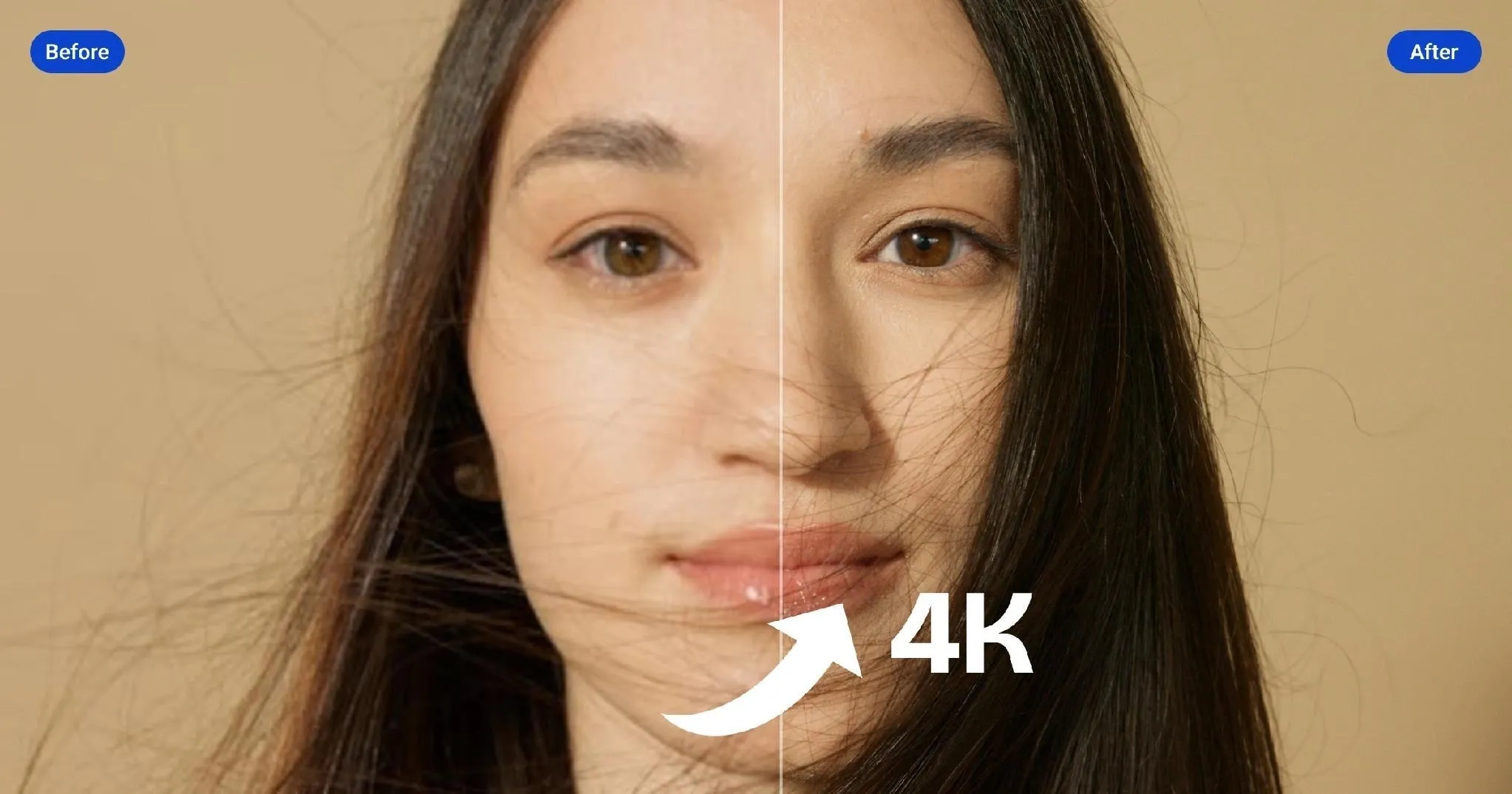
Artguru's Photo Enhancer targets noise, softness, lost detail, and poor lighting, while its multi-face mode is designed to improve every face in a group image. The homepage also promotes output up to 4K for this enhancement route.
For family photos, event shots, and group portraits, I like how little the user has to configure. The part I would watch is restraint: a strong face enhancement tool can sharpen eyes and skin while also making texture look too smooth or changing the visual age of the photo.
8K image upscaling
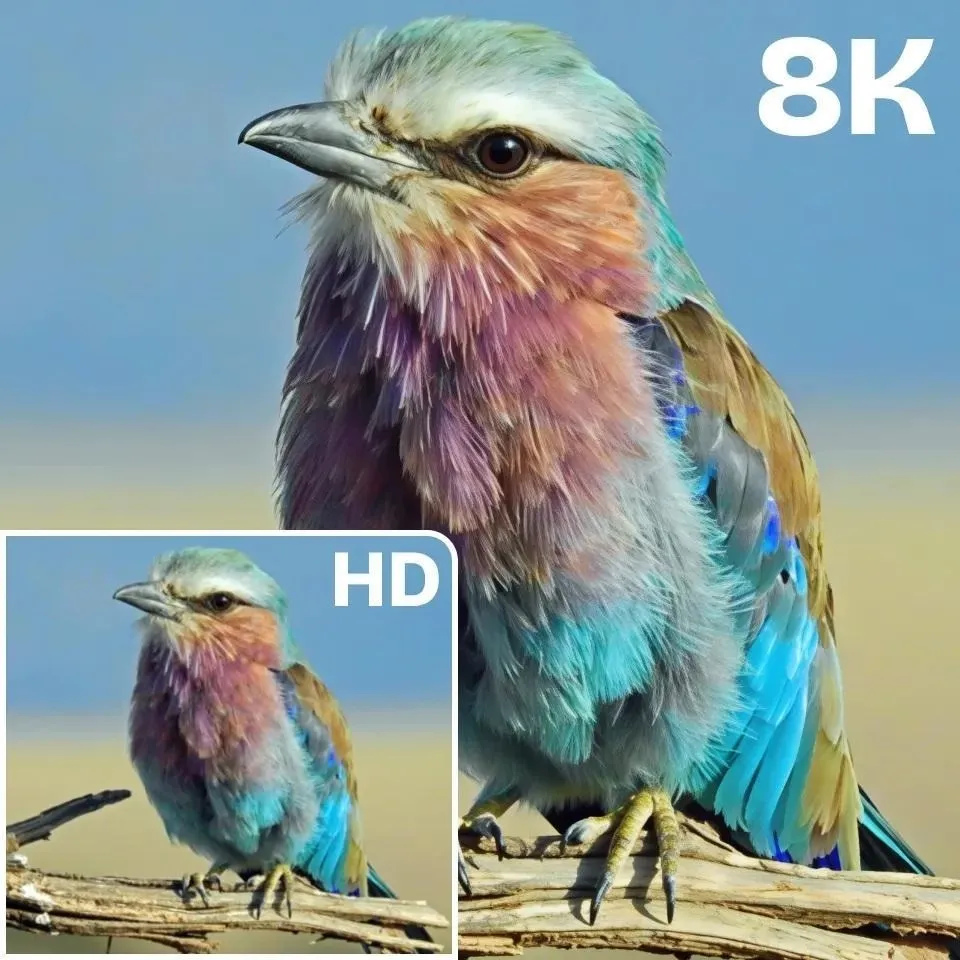
Artguru separates general enhancement from an 8K Image Upscaler aimed at larger displays and print-oriented use. That distinction is useful because a photo can be clear at its current size yet still be too small for a poster, banner, or crop.
For a clean but undersized source, image upscaling can make the file easier to reuse. It cannot reliably recover information that never existed, so tiny text, eyelashes, jewelry, or product labels may become plausible-looking detail rather than accurate detail.
Old photo restoration
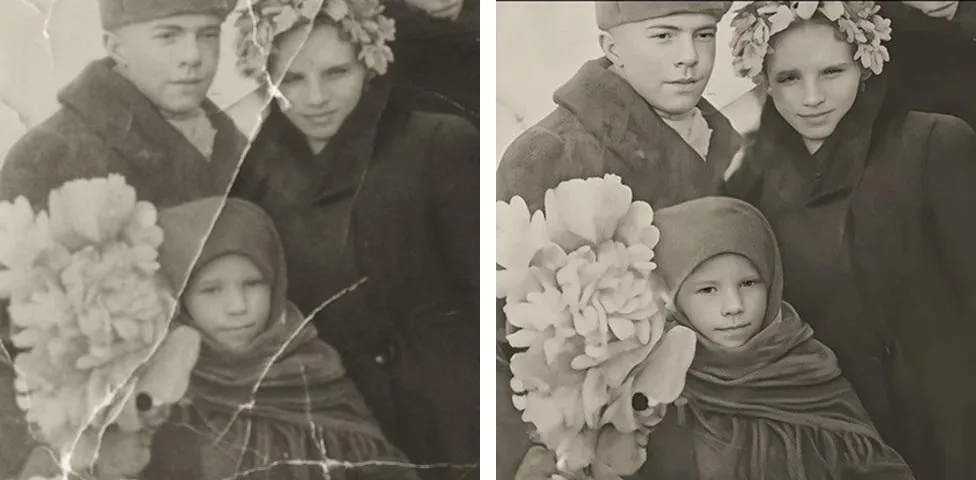
The Old Photo Restorer targets scratches, creases, spots, faded color, faces, and texture. This is more specific than sharpening because the tool is trying to repair physical damage while retaining the original appearance.
A photo restoration tool works best when the damage sits clearly apart from the subject. I would inspect the result much more closely when a scratch crosses an eye, mouth, or patterned garment, because the tool has to invent what was hidden and may create a detail that was never there.
Batch enhancement
Artguru supports batch enhancement for repeated quality work, and the homepage also promotes large-scale product-image processing with API access. That makes the product more relevant to teams with folders or catalogs than a one-photo demo suggests.
Batching is practical when a set of product photos shares the same softness or resolution problem. It is less safe when lighting, subject distance, and image quality vary widely, because one automatic treatment may overprocess the strong files while undercorrecting the weak ones.
Artguru Use Cases: Who Should Use It?
Artguru fits users who want to preserve the original photo while improving its technical quality.
- Family and archive cleanup: for users repairing soft, faded, scratched, or compressed personal photographs.
- Portrait improvement: for creators preparing clearer headshots or profile portraits without a full manual retouching session.
- Catalog quality pass: for small sellers improving resolution before background removal or listing layout begins.
- Print preparation: for users enlarging a clean source file for posters, banners, or physical display.
What I Liked
I liked that Artguru separates several meanings of 'better quality.' Sharpening a face, enlarging a file, and reconstructing a scratched photograph are different jobs, and the product gives each one a recognizable entry point.
The before-and-after decision is also easy to understand. A user does not need editing vocabulary to ask whether the improved version is clearer and still feels like the same photograph.
Where Artguru Falls Short
Automatic enhancement becomes less trustworthy when different parts of the image need different treatment. A portrait may need sharper eyes but softer skin, or an old photograph may need damage repair without modernizing its grain and color character.
- Quality improvement is not composition control: sharpening the file does not fix a distracting crop, weak subject placement, or empty selling space.
- Invented detail needs inspection: upscaling and restoration can create convincing texture that is not faithful to the original subject.
- Local distractions may need a separate edit: a cleaner photo can still fail because of one sign, cable, reflection, or object that requires targeted object removal.
Pros and Cons
| Pros | Cons |
|---|---|
| Simple upload-enhance-download workflow | Automatic treatment offers limited local judgment |
| Multi-face and portrait support | Skin and facial detail can look overprocessed |
| Dedicated 8K upscaling and restoration | Reconstructed detail may not be accurate |
| Batch and API routes for repeated work | Mixed-quality batches still need individual review |
Beyond Artguru
Sometimes Artguru is all I would use: upload a soft photo, check that the face still looks right, and keep the clearer version. I would look for another workflow only when 'make it clearer' turns into a creative request, such as changing the environment, fixing one local detail, or building a composition the camera never captured.
That is when I would open Pollo AI, a broader AI creative suite built for generating and directing images. I can keep the usable subject, describe the change, and rebuild the scene around it; for a straightforward upscale I would still stay in Artguru, but Pollo makes more sense once the image needs art direction rather than cleanup.
- Describe the local change: Pollo AI's AI photo editor lets the user state the desired revision instead of applying one global enhancement to the whole image.
- Keep the subject, replace the setting: Pollo AI's AI background changer is a more direct route when the person or product is usable but the environment is wrong.
- Build a commercial composition: Pollo AI's AI product poster maker gives sellers a layout and selling context when a sharper product photo alone does not communicate the offer.
Create More Than a Clearer Photo with Pollo AI
Edit the scene, direct the image, or build a new composition.
Try Pollo AI for Image Creation
Final Verdict
What I appreciated most was how quickly Artguru reveals whether the problem is technical or creative. If a one-click result fixes the photo, the user avoids an unnecessary editing project; if it does not, the remaining problem becomes easier to name.
Use Artguru for fast face enhancement, enlargement, old-photo repair, and repeated quality cleanup. Use Pollo AI when the improved file still needs selective direction, a new background, or a composition designed for a specific creative or commercial outcome.