



What Is Pollo Motion and How Does It Work?
Pollo Motion turns a reference video and your creative direction into a polished motion design asset. Use a template or upload a clip, add an optional prompt, then continue generation in Pollo Agent. It is built for creators, marketers, product teams, and designers who want to animate logos, product interfaces, UI details, text, or visual data without building every scene manually.
What Is Pollo Motion?
Pollo Motion is an AI motion graphics generator for creating short, stylized videos from references and creative assets. It supports practical motion design—such as animating a SaaS product interface or a logo reveal—as well as expressive, cinematic treatments for brand storytelling.
The workflow starts with a reference video. You can choose a template to load a sample clip or upload a video from your creations. A prompt is optional, allowing the reference video to guide the core motion while your description adds specific creative direction when needed.
Bring Your Brand Assets Into Motion
Turn logos, UI screens, product visuals, and data into polished motion graphics using a template or your own reference clip.
Try Pollo Motion Free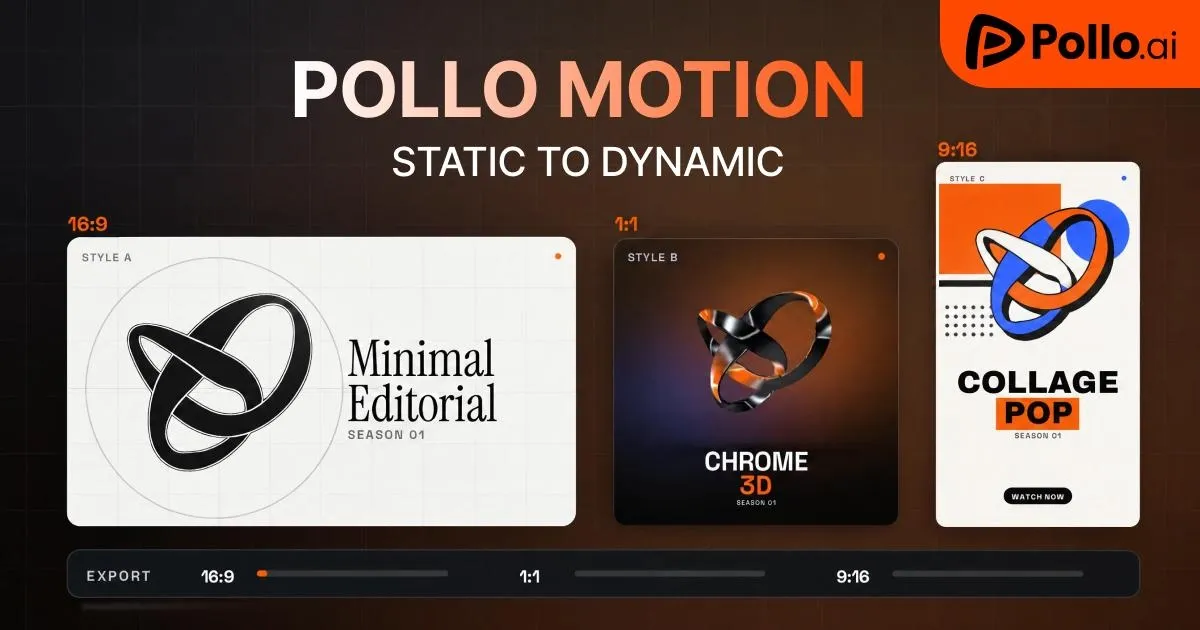
How Does Pollo Motion Work?
Pollo Motion transforms your visual assets into production-ready motion design by combining reference videos with autonomous rendering in Pollo Agent. The entire creation process breaks down into three fluid stages:
Step 1: Set Your Reference Video and Assets
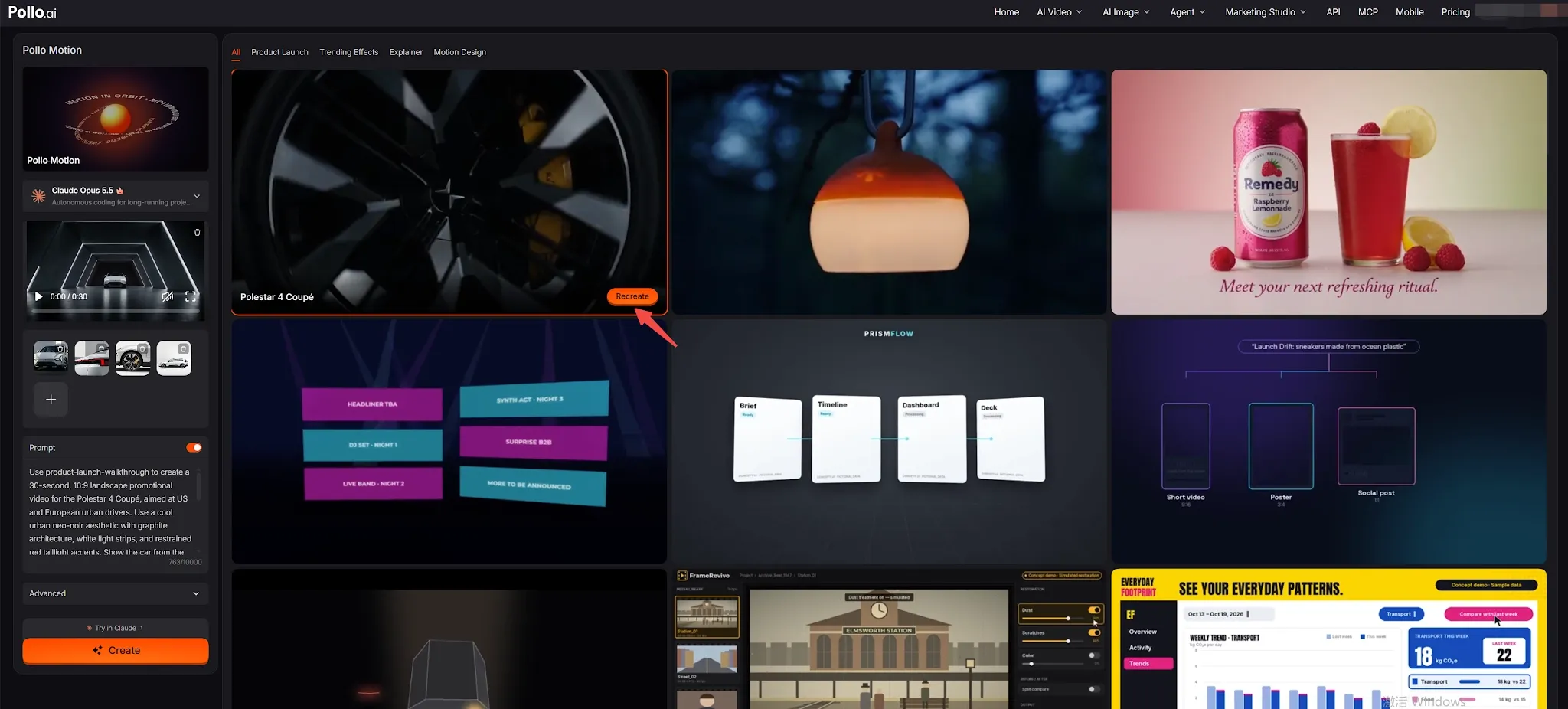
Recreate from a Template:
Browse the template gallery on the right and click the orange Recreate button on any card. This instantly loads its sample reference video and preset prompt into your left editor.
Upload Custom References:
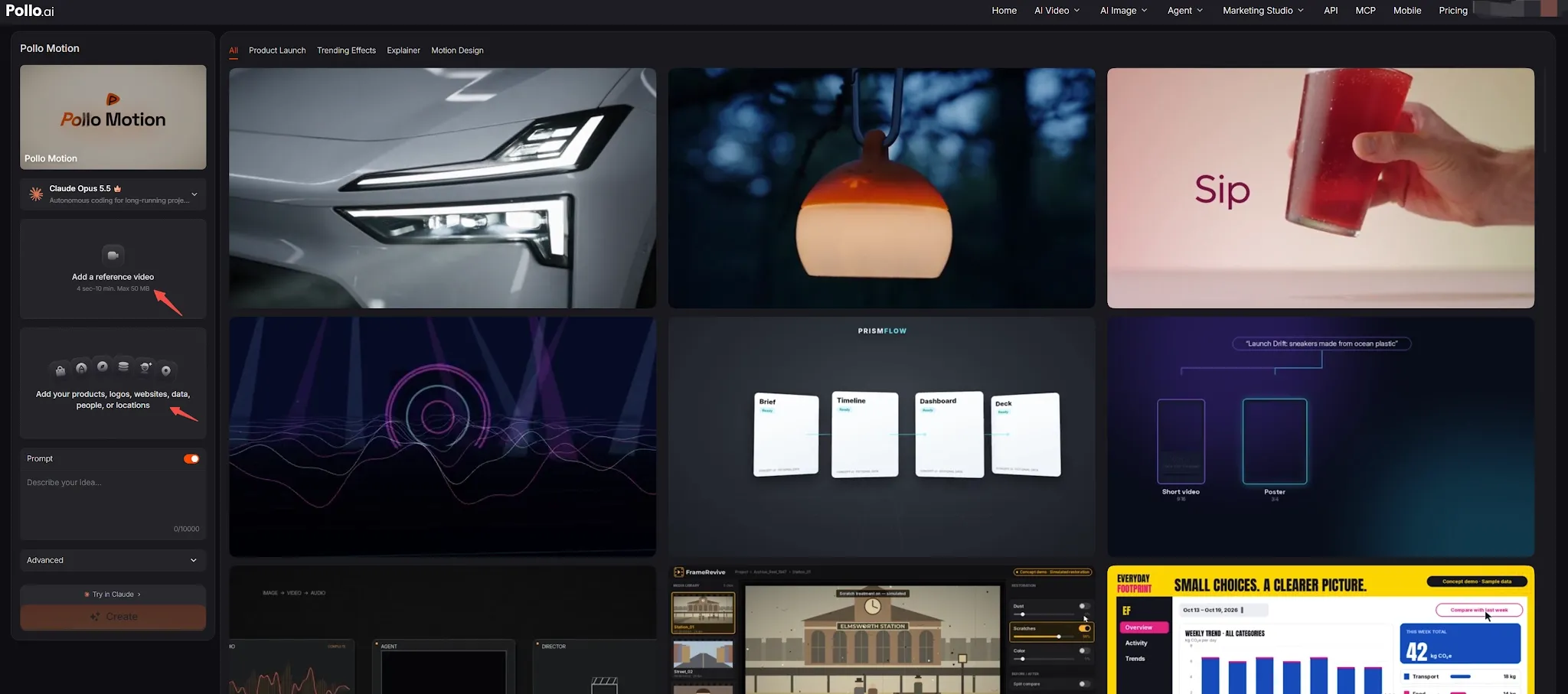
Click "Add a reference video" to upload a clip that sets the camera rhythm, then add your brand assets, UI screens, or data.
Step 2: Add a Prompt and Adjust Settings
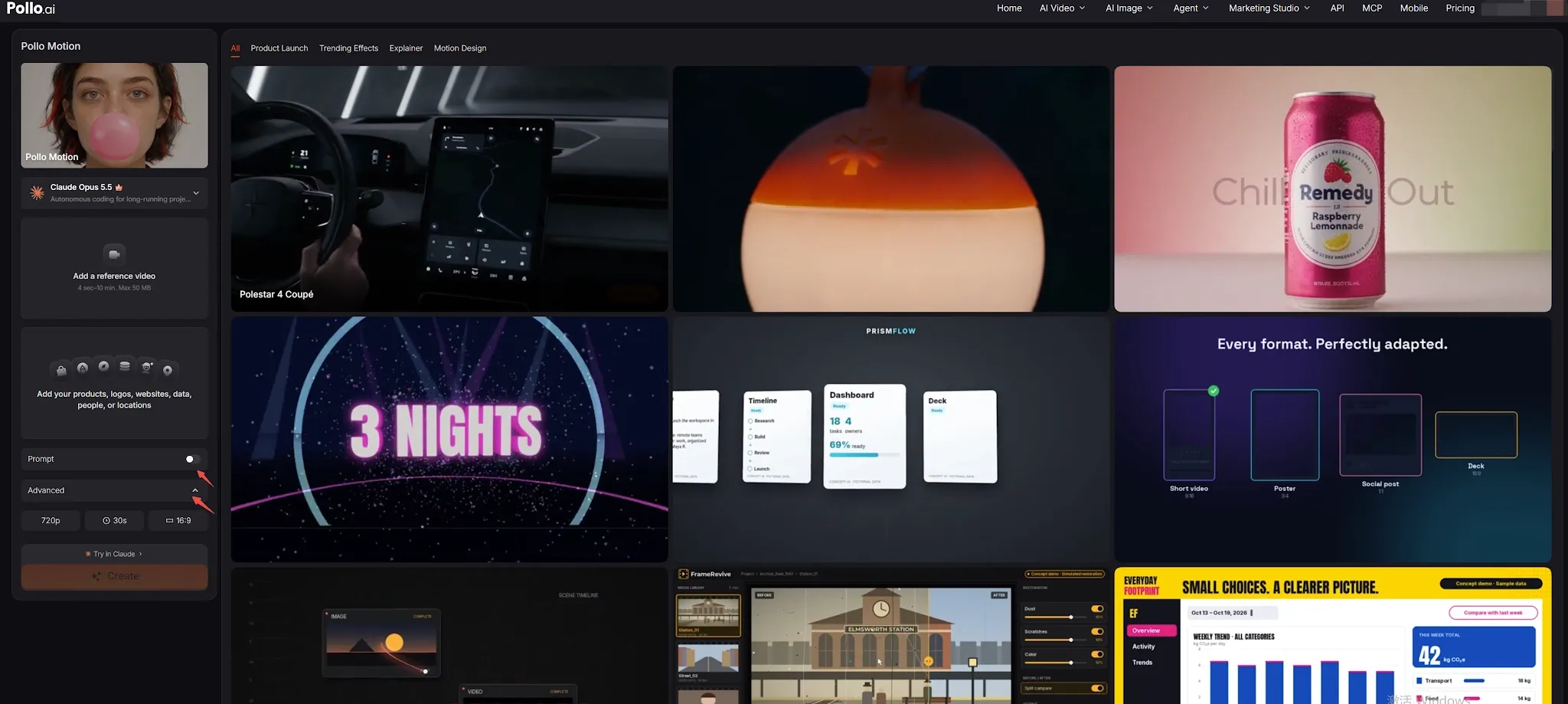
- Refine with Prompts (Optional): Toggle the Prompt switch on to guide the visual focus—such as a dynamic logo reveal, a clean SaaS UI interaction, or a kinetic typography sequence. If left blank, the reference video alone guides the output.
- Advanced Controls: Expand the Advanced menu to fine-tune format and duration to match your delivery needs.
Step 3: Create and Continue in Pollo Agent
- Launch Autonomous Generation: Click Create to pass the task to Pollo Agent, where autonomous code and video rendering run in the background.
What Makes Pollo Motion Worth Trying?
Pollo Motion brings a reference-based motion workflow into one streamlined creation path. You can start from a template or an existing clip, add direction when needed, and finalize generation seamlessly in Pollo Agent. This approach saves hours when you have a visual concept but want to skip manual timeline keyframing.
| What you bring | What Pollo Motion helps you make |
| Logo or brand visual | A short logo reveal or branded motion piece |
|---|---|
| Product or interface visual | A product feature or UI-focused animation |
| Text or data | A motion graphic that makes key information easier to notice |
| Reference video | A new short video guided by the reference motion and style |
What Can You Create With Pollo Motion?
Pollo Motion can help you develop short motion pieces for product storytelling, branded content, and social channels. The final look depends on your reference, prompt, and settings.
| Use case | Example direction |
| SaaS and product demos | Draw attention to a key interface or feature |
|---|---|
| Logo motion | Create a reveal for a brand or campaign |
| Data and information | Give a key number, chart, or message a motion treatment |
| Social content | Turn a product visual or brand idea into a short, distinctive clip |
Simple Tips for Better Pollo Motion Results
- Choose a reference with clear visual direction: Start with a clip whose motion or style closely matches your vision. A focused reference makes it easier for the AI to replicate the rhythm and pacing.
- Keep prompts specific and concise: If you add a prompt, focus on the primary movement or visual treatment. A short instruction about a logo, interface element, or product feature is more effective than overloaded descriptions.
- Anchor the key message: Decide which element should stand out—a logo, headline, or product feature—and keep your references aligned with that focus.
- Preview before downloading: Check the output for brand details, text clarity, and product alignment. If generation fails, review the system note and retry with a slightly adjusted reference or prompt. You can add video transitions when the finished piece needs a more deliberate flow.
Summary
Pollo Motion transforms motion graphics design by replacing complex timeline keyframing with an intuitive, reference-driven AI workflow. By combining sample templates or uploaded reference clips with optional creative prompts, creators, product teams, and marketers can produce studio-quality UI animations, logo reveals, and branded motion assets in minutes. Ready to elevate your brand visuals? Explore Pollo Motion today.
FAQs About Pollo Motion
What is Pollo Motion and who is it for?
Pollo Motion is an AI motion graphics generator that turns static brand assets and reference videos into finished animations through Pollo Agent. It is built for product teams, marketers, and creators who need fast, accurate motion design without manual keyframing.
Do I need to write a prompt in Pollo Motion?
No, prompts are completely optional. Pollo Motion extracts camera movement and pacing directly from your reference clip. You only need to add a prompt if you want to highlight a specific UI button, logo reveal, or transition.
Can I use my own video as a reference in Pollo Motion?
Yes. You can choose a preset template from the gallery or upload your own 4–30 second video from local storage or your Creations to guide the motion.
What brand assets can I upload to Pollo Motion?
You can upload logos, product photos, website UI captures, data charts, characters, or locations. The engine applies the reference clip's motion dynamics directly to these visual assets.
Where does Pollo Motion generate and store my videos?
Generations run automatically inside Pollo Agent. You can track rendering progress, inspect status notes if a task needs adjusting, and download finished high-resolution videos directly to your device.