PixAI is an AI image generator that transforms text prompts into anime artwork. It offers custom models and one-click editing tools built for the anime art community. While PixAI is strictly confined to 2D anime styles, Pollo AI delivers the ultimate all-in-one platform for professional creators. Transcending niche limitations, Pollo AI combines multi-model flexibility with 100+ specialized generators to offer design-ready output across every style. Try Pollo AI Image Generator For Free Now!
Text to Image
Image to Image
Kling 4.0
Up to 10 keyframes. Unlimited for 10 days with Ultra.
Pollo Recast
Recreate viral videos. Remix new versions.
Pollo Recast Challenge
One upload in. Your viral video out. Unlimited rewards await.
Pollo Agent x DeepSeek V4.1 FLASH
Faster completion at a much lower cost.
Pollo Agent x Gemini 4 Argon
Smarter reasoning. All through Pollo Agent.
WIN iPHONE DUO
Capture a city in one minute. Join the challenge now.
Pollo MCP
End-to-end content creation. Up to 4 Videos/ 20 Images for FREE.
Key Features of PixAI
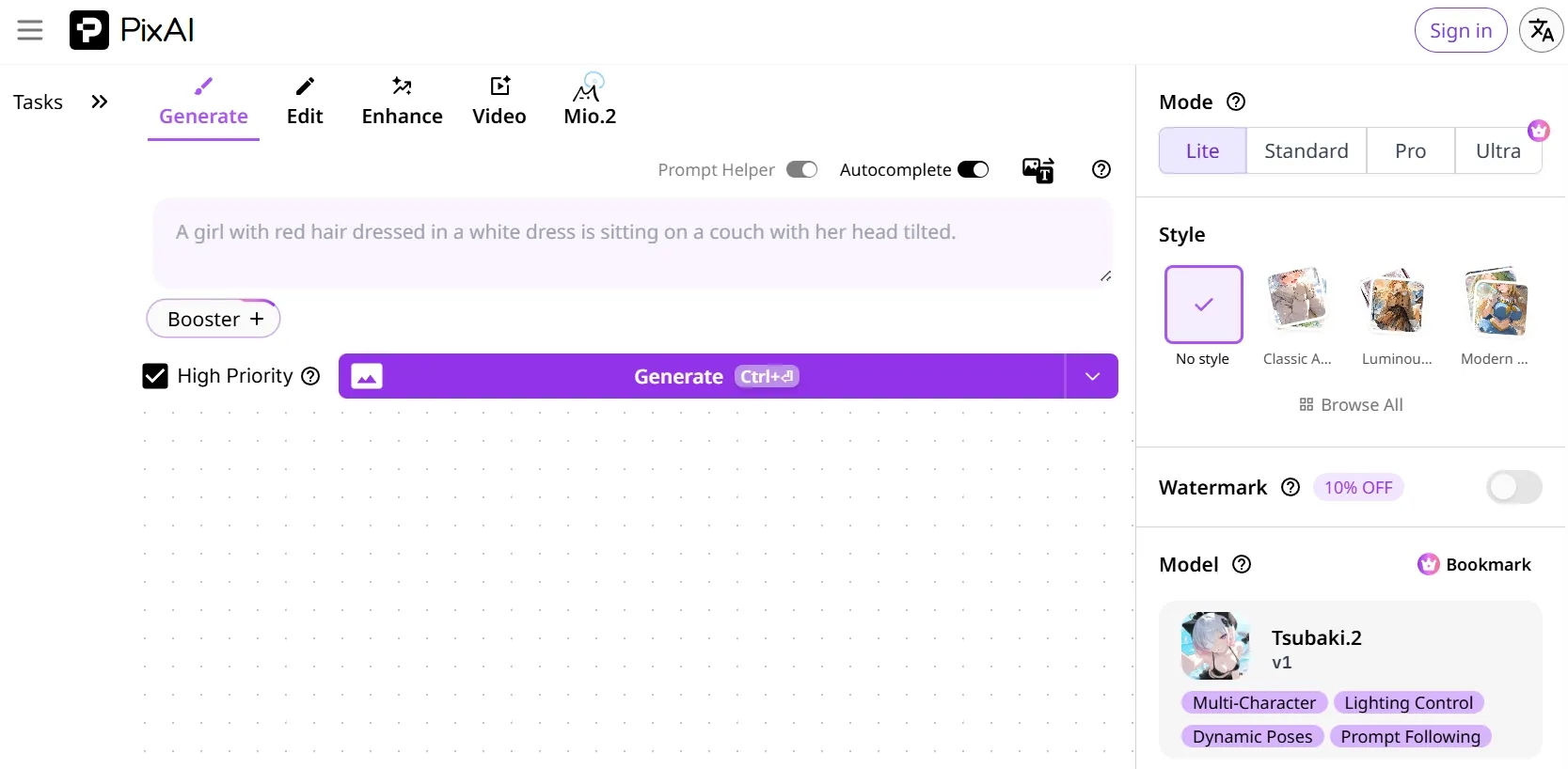
AI-Assisted Prompting: Automatically enhances basic image descriptions into refined text prompts
Custom Image Referencing: Upload reference images or sketch art with custom strength control available
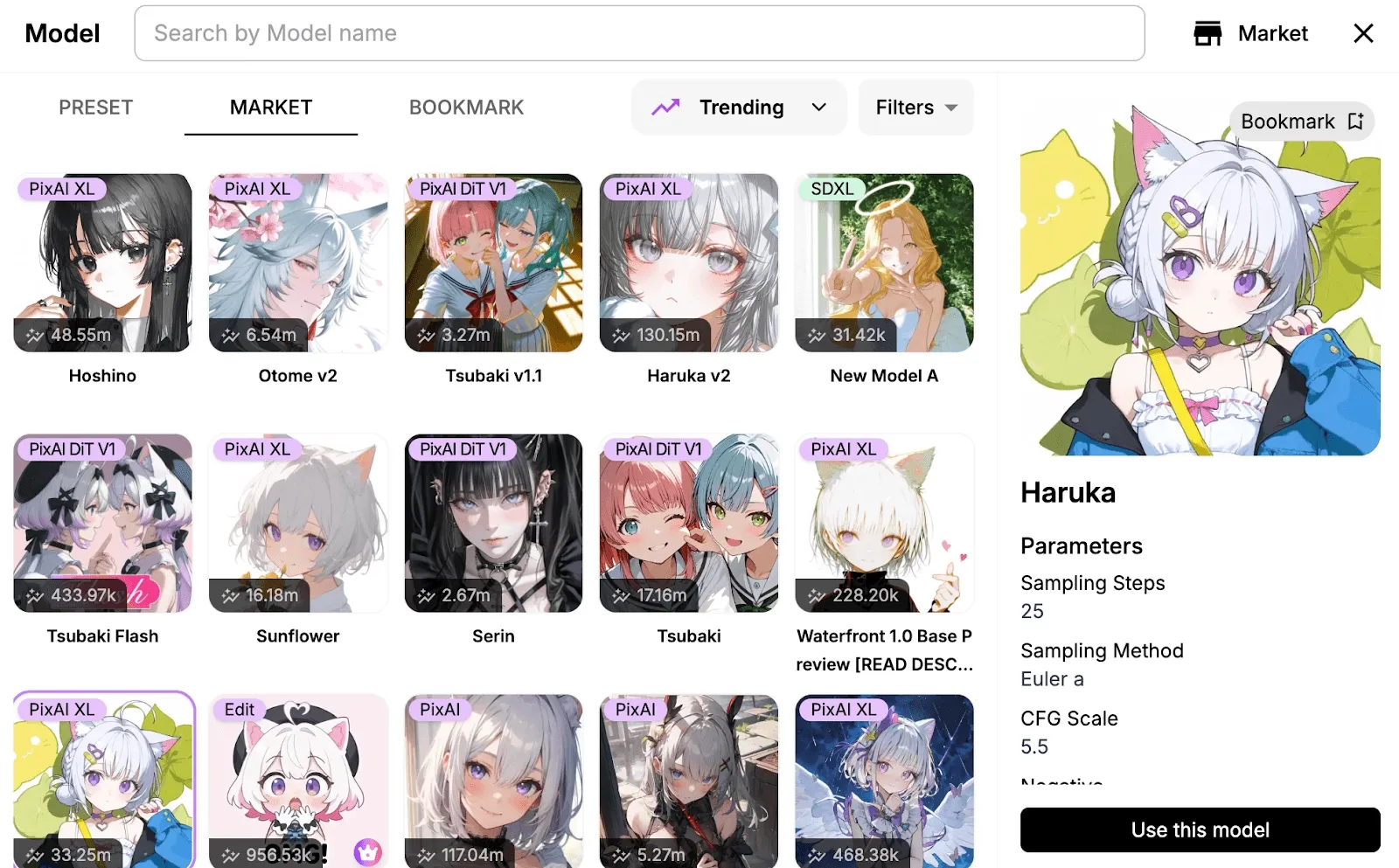
Custom Models & Styles: Explore several tailor-made AI models with different styles and strengths
Batch Image Processing: Instantly generate multiple image variations at once per prompt
One-Click AI Image Editing: Modify and refine any generated or existing images via text prompt
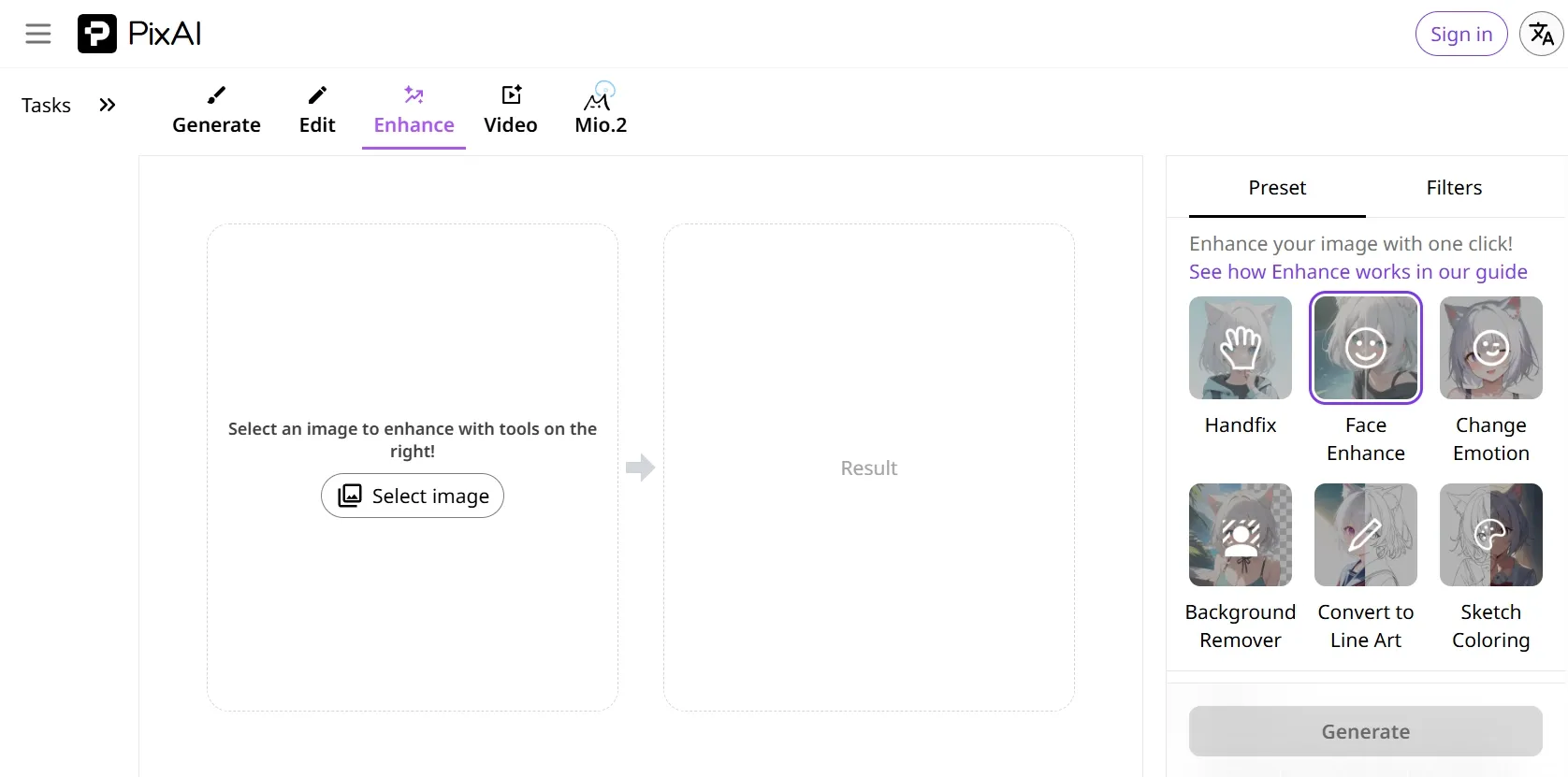
AI Image Enhancer: Effortlessly increase size and image resolution up to 2K
AI-Assisted Prompting
PixAI provides users with AI-powered assistance in refining their prompts for accurate and detailed image renders. Simply describe your idea for the desired image in plain language, and the AI will automatically enhance your input to craft a precise and well-inspired command that generates a truly polished art composition.
Custom Image Referencing
Aside from text prompts, PixAI users can upload reference images or even sketch art to steer the AI in the right creative direction, in terms of character design, style, composition, etc. It also offers strength control, allowing you to precisely set how much influence the reference will have on the final output for accurate results.
Custom Models & Styles
PixAI boasts an extensive library of custom-made models and ready-made presets that enable users to craft stylistically consistent anime artwork in a few clicks. This makes it easy to produce branded content or original characters for large-scale creative projects without repeatedly setting controls or configurations.
Batch Image Processing
With PixAI, users have access to instant batch processing that enables them to generate multiple image variations via one prompt. This caters well to any individual or brand that needs different options of the same character design to choose from or to scale their art creations through various image series.
One-Click AI Image Editing
Even with zero technical skills, PixAI users can retouch their images using one-click AI editing tools that make modifications based on text prompts. Whether you want to add/remove/replace elements, change styles, adjust lighting, etc, all it takes is a basic command like “change the background to a cityscape” for an instant result.
AI Image Enhancer
PixAI comes with an AI image enhancer, enabling users to increase the size and resolution of any image up to 2K without losing any detail. This creates infinite opportunities for artists, brands, and designers to quickly and effortlessly produce large art prints suitable for use in canvases, posters, billboards, etc.
Anime fans & hobbyists: Generating original characters, fan art, and custom character designs from text descriptions without any drawing skills.
Indie game developers: Producing character concept sheets, sprite references, and visual novel assets with stylistic consistency across multiple outputs.
Comic & manga illustrators: Rapidly prototyping panel compositions, character expressions, and scene layouts to accelerate the storyboarding process.
Social media content creators: Creating eye-catching anime-style profile avatars, banner art, and themed posts for platforms like Twitter/X, Instagram, and TikTok.
Graphic designers & brand artists: Exploring stylized mascot designs or promotional artwork rooted in Japanese pop-culture aesthetics.
Educators & writers: Visualizing characters from novels, scripts, or lesson plans in a distinctive illustrated style for presentations or book covers.
Virtual avatar creators: Building custom animated-style personas for VTubing, streaming overlays, and digital identity projects.
What Do Real Users Say About PixAI?
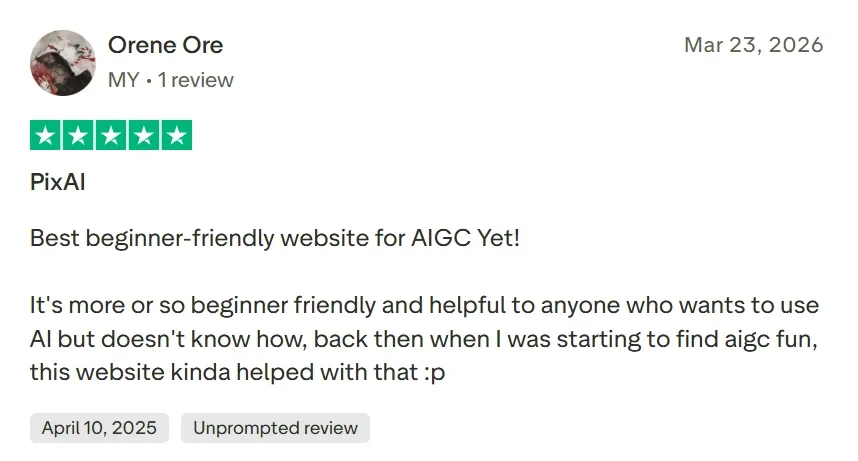
Users consistently praise PixAI for the quality of its anime-specific output. On Trustpilot, one verified user wrote: "Best beginner-friendly website for AIGC yet — it's more or less beginner friendly and helpful to anyone who wants to use AI but doesn't know how."
Despite its creative strengths, PixAI carries a 3.1/5 TrustScore on Trustpilot (23 reviews). Multiple users report aggressive and opaque billing practices, including charges of $200+ for annual subscriptions they claim never to have selected, and free trials billed despite cancellation within minutes.
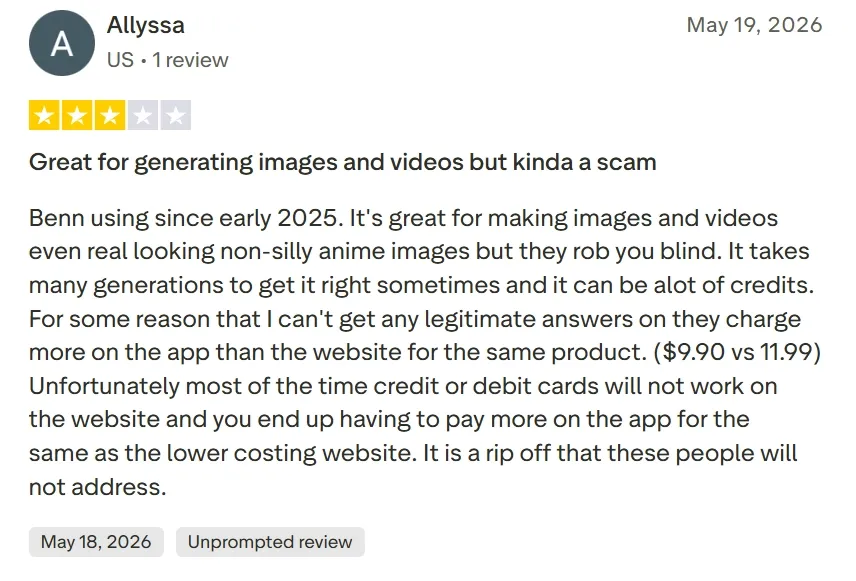
One reviewer stated bluntly: "It takes many generations to get it right sometimes and it can be a lot of credits... it is a rip off that these people will not address."
Beyond billing, users flag that the platform's output is locked to 2D anime styles — prompts for realistic landscapes or 3D renders consistently produce unwanted anime characters instead.
The ControlNet and character reference tools have also been criticized for unreliable face detection, and geographic IP blocks affecting users in certain regions add further accessibility friction.
Pollo AI directly resolves the frustrations. Where PixAI's credit system drains budgets through repeated regenerations, Pollo AI's multi-model architecture — spanning GPT Image 2, Seedream 5.0 Lite, Nano Banana 2 and more — means users can switch models to find the right output faster.
Furthermore, Pollo AI breaks down creative boundaries. With a rich library of over 100 specialized image generators, it seamlessly supports hyper-realistic photography, cinematic posters, 3D renders, cartoon characters, professional logos, and intricate graphic designs.
Beyond image generation, Pollo AI eliminates the credit-burning cycle of recreating images from scratch by providing an advanced AI photo editor. This tool allows users to make precise, prompt-driven edits, modify specific elements, or replace details instantly.
I’ve been using Pollo AI mainly for short videos and quick image-to-video tests. The interface is straightforward and it works well even with simple prompts, which is a big plus compared to tools that need long, complicated instructions. The results can be really impressive, and it’s honestly been fun to experiment with. I’d love a bit more consistency on faces when there’s movement, but overall it’s been a solid experience for what I needed.
Awesome website. loads of options and a great way to learn how to work with 'AI' my reasoning for 5 stars is based upon price, versatility and ease of use. Also I would like to add, Pollo AI runs a lot of promos on different AI products as well. I rate their customer service at 5 stars, when I purchased my first subscription my computer crashed the following weekend and I lost all my data and info passwords you name it I lost it, contacted pollo by email they responded quickly and found my info/username and account, and I was able to restore my account.
I have been using Pollo AI for short videos. It is easy to use and works well with simple prompts. Other generators seem to need long drawn out complicated explanations to get even close to what I want.
i tried 220 online img to vid in 2 months, and this is the best online video.I will subscribe for a year; there are many reasons. But freedom is the most important.
PixAI is an AI image generator that specializes in helping users create unique, anime-style artworks from simple text descriptions in just a few clicks. Even with no artistic skills, anyone can generate, modify, and refine their imagery across numerous styles like Studio Ghibli, etc.
Why should I use PixAI?
PixAI simplifies art creation through proprietary algorithms and a rich library of custom AI models built around aspects like character, pose, style, etc. This makes it an accessible solution for both professionals and amateurs with no experience or skill in anime character design.
Who is best-suited to using PixAI?
PixAI is versatile enough for any individuals or teams looking to produce anime-inspired content, like parody art, custom avatars, character designs, etc. In this sense, it can particularly cater well to anime fans, game developers, graphic artists, comic illustrators, educators, writers, etc.
How do I customize my images on PixAI?
For more personalized image creations, be as detailed as possible in your text prompts. This means specifying aspects like skin tone, hair, clothing, scenery, lighting, mood, etc. It also helps to upload a reference image and mention any unwanted elements in the negative prompt box.
Can I use the art creations I made on PixAI commercially?
Yes. Any artwork you generate with PixAI is copyright-free, so it will belong entirely to you and can be used any way you wish. For instance, you can publish it online and share it with audiences, or monetize it commercially through other media, such as graphic art, manga, etc.
Go Beyond Limits – Create Anything You Imagine with Pollo AI
Stop settling for average results and start leading with flawless, studio-grade images with Pollo AI today!









 Liz Cassidy


