



Amuse AI Video Generator
Amuse leverages your PC's CPU, GPU, and NPU to generate images and short videos without requiring an internet connection or cloud subscription. Its "EZ Mode" and hardware optimization make it a unique offering in the generative AI space. While Amuse excels at private, local generation for images and short clips, it struggles with video consistency and length — Pollo AI builds full-length, publication-ready videos from scratch, without editing needed. Try Pollo AI Now!
Key Features of Amuse
Video Restyle : Transforms existing real-world footage into various artistic styles, such as anime, oil painting, or cyberpunk aesthetics.AMD Super Resolution : Enhances the resolution and clarity of locally generated videos and images.Image-to-Video Animation : Converts static AI-generated images into moving sequences, maintaining visual consistency from the first frame.Zero-Dependency Setup : Provides a simplified installer that bundles all necessary libraries (ONNX, DirectML) for immediate local execution.Multi-Model Management : Allows users to download and toggle between various stable and video diffusion checkpoints within a single interface.Paint-to-Video Logic : Enables users to sketch basic shapes that the AI then interprets as motion paths or structural foundations for video.Privacy-Centric Processing : Ensures that every frame generated remains on the local hard drive, with zero data transmitted to external servers.
Video Restyle
Amuse allows creators to import a standard video and apply a complete visual overhaul. By selecting a style like "Comic Book" or "Watercolor," the AI re-renders every frame to match the target aesthetic.
AMD Super Resolution
Integrated with AMD's hardware capabilities, Amuse offers a Super Resolution feature that upscales and enhances the quality of both images and videos generated within the application. This is crucial for local generation, which can sometimes produce "draft quality" outputs, ensuring that the final product meets higher visual standards suitable for sharing or further editing.
Image-to-Video Animation
Amuse allows users to take a high-quality local image and "animate" it. The AI analyzes the depth and subjects within the image to predict natural motion. This is particularly useful for product showcases where a creator wants to add subtle movement to a high-resolution static shot without filming.
Zero-Dependency Local Workflow
One of the biggest hurdles in local AI is the complex environment setup (Python, Git, CUDA). Amuse removes this barrier by providing a unified GUI. Users can manage their model library and generation settings through a familiar Windows-style interface, making local video generation accessible to non-technical users.
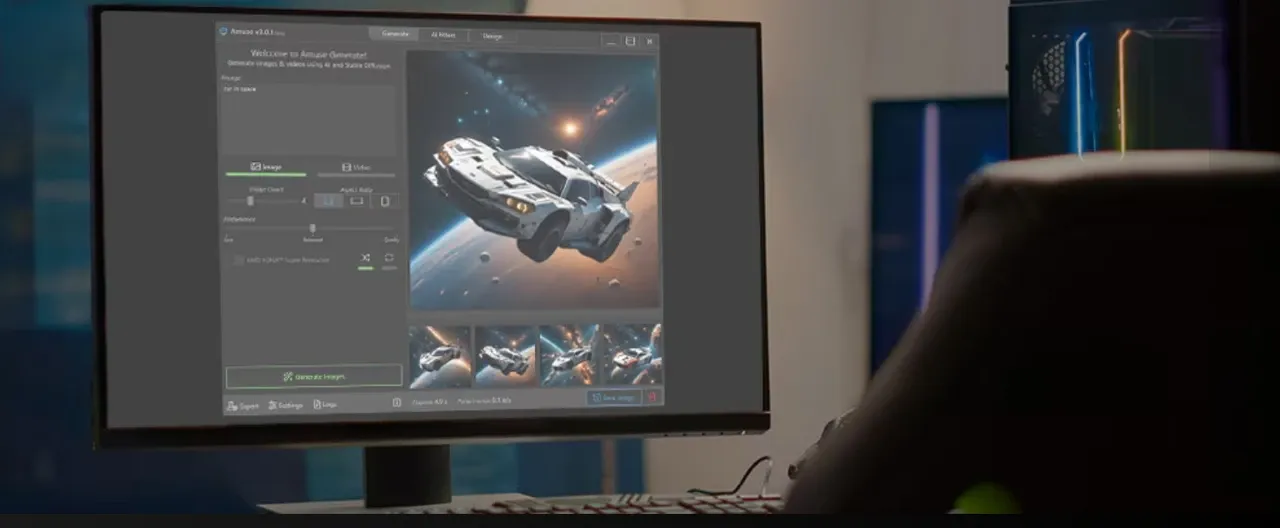
Paint-to-Video Interaction
This innovative feature lets users draw a "scribble" and describe what it should become. Amuse AI uses the sketch as a spatial guide for the video generation. This provides a level of directorial control that pure text prompts cannot match, as users can dictate the composition and placement of subjects within the moving frame.
Multi-Model Checkpoint Switching
Because it is built on open-source foundations, Amuse supports a variety of custom-trained models. Users can download specific "flavors" of AI—such as those optimized for photorealism or traditional animation—and switch between them instantly. This versatility is ideal for creators who want to experiment with different "vibes" across a single project.
Total Local Privacy
For industries involving sensitive data or private IP, the offline nature of Amuse is its strongest selling point. No content ever touches the cloud. Every concept, draft, and final export stays within the user's local security perimeter, making it a preferred choice for corporate "sandboxing" of AI concepts.
Amuse AI Product Positioning & Background
Amuse emerged in mid-2024 as a strategic collaboration between AMD and TensorStack AI, a New Zealand-based technology company. Initially launched as a beta program, it was designed to showcase the capabilities of AMD's Ryzen AI processors and Radeon graphics cards.
The market positioning of Amuse is distinctly focused on the "local, private, and free" niche. Unlike cloud-based giants such as Midjourney or Runway, Amuse targets users who prioritize data privacy and zero recurring subscription fees.
The software acts as a bridge between highly technical interfaces like ComfyUI and consumer-friendly cloud apps, offering a simplified GUI for complex local inference tasks.
Use Cases for Amuse AI
The Privacy-First Brand Strategist
Agencies working with unreleased product concepts use Amuse to brainstorm visual styles without the risk of data leaks. Since the generation happens offline, sensitive assets remain secure within the company’s internal network.
The AMD Hardware Enthusiast
Gamers and tech-savvy creators with Radeon RX 7000 GPUs use Amuse to maximize their hardware ROI. They can generate unlimited social media assets and meme content without ever hitting a paywall or waiting for cloud credits to renew.
The Anime and Stylized Content Creator
Creators focusing on video restyling use the local filters to turn daily vlogs into anime-inspired segments. The ability to run local "Video-to-Video" transformations allows for unique aesthetic experiments that would be prohibitively expensive on cloud platforms.
Amuse Review: What Users Actually Say about Amuse AI
Amuse is frequently praised for democratizing local AI generation. Users love the "EZ Mode" which hides the complexity of underlying models, allowing for a one-click generation experience.
However, a significant pain point is the limitation of its video generation. As noted in a detailed PCWorld review, when pushing the video past 10 seconds, "it was clear that the generated art had been fashioned from several clips, and not always of the same thing."
This is a classic "isolated shots" problem. Users find themselves struggling to piece together brief, morphing clips into a story.
Pollo Agent addresses this inconsistency, which produces stable, repeatable, and full-length narratives. Unlike Amuse, Pollo Agent ensures that characters and environments remain consistent throughout the entire video duration.

Feature Comparison about Amuse vs ComfyUI vs Pollo AI
| Comparison Factor | Amuse | ComfyUI | Pollo AI |
| Primary Logic | Local, simplified GUI for consumer hardware. | Highly technical, node-based local generation. | Agentic Generation: Creates full-length videos from scratch. |
| Output Type | Still images and short draft-quality clips. | Complex, highly customized visual assets. | Publication-ready, post-ready videos. |
| Technical Edge | Zero-setup EZ Mode and hardware optimization. | Infinite modularity and developer control. | Contextual Understanding & Multi-model integration. |
| Video Production | Limited to brief, low-resolution snippets. | Requires advanced workflows for video. | Generates cinematic footage directly from prompts. |
| Effort | High manual effort required to stitch clips together. | Extremely steep learning curve. | Zero. The Agent delivers a cohesive narrative. |
Why Top Users are Switching to Pollo AI
Production-Ready Logic
Pollo Agent understands your vision, creates publication-ready video—no manual editing required.
All-in-One Creativity
Access a suite of 100+ tools for face swapping, and video upscaling within one cohesive workflow.










 5000+ reviewsTrustscore 4.4
Loved by 10M+ Creators and Marketers Globally
Thousands of satisfied users have shared their Pollo AI experiences on Trustpilot, rating us as "Excellent." See what they love about our platform.
Liz Cassidy Dec 15, 2025Richard QuickOct 15, 2025armourdudeNov 19, 2025
 DuduJan 14, 2026
 Ray WarnesDec 30, 2025
 lawless clanNov 22, 2025
Discover More AI Video Generators on Pollo AI
FAQs
What is Amuse used for?
Amuse is a free, locally-run AI application that allows users to generate images, apply photo filters, and create short video clips using their PC's own hardware resources.
Does Amuse require an internet connection?
No, one of its core features is that it operates entirely offline. Once the necessary AI models are downloaded, all processing is done locally, ensuring complete privacy.
Is Amuse only for AMD computers?
While initially developed in partnership with AMD and optimized for Ryzen and Radeon hardware, the software is now open-source and can be run on various hardware configurations, including those from other vendors.
Can Amuse generate long videos?
Currently, the software is best suited for short, draft-quality video clips. Generating longer videos often results in a lack of consistency and cohesion between frames.
What is EZ Mode in Amuse?
EZ Mode is a simplified user interface designed for beginners. It removes complex settings and allows users to generate AI art simply by typing a text prompt, without needing technical knowledge.
Can I use my own photos in Amuse?
Yes, the software includes features like photo AI filters and video restyle, which allow you to upload your own images or footage and apply various stylistic AI transformations to them.
What are the hardware requirements for Amuse?
Because it runs locally, it requires a relatively modern PC. A discrete graphics card with ample VRAM (Video RAM) or a newer AI-focused processor with an NPU (Neural Processing Unit) is highly recommended for optimal performance.

Move Beyond Hardware Limits with Pollo AI
Stop struggling with slow local renders and hardware bottlenecks.