



Runway Text to Video
Runway offers a text-to-video generator that allows users to create novel videos in various visual styles using text prompts. It's available in its Gen-2, Gen-3 Alpha and Gen-3 Alpha Turbo models, and comes with customization options like camera view, motion, etc. You can now try these Runway models in Pollo AI video generator!
Kling 4.0
Up to 10 keyframes. Impressive performance.
Key Features of Runway Text-to-Video
Advanced Prompt Understanding: Use detailed text prompts to craft captivating video clips in a flash.Photorealistic Characters: Produce videos with realistic and believable charactersCamera Control: Alter camera movements by adjusting horizontal, pan, vertical, tilt, etc.Style Presets: Access over 30 preset styles to create unique videos.Customizable Aspect Ratios: Create videos with different dimensions to cater to various platforms.
Advanced Prompt Understanding
An advanced text to video AI generator should have strong prompt understanding ability. Runway text-to-video tool allows users to input descriptive text prompts and the AI model will analyze it to produce unique and imaginative visual sequences accurate to your instructions. From cinematic clips to animations, you can freely explore a wide range of visual narratives.
| Prompts | Output videos |
| Wide angle shot of a painting in a museum. The camera zooms in close to the painting | |
| FPV camera view exiting through a tunnel into a stunning and lively underwater lake | |
| Top-down-drone-shot of icebergs with muted colors | |
| The late afternoon sun peeking through the window of a New York City loft. |
Photorealistic Characters
Using Runway’s Gen-3 Alpha model, you can produce realistic characters with expressive actions and gestures, as well as create all sorts of unique and believable environments that can stun audiences and keep them engaged.
| Prompts | Output videos |
| Cinematic wide portrait that features a man with his face being lit by TV glow. | |
| Old man playing piano, the camera view taken from the side. |
Camera Control
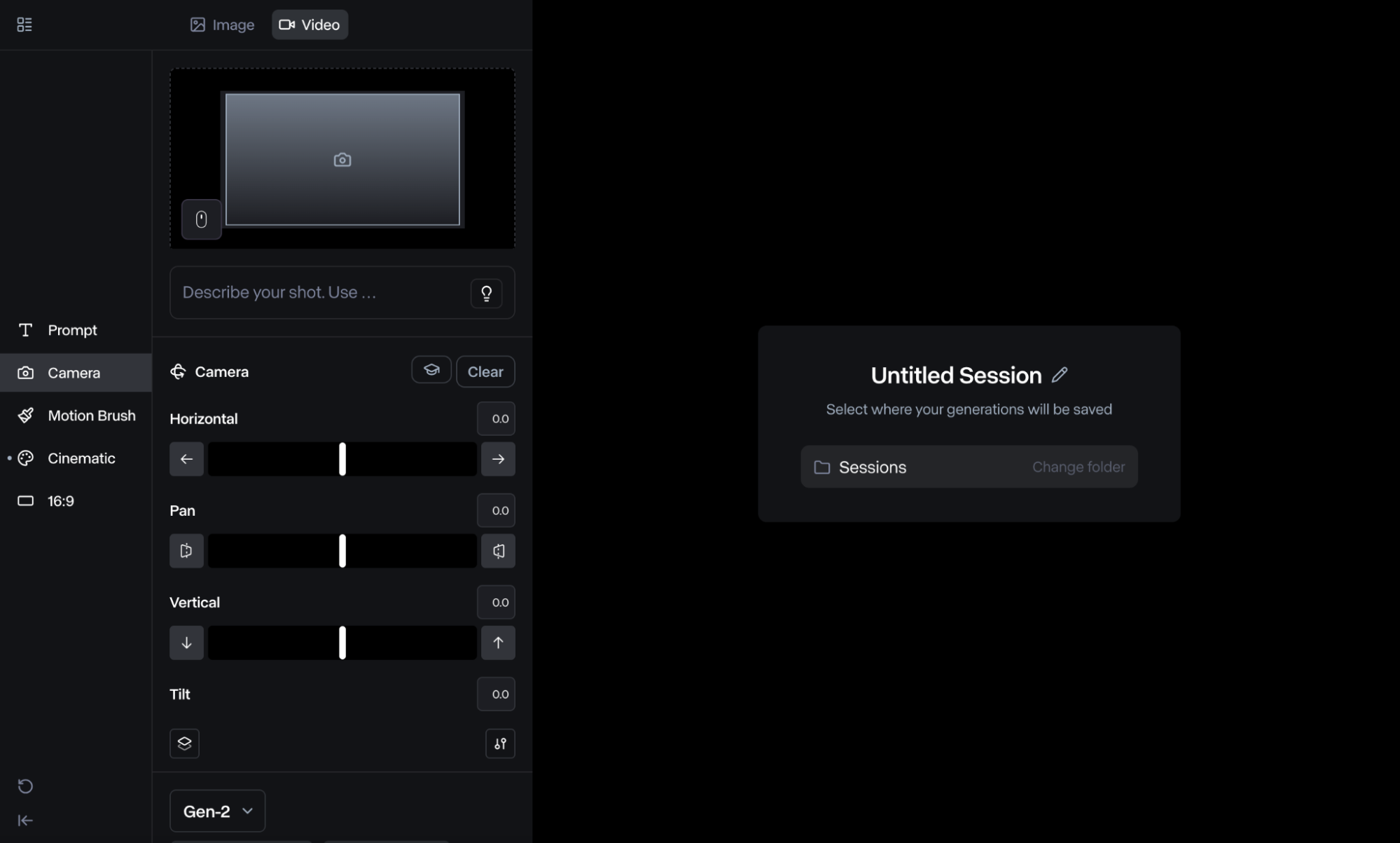
The text-to-video generation feature of Gen-2 and Gen-3 Alpha models allows you to adjust various camera movements based on your needs. You can adjust zoom, tilt, pan, roll, and other settings, which gives you more control over the final output.
Style Presets
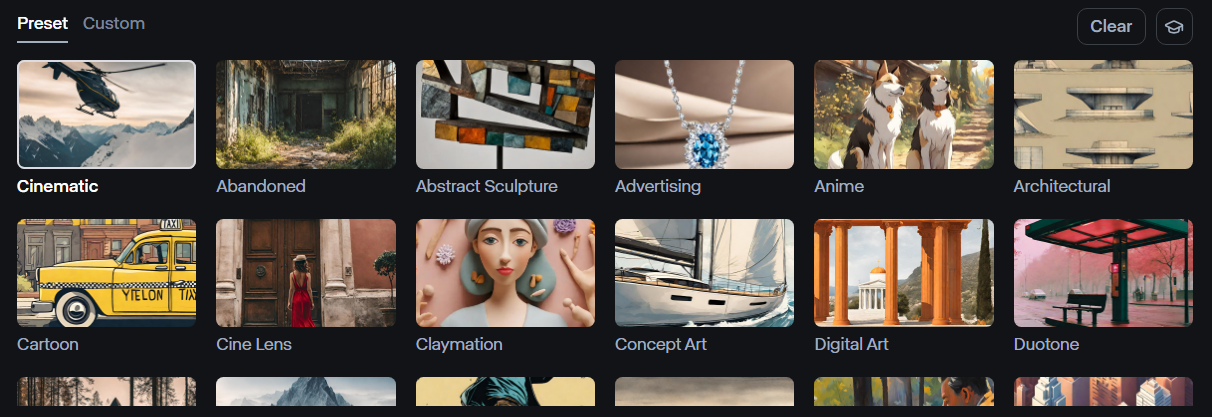
Runway provides access to over 30+ visual styles to choose from, each one with a unique aesthetic. You can create all sorts of videos such as claymation, isometric 3D, anime, and more. This makes it a versatile solution that lets you explore a wide range of visual ideas.
Customizable Aspect Ratios
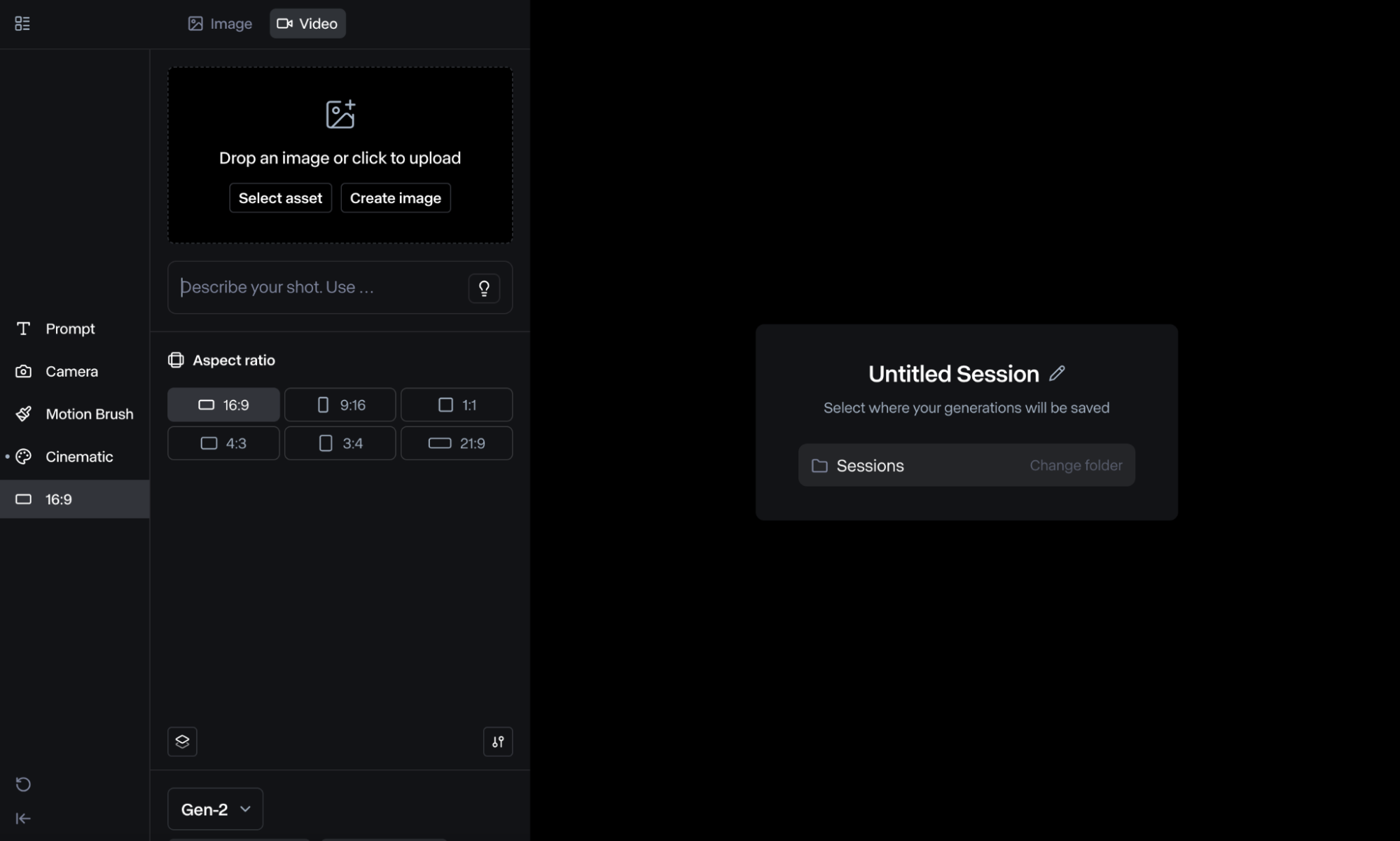
When using text-to-video on Runway's Gen-2 model, you can customize the video resolution to suit any aspect ratio. You can choose between 16:9, 9:16, 1:1, 4:3, and several other options. This makes it easier to publish videos that cater well to various social platforms.
What People Are Talking About Runway Text-to-Video on Reddit
Some users noted finding difficulty with using text prompts on Runway. As you can see below, the tool can be unpredictable, which means having to experiment and choose the best result.
Comment
by u/scumble373 from discussion
in runwayml
The same can be seen with this other user, who also found it difficult to achieve the exact results they wanted even with precise prompts.
Comment
by u/therobboreht from discussion
in runwayml
This user claims to have gotten better results using Gen-3 Alpha but it still took them a few attempts before Runway delivered a satisfying result.
Comment
by u/therobboreht from discussion
in runwayml
YouTube Videos About Runway Text-to-Video
What People Are Talking About Runway Text-to-Video on X
📰 Runway’s new #AI tool, Frames, generates cinematic video clips from text or video prompts. It enables users to direct scenes with precise details, such as camera angles and lighting, or use images to produce styled shots like dolly or slow motion.https://t.co/NfQkxCj9U6
— Center for Data Innovation (@DataInnovation) December 19, 2024
Text to video, simplified. 🚀 Create eye-catching videos in just minutes with Runway Gen-3.
— משב (@mashavtv) January 22, 2025
This video was made with Runway.
🚨 Breaking News
— There's An AI For That (@theresanaiforit) July 1, 2024
Runway just released its Gen-3 Alpha Text to Video to everyone.
It's a groundbreaking advancement in video generation technology.
︎ ︎ ︎ ︎ ︎ ︎
Significant Insights:
Gen-3 Alpha is the first of Runway’s new series of models, designed for high-fidelity,… pic.twitter.com/lPYoEFsj2P
Runway announced that Gen-3 Alpha,its AI text-to-video generation model, can now create high-quality videos from images
— Brett Adcock (@adcock_brett) August 4, 2024
This will improve artisitic control and consistency in video generations for users pic.twitter.com/e8pzkjyg2P
Runway AI just dropped Gen-3 Alpha with wild 100% AI videos 🤯https://t.co/ocyXuDgBeF
— Min Choi (@minchoi) June 17, 2024
Runway text to video AI and puppy love came together for me to generate this video 🔥🔥
— Prashant (@Prashant_1722) July 2, 2024
kudos @runwayml pic.twitter.com/UXNlSSwZDD
— Anu Aakash (@anukaakash) December 14, 2024
❤️ #runway
— aroha AI (@arohaAIX) July 2, 2024
Finally figured it out 🚀
Text to video (single person) character consistency!
In heavy testing mode, more later ❤️
(note: videos are all from first roll, different prompts) pic.twitter.com/AeLt2cV73Z
The Runway Gen-3 Text-to-Video model knows math.
— Smoke-away (@SmokeAwayyy) July 1, 2024
Prompt: "Stationary camera. The answer to 45÷5 is on the computer screen." pic.twitter.com/sN8t5YsBzB
chaos to calm - runway gen3 text to video https://t.co/mgyXJ6dzu3 pic.twitter.com/ScCCCMmLfP
— Anu Aakash (@anukaakash) July 3, 2024
⚡ The best GEN-3 prompts so far.
— Javi Lopez ⛩️ (@javilopen) July 2, 2024
Runway released its new text-to-video AI Generator 48 hours ago.
I've spent hours testing the most advanced and craziest prompts to get the ultimate results so you don’t have to.
Here are ALL of them (+45 prompts) 🧵👇 pic.twitter.com/e47Ybly8n0

10M+Users
Using Pollo AI to Create and Inspire


Used by 10M+ Creators and Marketers
- Liz CassidyDec 15, 2025Easy to use, great results for short videosI’ve been using Pollo AI mainly for short videos and quick image-to-video tests. The interface is straightforward and it works well even with simple prompts, which is a big plus compared to tools that need long, complicated instructions. The results can be really impressive, and it’s honestly been fun to experiment with. I’d love a bit more consistency on faces when there’s movement, but overall it’s been a solid experience for what I needed.
- Richard QuickOct 15, 2025Awesome websiteAwesome website. loads of options and a great way to learn how to work with 'AI' my reasoning for 5 stars is based upon price, versatility and ease of use. Also I would like to add, Pollo AI runs a lot of promos on different AI products as well. I rate their customer service at 5 stars, when I purchased my first subscription my computer crashed the following weekend and I lost all my data and info passwords you name it I lost it, contacted pollo by email they responded quickly and found my info/username and account, and I was able to restore my account.
- armourdudeNov 19, 2025I have been using Pollo AI for short…I have been using Pollo AI for short videos. It is easy to use and works well with simple prompts. Other generators seem to need long drawn out complicated explanations to get even close to what I want.
- DuduJan 14, 2026I'm just amazed by the level of quality…I'm just amazed by the level of quality output that Pollo AI can produce from a simple image. The motion, the realism, It's too good!!
- Ray WarnesDec 30, 2025A fabulous journeyI find Pollo easy to use, it gives me great results and I'd recommend it to anyone. It has been a wonderful experience for me.
- lawless clanNov 22, 2025i tried 220 online img to vid in 2…i tried 220 online img to vid in 2 months, and this is the best online video.I will subscribe for a year; there are many reasons. But freedom is the most important.


Helpful Articles About Runway Text to Video
FAQs
Which Runway AI models offer text-to-video?
You can access Runway’s text-to-video feature on all three AI models: Gen-2, Gen-3 Alpha, and Gen-3 Alpha Turbo. However, keep in mind while Gen-2 and Alpha allow for text-only generation, the Turbo model only offers text + image-to-video generation.
Is Runway text-to-video free?
Runway comes with a free plan that allows you to generate videos for free. However, this plan comes with limited credits. If you want to generate more videos using text prompts, then you will need to subscribe to a premium plan.
What videos can I generate with Runway text-to-video?
You can use the text-to-video feature to produce all kinds of content in various visual styles such as claymations, 3D videos, anime, graphic novel, pixel art, and so much more. This makes Runway ideal for experimenting with all kinds of creative visual ideas.
How to prompt in Runway text-to-video?
The prompt used to generate videos on Runway should be direct, descriptive and avoid negative phrases (don't/doesn't, no, etc.). It can follow the format like [Camera movement]: [Establishing scene]. [Additional details]. Check out our Runway prompt guide for more details.
How long will the generated text-to-video content be?
Runway text-to-video allows you to generate 4-second videos on the Gen-2 model and 5-second videos on the Gen-3 Alpha model. You will also have the option to extend the video after generation, so if you need longer-duration videos, then that’s an option.
Where else can I use Runway text-to-video?
You can access Runway text-to-video on Pollo AI. The AI video generator is integrated with Runway and several other AI models such as Luma AI, Kling AI, and Hailuo AI, just to name a few. This means you can access numerous features and capabilities in one place.
